
Account management’s goal No.1 is to make the customer happy.
Account management solves 4 customer problems:
- “There’s no time to get things done — it needed to be done the day before yesterday”;
- “I don’t know how you do what I need. Can you do it for us?”;
- “The deadline is coming up. Will you make it? At the previous company, the equipment broke down the night before the work was due”;
- “How do I put together a budget?… Prices on the market vary. Is yours cheap or expensive?”
When account management is set up in the classic way, the “efficient” processes — like sending invoices and reports — barely take up 10%. The rest of the time, the account manager is simply talking to the customer — heart-to-heart or in raised voices, about the project and beyond… and, characteristically, on the clock.
At the early stages, at many small agencies, account management is handled by the company’s founders. This is one of the common barriers to growth.
What do account management costs consist of?
Account management costs = the manager’s pay.
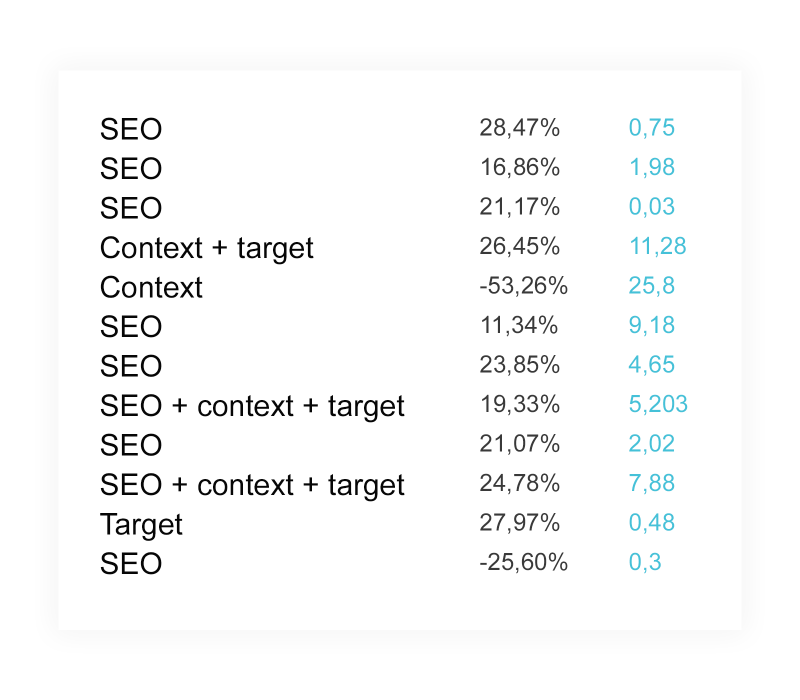
A manager’s time can be measured in hours. At Sreda Digital, we started counting it like this: an hour to prepare an invoice, an hour for a report, and… some number of hours communicating with the customer. It turned out that account management takes up to 50% of the time allocated to a project. That means the customer was spending money not on promoting their own website, but on endless conversations with the manager.
Account management includes getting to know the customer, announcing promotions and new services, and helping resolve any project issues.
How can you help the customer and the manager spend less time on account management?
We decided to automate the processes with a task management system. We chose the right one through trial and error. Each one fell short in some way: some had no Gantt chart, some had everything but in an overly complicated way, and some had poor support.
In the end, we rolled out Worksection and moved the following into it:
- tasks
- project communications
- customer communications.
Why didn’t account management work in Worksection at first?
Introducing a CRM system at an agency is only half the battle. We still had to convince our customers to switch from the “100500 communication channels” to Worksection. We made the following arguments:
- You will promptly communicate with your contractor — ask your questions and give feedback.
- You will get access to all data on the project — what has been done, what is underway, and what is only planned.
- You will quickly find important files — texts, tables, and diagrams will be in the system.

As a result of the rollout, the projects were automated, but the customers were still dissatisfied. Why?
- We didn’t assign tasks right away. The manager had a queue of work. The path from signing the contract to assigning tasks took several days.
- We set overly large tasks. The customer didn’t see any movement on the project. It looks like there’s no progress and the employees aren’t working.
- We didn’t respond instantly. If a customer didn’t get an answer within half an hour, they immediately called management.
How did we solve the problems?
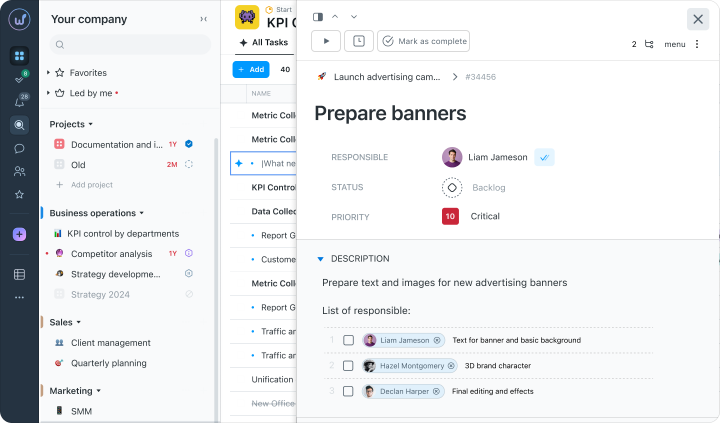
We started assigning tasks from a template
It became easier to find our way around the tasks. We divide general tasks into subtasks, and subtasks into checklists. Each task has people responsible, and they can change at different stages of the work.
The customer sees who is doing which tasks.
We moved the team’s communication into Worksection
We enter current issues, plans, and the results of “live” discussions into the tasks as bullet points.
The customer sees the entire work process.
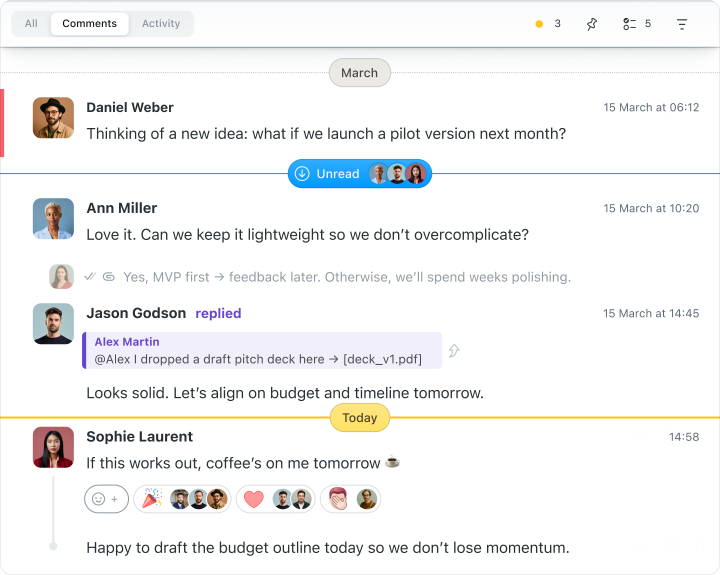
As if the customer was in the office with us :)
We assigned an employee to handle all task changes
Worksection integrates with Telegram, so notifications about new messages arrive instantly. The person responsible (for example, the PM’s assistant) handles the changes: tags the relevant employees and keeps an eye on the project’s progress.
As a result, the response time to a customer has dropped to 15 minutes.
What changed once the account management automation problems were solved?
Now: 5 – 10%
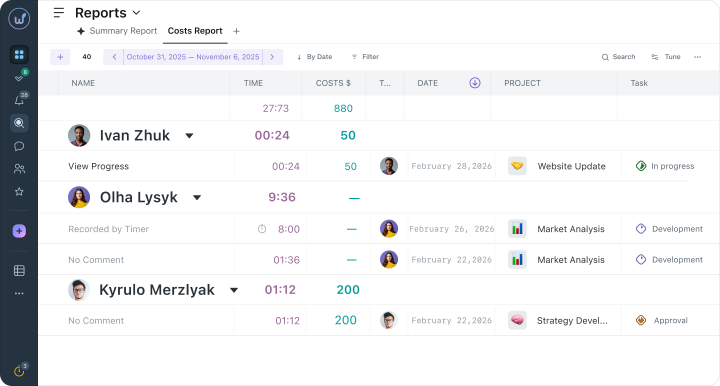
Now: Worksection
With 5 – 10 communication channels (for the same client!), the PM jumped from one task to another, repeated the same explanations, and lost messages. Now the project is run entirely in Worksection: nothing gets lost, and everything is clear and easy to follow.
Now: communication with the account via Worksection
The people doing the work also spend time communicating with the client, but less than if the PM alone were doing it.
Summary
- It’s not enough to choose a CRM (Worksection, in our case) — you also have to roll it out properly. As with any tool, though.
- Account management costs = the manager’s pay.
- On digital projects, automating account management reduces its cost.
- If account management takes more than 10% of the time spent on a project, improve the efficiency of your processes.
- If a template simplifies and speeds up the work, it’s a good template.
- When the customer understands who is doing which tasks, they’re at ease. And that means the team is at ease too.
- Assign an employee to handle task changes: reschedule deadlines, add checklists, answer the customer’s minor questions, and create subtasks. The project manager’s assistant can be that person.
- Remember the rule: if a decision or idea isn’t recorded in the system, it doesn’t exist.
- The main thing account management gives us is the ability to deliver customer service at a consistently high level, with predictable costs.
Accounting firm in Dubai
Digital Marketing Company In India