Manage the company's resources with ease

Work­sec­tion helps you eas­i­ly man­age peo­ple, busi­ness process­es, cus­tomer rela­tion­ships, and plan projects in one place. Focus on lead­ing the com­pa­ny, man­age staff, doc­u­ment flow, plan vaca­tions and events in one system.
Try Now
The inter­face works instant­ly and with­out reload­ing. Avail­able on per­son­al com­put­ers and in the mobile application.

Simplicity of implementation

Work­sec­tion clients praise the sim­plic­i­ty and intu­itive­ness of the sys­tem, which can be under­stood by employ­ees of var­i­ous spe­cial­ties and ages. Our ser­vice is used by prod­uct com­pa­nies, dig­i­tal stu­dios, and gov­ern­men­tal insti­tu­tions. On aver­age, com­pa­nies begin to ful­ly oper­ate in Work­sec­tion with­in 2 weeks after launch.

Team management

Work­sec­tion is suit­able for both HR teams and, for exam­ple, pro­gram­mers and accoun­tants. Orga­nize employ­ees into teams and depart­ments for con­sis­ten­cy among all com­pa­ny divi­sions in one sys­tem. The dash­board with ana­lyt­ics for peo­ple will show the work­load of each per­former, and the Start/​Stop timer with col­ored indi­ca­tion will help mon­i­tor how much employ­ees are actu­al­ly work­ing. Online/​offline sta­tus­es with a Do Not Dis­turb” mode indi­cate who is cur­rent­ly available.

Regular tasks

No need to deal with dai­ly rou­tines any­more. Cre­ate a recur­ring task in Work­sec­tion for a spe­cif­ic day and time. For exam­ple, you can set a task to cre­ate a report at the end of each month. Recur­ring tasks are cre­at­ed auto­mat­i­cal­ly accord­ing to the sched­ule along with sub­tasks, pri­or­i­ties, and assignees.

Safe storage

Work­sec­tion fea­tures a con­ve­nient file man­ag­er with a struc­tured orga­ni­za­tion of files and a search func­tion. No more need to search through all the files on the com­put­er — the required doc­u­ment will be locat­ed under the cor­re­spond­ing task. Con­nect Google Dri­ve and work with Google Docs, Sheets, and Pre­sen­ta­tions direct­ly with­in the system.


Two-fac­tor authen­ti­ca­tion, Azure AD SSO, IP restric­tions, and com­pli­ance with GDPR and ISO 27001 stan­dards will keep your data safe from threats.

Checklists

Check­lists help orga­nize work with large and com­plex tasks. Break down the task into stages and cross off com­plet­ed ones. Attach check­lists to the task descrip­tion or direct­ly in the comments.

Notifications

As soon as some­thing hap­pens in the project — you will receive a noti­fi­ca­tion in your brows­er, via email, in Slack, Telegram, or Viber. Set up a dai­ly morn­ing digest to receive the lat­est updates from the team before the start of the workday.


For exam­ple, imme­di­ate­ly after a task is cre­at­ed, par­tic­i­pants sub­scribed to the task will receive a noti­fi­ca­tion in their inboxes.

Communication

All com­mu­ni­ca­tion regard­ing the task occurs direct­ly with­in the task — it’s a com­ments that retains the entire his­to­ry of changes: who was assigned respon­si­bil­i­ty, why the dead­line was post­poned, what the client wrote, and how the man­ag­er respond­ed. For quick com­mu­ni­ca­tion, there’s a built-in mes­sen­ger with pri­vate, group, and project chats. AI sum­maries will help quick­ly grasp the essence of a long discussion.
In Work­sec­tion, you can also add emo­ji reac­tions to com­ments and use built-in replies (threads).

Work with documents

In Work­sec­tion, you can cre­ate a sep­a­rate project for admin­is­tra­tive doc­u­ments and secure­ly man­age your com­pa­ny’s doc­u­ment flow. Send and receive doc­u­ments online, con­nect Google Dri­ve, and work with any document.
Admin­is­tra­tive projects are hid­den from reg­u­lar employ­ees through pri­va­cy settings.

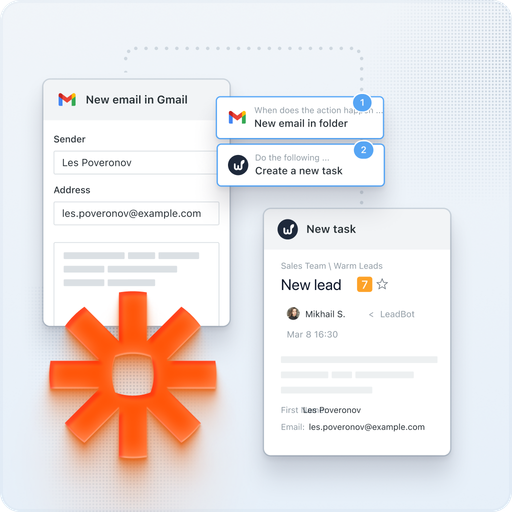
Integrations through API, Zapier

We have imple­ment­ed inte­gra­tions with mail, Google Cal­en­dar, Google Dri­ve, Google Docs/​Sheets/​Presentations, Google Meet, Google Forms, Fig­ma, Slack, Telegram, Viber, Key­CRM, Hub­Spot, Pipedrive, NetHunt. Using REST API and Web­hooks, you can input any infor­ma­tion into Work­sec­tion or export the data you need. Zapi­er allows you to con­nect hun­dreds of exter­nal ser­vices.
For exam­ple, with the Telegram inte­gra­tion, you can reply to com­ments on tasks through a bot in the messenger.

Frequently Asked Questions about Worksection for HR

How can the HR depart­ment use Work­sec­tion for per­son­nel management?

Work­sec­tion enables the HR depart­ment to cen­tral­ly man­age per­son­nel, busi­ness process­es, and projects. You can plan vaca­tions, mon­i­tor doc­u­ment flow, auto­mate rou­tine tasks, and ensure trans­paren­cy in team oper­a­tions. The intu­itive inter­face and mobile access sim­pli­fy the imple­men­ta­tion and use of the system.

Is it pos­si­ble to track employ­ees’ work­ing hours in Worksection?

Yes, Work­sec­tion has a built-in time track­ing sys­tem. You can set hourly rates for employ­ees, mon­i­tor their work­load through the Kan­ban board, and receive detailed reports on time spent on projects and tasks.

What are the advan­tages of Work­sec­tion for HR dur­ing onboard­ing new employees?


Work­sec­tion allows you to cre­ate check­lists for onboard­ing new employ­ees, auto­mate repet­i­tive tasks, and cen­tral­ly store doc­u­ments. This ensures a struc­tured approach to onboard­ing and reduces the time tak­en to get up to speed.

Does Work­sec­tion help track team productivity?

Yes, Work­sec­tion pro­vides tools for mon­i­tor­ing pro­duc­tiv­i­ty, such as Gantt charts, Kan­ban boards, and task com­ple­tion reports. This allows the HR depart­ment to assess the effec­tive­ness of the team and time­ly adjust work processes.

How should an HR man­ag­er plan tasks and mon­i­tor their exe­cu­tion in Worksection?

The HR man­ag­er can cre­ate tasks and sub­tasks, assign respon­si­bil­i­ties, set dead­lines, and estab­lish pri­or­i­ties. By using the Kan­ban board and Gantt chart, one can visu­al­ly mon­i­tor the progress of tasks and respond prompt­ly to delays.

Can Work­sec­tion be inte­grat­ed with oth­er HR systems?

Yes, Work­sec­tion sup­ports inte­gra­tion with oth­er sys­tems via API and ser­vices like Zapi­er. This allows for the automa­tion of data exchange between dif­fer­ent plat­forms and opti­mizes HR processes.

Is Work­sec­tion suit­able for work­ing with remote employees?

Yes, Work­sec­tion is ide­al for man­ag­ing remote teams. Built-in com­mu­ni­ca­tion, time track­ing, and report­ing tools ensure effec­tive inter­ac­tion and con­trol over task exe­cu­tion regard­less of employ­ees’ locations.

Which HR process­es can be auto­mat­ed using Worksection?

Work­sec­tion allows automat­ing such HR process­es as:
  • Cre­at­ing and assign­ing reg­u­lar tasks
  • Track­ing work­ing hours and pay­roll calculations
  • Man­ag­ing vaca­tions and sick leaves
  • Updat­ing task sta­tus­es and noti­fy­ing about changes
  • Stor­ing and access­ing per­son­nel documentation

This enables the HR depart­ment to focus on strate­gic tasks while reduc­ing rou­tine workload.