Notion is one of the best tools for project management and data organization, record keeping and teamwork. The service is ideal for taking notes, maintaining a database, and collaborating on content.
Notion has earned popularity for its flexibility and intuitive interface. However, in 2026, teams are increasingly looking for alternative solutions that offer advanced project management capabilities deep analytics.
Why are teams looking for alternatives to Notion?
Despite its popularity, Notion has a number of limitations that can complicate operations. The main reasons users are looking for somewhere to switch from Notion are:
 Lack of analytics and reporting tools
Notion does not offer built-in analytics and reporting. This makes task monitoring less efficient. Teams have to use third-party services or manually collect data, which takes additional time and resources.
For example, Worksection, ClickUp, and Asana provide dashboards and automated reports. With their help, you can track key metrics without complex integrations.
 Limited functionality for businesses
While Notion is great for building a database, it doesn’t replace a full-fledged project management platform. Companies are forced to combine it with other tools such as Trello. Because of this, it’s impossible to run business processes in a centralized way, with information scattered between different services.
Asana and Worksection offer a unified space for project management, including Gantt chart, task manager, deadline control and reporting. In this way it is possible to reduce the cost of additional tools and simplify the work of the team.
 High entry threshold for new users
Notion’s flexibility is its main advantage, but also a disadvantage. Although the platform offers templates, the lack of a fixed structure can make it difficult for new employees to adapt. Users need time to learn and customize, as Notion does not constrain them to a single work format and requires them to build workflow logic on their own.
Trello, Microsoft OneNote and Worksection offer ready-made workspaces where tasks can be easily prioritized and custom labels can be used. This reduces customization time and makes it easier to get workflows up and running.
 Limited access settings
You can share documents and pages in Notion, but the tool doesn’t provide granular access rights within the pages themselves. This makes it difficult to control information privacy, especially if contractors or clients are involved in the project. Lack of flexible role management can lead to participants seeing or editing data they shouldn’t have access to.
In Worksection, access rights are configured in more detail. The system allows you to customize roles and set who can view, edit or comment on tasks.
Criteria for choosing a project and team management platform
Choosing the right project and task management platform is a strategic decision that affects team productivity, deadline control, and business process efficiency. It is important to consider how well the platform matches the company’s specifics, how easy it is to learn, and what additional features it offers.
Among Notion similar programs you can find solutions with different levels of functionality — from simple tools for organizing work processes to complex platforms with analytics, automation and advanced settings.
Platform functionality
The first thing to consider is the functionality of the platform. Depending on the nature of your work, you may need different tools: task management with clear assignment of performers, a Gantt chart to track deadlines, checklists and subtasks to detail processes, and a reminder system so the team doesn’t miss important deadlines.
For results-oriented companies, analytics and reports that track key performance indicators (KPIs) are critical. You should also consider the need to support automation of routine processes.
Integrations with other services
If the team already uses messengers, calendars and CRM systems, it is important that the new platform can synchronize with them. This will help avoid duplication of information and make the system easier to implement. For example, integration with Google Calendar or Outlook allows you to keep track of tasks on your personal schedule, and connecting to CRM systems makes it easier to work with clients.
Easy to use
In addition to functionality and integrations, ease of adoption is important when choosing a project management tool.If the interface is complex and requires lengthy training, it can slow down system adoption, increase employee workload and reduce overall productivity.
It is important that new users can quickly understand the interface and get started without having to learn complex instructions. The platform should be logically structured and basic functions should be accessible at an intuitive level.
Company budget
Finally, it’s worth considering budget. Some platforms offer free plans for small teams, but if a company needs advanced features, it’s important to evaluate the cost of paid plans. Transparent pricing and flexible terms and conditions will help you choose a solution that fits your business needs and doesn’t create financial strain.
Best Notion alternatives in 2026
Notion’s modern counterparts offer flexible solutions for project management and teamwork. Let’s take a look at the top 10 best alternatives to Notion in 2026.
Worksection.
Worksection is a project management and teamwork tool. The service focuses on project management and work control functions. Worksection is suitable for construction businesses, marketing agencies, IT teams. As well as companies working with contractors who need to track deadlines, analyze efficiency and control employee workload.
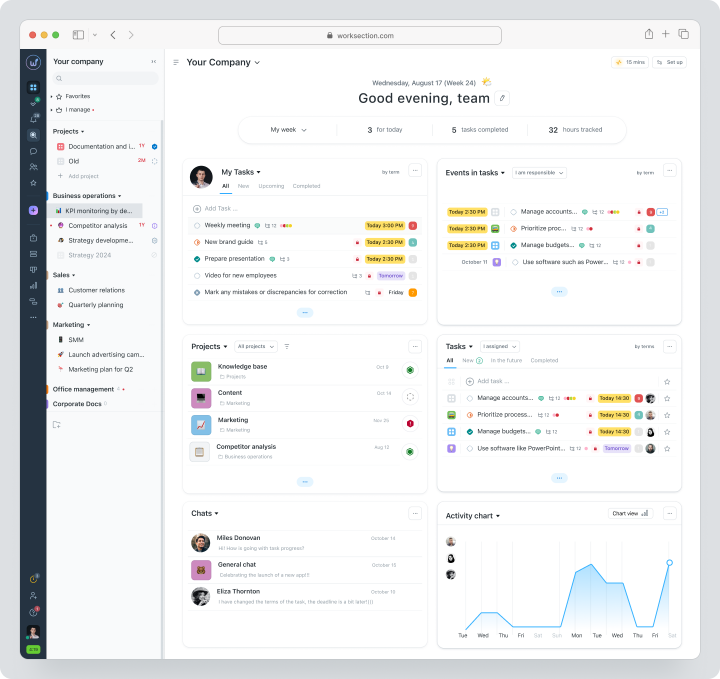
The system offers an intuitive interface, flexible reporting system with built-in analytics tools. This makes Worksection a convenient solution for teams of any size.
| Price | There is a free plan | Price from $5 per user per month |
Key features
- Gantt chart — helps to visualize the work process, track deadlines and dependencies between tasks. The tool is especially useful for complex projects where a clear sequence of actions is important.
- Flexible reporting system — allows you to analyze progress, time and resource costs. Reports can also be exported to be shared with clients or external analytics.
- Customize roles and access to manage access levels within the team. For example, you can restrict editing of tasks, allow clients or contractors access to only certain sections of the project.
The main difference from Notion
Worksection already includes all the necessary tools for project management, while Notion requires customization and integration of third-party solutions. Built-in analytics and reporting allow teams to track performance, analyze employee workload, and export data for further analysis. This is especially important for businesses that not only want to effectively systematize content workflow, but also workflow management.Pros and cons
Advantages:
- Built-in reports and analytics. Help analyze task deadlines, workload distribution, and team productivity.
- Access Controls. Allow you to differentiate rights for employees, clients and contractors, preventing information leakage.
- Optimal cost. Affordable tariffs with a full set of basic tools for project management.
- High-quality support. Prompt support and maintenance of users at all stages of work with the system.
Disadvantages:
- Limited customization options. Unlike Notion, Worksection does not offer the same level of interface personalization.
- Lack of built-in templates. The system does not offer ready-made solutions for the type of business or a particular methodology.
Coda
Coda is an all-in-one tool that combines documents, spreadsheets, and automation in one place. It is suitable for teams that value agile data management, collaboration and process automation.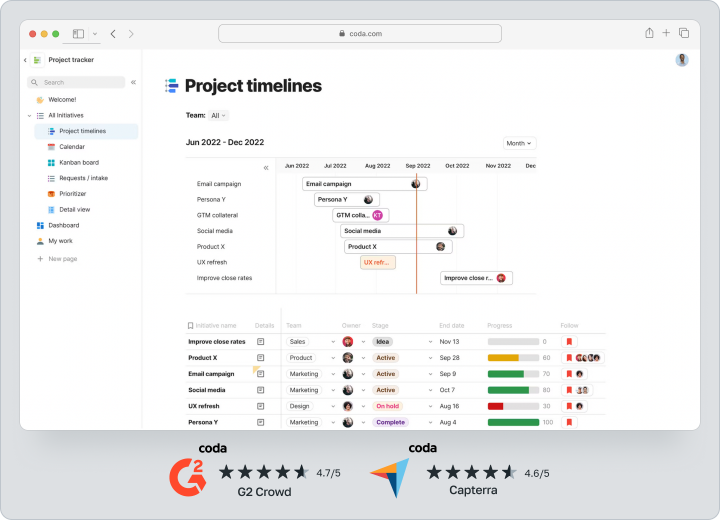
Coda is focused on project management, task management and building custom workflows. This makes the service a handy tool for businesses and creative teams.
| Price | There is a free plan | Price from $15 per user per month |
Key features
- Modular structure — allows you to create flexible working documents with interactive elements, combining text, tables and databases.
- Workflow automation — support for scripts and triggers to perform tasks automatically, saving time.
- Integration with external services — support for Slack, Google Sheets, Jira, Trello makes Coda easy to work with in an ecosystem of other tools.
The main difference with Notion
Coda offers automation capabilities that allow you to build complex workflows with formulas and integrations. This makes Coda a complete tool for managing projects and processes within a team.Pros and cons
Advantages:
- Flexibility and customization. Ability to create unique workspaces with dynamic elements.
- Process Automation. Built-in triggers, buttons and formulas simplify work.
- Integrations with popular services. Convenient interaction with CRM, task managers and cloud storage.
Disadvantages:
- Difficulty to master. Requires time to customize and understand the logic of work.
- Not ideal for simple tasks. Overloaded with functionality if you use it only for taking notes or simple processes.
For example, Worksection is quite adaptive in this respect. Division of tasks into subtasks of two levels allows you to conduct both simple and complex processes.
Evernote
Evernote is one of the most popular platforms for taking notes, storing documents, and organizing information. Evernote is more focused on individual work, but still offers basic collaboration features.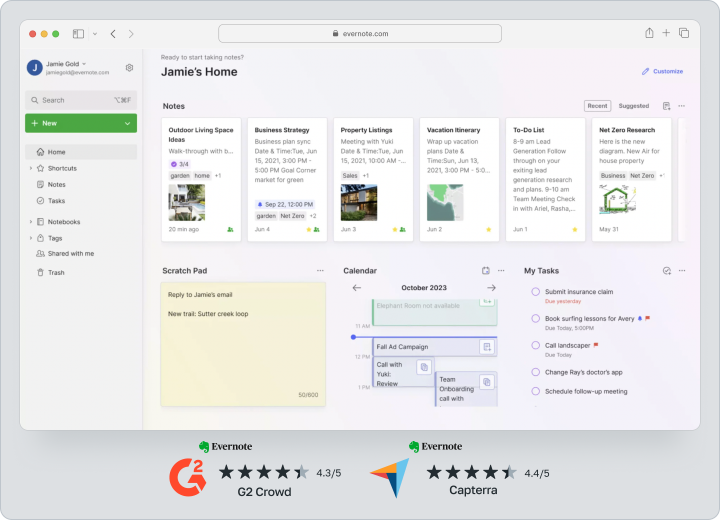
It is suitable for small teams of freelancers, students and professionals who need to quickly find, organize and edit information.
| Price | There is no free plan for teams | Price from $5 per user per month |
Key features
- Tag and Folder System — helps you structure your notes and quickly find the information you need.
- Optical text recognition (OCR) — allows you to scan documents and find text inside images.
- Synchronization across all devices — easy access from your computer, tablet and smartphone.
The main difference with Notion
The main advantage of Evernote is the convenient search for information. The system is ideal for quickly creating and finding notes.Pros and cons
Advantages:
- Ease of use. Intuitive interface that doesn’t require complicated customizations.
- Easy search. Evernote can search for text even within images and scans.
- Accessibility on all platforms. Synchronization with Windows, Mac, iOS, Android.
Disadvantages:
- Limited command capabilities. Available functionality may not be enough for full project and task management.
- Paid features. The functionality for teams is available only on a paid tariff.
ClickUp
The next possible replacement for Notion is the ClickUp team platform. It is an all-in-one project and task management platform aimed at teams of any size. ClickUp provides tools for working with tasks without the need for additional integrations.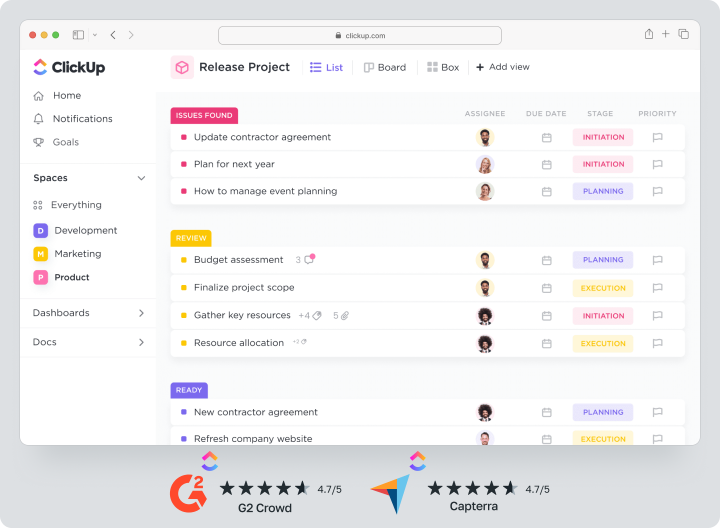
The system offers flexible tools for planning, workflow automation and analytics, making it convenient for businesses, IT teams and creative agencies.
| Price | There is a free plan | Price from $10 per user per month |
Key features
- Universal task mapping — supports lists, boards, tables, Gantt charts and calendar, allowing you to organize your work in a way that suits your team.
- Process automation — the ability to create automated scripts, reducing routine operations.
- Integration with popular services — support for Slack, Google Drive, Trello, GitHub and over 1000 other tools via Zapier.
The main difference with Notion
ClickUp is a full-fledged project management system, whereas Notion is more focused on documentation and knowledge base. ClickUp already has a built-in task manager, automation, and analytics, making it more convenient for comprehensive teamwork management.Pros and cons
Advantages:
- Interface flexibility. Multiple ways to organize tasks, including kanban, calendar, and Gantt chart.
- Automation tools. Allow you to automate repetitive processes and reduce routine work.
- Integrations with other products. Ability to connect external tools to the platform to synchronize data.
Disadvantages:
- Difficulty of mastering. Rich functionality requires time to learn.
In this case, it is important that the system provides quality support during the integration process. Worksection helps customers at all stages of product implementation with a team of support professionals and customer success. - Cost. The price of ClickUp can be quite high for startup teams or startups with a limited budget.
Asana
Asana is a simple and intuitive service that allows teams to structure workflows, track tasks, and coordinate collaboration.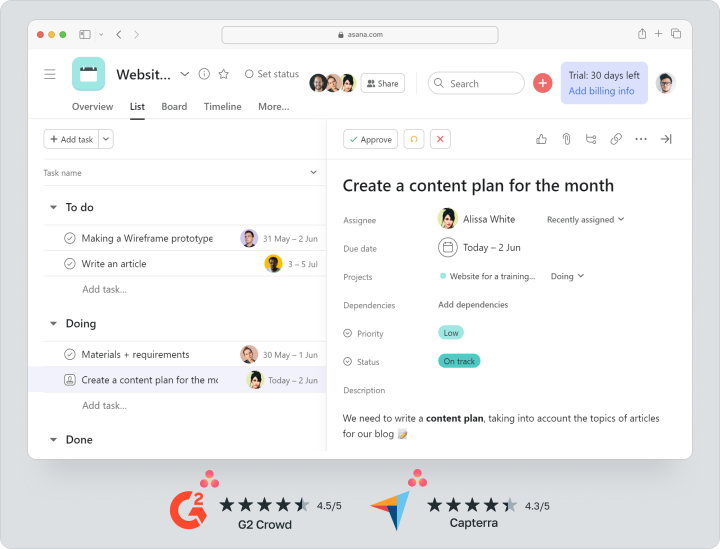
Asana offers ready-made templates, kanban boards, Gantt chart and other tools, making it convenient for business, marketing agencies and IT teams.
| Price | There is a free plan | Price from $13.49 per user per month |
Key features
- Flexible task scheduling — support for lists, calendar and kanban boards, visual project management.
- Dividing tasks into stages — the ability to split projects into subtasks, assigning responsibility for each stage.
- Integration with popular services — synchronization with Slack, Zoom, Google Calendar, Trello and other tools.
The main difference from Notion
Asana is focused on task and process management, while Notion is more suitable for taking notes and working with content. Asana already has built-in notifications, deadline control, and prioritization system, making it easy to work in a team of any size.Pros and cons
Advantages:
- Intuitive interface. Asana is easy to learn, making it convenient for teams without a technical background.
- Flexibility in task management. You can divide projects into phases, set deadlines, and track progress.
- Convenient reminder system. Automatic notifications help you not miss task deadlines.
Disadvantages:
- Price. The cost of Asana can be too high for teams with a limited budget.
- Database. If you need databases to organize work information, you may not have enough Asana functionality for this request.
Microsoft OneNote.
Microsoft OneNote is a digital notebook for taking notes, storing ideas, and collaborating. The tool is ideal for students, teachers, freelancers, and office workers who need to quickly jot down information and organize data.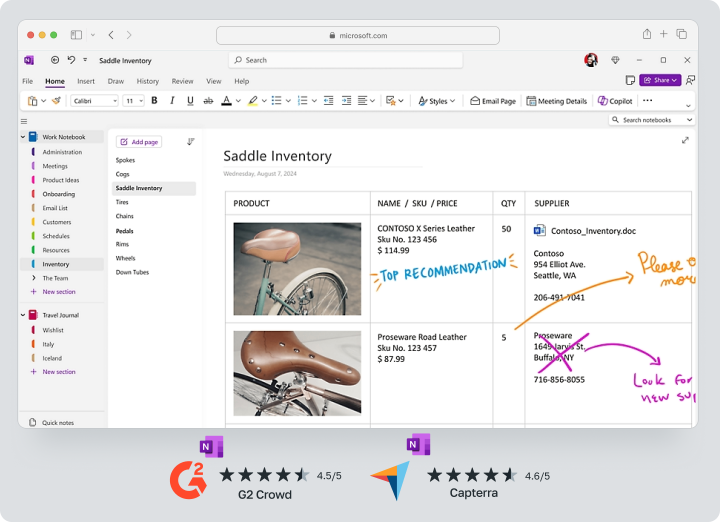
OneNote is integrated into the Microsoft 365 ecosystem, making it convenient for Word, Excel and Outlook users.
| Price | The tool is free to use and download for Windows, Apple, and Android devices |
Key features
- Flexible note-taking — the ability to create notes in handwritten text, images, lists and tables.
- Synchronization with other Microsoft products — integration with Outlook, OneDrive, Teams and Office 365.
- Handwriting recognition — allows you to convert handwritten notes into printed text.
Main difference from Notion
The main difference between Microsoft OneNote and Notion is the format for working with information. OneNote works like an electronic notepad, where users can organize notes into sections and pages without strict structures. Notion, on the other hand, offers a more structured approach that is more suited for database management and teamwork.Pros and cons
Advantages:
- Full integration with the Microsoft ecosystem. Easy to work with Outlook, Excel, and Teams.
- Ease of use. Intuitive interface that is easy to use for working with notes.
- Availability on all devices. Synchronization with Windows, Mac, iOS and Android.
Disadvantages:
- Limited options for project management.
- Lacks flexibility for teamwork. Fewer options compared to Notion for collaborative document editing.
Confluence.
Confluence is another Notion analog developed by Atlassian. The platform is used for collaboration and enterprise document management. It is ideal for businesses, IT teams and large companies that need to maintain structured documentation and knowledge bases.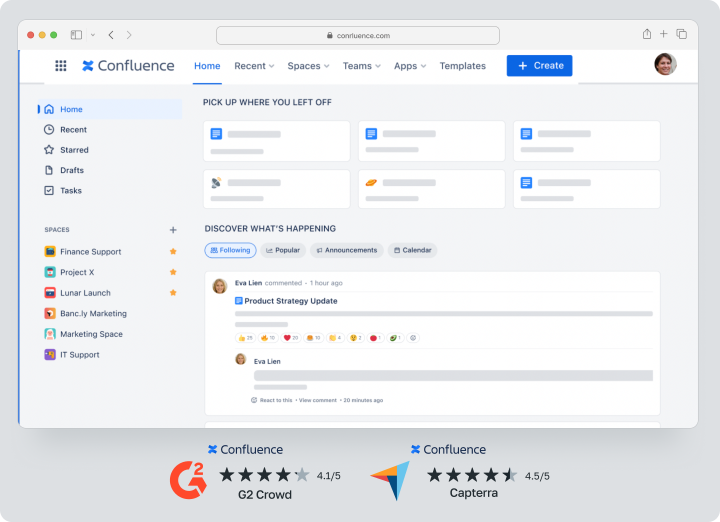
Confluence is focused on enterprise use, providing version control, access management and integration with Jira.
| Price | There is a free plan | Price starting at $6.70 per user per month |
Key features
- Create and edit documentation — easy-to-use templates for maintaining knowledge bases, technical documentation and reports.
- Jira and Trello integration — synchronize with other Atlassian tools.
- Access Restriction and Version Control — Track changes to documents and manage permissions.
Key difference from Notion
Confluence is focused on enterprise documentation work, while Notion is more suited for flexible content work and personal knowledge bases. Confluence offers version control tools, security settings, and integration with task management systems, making it ideal for IT teams and large organizations.Pros and cons
Advantages:
- Flexible access customization. You can differentiate between editing and viewing privileges.
- Integration with Jira, Trello and other Atlassian services, which is convenient for IT teams.
- Large selection of templates. Quick creation of documentation and internal pages.
Disadvantages:
- Complexity of implementation. The interface takes time to master.
- Price. Confluence has an average price per user across the market, but it can also be too high for start-up teams.
Airtable
Airtable is a tool that combines table and database functionality and is suitable for businesses, marketing agencies, analytics teams and developers. The service allows you to structure information in the form of tables, cards, galleries or calendar.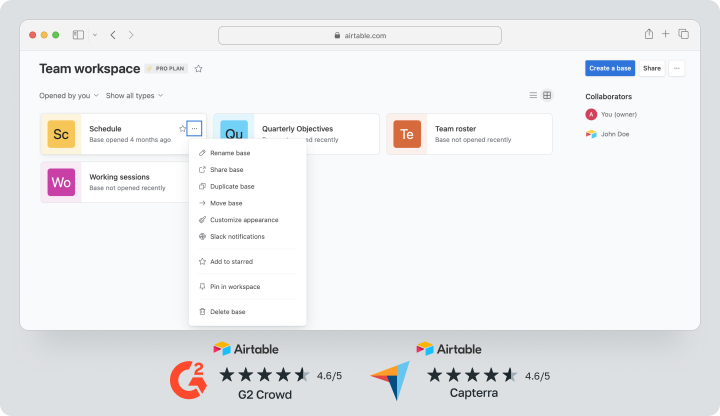
Airtable focuses on flexible database functionality, providing users with filters, automation and integrations with other services.
| Price | There is a free plan | Price from $24 per user per month |
Key features
- Customizable databases — the ability to create and edit complex tables with formulas, links and nested data.
- Multiple ways of presenting data — support for tables, galleries, kanban boards and calendar, allowing you to customize the tool to meet your team’s needs.
- Flexible automation — create automated scripts to optimize workflows.
Main difference from Notion
The main difference between Airtable and Notion is that it presents information in a database format and offers advanced capabilities for working with large data sets. Notion, on the other hand, is more versatile, but is limited in the flexibility of tables and analytical tools.Pros and cons
Advantages:
- Flexibility in data management. You can create complex data structures and manage relationships between tables.
- Different types of views. Users can switch between tables, cards and calendar.
- Integrations with popular services. Support for Slack, Google Drive, Zapier, Trello and other tools.
Disadvantages:
- Difficulty to set up. Requires time to customize and understand the logic of work.
- Limited capabilities for working with texts and content, compared to Notion.
Trello
Trello is a visual task manager that allows you to organize tasks in a kanban board view. It is ideal for teams that need a simple and intuitive project management system, as well as freelancers, small businesses and startups.
Unlike Notion, Trello focuses on simplified task management without overwhelming users with additional features.
| Price | There is a free plan | Price from $6 per user per month |
Key features
- Kanban boards and cards — convenient visual organization of tasks thatcan be easily adapted to any process.
- Integrations with other tools — the ability to connect Slack, Google Drive, Jira and Zapier.
- Customizable workflows — creating automatic rules to move tasks around.
The main difference with Notion
Trello is focused on simple task management, while Notion is more suited for note taking and content management. Trello lacks deep customization and analytics, but its simplicity and convenience make it a popular tool for organizing processes.Pros and cons
Advantages:
- Ease of use. Intuitive interface that doesn’t require complicated customization.
- Flexibility in task management. Users can easily move cards between columns.
- Integration with other services. Support for CRM, cloud storage, and other task managers.
Disadvantages:
- Limited analytics capabilities compared to Woeksection and other competitors.
- Functionality for working with texts and structured data is limited, unlike Notion.
Quip
Quip is a collaboration platform that brings documents, spreadsheets, and chats together in one place. It’s ideal for teams that work with text-based documents but want easy-to-use tools for communication and collaborative editing.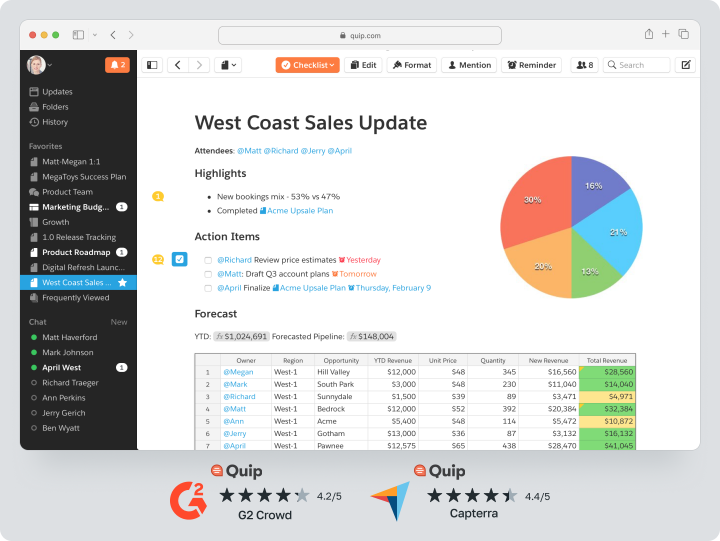
Quip is integrated into the Salesforce ecosystem, making it especially useful for Salesforce.
| Price | There is a free plan | Price from $12 per user per month |
Key features
- Collaborative document editing — the ability to work in a single file in real time.
- Salesforce integration — easy document management in conjunction with CRM.
- Built-in chats and comments — the ability to communicate directly in the workspace.
The main difference from Notion
Quip emphasizes collaborative editing and integration with enterprise systems. In Quip, users can have discussions right within documents, reducing the need for third-party messengers.Pros and cons
Advantages:
- Real-time collaboration. Ability to edit documents and discuss them in chat.
- Integration with Salesforce. Convenient solution for sales and customer support departments.
- Flexible data organization options. Support for tables, lists and templates.
Disadvantages:
- Quip’s functionality may not be enough to fully manage complex projects.
- Limited interface customization, unlike Notion.
Notion Best Alternatives Comparison Table
This table will help you choose the best platform based on its features, cost, and optimal team size.| Name | Optimal team size | What tasks it is suitable for | Minimum cost per user |
Worksection | Small and medium business | Project and task management | from $5/month |
Coda | Teams of 10 – 100 people | Automation and document management | from $15/month |
Evernote | Small teams | Notes and storage | from $5/month |
ClickUp | Teams of 5 – 100 people | Flexible project and task management | from $10/month |
Asana | Teams of 10 – 100 people | Task management and teamwork | from $13.49/month |
Microsoft OneNote | Individual and team use | Work with notes and documents | Free |
Confluence | Medium and large companies | Corporate documentation and knowledge bases | from $6.7/month |
Airtable | Teams of 5 – 50 people | Work with databases and structured data | from $24/month |
Trello | Small and medium teams | Simple task management | from $6/month |
Quip | Corporate teams and departments | Collaborate on documents and chats | from $12/month |
Which platform to choose in 2026?
Choosing a Notion analog depends on your team’s objectives, flexibility, usability and platform functionality requirements. Technology is evolving in 2025, and many services offer advanced capabilities for project management, document management, and workflow automation. However, each platform has its own strengths, and it’s important to choose the one that best fits your needs.
If you’re looking for a versatile project and document management platform, consider Worksection, Confluence, and Quip. These solutions include built-in task tools, analytics, and access control, making them convenient for business teams working with large amounts of information. Worksection allows for flexible project management, role assignment and reporting. Confluence is more focused on building corporate knowledge bases, while Quip offers easy collaborative document editing and real-time discussions.
If your priority is effective teamwork, it’s better to choose Coda or Trello. These platforms provide simple and clear interaction between employees, helping them to quickly organize tasks and work in a unified space. Trello offers a kanban system that is convenient for visual project management, while Coda combines powerful automation tools with the flexibility to customize workflows.
For those looking for a platform with the simplest possible interface and quick customization, will suit Worksection, Evernote and Microsoft OneNote. Evernote and OneNote are convenient for working with notes, storing information and quickly searching for data, while Worksection helps structure the work of the entire team and minimize chaos in tasks.
Those looking for deep customization and integration with external services should consider ClickUp, Asana and Airtable. These tools allow you to flexibly customize workspaces, automate processes, and synchronize data with other platforms. ClickUp offers a variety of automation scenarios, Asana focuses on easy task management, and Airtable provides database functionality for flexible information management.
Frequently Asked Questions (FAQ)
 What is the best alternative to Notion for businesses?
The best option when choosing a Notion alternative would be Worksection. It already includes all the necessary tools for project management such as Gantt chart, time tracking, analytics and access control. Unlike Notion, where you need to customize integrations, Worksection has all the features built in, making the platform easy to work with at no extra cost.
Are there any free analogs to Notion?
Yes, there are platforms with free plans, but most have limited functionality. Worksection offers a free plan that is suitable for small teams. It includes basic tools to control tasks and projects, making it a good option for startups and small businesses.
How does Worksection differ from Notion?
Worksection offers flexible task structure, analytics, built-in project management tools, and granular access settings. Unlike Notion, which requires additional integrations for analysis and reporting, Worksection already includes basic functions for business process management. This makes the service more convenient for project management and teamwork.