Task managers have become an integral part of team work. According to data from Cloudwards, small businesses spend an average of $8.9 per user per month on such services, while the average is around $16.88. In reality, the figures are even higher: companies often overpay for more expensive plans for just one needed feature or use several different platforms — for tasks, reporting, file sharing, and messaging.
Worksection offers a different approach. Here, all key tools for project management are available right away at an affordable price — from $3.4 per user. Kanban, Gantt charts, reporting, time tracking, and task communication are basic parts of every plan.
In this article, we will examine what hidden costs arise when working with popular task managers and why Worksection is a cost-effective alternative for teams of any size.
Why companies overpay for task managers
 Rising costs with the team
Many services seem affordable until the team is small. But as soon as you start to scale, the cost rises sharply. For example, a $10 per user plan turns into $200 per month for a team of 20 people — and that’s just the basic payment without additional features.
 The need to buy more expensive plans for just one feature
In many services, key tools such as Gantt charts, time tracking, or advanced reporting are only available in premium packages. Teams are forced to overpay several times for one needed capability, receiving dozens of “extra” features that they don’t even use.
 Additional plugins for basic functionalities
Some services offer basic features only through separate modules or integrations: from access limitations and email notifications to reports or even simple time tracking. This not only increases costs but also creates chaos in work — it’s necessary to search for, connect, and pay for third-party solutions.
 Limitations of free versions
Free plans usually have serious limits: on the number of users, integrations, or the volume of stored files. This might suit a startup with a few people, but as soon as the team grows, they have to look for other software or switch to expensive plans.
How Worksection addresses these challenges
In Worksection, you get the full set of necessary tools at once — without additional plugins or more expensive plans. This allows teams of any size to effectively manage tasks and communication at a transparent price.
Affordable price and transparent pricing policy
There are no hidden fees in Worksection: even in basic plans, you get a complete set of tools for task management, communication, and reporting — from Gantt charts to time tracking. Prices start at $3.4 per user per month—without hidden limitations or the need for upgrades.
What this means for the team:
- No need to buy more expensive packages just for one feature;
- Costs are predictable and clear;
- One system covers planning, reporting, and communication.
Complete feature set without additional charges
 Interactive dashboards
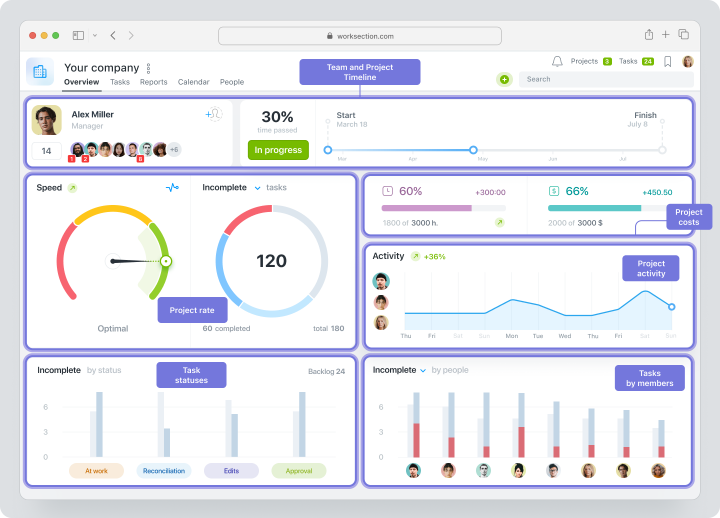
In Worksection, the starting page of each project is a dashboard that provides access to all key metrics:
- progress of task completion and deadline adherence;
- team workload and task distribution;
- financial metrics — budget usage, time expenditure, completed hours.
Dashboards are available to all project participants and help the team see the big picture, analyze key metrics, and make quick decisions. They can also be exported to PDF or PNG for presentations and reports.
The main advantage is that the dashboard in Worksection is interactive: you can switch between blocks, customize the view and display of data for your tasks. This turns the dashboard into a convenient real-time working tool, not just static analytics. Therefore, there is no need for additional BI services or complex extra modules.
 Gantt Chart
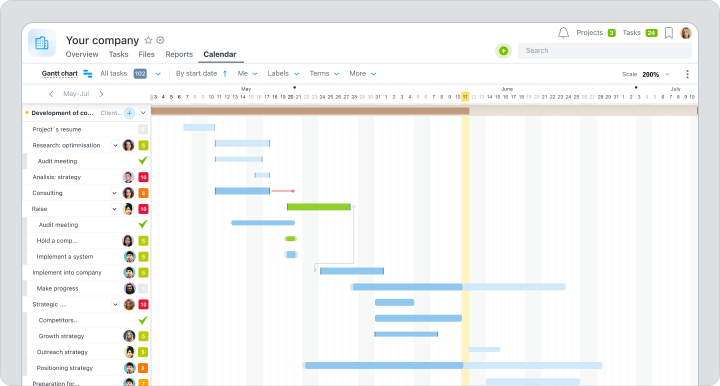
The Gantt chart allows you to visualize all tasks on a shared timeline. This helps to see how different stages are related, understand team load, and make well-considered management decisions quickly. In the Gantt chart you can:
- set deadlines and edit tasks directly from the timeline in real-time;
- specify dependencies between tasks;
- customize filters to display only the needed information;
- export charts for reporting or presentations;
- switch between viewing a single project or all account activity.
In Worksection, the Gantt chart is included in all basic plans, so teams receive a powerful planning tool without needing to switch to more expensive plans.
 Kanban
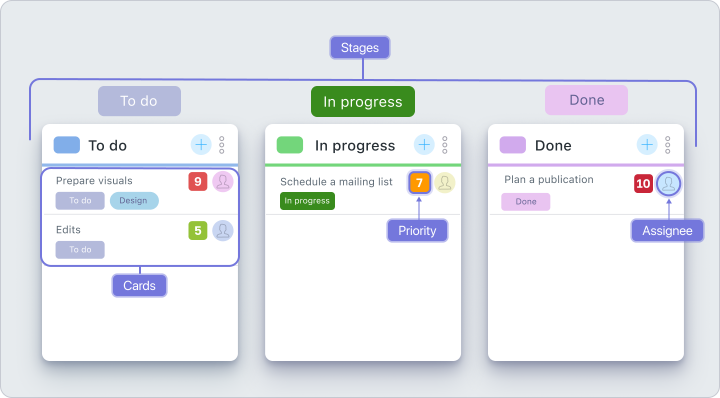
Kanban is a simple way to organize tasks by status. Tasks are displayed as cards that move between columns through Drag&Drop according to the workflow.The Worksection Kanban easily adapts to any project type, team workflow style, or processes. This allows for quick status control of tasks, understanding workload, and responding to changes in real-time.
Worksection Kanban capabilities:
- Project Kanban—displays tasks within a single project.
- Project boards—a convenient overview at the account level, useful for agencies and companies with multiple clients (available in Premium plans and higher).
- People Kanban—grouping tasks by responsible persons for load assessment.
- Day Kanban—calendar view of tasks with deadlines.
- Custom statuses and labels—adaptation to team workflows.
- Process automation—rules for quick assignment of responsibilities or deadlines.
- Filters—search for tasks by assignees, tags, or deadlines.
 Time tracking
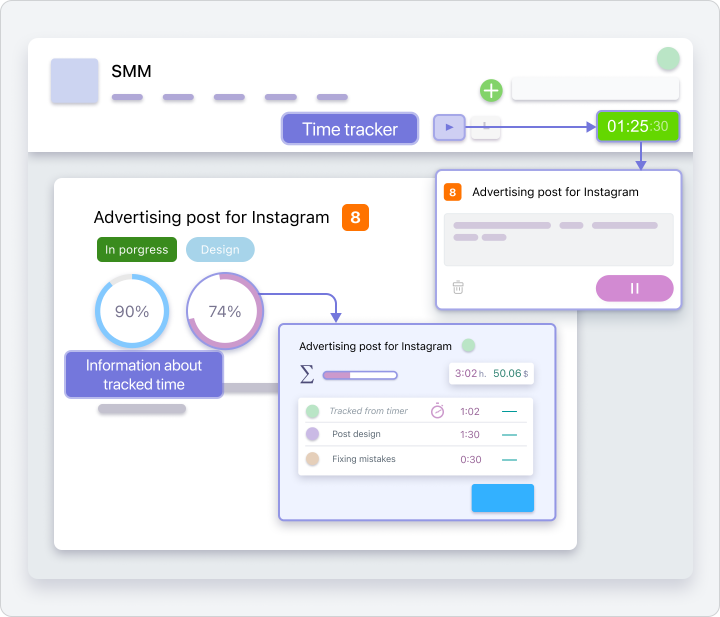
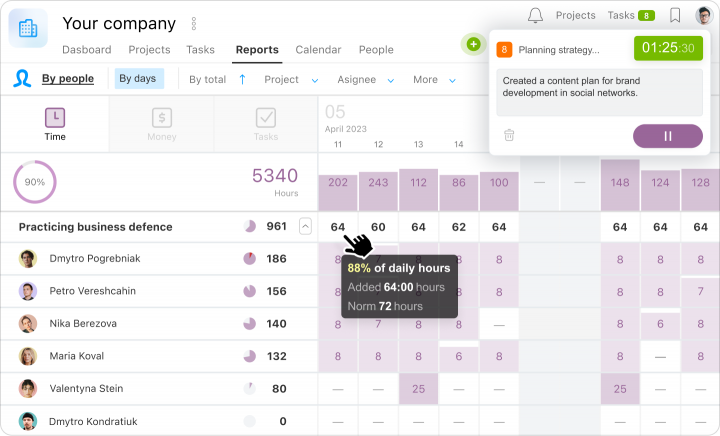
Time tracking in Worksection allows teams to accurately track time spent on tasks directly in the system. Each participant can start a timer, log working time, and link it to specific tasks, helping to analyze productivity and plan resources.
Main features and advantages:
- Built-in timer – log time without third-party apps.
- Plan/fact comparison – evaluate task execution efficiency.
- Reporting – generate detailed reports on time spent for analysis and planning.
- Transparency – the team sees how much time is spent on each task, which increases openness and control.
This feature is also available in the basic Worksection plan, so users do not need to spend money on separate trackers or integrations with third-party services.
 Reports without Excel and unnecessary modules
In Worksection, reports are generated automatically based on key metrics: plan execution, participant progress, time expenditure, and financial indicators. This reduces routine reporting and allows focusing on strategic tasks.
Main tools:
- Automatic report generation – without the need for manual data collection.
- Template customization – for different roles: managers, teams, clients.
- Export in convenient formats – for further analysis or presentations.
- Personalization of notifications – receive only important information.
In the basic Worksection plan, you get a full set of reports and analytics without needing to buy additional modules or integrations.
 Communication and files — in the context of tasks
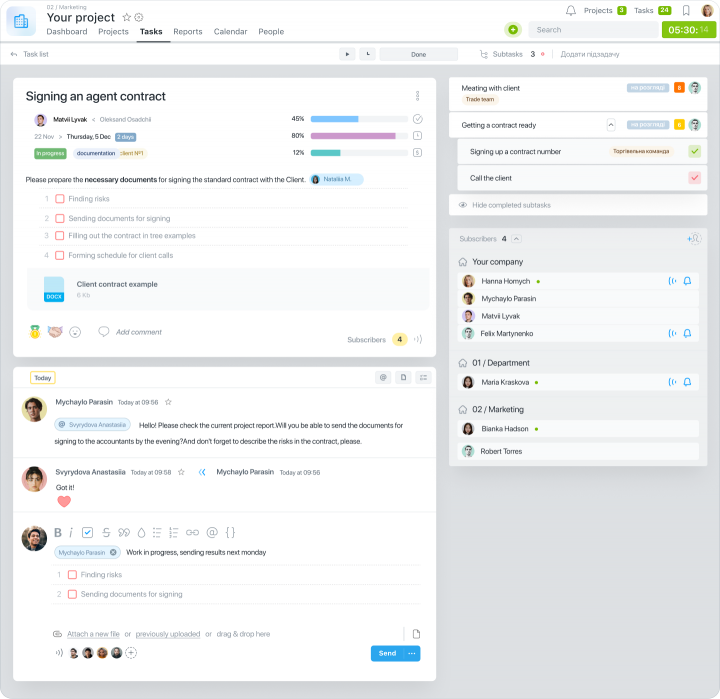
In Worksection, all discussions and documents are stored directly in tasks. This allows the team not to waste time searching for necessary emails or messages in chats.
Main features and advantages:
- Discussions in tasks — all comments are linked to a specific task, reducing confusion.
- Files and documents — upload and store files directly in tasks, without the need for separate sharing services.
- Communication history — all work context is preserved, and new participants can quickly catch up on the project.
- Transparency for the team — everyone sees who is doing what, which increases trust and control.
Thus, there is no need for third-party messengers and numerous chats — and, accordingly, expenses on them.
 Personalized notifications
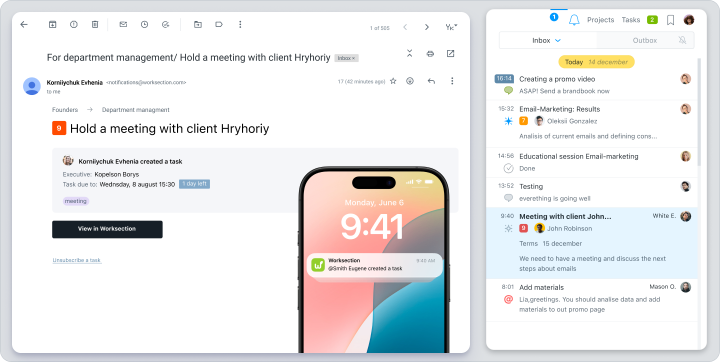
Worksection has a notification system that allows all project participants to stay up to date — about changes in tasks, new comments, approaching or changing deadlines and statuses, assignments, etc. Notifications are set individually for each user. You can choose which events are truly important, set priorities, and channels of delivery.
Notifications can be received:
- as email messages;
- as push notifications in the browser or mobile app;
- through integration with messengers (via API).
This helps the team not to miss important updates and makes work more convenient — without additional services and settings.
 A single platform for work
Worksection combines tasks, communication, files, and reports in one environment. The team no longer needs to switch between several services — everything needed for project management is available at once.
This provides teams with:
- Centralization of processes—tasks, comments, files, and analytics in one interface.
- Reduction of chaos—the team works with one platform instead of 3 – 4 different services.
- Easy onboarding for newcomers—new employees quickly get familiar with the work since they only need to learn one tool.
- Time and budget savings—one service instead of several subscriptions and plugins.
Worksection allows the team to focus on work, not on switching between different tools.
 Integrations and easy migration from other services
Worksection brings all necessary services into one environment. You can connect Google Drive, Telegram, Slack, Email, and other popular services, as well as import data from other systems.
Worksection supports integrations with:
- Calendars (Google Calendar, Outlook) — to see deadlines in personal schedules;
- Email clients—to create tasks directly from emails;
- CRM systems—for synchronization with sales processes;
- Messengers—to receive important updates also in Slack, Telegram, and others.
- all projects and tasks with subtasks;
- deadlines and assignees;
- comments and discussions;
- attached files — they will remain in the corresponding tasks and organized by projects.
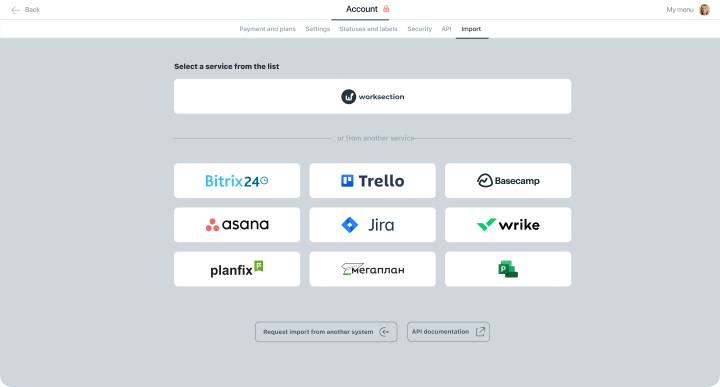
Thanks to integrations and easy migration, Worksection allows teams to quickly organize work in a unified environment and replace several individual services, saving time and budget.
How Worksection saves team time and resources
- Less chaos — more focus
Instead of 3 – 4 different platforms, the team works in a single system. This reduces the number of errors, task duplications, and confusion.
- Faster decision-making
All discussions, files, and deadlines are linked to tasks. The team does not have to waste time searching for the necessary email or message in chat — decisions are made faster and more confidently.
- Complete project picture
Dashboards and reports show team load, progress, and bottlenecks. This allows managers to respond to issues in time and avoid deadline failures.
- Budget savings
One subscription replaces several individual services: task manager, time tracker, reporting system, and internal communication. The team gets full functionality without extra costs.
- Quick onboarding for newcomers
New employees adapt quickly, as they only need to learn one tool — Worksection.
Comparison of Worksection’s capabilities with Asana, Monday.com, and Trello
| Parameter | Worksection | Asana | Monday.com | Trello |
| Price* | From $3.4 | From $10.99 | From $8 | From $5 |
| Kanban |  | | | |
| Gantt Chart | |  In Premium plan In Premium plan | |  Integration required Integration required |
| Time Tracking | | In Premium plan | In Premium plan | Integration required |
| Reports | | In Premium plan | | Limited |
| Integrations | | | | |
| User rating | 4.8 / 5 on G2 4.9 / 5 on Capterra | 4.5 / 5 on G2 4.3 / 5 on Capterra | 4.7 / 5 on G2 4.6 / 5 on Capterra | 4.4 / 5 on G2 4.5 / 5 on Capterra |
*price per user/month
Worksection has the lowest price among competitors while maintaining full functionality for project management and team collaboration.
Asana and Monday.com offer extended capabilities, but at a higher price, which is not always justified for small and medium teams.
Trello is a good tool for simple projects, but for more complex tasks, you will need additional integrations and setups.
Conclusions
As the team grows, project management becomes more complex, and software costs increase. Many services require additional subscriptions, and to work fully, one has to use several platforms at once. This not only adds costs but also creates chaos and takes time.
In Worksection, all key tools for task management, time tracking, communication, and reporting are gathered in one service. Meanwhile, the platform remains accessible for any teams—starting at $3.4 per user per month.
With Worksection, you get the maximum functionality for the minimum expense. Try Worksection for 14 days for free and see for yourself how easy it is to manage projects in one service.