Teams looking for a Teramind alternative should decide first whether they need employee time tracking, workforce analytics, insider-threat detection, or data-loss prevention. Worksection is a project-first option for transparent time records, ActivTrak focuses on workforce analytics, and CurrentWare offers modular endpoint controls. This guide compares the best Teramind alternatives by features, price, privacy, security, and practical migration needs.
Quick take:
- Best for project-based time tracking: Worksection.
- Best for workforce analytics: ActivTrak.
- Best for modular endpoint controls: CurrentWare.
Why are teams looking for alternatives to Teramind?
Teramind combines user activity monitoring, screen recordings, behavior rules, and DLP features. That can be appropriate for an authorized security program, but teams should compare the actual need, employee notice, data retention, and administrator workload before deploying monitoring. Reasons to look at Teramind alternatives may include:
- A project team needs timesheets and workload reports, not screen recording.
- Security teams need a narrower device or web-control module.
- The organization needs a clearer balance between monitoring and employee privacy.
- A five-seat minimum changes the total cost for a small group.
- IT wants different cloud, on-premises, or endpoint deployment options.
- Managers need time reports that do not require a security console.
Pros & Cons of Teramind
Advantages
- Teramind combines activity evidence, behavior analytics, rules, and investigation tools.
- Its DLP tier extends monitoring with content-based detection and automated blocking.
- Cloud and self-hosted deployment options are available for different environments.
Disadvantages
- Continuous or detailed monitoring can create privacy, trust, and employee-notice obligations.
- The product’s security breadth may exceed the needs of a team that only wants time reporting.
- Video, event data, and rule configuration require storage planning and administrator ownership.
Restrictions of Teramind
Teramind licenses are sold monthly or annually with a five-seat minimum. Starter, UAM, and DLP differ materially in analytics, forensics, and policy enforcement; a Starter subscription is not equivalent to DLP. Before rollout, verify which endpoints, integrations, retention periods, recording settings, and compliance evidence are included in the selected bundle.
Prices of Teramind
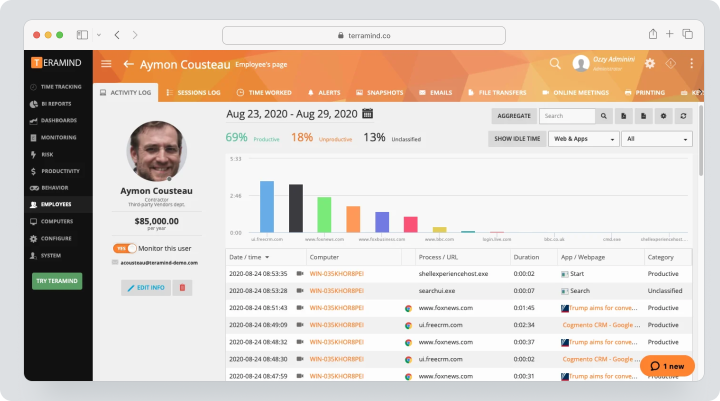
Teramind’s current pricing page provides a configurable seat and billing selector rather than a single fixed headline rate. The vendor lists Starter, UAM, and DLP; published vendor materials have described annual rates around $14, $28, and $32 per seat/month, respectively, with enterprise and government pricing by quote. Confirm the actual rate in the live calculator. Among the best Teramind alternatives, pricing should be compared at the same number of licenses. All plans have a five-seat minimum; annual subscriptions are paid upfront and non-refundable, while monthly plans can be canceled at any time. The vendor advertises an 8% annual-billing saving in its pricing interface.
A fair estimate includes the minimum seats, storage and retention, server or private-cloud costs if applicable, onboarding, custom integrations, and any professional services. Teramind competitors often use different billing units, so compare license, endpoint, retention, and module costs on one common team size. There is no permanent free plan; a free trial is available. A cheaper alternative to Teramind can be Hubstaff, Toggl Track, or Monitask for timekeeping, but those products do not reproduce DLP or insider-risk controls.
Pricing details by alternative
Compare the billing unit and annual commitment as carefully as the headline rate. Free access ranges from a true small-team plan to a time-limited trial, while enterprise security products are usually quoted. Listed add-ons are only those the vendor publishes; the final quote can depend on seats, endpoints, retention, or deployment.
| Alternative | Public starting prices | Billing / free access | Add-ons and limits to check |
|---|---|---|---|
| Worksection | $5/user/month; free tier | No minimum noted; paid tiers depend on plan | Free plan has user and project limits |
| ActivTrak | Free: 3 workers/30-day history; paid $7 – $21/worker/month, billed annually | 14-day full-feature trial; paid plans annual, 5‑license minimum | Screen Details by quote; extended history $1/worker/month |
| Hubstaff | $4.99/seat/month annually; $7 monthly | Starter, Grow, Team and Enterprise; annual plans include two months free | Optional analytics and product features vary by tier |
| Time Doctor | Basic $6.67 annual/$8 monthly; Standard $11.67/$14; Premium $16.70/$20 | 14-day trial; monthly or annual billing | Optional reports $2 – $3/user/month; SSO, HRIS and payroll integrations billed separately |
| Monitask | Pro $6.49 annual/$7.99 monthly; Business $8.99/$10.99; Business Premium $12.99/$15.99 | 10-day free trial; annual billing saves 18% | Retention, integrations, screenshot limits and APIs vary by plan |
| Toggl Track | Free for up to 5; Starter $9/license annual/$12 monthly | Free plan for small teams; paid seat licenses billed per member | Time Off Management is an add-on; Premium by sales/demo |
| Proofpoint | Custom enterprise quote | No public free plan; demo and procurement process | Quote may reflect capture volume, retention, modules, and services |
| DeskTime | Pro $6.42/user/month annual; Premium $9.17; Enterprise custom | 14-day trial; annual billing includes a free month | Screenshots, integrations and shift tools vary by tier |
| Insightful | Analytics $8/seat/month annual or $10 monthly; Insights $24 annual | Free Analytics trial; Insights annual, 50-seat minimum | Intelligence and private-cloud/on-prem deployment priced by quote |
| CurrentWare | Modules $6 – $12/user/month; full CurrentWare Suite $20/user/month, billed annually | Trial available; cloud and self-hosted options | Screenshots and on-prem/add-on costs may require a quote |
Verify each amount on the linked vendor page before purchase; annual rates are not directly comparable with monthly rates.
DLP, insider-threat detection, and compliance
The security focus is an important distinction in this category. Its public feature matrix describes user-behavior analytics and insider-threat detection, and the DLP plan adds content-based rules, sensitive-content detection, and blocking controls. Proofpoint targets enterprise security operations; CurrentWare provides modular web and device controls; ActivTrak, Hubstaff, Time Doctor, Monitask, Toggl Track, DeskTime, and Insightful have different workforce-monitoring or time-tracking scopes. A time tracker should not be treated as equivalent to a DLP product.
A vendor may describe features that support GDPR, HIPAA, or SOC 2‑related workflows, but purchasing a tool does not make an organization compliant. Validate the applicable certification or attestation, covered services, contract terms, data processing, retention, access logs, and configuration with counsel and your security team. In particular, confirm whether the exact product and deployment are in scope for a SOC 2 report or a HIPAA business associate agreement.
Best Teramind alternatives in 2026
Teams considering apps like Teramind should compare monitoring scope, data retention, employee notice, and deployment before choosing a replacement.
The list preserves the core employee-monitoring and workforce tools from the brief, while replacing the four requested products: Clockify with Monitask, RescueTime with Toggl Track, Kickidler with Proofpoint, and TMetric with CurrentWare. Worksection, ActivTrak, and Hubstaff remain near the top because they represent project-based time, analytics, and field-team workflows. The best Teramind alternatives differ in the amount and purpose of monitoring they perform.
Worksection
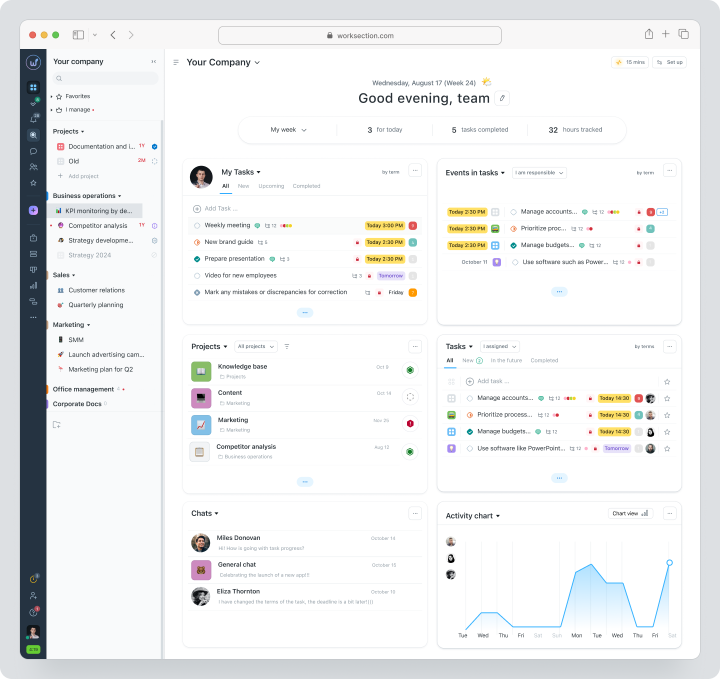
Worksection is best for project teams seeking transparent time tracking. Its key strengths include project tasks, gantt, time reports, client access, while teams comparing options should account for this limitation: not an employee-surveillance or dlp platform. Review the product and trial with a representative workflow before committing. As one of the best Teramind alternatives for project teams seeking transparent time tracking, compare the product on one live team project before committing.
Key features
- Tasks, subtasks, comments, files, Kanban and Gantt views.
- Built-in time tracking and project-level time and cost reports.
- Mobile apps, client access, and role permissions.
The main difference from Teramind
Worksection records work against projects and tasks; it is a lower-surveillance alternative rather than a direct replacement for the current platform’s forensic monitoring, DLP policies, or endpoint controls.
Prices of Worksection
Worksection offers four pricing plans. Free is available for up to 5 users and 2 projects. Basic costs $5/user/month with monthly billing or $3.75 with annual billing. Business costs $10/user/month or $7.50 with annual billing, while Premium costs $15/user/month or $11.25 with annual billing. All three paid plans include unlimited projects and users.
Pros & Cons of Worksection
Advantages:
- Transparent task-based time records can support team planning.
- Includes project collaboration and time tracking in one platform.
Disadvantages:
- Does not record screens or keystrokes.
- Does not provide endpoint DLP or insider-threat forensics.
ActivTrak
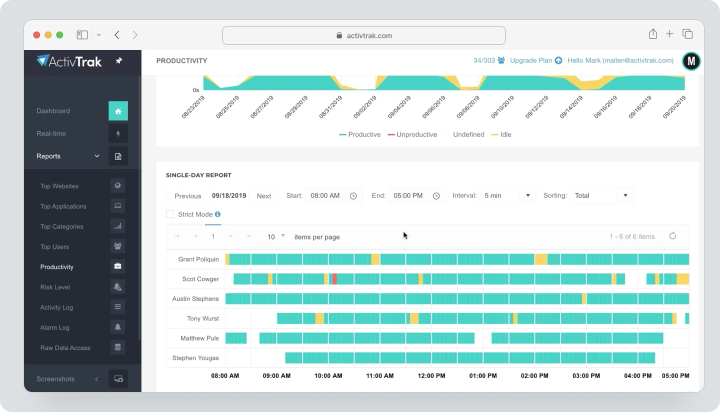
ActivTrak is best for workforce analytics and productivity coaching. Its key strengths include activity analytics, team trends, capacity planning, while teams comparing options should account for this limitation: dlp and forensic recording are not its core focus. Review the product and trial with a representative workflow before committing. As one of the best Teramind alternatives for workforce analytics and productivity coaching, compare the product on one live team project before committing.
Key features
- App and website activity analytics with team dashboards.
- Productivity trends and capacity planning for managers.
- Optional screenshots and other capabilities depend on plan.
The main difference from Teramind
ActivTrak focuses on workforce analytics and coaching rather than the current platform’s broad surveillance and data-loss enforcement. Check whether the selected plan includes the level of screen capture and security response you need.
Prices of ActivTrak
Free covers up to 3 workers, 3 GB, and 30 days of history; paid plans require at least 5 licenses and are billed annually. Current listed rates are $7/worker/month for Work Activity Tracking, $15 for Workforce Management, and $17 for Productivity Optimization. A 14-day full-feature trial is available. Screen Details is an add-on with a quote; data history is $1/worker/month.
Pros & Cons of ActivTrak
Advantages:
- Analytics can support workload discussions and team-level insights.
- Free plan allows a small team to evaluate basic functionality.
Disadvantages:
- DLP and forensic investigations are outside this product’s scope.
- Some monitoring features are plan-dependent.
Hubstaff
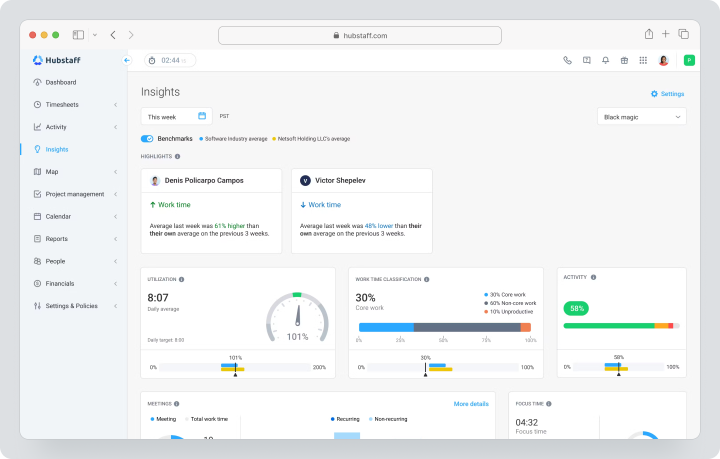
Hubstaff is best for remote, field, and project-based teams. Its key strengths include time tracking, gps, payroll and invoicing workflows, while teams comparing options should account for this limitation: less depth in dlp and insider-threat investigations. Review the product and trial with a representative workflow before committing. As one of the best Teramind alternatives for remote, field, and project-based teams, compare the product on one live team project before committing.
Key features
- Time tracking with optional screenshots and activity levels.
- GPS and scheduling for eligible field-work workflows.
- Timesheets, payroll, and project cost reporting.
The main difference from Teramind
Hubstaff centers time capture, workforce scheduling, and payments. the current platform focuses on user activity monitoring, forensics, and data-loss controls; Hubstaff is not a like-for-like DLP replacement.
Prices of Hubstaff
Paid pricing varies by product and annual or monthly billing. Entry tiers are commonly listed from about $4.99/user/month annually; verify minimum seat counts, screenshot rules, and payment features on the vendor pricing page.
Pros & Cons of Hubstaff
Advantages:
- Strong time and attendance workflow for distributed teams.
- Combines time records with payroll and project costs.
Disadvantages:
- Screenshots and activity scoring require careful employee notice.
- Does not match the incumbent’s policy-based data-loss prevention.
Time Doctor
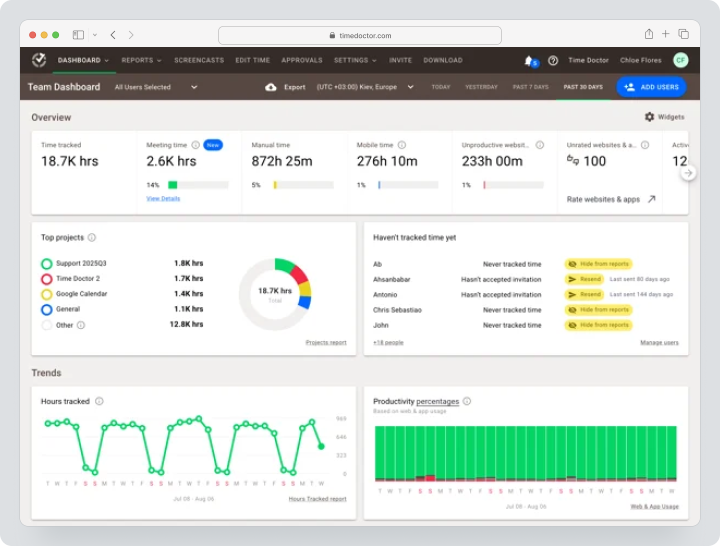
Time Doctor is best for time accountability and distributed-team reporting. Its key strengths include time reports, optional screenshots, attendance insights, while teams comparing options should account for this limitation: not designed as a full dlp or siem product. Review the product and trial with a representative workflow before committing. As one of the best Teramind alternatives for time accountability and distributed-team reporting, compare the product on one live team project before committing.
Key features
- Time tracking, timesheets, attendance, and reports.
- Optional screenshots and activity levels with configurable settings.
- Payroll and project-cost integrations.
The main difference from Teramind
Time Doctor focuses on time accountability and team analytics. the current platform provides deeper audit and security monitoring, including DLP on its higher tiers.
Prices of Time Doctor
Basic is $6.70/user/month annually or $8 monthly; Standard is $11.70 annually or $14 monthly, and Premium is $16.70 annually or $20 monthly. Enterprise is custom. The 14-day trial includes Premium. Optional add-ons range from $2 – $3/user/month, while SSO, HRIS, and payroll integrations have separate monthly fees.
Pros & Cons of Time Doctor
Advantages:
- Useful time reports for remote and outsourced teams.
- Screenshots can be configured to match a transparent policy.
Disadvantages:
- Not a substitute for endpoint DLP or insider-risk forensics.
- Monitoring design should be reviewed with HR and legal teams.
Monitask
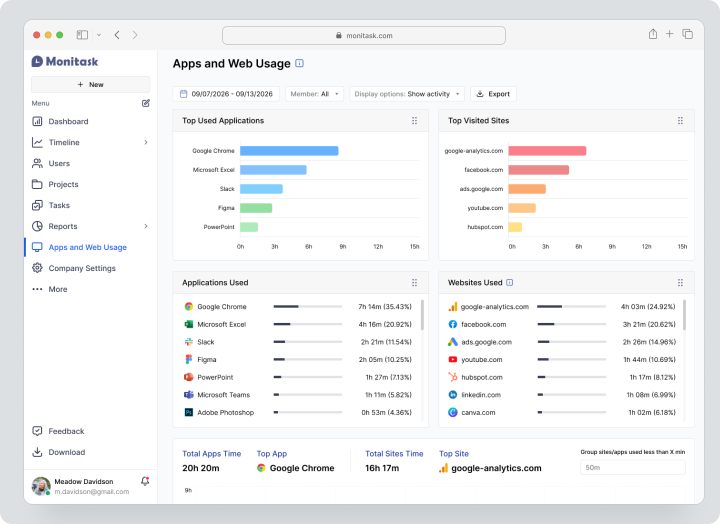
Monitask is best for affordable time tracking with screenshots. Its key strengths include timesheets, optional screenshots, attendance, while teams comparing options should account for this limitation: no dlp, usb control, or advanced threat analytics. Review the product and trial with a representative workflow before committing. As one of the best Teramind alternatives for affordable time tracking with screenshots, compare the product on one live team project before committing.
Key features
- Time tracking and automated timesheets.
- Optional periodic screenshots and app/site usage reports.
- Project and team reporting for distributed teams.
The main difference from Teramind
Monitask is designed for proof-of-work and time management at a lower operational scope. the current platform is a more extensive monitoring and security platform with policy enforcement and investigations.
Prices of Monitask
Pro is $6.49/user/month annually or $7.99 monthly; Business is $8.99 annually or $10.99 monthly; Business Premium is $12.99 annually or $15.99 monthly. Enterprise is $15.99 annually or $19.99 monthly. A free 10-day trial is available; the vendor page lists paid plans rather than a permanent free plan.
Pros & Cons of Monitask
Advantages:
- Straightforward time and screenshot workflow.
- Can be a lower-cost option for teams that need basic work records.
Disadvantages:
- No DLP, USB policy control, or deep insider-threat analytics.
- Screenshot retention and reporting limits should be checked before adoption.
Toggl Track
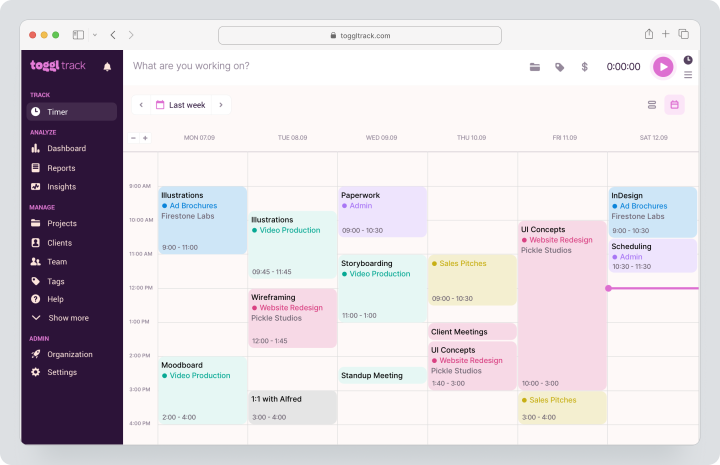
Toggl Track is best for time tracking with low-surveillance practices. Its key strengths include timers, project budgets, billable reports, integrations, while teams comparing options should account for this limitation: does not provide employee surveillance or dlp. Review the product and trial with a representative workflow before committing. As one of the best Teramind alternatives for time tracking with low-surveillance practices, compare the product on one live team project before committing.
Key features
- One-click timers, timesheets, and project-level reports.
- Billable rates, budgets, and reminders on paid tiers.
- Browser, desktop, and mobile apps with integrations.
The main difference from Teramind
Toggl Track records time without screenshots or keylogging. It suits teams seeking less intrusive time management, not organizations that require the current platform-style forensic capture or DLP.
Prices of Toggl Track
Free is available for up to five users. Starter costs $9/license/month annually or $10 monthly; Premium pricing is available by demo or sales request. Time Off Management is an optional add-on. The paid license is billed for each member seat, including unassigned seats.
Pros & Cons of Toggl Track
Advantages:
- Transparent time reports without surveillance-style capture.
- Free tier for small teams.
Disadvantages:
- No screenshot monitoring, insider-threat detection, or DLP.
- Requires user participation for accurate time entry.
Proofpoint
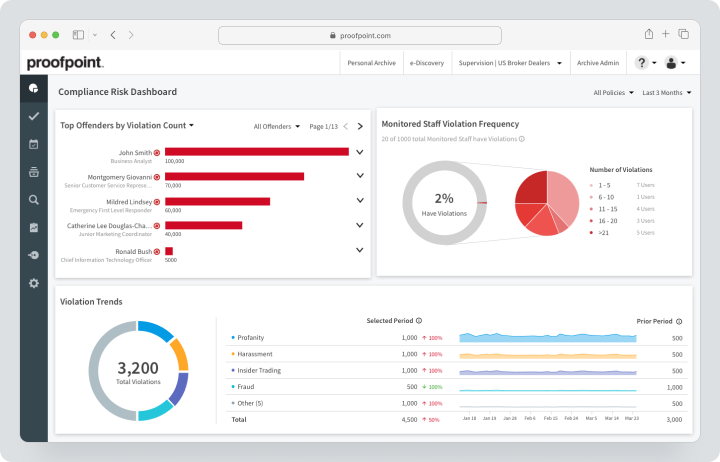
Proofpoint is best for enterprise insider-threat and data-loss programs. Its key strengths include threat intelligence, investigation workflows, dlp ecosystem, while teams comparing options should account for this limitation: enterprise sales and implementation; public prices unavailable. Review the product and trial with a representative workflow before committing. As one of the best Teramind alternatives for enterprise insider-threat and data-loss programs, compare the product on one live team project before committing.
Key features
- Insider-threat management and investigation capabilities.
- Data-loss prevention across a broader security portfolio.
- Enterprise integrations and professional-services options.
The main difference from Teramind
Proofpoint is an enterprise security platform rather than a lightweight time-tracking product. It may suit SOC and compliance teams, but is likely excessive when the core need is project visibility or attendance.
Prices of Proofpoint
Pricing is quote-based and depends on product modules, deployment, endpoints, and service requirements. Ask for a scoped quote that includes retention, integrations, support, and implementation rather than comparing it with a single-seat SaaS price.
Pros & Cons of Proofpoint
Advantages:
- Can fit organizations with established security operations.
- Broader security ecosystem and policy context.
Disadvantages:
- No transparent self-serve price or permanent free plan.
- Rollout and administration can be substantial.
DeskTime
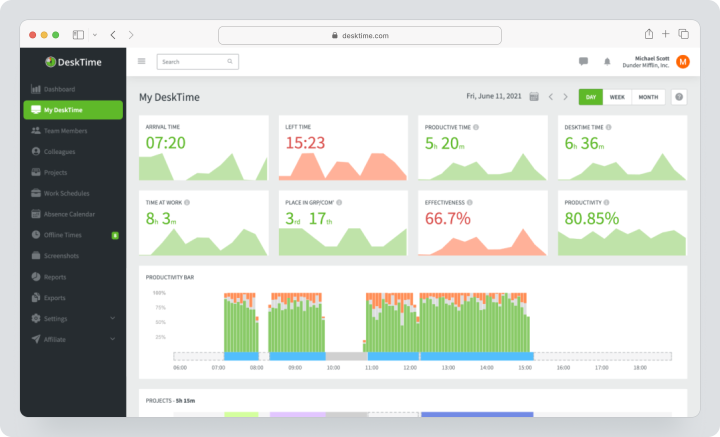
DeskTime is best for automatic time tracking and attendance. Its key strengths include automatic timers, shift scheduling, productivity reports, while teams comparing options should account for this limitation: lighter security coverage than teramind. Review the product and trial with a representative workflow before committing. As one of the best Teramind alternatives for automatic time tracking and attendance, compare the product on one live team project before committing.
Key features
- Automatic time tracking and project categorization.
- Attendance, shifts, and productivity reports.
- Optional screenshots and private-time settings.
The main difference from Teramind
DeskTime is primarily a time and attendance tool. the current platform adds broader monitoring, forensics, and data-loss prevention; teams can choose DeskTime only if those security controls are not required.
Prices of DeskTime
DeskTime Pro starts at $6.42/user/month and Premium at $9.17 when billed annually; Enterprise is custom for 200+ users. There is no permanent free plan, but a 14-day trial is offered. Annual billing includes one month free; screenshots and integrations are in Premium.
Pros & Cons of DeskTime
Advantages:
- Automatic time capture reduces manual timesheet entry.
- Private-time options support a more transparent employee policy.
Disadvantages:
- Not a replacement for DLP and threat investigation.
- Advanced reports and controls may require paid tiers.
Insightful
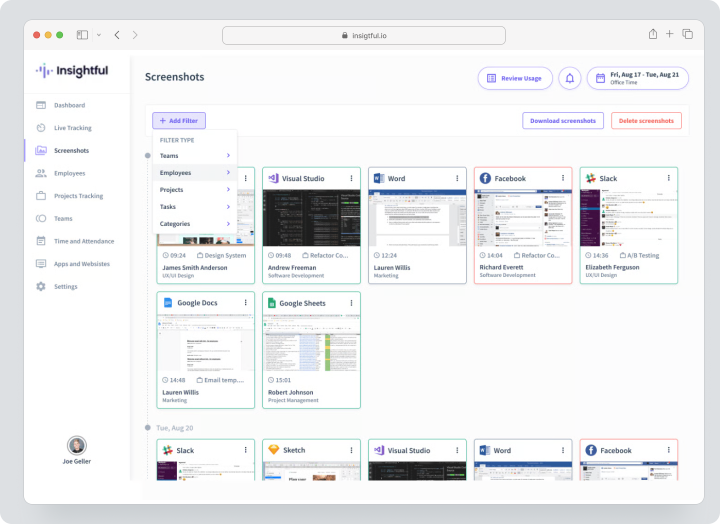
Insightful is best for workforce analytics with optional screen monitoring. Its key strengths include time, attendance, activity, and workforce dashboards, while teams comparing options should account for this limitation: security enforcement scope varies by plan. Review the product and trial with a representative workflow before committing. As one of the best Teramind alternatives for workforce analytics with optional screen monitoring, compare the product on one live team project before committing.
Key features
- Time and attendance reporting with productivity analytics.
- Optional screenshots, app/website tracking, and workforce planning.
- Team dashboards for office, hybrid, and remote work.
The main difference from Teramind
Insightful emphasizes workforce productivity and workforce analytics. the current platform offers more granular security rules and forensic capabilities for organizations investigating insider risk.
Prices of Insightful
Analytics costs $8/seat/month annually or $10 monthly. Insights is $24/seat/month annually with a 50-seat minimum; Intelligence is custom. A free Analytics trial is available. Private-cloud or on-prem deployment costs extra.
Pros & Cons of Insightful
Advantages:
- Combines attendance, time, and activity context.
- Team-level dashboards help managers review capacity.
Disadvantages:
- Plan and add-on boundaries require careful review.
- DLP and security response need separate validation.
CurrentWare
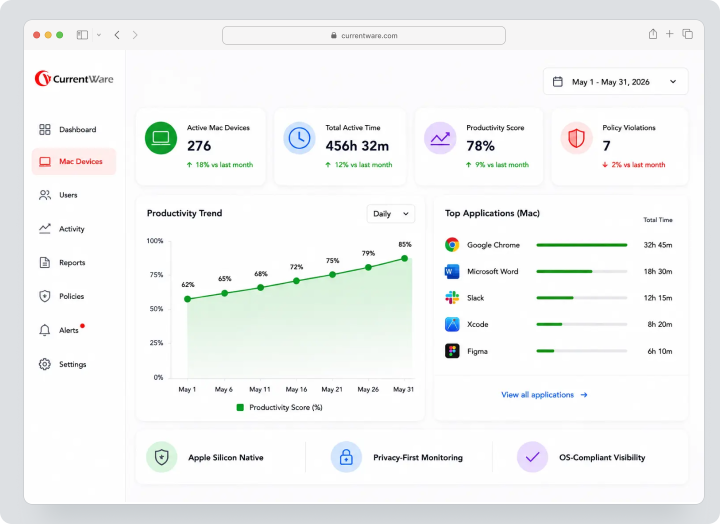
CurrentWare is best for modular endpoint policies and web/device control. Its key strengths include web filtering, usb controls, activity reporting modules, while teams comparing options should account for this limitation: capabilities and cost split across products. Review the product and trial with a representative workflow before committing. As one of the best Teramind alternatives for modular endpoint policies and web/device control, compare the product on one live team project before committing.
Key features
- BrowseControl for web filtering and application controls.
- AccessPatrol for USB and device control.
- BrowseReporter for computer activity reports and optional screenshots.
The main difference from Teramind
CurrentWare sells modular endpoint controls, letting IT teams select web, device, or activity modules. the current platform offers a more integrated monitoring and DLP environment; compare the exact modules needed for parity.
Prices of CurrentWare
CurrentWare lists BrowseControl at $6/user/month; enPowerManager at $6; BrowseReporter and AccessPatrol at $12 each for SaaS. Premium add-ons, screenshots, on-premises options, and larger deployments may need a quote. Check whether your selected bundle is billed per machine or user.
Pros & Cons of CurrentWare
Advantages:
- Modular purchasing can avoid paying for unused capabilities.
- Cloud and self-hosted options support different IT policies.
Disadvantages:
- Full feature coverage may require multiple products.
- No universal price for a comparable security configuration.
Comparison table
This Teramind vs alternatives comparison separates time and workforce tools from products that provide endpoint controls or DLP. A free plan does not imply equivalent security coverage. The best Teramind alternatives differ in the type and depth of monitoring they provide. Verify data retention, recording settings, deployment, and product-specific terms before making a decision.
| Tool | Best for | Key strengths | Main limitations | Starting price | Free plan (Y/N) | Platforms | DLP / security scope |
|---|---|---|---|---|---|---|---|
| Worksection | Project teams seeking transparent time tracking | Project tasks, Gantt, time reports, client access | Not an employee-surveillance or DLP platform | Free tier; paid plans from $5/user/month | Yes | Web, Windows, macOS, iOS, Android | Project permissions and account controls; not endpoint DLP or keystroke monitoring |
| ActivTrak | Workforce analytics and productivity coaching | Activity analytics, team trends, capacity planning | DLP and forensic recording are not its core focus | Free for 3 users; paid tiers $10 – $17/worker/month | Yes | Windows, macOS, Linux, ChromeOS; web dashboards | Productivity analytics and alerts; limited compared with dedicated DLP suites |
| Hubstaff | Remote, field, and project-based teams | Time tracking, GPS, payroll and invoicing workflows | Less depth in DLP and insider-threat investigations | Starter $4.99/seat/month annually; monthly billing $7 | No | Windows, macOS, Linux, iOS, Android, web | Screenshots and activity metrics; no full endpoint DLP suite |
| Time Doctor | Time accountability and distributed-team reporting | Time reports, optional screenshots, attendance insights | Not designed as a full DLP or SIEM product | Basic from $6.70/user/month annually ($8 monthly); higher tiers cost more | Trial only | Windows, macOS, Linux, iOS, Android, web | Workforce monitoring and alerts; no enterprise DLP enforcement |
| Monitask | Affordable time tracking with screenshots | Timesheets, optional screenshots, attendance | No DLP, USB control, or advanced threat analytics | Pro from $6.49/user/month annually ($7.99 monthly); 10-day trial | No | Windows, macOS, Linux, iOS, Android, web | Basic activity and screenshot monitoring; no comparable endpoint DLP |
| Toggl Track | Time tracking with low-surveillance practices | Timers, project budgets, billable reports, integrations | Does not provide employee surveillance or DLP | Free plan; Starter $9/license/month annually or $12 monthly | Yes | Web, Windows, macOS, Linux, iOS, Android | Project-level account security; no monitoring or DLP function |
| Proofpoint | Enterprise insider-threat and data-loss programs | Threat intelligence, investigation workflows, DLP ecosystem | Enterprise sales and implementation; public prices unavailable | Custom enterprise quote | No | Cloud and enterprise deployments; verify supported endpoints | Enterprise data-protection and insider-threat capabilities; confirm product bundle and controls |
| DeskTime | Automatic time tracking and attendance | Automatic timers, shift scheduling, productivity reports | Lighter security coverage than Teramind | Pro from $6.42/user/month annually; Premium $9.17; Enterprise custom | No (trial only) | Windows, macOS, Linux, iOS, Android, web | Productivity/time reports; not a DLP or insider-risk response platform |
| Insightful | Workforce analytics with optional screen monitoring | Time, attendance, activity, and workforce dashboards | Security enforcement scope varies by plan | Analytics free trial; $8/seat/month annually or $10 monthly | No | Windows, macOS, Linux, iOS, Android, web | Workforce analytics and screenshots; validate any DLP needs separately |
| CurrentWare | Modular endpoint policies and web/device control | Web filtering, USB controls, activity reporting modules | Capabilities and cost split across products | Modules start at $6/user/month; BrowseReporter $12; suite varies by bundle | No | Windows endpoints; cloud or on-prem deployment options | Modular web filtering and device controls; scope depends on products selected |
Prices and feature scope reviewed November 19, 2026. Public pricing may change; custom quotes and module bundles vary.
Best Teramind alternative by use case
AI-powered personal knowledge management
For a knowledge workflow linked to projects, Worksection keeps task context and time records together, while Notion or ClickUp can hold more flexible documentation. Neither project wiki is an endpoint monitoring product. Compare AI data terms separately from security controls.
powerful formulas and databases
ActivTrak offers workforce analytics rather than database modeling. If the real need is to analyze work records, use exportable reports or a connected BI tool and keep the monitoring scope minimal. For relational project records, ClickUp or Notion may fit better than a surveillance platform.
turning daily notes into networked hubs
Teams that need a searchable knowledge hub can pair a documentation tool such as Notion with an approved time or security product. Teramind’s activity records are not a substitute for a team wiki. Define retention and access before linking sensitive activity records to other systems.
collaborating with your team
Worksection, Hubstaff, and Time Doctor address different collaboration and time needs: project updates, team time, and attendance reporting. Choose based on whether people should record time against project work or whether managers require monitoring signals. Communicate the policy to employees before rollout.
privacy, security, and data relationships
Among the best Teramind alternatives for security-oriented use cases, CurrentWare and Proofpoint support different levels of endpoint and insider-risk controls. Review endpoint coverage, role access, event retention, data residency, exportability, and audit evidence. Keep security and HR responsibilities clear, and validate any GDPR, HIPAA, or SOC 2‑related claims for the precise deployment.
mind mapping
The best Teramind alternatives are not necessarily mind-mapping tools, since mind mapping is not a core reason to adopt employee monitoring. If a team needs planning boards, Worksection or ClickUp can convert tasks into project views while a dedicated diagramming app handles discovery. Keep productivity analytics separate from idea capture unless there is a documented need.
fearless tinkerers
For administrators who want control, some of the best Teramind alternatives include CurrentWare’s modular setup and configurable rules for administrators who want to tune endpoint policies. That flexibility increases configuration responsibility. Start with a narrow policy, document exceptions and retention, and test the user experience before enabling broader collection.
Best Teramind Alternative for Insider-Threat Detection and DLP
For insider-threat investigation and data-loss prevention, compare Teramind DLP with Proofpoint and CurrentWare’s specific modules. Verify alert context, content inspection, response actions, evidence retention, and SIEM integration. Workforce time tools such as Toggl Track are not substitutes for security controls.
Best Teramind Alternative for Regulated Industries (Finance, Healthcare, Legal)
When evaluating best Teramind alternatives for regulated teams, shortlist products only after checking product-specific attestations, deployment scope, data processing terms, and retention. The original platform or Proofpoint may support security programs, while CurrentWare can address selected endpoint controls. Have legal and security teams validate GDPR, HIPAA, and SOC 2 requirements for the exact service.
Budget option for basic time tracking
Apploye is sometimes compared as a budget-friendly stealth-monitoring option for teams that want attendance or time features. Review its tracking and employee-notice settings before deployment. Treat it as a workforce/time product, not as a substitute for Teramind DLP, USB controls, or forensic investigations. Verify current price, screenshots, retention, platform coverage, and employee-facing privacy settings before choosing it.
What to prepare for migrating from Teramind
Inventory user groups, monitored endpoints, policy rules, alerts, screenshots, video events, application categories, integrations, and retention settings. Export reports and configuration data through documented vendor tools; ask support whether historical recordings and rule histories are exportable, and preserve only what your policy and legal basis allow. Map Teramind administrators, investigators, managers, and employees to the new product’s least-privilege roles.
Prepare an integration checklist for identity providers, SIEM, ticketing, HRIS, payroll, and project tools. Pilot the replacement on a small, clearly notified group, compare reporting and incident workflows, then schedule a staged rollout. Set a timeline, data-retention decision, employee communication owner, and rollback criteria. Keep Teramind read-only during the validation window so that no security evidence is lost before the new workflows are accepted.
FAQ
What is the best alternative to Teramind for businesses?
The best choice depends on the job. Worksection suits project teams that need task-based time records; ActivTrak focuses on workforce analytics; Proofpoint and CurrentWare address security or endpoint-control needs. Compare monitoring depth, DLP, deployment, price, and employee notice before selecting a Teramind alternative.
Why are people leaving Teramind?
Organizations may move because they need simpler time tracking, a lower seat commitment, less intrusive monitoring, or a different endpoint-security stack. Teramind can still fit teams that need its investigation and DLP functions. Decide which data and controls are genuinely required before comparing replacements.
Why is Teramind not working?
Check the vendor status, agent installation, endpoint permissions, network access, user assignment, and policy scope. A blank report may reflect a disabled agent or a filter, not a product outage. Reproduce the problem on one test device and consult the administrator or vendor support before exporting data.
What are common Teramind errors?
Typical monitoring issues include an offline agent, missing endpoint permissions, incomplete screenshots, an incorrect user-to-device mapping, and alerts that do not match the expected rule. Verify the agent version, OS support, time zone, policy conditions, and retention configuration. Document examples before changing policy settings.
What does Teramind cost?
Teramind has Starter, UAM, and DLP subscriptions with a five-seat minimum, plus a custom Enterprise tier. Published rates have been around $14, $28, and $32 per seat/month on annual terms, but the live pricing calculator and quote should be checked. Monthly and annual billing have different payment conditions.
What does Teramind monitor, and can it record audio or keystrokes?
Depending on plan, configuration, operating system, and policy, Teramind can collect app and website activity, screenshots or video, keystrokes, and other endpoint events; its feature matrix lists optional audio and keystroke capabilities. Recording should be configured lawfully, transparently, and only for a documented business purpose.
Are there any open-source alternatives to Teramind?
There is no direct open-source equivalent that provides the same integrated endpoint monitoring and DLP suite. Organizations can assemble self-hosted logging or endpoint tools, but that requires engineering, maintenance, security review, and an explicit employee policy. Compare total operating cost with a supported commercial product.
What are the best free Teramind alternatives in 2026?
ActivTrak offers a free plan for small teams, and Toggl Track has a free time-tracking tier. Worksection also offers a limited free plan for project work. These are useful for basic analytics, time records, or task tracking, but they do not reproduce Teramind’s DLP and forensic controls.
Are there any free analogs to Teramind?
A free Teramind alternative can cover only part of the use case. ActivTrak may support basic workforce analytics; Toggl Track and Worksection focus on time or project work. Check user limits, screenshot availability, retention, and security features before assuming a free tier can replace a paid monitoring platform.
How does Worksection differ from Teramind?
Worksection tracks time against tasks and projects, then reports team work and costs. It does not record employee screens or keystrokes and does not provide DLP. Teramind is designed for user-activity visibility and security monitoring. Choose Worksection when project delivery is the need, not endpoint surveillance.
Is Teramind a legitimate company, and is it safe to use?
Teramind is an established commercial software vendor with published product, pricing, and support resources. Whether a deployment is safe for your organization depends on configuration, contracts, access control, data retention, and employee notice. Review current security documentation and perform your own vendor assessment.
How secure is Teramind for storing monitoring data?
Security depends on the selected cloud or self-hosted deployment, encryption and access settings, retention, administrator roles, and contract terms. Ask the vendor for current security documentation, audit reports, data-processing terms, backup details, and deletion procedures. Restrict access to monitoring data to authorized staff.
Is there anything better than Teramind?
There may be a better fit for a narrower need: Toggl Track for low-surveillance time logs, ActivTrak for workforce analytics, or Proofpoint for enterprise security programs. Teramind remains broader for monitoring and DLP. Define required features and compare the operational and privacy trade-offs.
What’s the best alternative to Teramind for remote teams?
For remote teams focused on delivery, Worksection offers task-based time reporting; Hubstaff or Time Doctor can suit attendance and work-time workflows. If the remote-work concern is insider risk or data loss, evaluate CurrentWare, Proofpoint, or Teramind instead. Match the tool to the written policy.
A Teramind AI alternative should be judged by how well it handles classification, summaries, and employee privacy. Teramind alternatives with AI also need a clear data-use policy, admin review, and usage limits. Tools like Teramind should be compared on monitoring depth as well as their AI features.
Among the best Teramind alternatives, each tool serves a different operating model: security teams should start with DLP and incident response, while project teams should start with clear time records and employee transparency.
Need project time tracking without screenshots?
See how Worksection tracks time against projects and tasks, then compare the workflow with your current monitoring policy.
Explore Worksection