Solutions
worksection
beta
help
How can I close a task retroactively?
If a task needs to be considered completed earlier (with a different closing date), you can close it as usual and then change the closing date through the "Task Report".
Permissions The following users can close a task retroactively:
- Account owner
- Account administrator with the "allow editing everything" permission
- Team administrator with the "allow editing everything" permission (for tasks where the author or assignee is a member of their team)
- Department administrator with the "allow editing everything" permission (for tasks where the author or assignee is a member of their department)
- Project lead
- Task author
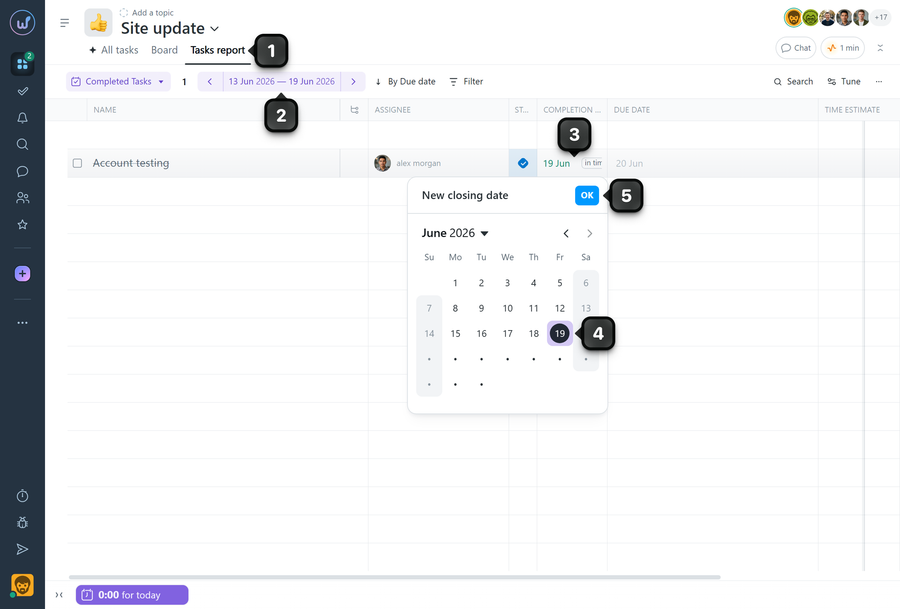
To change the task's closing date, open the "Task Report"1. Specify the time period2 and find the required task in the list. Click the task's closing date3. In the calendar that opens, select the required date4 and click "OK"5.
Leave your review
Did this article help you?
Glad we could help! What was helpful?
Sorry this didn't help. What went wrong?

