Solutions
worksection
beta
help
Who receives notifications about task events? How to change the subscriber list?
Notifications about task events (comments, parameter changes, and other actions) are received by "task subscribers". To control who sees and receives notifications about a task, you need to manage the subscriber list.
Permission to manage subscribers belongs to:
- Account owner
- Account administrator with the "Allow admin to edit everything" permission
- Team administrator with the "Allow admin to edit everything" permission (for tasks where a member of their team is the author or assignee)
- Department administrator with the "Allow admin to edit everything" permission (for tasks where a member of their department is the author or assignee)
- Project manager
- Task author
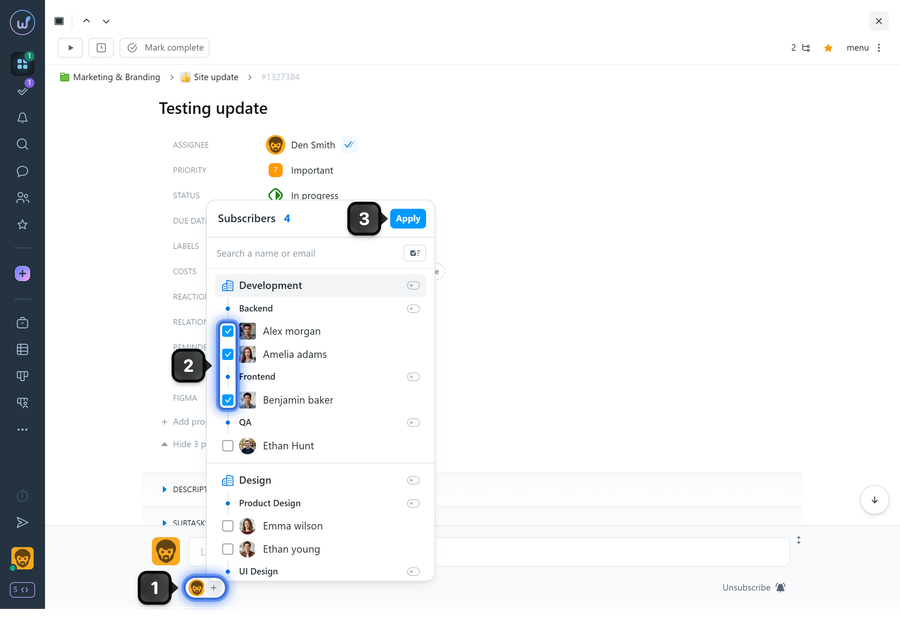
To subscribe or unsubscribe members from an existing task, in the task window click on the "subscribers" circle1 at the bottom, then check2 (or uncheck) the required members and click "Apply"3.
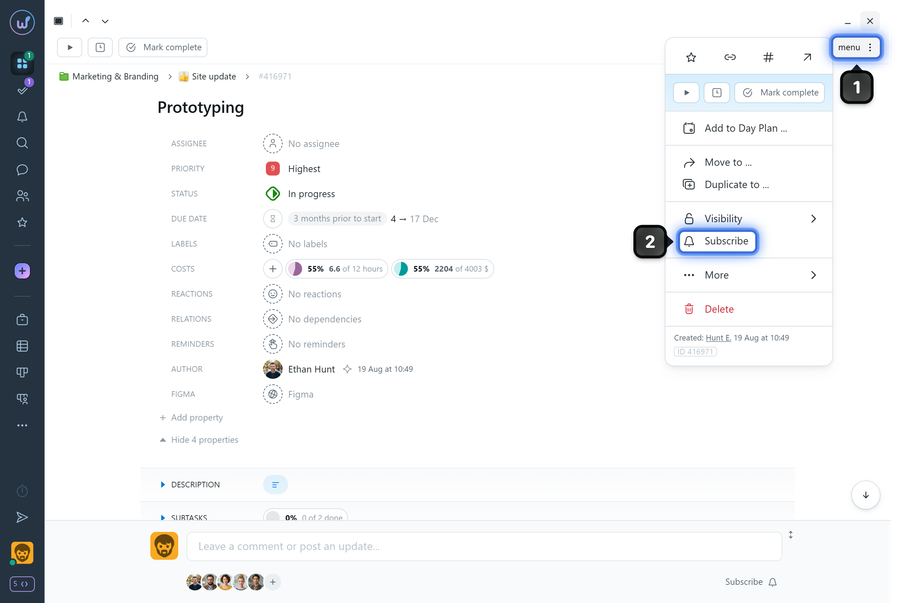
Each project member can subscribe or unsubscribe themselves from a task.
To do this, open the task menu1 and click "Subscribe"2 (if you are not subscribed). If you are already a subscriber, the item will say "Unsubscribe" and clicking it will remove you from the task subscribers.
Leave your review
Did this article help you?
Glad we could help! What was helpful?
Sorry this didn't help. What went wrong?
Previous
How to change the task assignee?

