Solutions
worksection
beta
help
How to change the estimated costs of a task?
Estimated costs are the planned time and/or budget for completing a task. They can be changed when the scope of work is refined or when the plan needs to be updated for comparison with actual costs.
Permissions The following users can change estimated costs:
- Account owner
- Account administrator with the "Allow admin to edit everything" permission
- Team administrator with the "Allow admin to edit everything" permission (for tasks where a member of their team is the author or assignee)
- Department administrator with the "Allow admin to edit everything" permission (for tasks where a member of their department is the author or assignee)
- Project manager
- Task author
- Assignee (optionally)
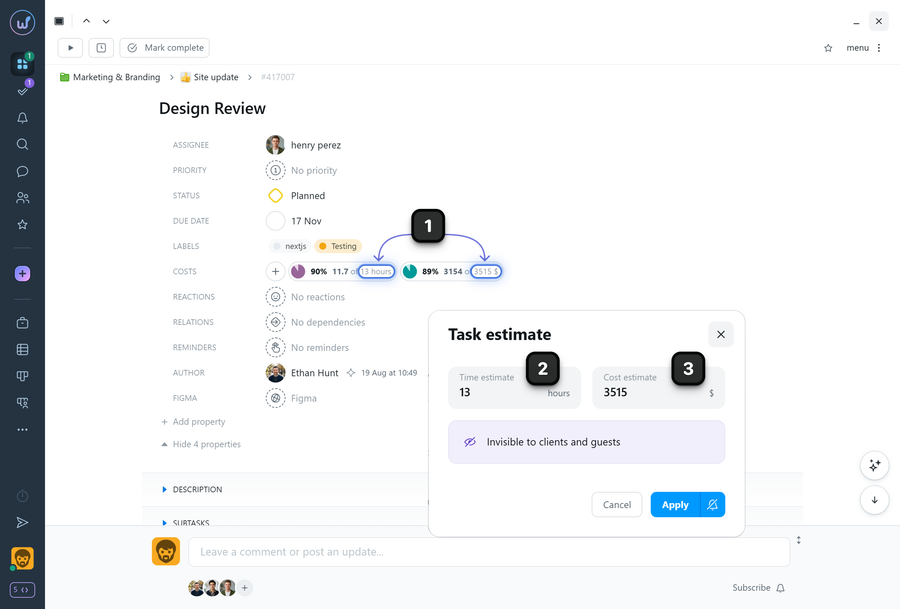
To change estimated costs — open the task window and in the properties click on one of the values1 of the previously set estimated costs. In the window that appears, enter the new estimated costs: time2 or financial3.
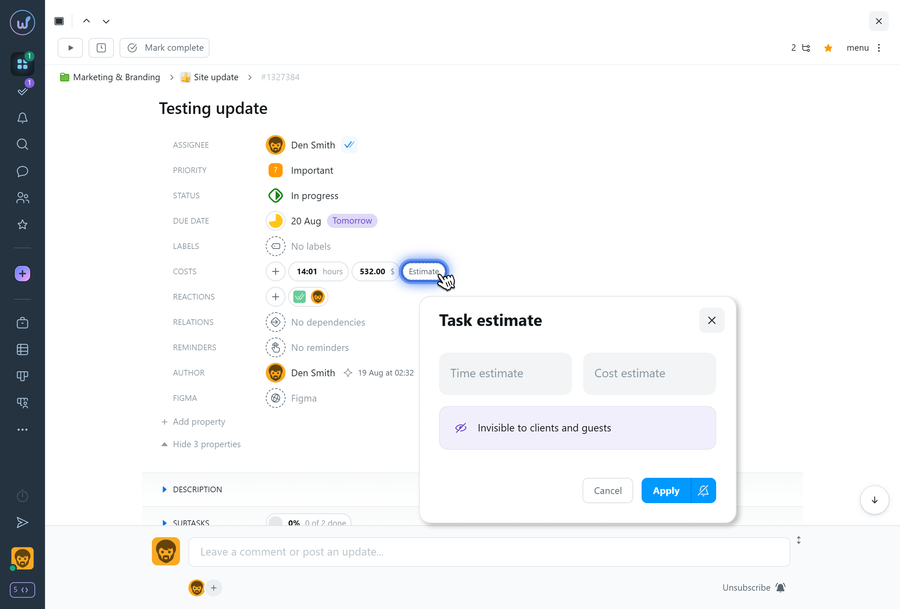
Note If estimated costs have not been set yet, an "Estimate" button will be available in the task properties to enter planned time or financial costs.
Leave your review
Did this article help you?
Glad we could help! What was helpful?
Sorry this didn't help. What went wrong?

