Solutions
worksection
beta
help
How can I delete an event record from a task?
Permissions The following users can delete an event:
- Account Owner
- Account Administrator with the “Allow editing everything” permission
- Team Administrator with the “Allow editing everything” permission (for tasks where the author or assignee is a member of their team)
- Department Administrator with the “Allow editing everything” permission (for tasks where the author or assignee is a member of their department)
- Project Lead
To delete an event from the activity feed, select it1 in the list and click “Delete”2.
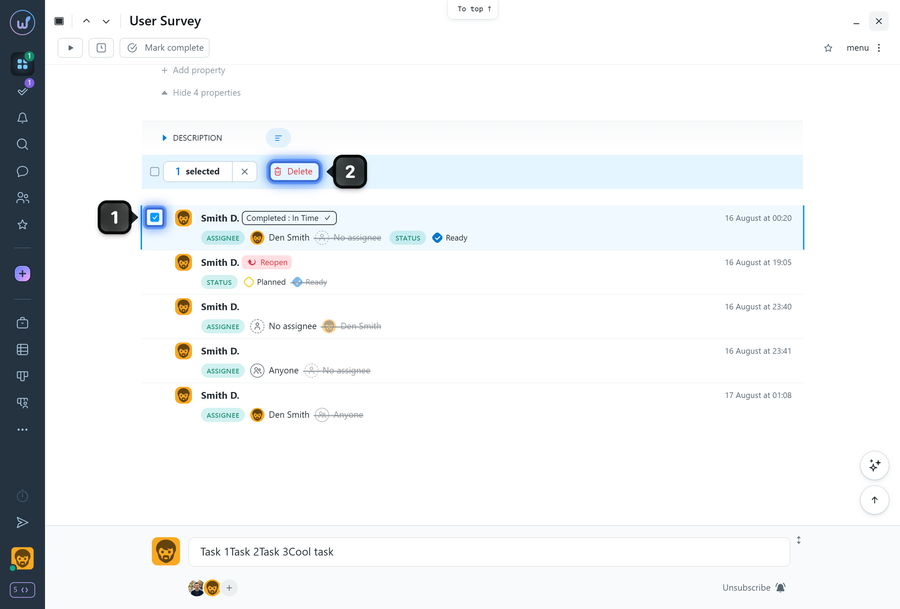
Note! Deleted events are saved in the task history (log).
Instead of deleting an event, you can undo the action. This does not “delete” the record from the activity feed but reverses the result of the change (for example, restores the previous status).
To do this, hover over the required event and click the “Undo” button1. In the window that appears, you can enter a reason and choose whether to notify subscribers about the undo action. To confirm the cancellation, click “Cancel”2 - the action will be undone.
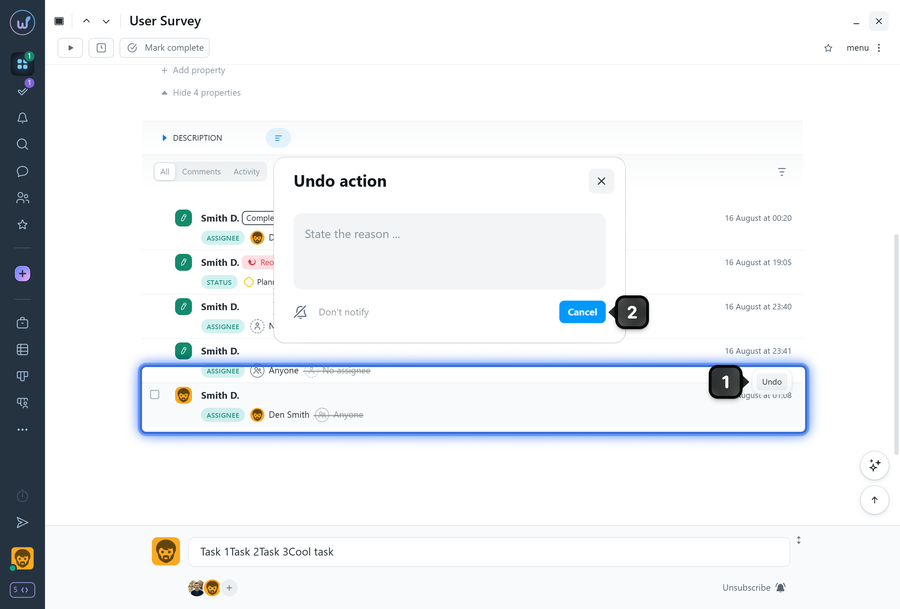
Note! Not all actions can be undone this way. If there is no “Undo” button, it means that the action cannot be undone.
Leave your review
Did this article help you?
Glad we could help! What was helpful?
Sorry this didn't help. What went wrong?

