Solutions
worksection
beta
help
How do I apply label groups to a project?
By default, after a project is created, it receives the label groups that are set as default in the account settings.
After the project has been created, you can add or remove label groups assigned to it.
Access available to:
- Owner
- Account administrator with the "Allow project management" permission
- Project lead
- Project author
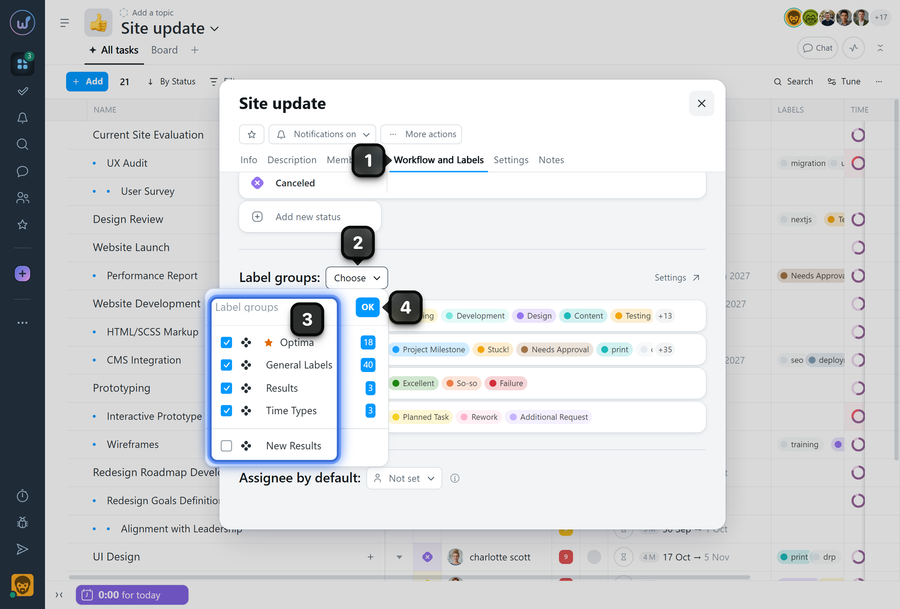
To add or remove a label group, open the project window and click the "Workflow and labels" tab1. Scroll down to the "Label groups" section and click the button2. In the drop-down list, select or deselect the required label group3, then click "OK"4.
Note! If you remove a label group, tasks that already have labels from that group assigned will not be affected. However, once new labels are assigned to a task, the old labels from the removed group will be automatically removed.
Leave your review
Did this article help you?
Glad we could help! What was helpful?
Sorry this didn't help. What went wrong?

