Solutions
worksection
beta
help
What does the "Set by default" option do for a label group?
The "Default" option automatically applies the selected label group to all new projects. This ensures a consistent starting set of labels without manual assignment for each new project.
Permissions The following have access:- Owner
- Account Administrator with permission: "Access to account settings".
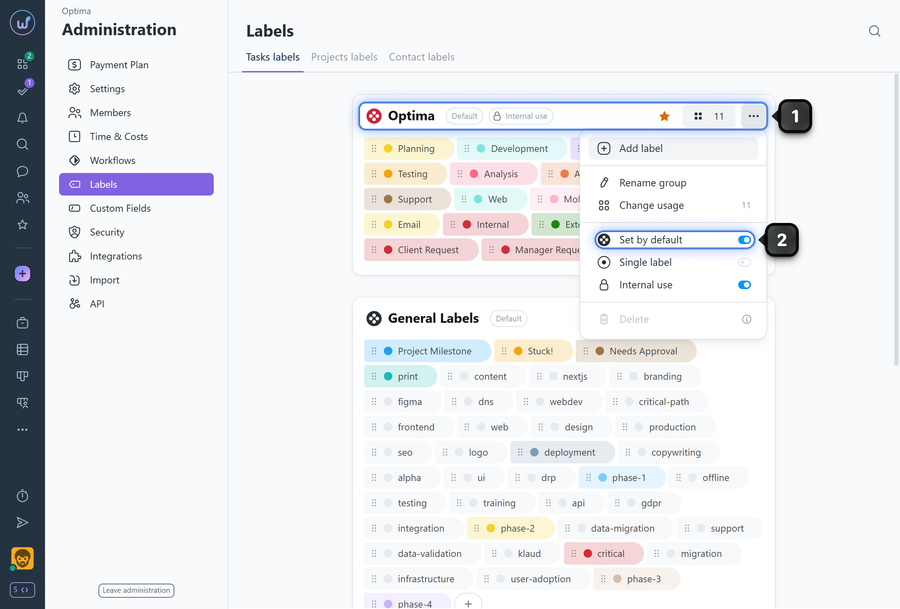
To set a label group as "default", go to Administration → Labels.
Find the desired label group and click "three dots"1.
In the menu, enable the "Set by default" option2.
To disable:
In the same "three dots" menu, disable the "Set by default" option.
- The option only affects new projects; existing projects will not automatically receive this label group.
- After disabling, already-created projects remain unchanged — the option has no retroactive effect.
- You can enable the "Set by default" option for multiple label groups and all of those groups will automatically be applied to new projects.
Leave your review
Did this article help you?
Glad we could help! What was helpful?
Sorry this didn't help. What went wrong?

