Solutions
worksection
beta
help
How to drag labels between groups or reorder them within a group?
Drag & drop helps quickly organize long label lists: you can move a label to another group or change its position within the current group. The order of labels affects their display in task selectors and filters.
Permissions The following have access:
- Owner
- Account Administrator with permission: "Access to account settings".
Where to configure
Find the source group and the target group.
Hover over the desired label1 and, holding the left mouse button, drag the label onto the target group card2 and release. The label will move to the new group.
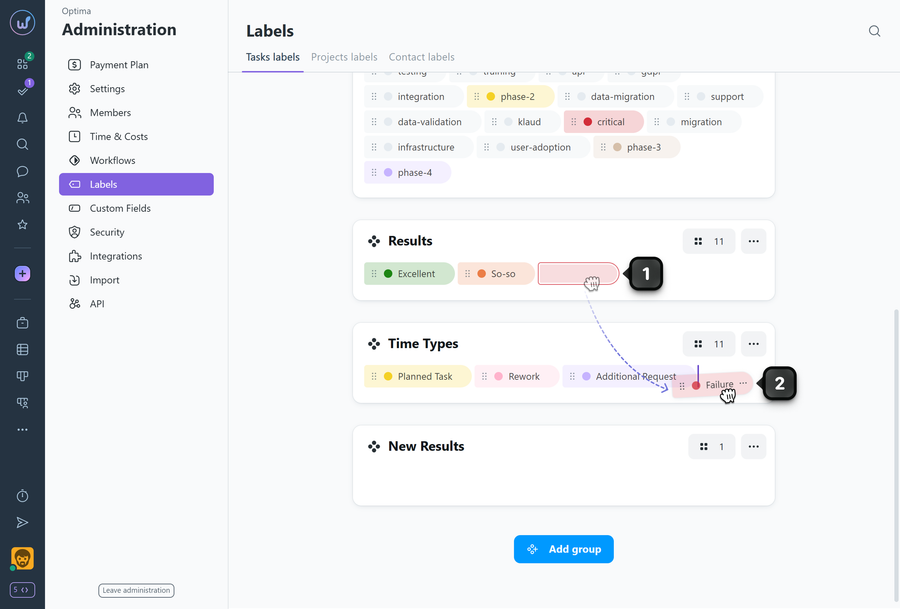
Labels can be moved within a group in the same way.
Please note!
- The order of labels in a group affects how labels are displayed in tasks, filters, and other places.
- If you move a label to a group that is not used in certain projects, the label will become unavailable there until the group is assigned to those projects.
- After moving a label to a group that is not used in the project, the label will remain on existing tasks until a new label is assigned.
Leave your review
Did this article help you?
Glad we could help! What was helpful?
Sorry this didn't help. What went wrong?

