Solutions
worksection
beta
help
How does the "Single label" option work and when should it be enabled?
The "Single label" option restricts the user's selection within a specific group: only one label from this group can be applied to an object (task/project). This is convenient for mutually exclusive categories.
Permissions The following have access:
- Owner
- Account Administrator with permission: "Access to account settings".
Where to configure
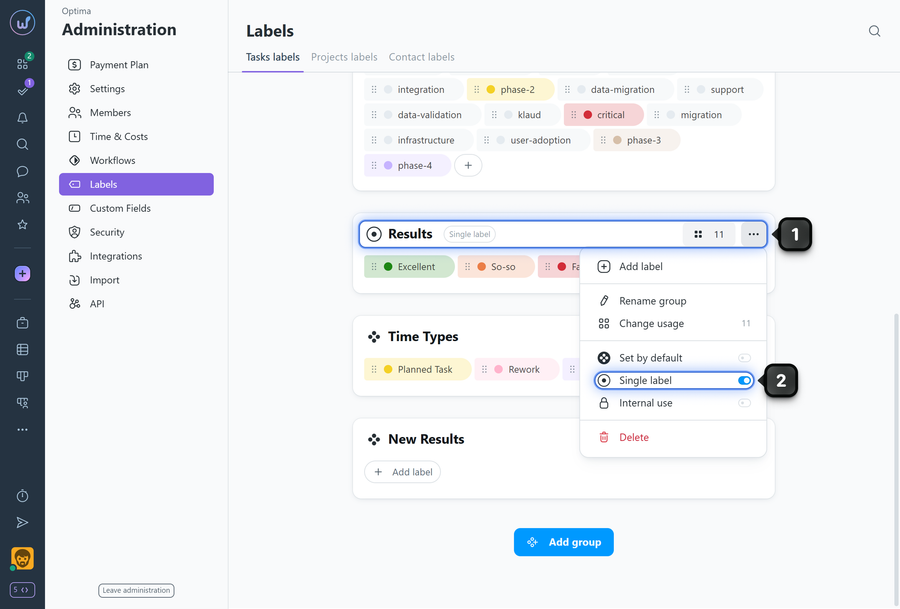
To enable "Single label" for a group, find the desired label group and click "three dots"1 on the group card. Enable the "Single label" option2.
How it works
- Within this group, a user can assign only one label at a time.
- Selecting a new label from the group replaces the previous label from that group.
- The option does not affect other groups: different groups can have one or multiple labels depending on their settings.
When to enable
- When categories are mutually exclusive (e.g., "Task type": bug, feature, research).
- To avoid "cluttering" with multiple labels from one category and maintain clean analytics.
- "Single label" does not restrict the use of labels from other groups — the restriction only applies within the selected group.
- Before enabling in active groups with large amounts of data, notify the team, as the way labels are selected in forms will change.
- If multiple labels from the group are already assigned to a task, they will be preserved after the option is enabled.
Leave your review
Did this article help you?
Glad we could help! What was helpful?
Sorry this didn't help. What went wrong?

