Solutions
worksection
beta
help
What are "label groups" and what settings are available for them?
Label groups are containers for related labels that allow you to organize the classification of tasks, projects, or contacts according to your team's logic. Each group has its own settings and scope of application.
Permissions The following have access:
- Owner
- Account Administrator with permission: "Access to account settings".
Where to configure
Account Administration → Labels.
What label groups are
- Combine individual labels into logical sets.
- Allow assigning sets to specific projects and controlling label visibility/usage.
- Determine the display order of labels in tasks/projects/contacts.
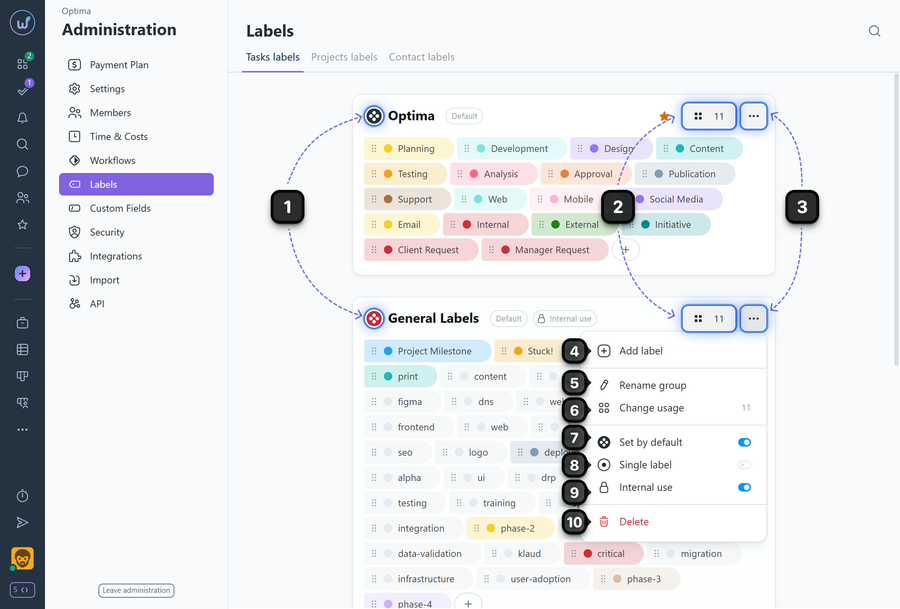
1 Label group name
2 Button with an indicator of the number of projects where the label group is applied
3 Label group settings ("three dots" menu)
4 Add label — create a new label within the group.
5 Rename group — change the label group name.
6 Change usage — assign/unassign the group for specific projects.
7 Set by default — automatically assign the group to new projects.
8 Single label — restrict the ability to assign multiple labels from this group to a task.
9 Internal use — hide labels from client team members (visible only to "my team" type members).
10 Delete — permanently delete the label set.
Leave your review
Did this article help you?
Glad we could help! What was helpful?
Sorry this didn't help. What went wrong?

