Solutions
worksection
beta
help
How to assign a label group to specific projects and remove the assignment?
Assigning a label group makes its labels available in the selected projects. This allows project members to assign labels to tasks.
Permissions The following have access:- Owner
- Account Administrator with permission: "Access to account settings".
To assign a label group to projects, go to Administration → Labels.
Find the desired label group, click "three dots"1 on the group card and select "Change usage"2.
Check the projects3 or all projects in a folder4 where the group should be applied, and click "OK"5.
If needed, enable "Set by default"6 so the group is automatically applied to new projects.
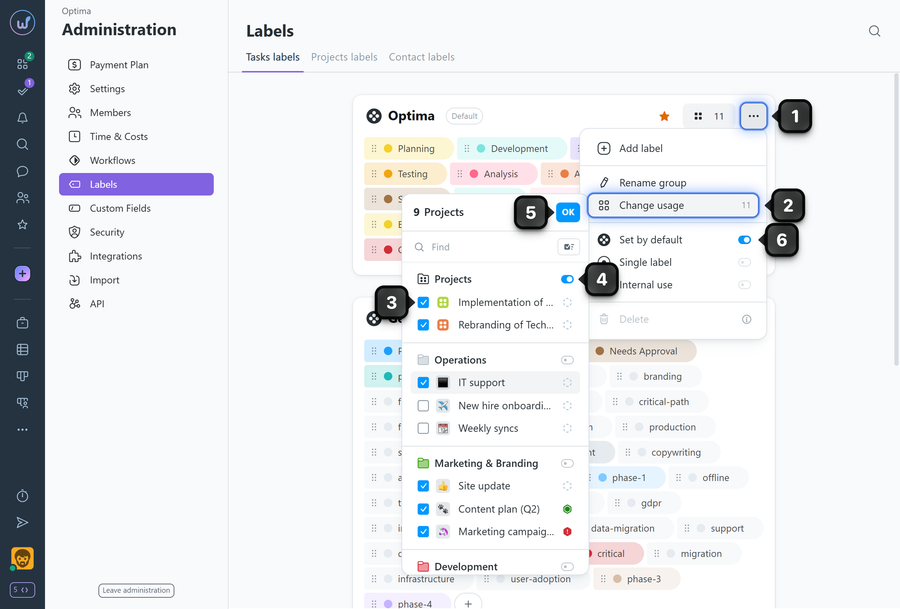
To remove the group assignment — in the same "Change usage" menu, uncheck the projects where labels from this group should no longer be used.
Please note! If you remove a label group from a project, all previously assigned labels will remain on tasks until a new label is assigned.
Leave your review
Did this article help you?
Glad we could help! What was helpful?
Sorry this didn't help. What went wrong?

