Solutions
worksection
beta
help
How do I add members to a project?
Members can be added to a project during creation or after creation — via the project window. You can add individual people, teams, or departments, and also invite a new member to the account and add them to the project at the same time.
Permissions available to
- Owner
- Account Administrator with the "Allow managing projects" permission
- Project author
- Project Lead
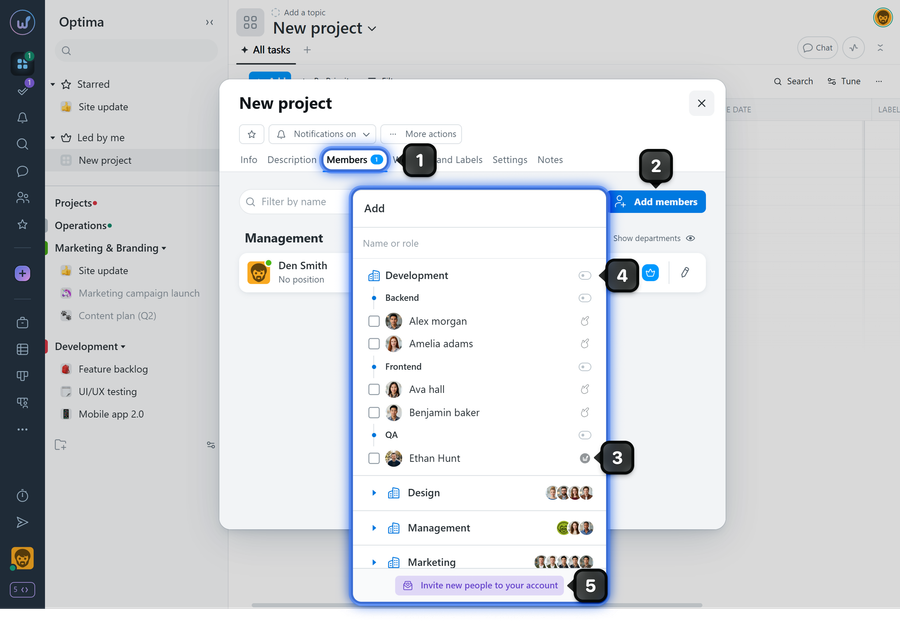
To add members to an already created project, open the project window and on the "Members" tab1, click "Add members"2. In the window that appears, select individual people3 or click a department/team name to add all members from that department/team4. You can also invite a member to the account5 if they are not yet registered.
Please note! Inviting new members to the account is available to:
- Owner
- Administrators with the "Allow admin to manage people" permission
Leave your review
Did this article help you?
Glad we could help! What was helpful?
Sorry this didn't help. What went wrong?

