Solutions
worksection
beta
help
How do I change the workflow (status set) of a project?
By default, after creation a project receives the status set (workflow) that is set as "default" one in the account settings.
After creating a project, you can change its workflow.
Permissions available to
- Owner
- Administrators with project management permissions
- Project Lead
- Project author
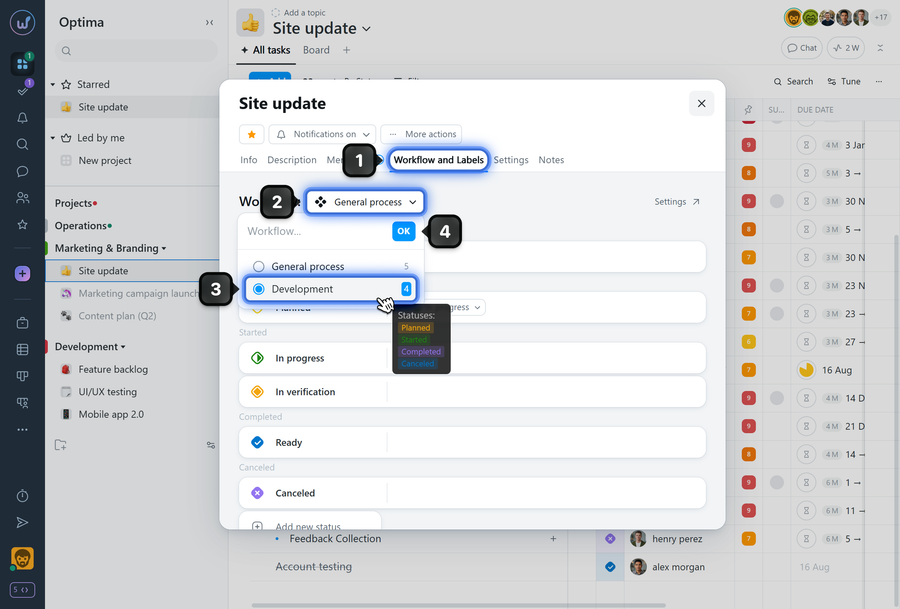
To change the workflow, open the project window and click the "Workflow & Labels" tab1. Click button2, select the desired workflow from the dropdown3, and click "OK"4.
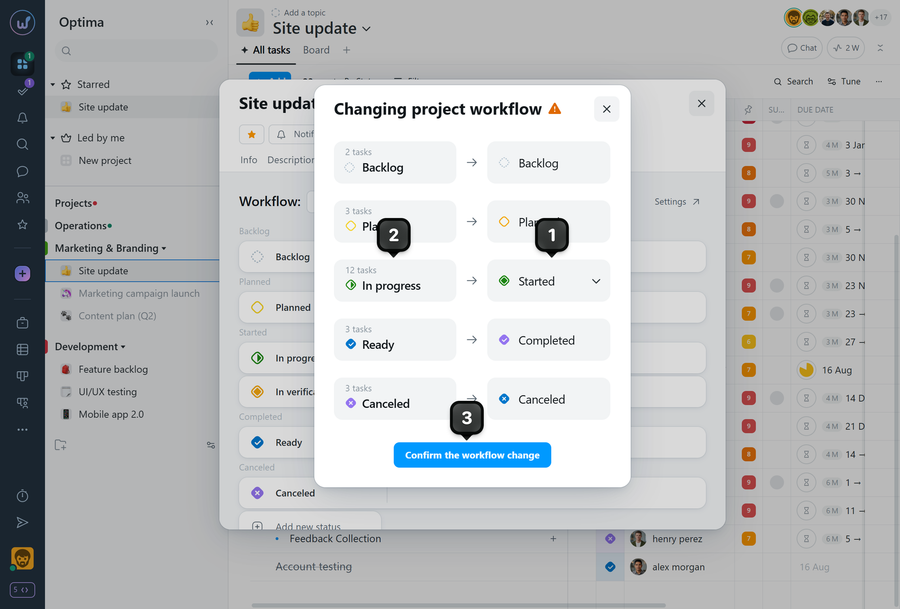
If the project already contains tasks with statuses from the previous workflow, a status mapping window will open.
For each status2, select the corresponding status1 from the new workflow that will replace it in the project tasks.
Once finished, click the confirmation button3.
Please note!
- Changing the workflow resets automation settings.
- The project task page in Kanban view is built based on the workflow statuses.
Leave your review
Did this article help you?
Glad we could help! What was helpful?
Sorry this didn't help. What went wrong?

