Solutions
worksection
beta
help
How do I set the default assignee for project tasks?
Set a default assignee so that all new tasks automatically receive an executor without having to select one manually each time.
Premissions available to:
- Owner
- Account administrator with the "Allow project management" permission
- Project lead
- Project author
To change the workflow settings, open the project window and click the "Workflow and labels" tab1. Scroll down to the "Assignee by default" section and click the drop-down button2. Select the required participant3 or one of the following options: "Anyone"4 or "Not set"5.
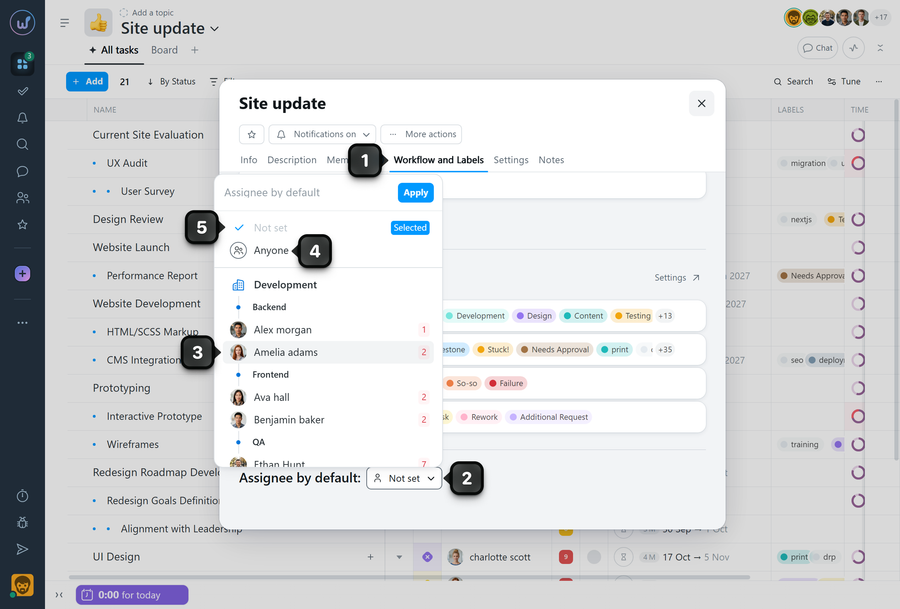
3 The selected participant will be automatically assigned to all new tasks in the project.
4 "Anyone" - any participant, including a "Guest", can take such a task into work and assign themselves as the assignee.
5 "Not set" - the task author will automatically become the assignee.
Tip Choose the participant who actually coordinates the work in the project to reduce the need for reassignment.
Please note!
- Only participants of this project are available in the list. Add a user to the project participants if you cannot find them in the list.
- The assignee can still be changed manually when creating an individual task.
- Existing tasks are not automatically updated after this setting is configured or changed.
Leave your review
Did this article help you?
Glad we could help! What was helpful?
Sorry this didn't help. What went wrong?

