Solutions
worksection
beta
help
How do I configure participant permissions when creating a project?
Configure the list of participants directly in the project creation window to restrict or expand access without any additional steps after the project is created.
Access available to:
- Owner
- Administrators with permission to create and manage projects
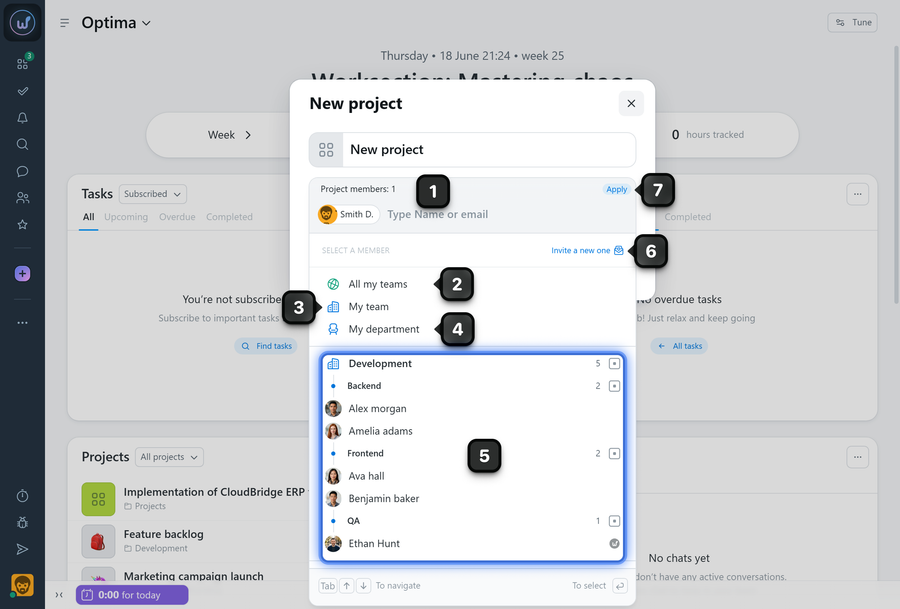
To configure permissions while creating a project, click the project participants area1 in the creation window. In the menu that appears, select who will have access to the project:
2 All my teams - access will be granted to all participants except client teams.
3 My team - access will be granted to participants from your team.
4 My department - access will be granted to participants from your department.
5 Individual participants.
6 Invite a new one - select this option to invite a participant to the account.
Once all the required participants have been added, click the "Apply" button7.
Note! The following users can invite new participants to the account:
- Owner
- Administrators with the "Allow to manage people" permission.
The selected participants will gain access to the project immediately after it is created.
After the project has been created, the list of participants can be changed in the project settings.
Tip Click the name of a team or department to add the entire team or department to the project's participant list.
Leave your review
Did this article help you?
Glad we could help! What was helpful?
Sorry this didn't help. What went wrong?

