Solutions
worksection
beta
help
How do I set labels or a status for a project?
Labels help quickly categorize and find projects. Status shows the current stage of the project lifecycle. Together they provide transparency and convenient filtering.
Setting labels and statuses for a project is available on the Business and Premium plans.
Permissions available to
- Owner
- Administrators with project management permissions
- Project Lead
- Project author
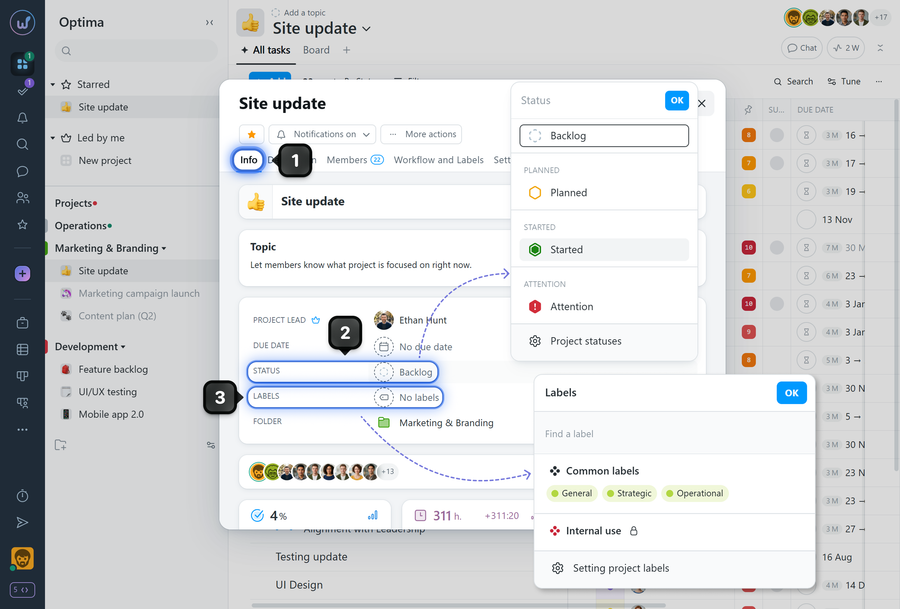
To assign a label or set a status on a project, open the project window and go to the "Info" tab1. Click the "Status" field2 and in the window that appears, select the desired project status. To set labels, click the "Labels" field3 and select the desired labels in the window that appears.
Please note! A project can have only one status, but there is no limit to the number of labels that can be assigned.
Leave your review
Did this article help you?
Glad we could help! What was helpful?
Sorry this didn't help. What went wrong?

