Solutions
worksection
beta
help
How do I configure permissions and restrictions in a project?
Permissions available to
- Owner
- Account Administrator with the "Allow managing projects" permission
- Project author
- Project Lead
To configure project permissions/restrictions, open the project window and go to the "Settings" tab1.
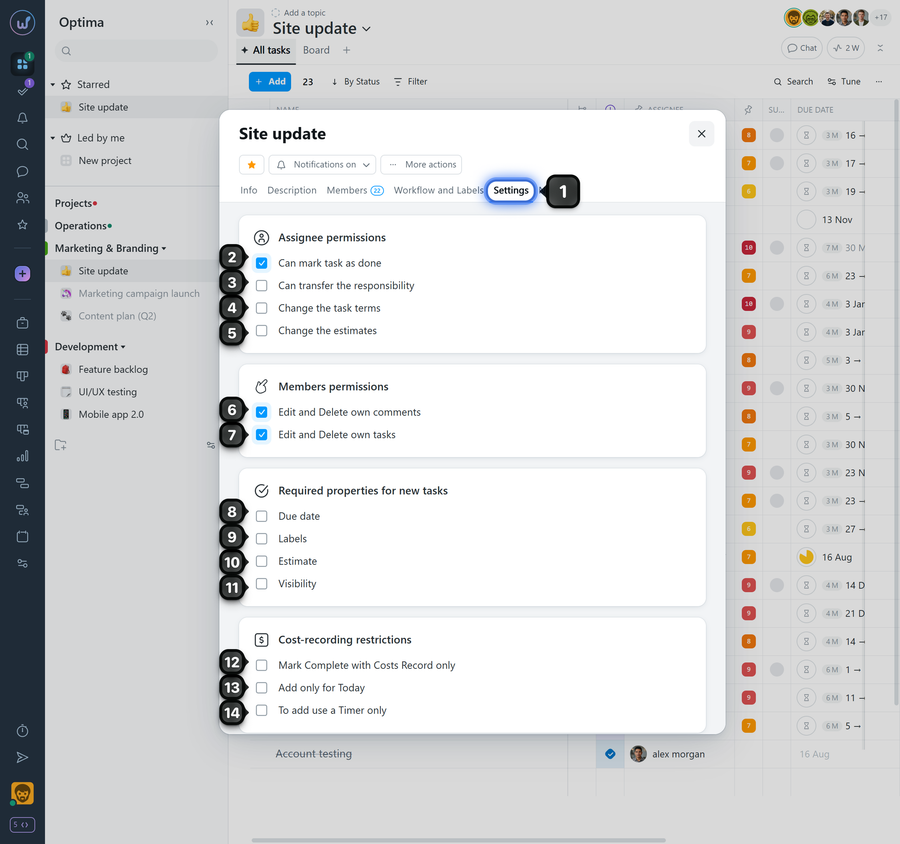
Assignee permissions:
2 Can mark tasks as done — allow the assignee to close tasks
3 Can transfer the responsibility — allow the task assignee to change the assignee to someone else
4 Change the task terms
5 Change the estimates — permission to modify the task's estimated costs (available on the "Business" plan and above).
Member permissions — available on Premium plan and above
6 Edit and delete own comments — if disabled, members cannot delete or edit their own comments, except for the Project Lead and administrators with the "Allow admin to edit everything" permission. In this case, comments will have an automatic 3-minute publication delay. While a comment is not yet published, the member can still edit or delete it.
7 Edit and delete own tasks — if disabled, members cannot edit or delete tasks they created, except for the Project Lead and administrators with the "Allow admin to edit everything" permission. In this case, tasks will have an automatic 3-minute publication delay. While a task is not yet published, the member can still edit or delete it.
Required properties for new tasks — available on Premium plan and above
8 Due dates — prevent creating tasks without due dates
9 Labels — prevent creating tasks without labels
10 Estimate — prevent creating tasks without specifying estimated costs
11 Visibility — prevent creating tasks without restricting the visibility scope
Cost-recording restrictions — available on Premium plan and above
12 Mark complete with cost record only — prevent closing tasks without logged time.
13 Add only for today — prevent logging time with a past date, and restrict editing the log date in reports for all members except the Owner and Account Administrator with the "Allow admin full access to time and finances" permission.
14 To add use a timer only — prevent members from logging time in tasks manually.
Leave your review
Did this article help you?
Glad we could help! What was helpful?
Sorry this didn't help. What went wrong?

