In the 18 years of Worksection’s operation, we have noticed: a lot of time is spent not on the tasks themselves, but on the actions surrounding them. Finding the right task, filtering the list, switching between sections, and then going back to where you left off.
Separately, this takes seconds. But in real work — especially in large projects — these small steps are repeated constantly and disrupt the flow.
Our clients often spoke about this directly. And even more often — they simply tried to work “around it”: switching less, not touching filters unnecessarily, sticking to the familiar view of tasks, even if it doesn’t quite fit.
That’s why in Worksection 2.0 we focused not on new scenarios, but on simplifying the familiar ones. Removing unnecessary transitions, editing tasks directly in the list, saving settings, and quickly switching between different work formats.
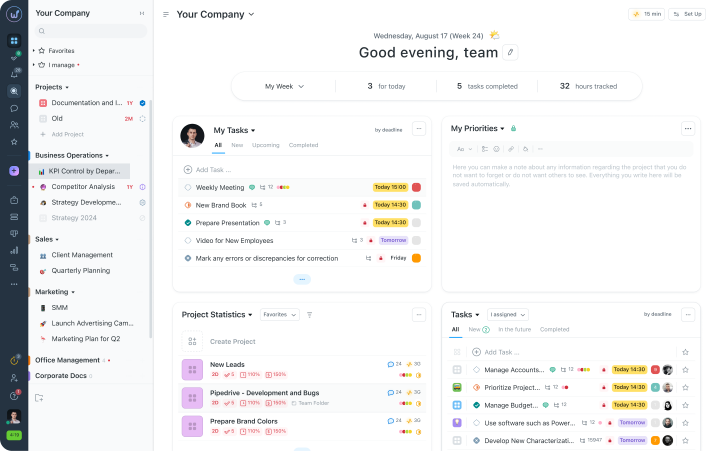
Here’s what’s changed in Worksection 2.0:
- Tasks and projects open without reloading — you click once and you’re already working.
- Inline editing — change the name, status, deadline, or assignee without navigating to the task form.
- The same work data in different forms — switch with one click between list, Kanban boards, Gantt chart, and calendar.
- Saved view modes — set filters, columns, and grouping once — and you won’t need to do it every time.
- The main page as your own dashboard — priorities and analytics on the first screen, without the need to gather data manually.
When work slows down due to trivialities
We know that the biggest enemy of productivity is unnecessary actions. Does it sound familiar? You sit down to work — and the first few minutes are spent figuring out where you left off. Finding the right project, opening the list, switching between tabs, waiting for something to load.
And when this happens dozens of times a day, it’s easy to lose focus. That’s why in Worksection 2.0 we aimed to eliminate all these moments. To spend less time on transitions between screens and more on the tasks themselves.
Sidebar and transitions without reloading
One of the things that slows work down the most is constant switching between pages. Open a project, then reports, then settings — and every time it feels like starting over.
In Worksection 2.0 we simplified this. The main menu is always at hand — on the left, no matter where you are now. You can quickly switch between projects, reports, or settings without “reloading” the page.
Because of this, context is not lost: you don’t return to the beginning every time and waste time finding the right place again.
Tab panel in the project
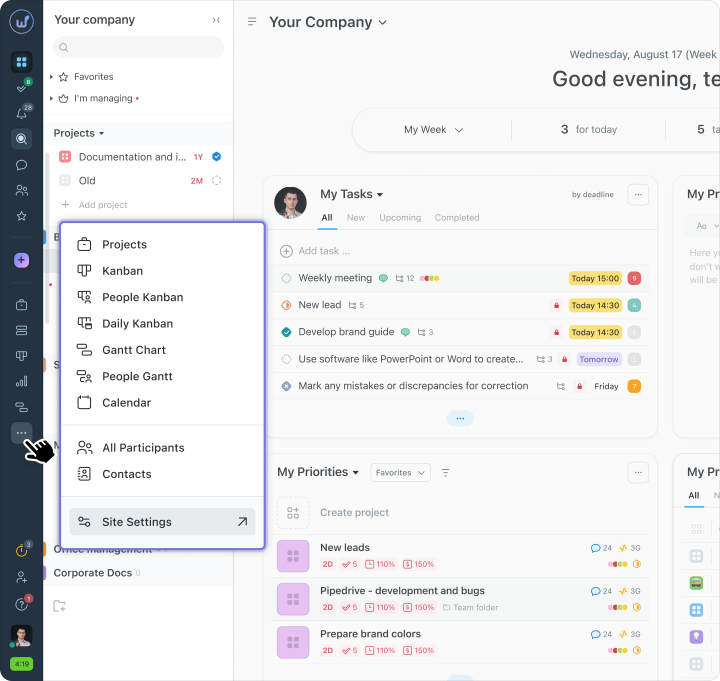
In projects, people rarely work in one view. Today you’re looking at the task list, in a minute — checking statuses on the board, then — deadlines on the Gantt chart. Previously, such transitions took time and often disrupted settings.
In Worksection 2.0 we solved this with a tab panel inside the project.
Now you can switch between different work formats with one click — without losing filters, columns, or grouping. You stay in the same space, just looking at tasks from a different angle.
The tabs can be customized:
- add those you use most often;
- change their order;
- remove the unnecessary to avoid cluttering the interface.
- list — when detail is needed;
- boards — to quickly assess the state of tasks;
- Gantt chart — when deadlines and dependencies are important;
- calendar — to see the load over time.
Quick task creation
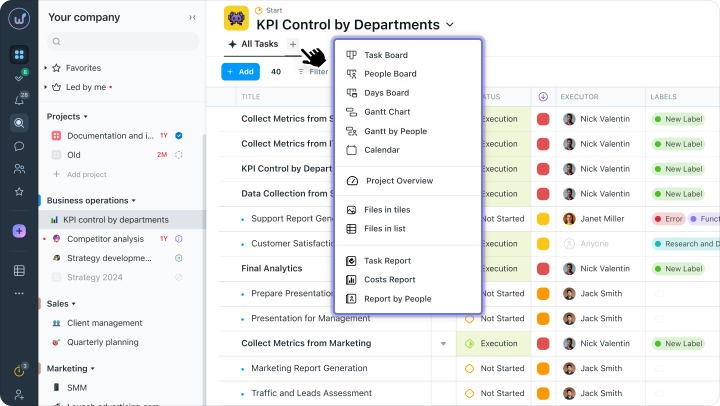
Familiar situation: during a meeting or discussion, a new task arises — and it’s important to capture it immediately, before it gets lost in chats or notes.
Previously, this required opening a form and filling out several fields. It took time — and often distracted from the conversation itself.
In Worksection 2.0, you can create a task literally in a few seconds. Click “Add” — enter the title, choose the assignee and deadline. Everything else can be added later when there’s time.
So during meetings or brainstorming sessions, you don’t drop out of the process — just capture tasks on the go and move on.
Editing tasks without unnecessary windows
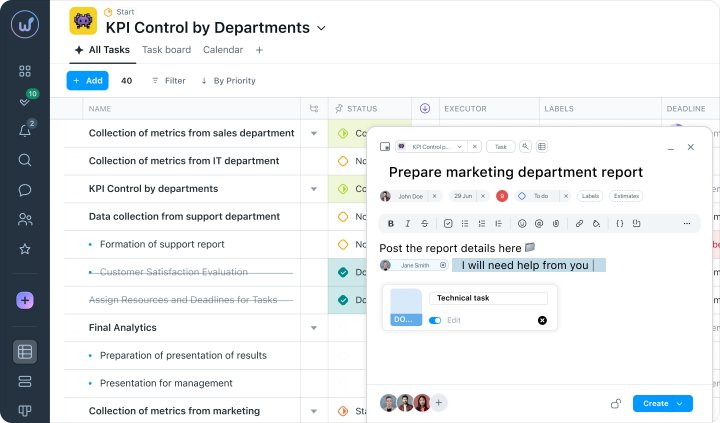
When you need to make quick changes to tasks, unnecessary transitions start to annoy. Open the task, find the field, change it, save, go back. If there are ten such tasks — it becomes a task in itself.
In Worksection 2.0 we simplified this. Most changes can be made directly in the workspace — without opening the task and without additional steps.
You change deadlines, assignees, or statuses directly in the list or on the board — and see the result immediately.
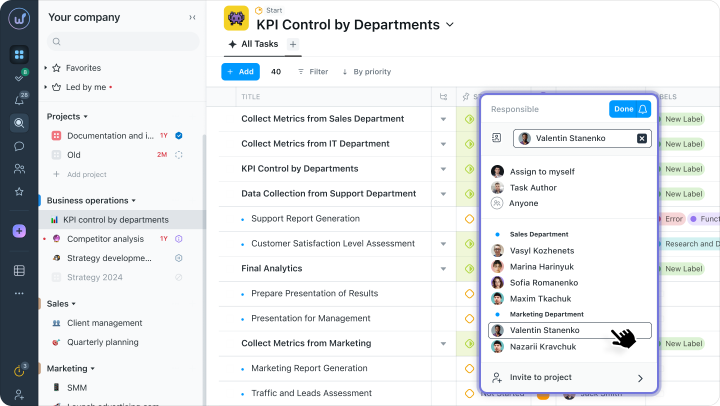
Inline editing directly in the task table
In the task list, something is constantly changing: deadlines shift here, assignees change there, labels are added somewhere. This is a normal part of the work — but it often takes the most trivial time.
In Worksection 2.0 these edits do not disrupt the process. You simply edit the required field directly in the table — and move on immediately.
Without opening the task, without unnecessary actions and without losing context. This is especially convenient after planning or meetings, when you need to quickly update many tasks in a row and not lose pace.
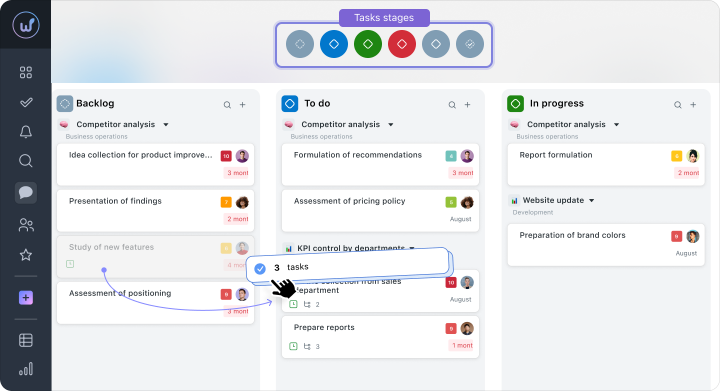
Mass actions with tasks on Kanban boards
After meetings or reviewing tasks, it’s often necessary to quickly “move” a large chunk of work: change statuses, update priorities, move tasks between stages.
Previously, this had to be done one task at a time — and such trivial actions easily wasted extra time.
In Worksection 2.0, you can work with several tasks at once. Select the necessary cards — and move them between columns or change parameters at once.
The board updates immediately, so you see the current status right away and don’t waste time on checks.
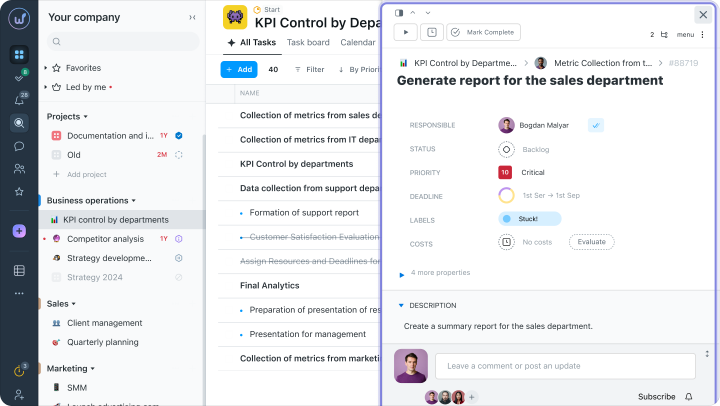
Viewing tasks in a convenient window with navigation
When you need to quickly go through several tasks in a row, constant opening and closing of pages only slows down work.
In Worksection 2.0, tasks open in a compact window over the list. You can immediately view details, switch between tasks using arrows or expand the window to full screen — if focus is needed. Without returning to the list and unnecessary transitions between pages.
This is especially convenient when working with related tasks and it’s important to quickly go through several in a row.
Saved view modes
When working with tasks, the same scenarios often repeat: check what’s planned for today, look at overdue tasks, go through critical bug fixes, or prepare tasks for testing.
To avoid resetting the task table every time, in Worksection 2.0 you can save your own view modes. Each of these modes remembers everything: filters, sorting, set and order of columns, task grouping.
You create a convenient view once — and the system saves it with all parameters. You can return to it with one click.
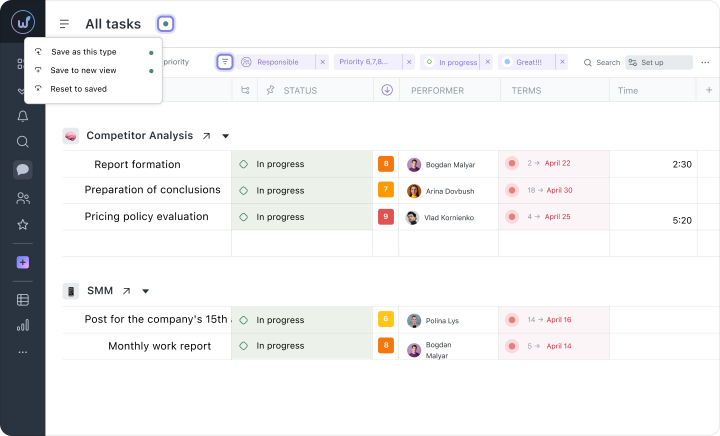
Quick access to saved settings
Saved modes do not need to be searched in separate menus — they are available directly from the views panel. This means that you can instantly switch between different cuts of tasks: for instance, view priority ones and then immediately move on to overdue ones.
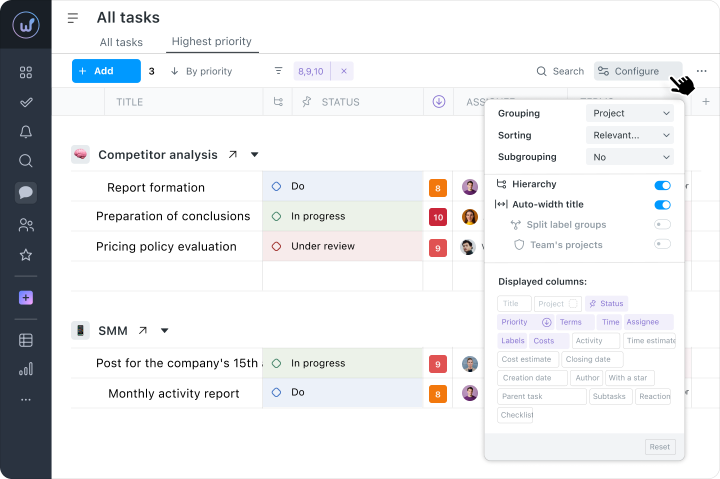
Individual task table settings
In different teams and even in different tasks, different levels of detail are required. Some people are fine with basic fields, while others need to see as many parameters as possible at once.
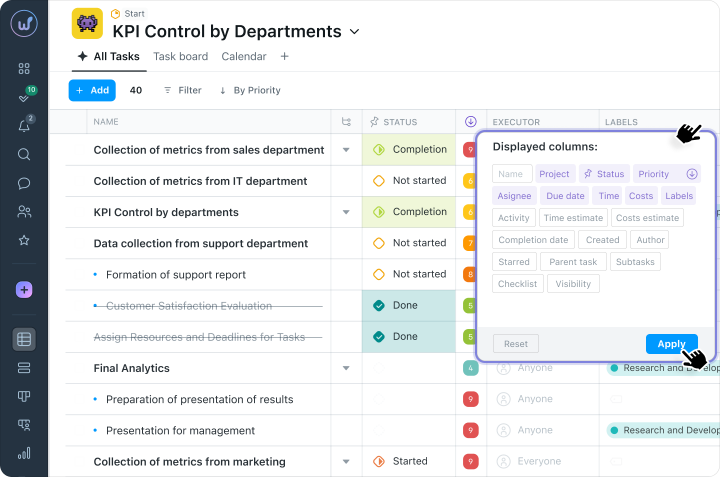
In Worksection 2.0, you can customize the table for yourself: add or hide columns, change their order, pin important fields, and adjust width. As a result, only what’s actually needed for work at a given moment remains on the screen.
Built-in chats for quick communication
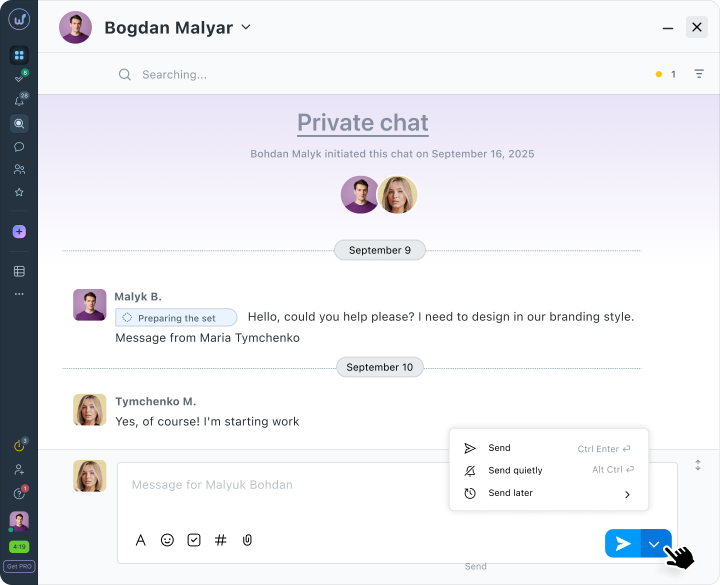
This is one of the updates users requested the most. Because in practice it turned out that: tasks — in the system, but quick discussions, clarifications, and files — in separate messengers. As a result, part of the context was lost.
In Worksection 2.0, communication returns to one space. Now discussions, files, and decisions live next to the tasks — without switching between services.
Chats are divided for different work scenarios:
- private — for one-on-one dialogues;
- group — for team discussions;
- project — automatically unites all project participants in one space.
Try Worksection 2.0 for free for 14 days via this link 
Real scenarios: how it works daily
Here’s how the changes in Worksection 2.0 look in the daily work of different roles in the team.
For leaders and business owners
Situation: before the weekly meeting, it’s necessary to quickly understand what’s happening in the projects.
Previously, this meant several sections, manual task checks, and status reconciling — essentially separate preparation for the meeting itself.
In Worksection 2.0, everything is consolidated into one screen: the dashboard immediately shows key tasks, team activity, and project dynamics. Without manual data collection and unnecessary transitions.
For project managers
Situation: after a meeting with the team, it’s necessary to quickly note several new tasks.
This usually means creating tasks one by one and having to go back each time. If something distracts — part of it might simply not be saved.
In Worksection 2.0 drafts are saved automatically, allowing you to create several tasks in a row while switching between them. Without losing entered data and unnecessary actions.
For executors
Situation: it’s necessary to quickly update statuses of tasks in several projects at once.
Instead of constantly opening each task separately, it’s enough to go to the table, filter the necessary tasks, and change them right in the list. Without page transitions and without losing context.
Worksection 2.0 mobile application
We have completely updated the Worksection 2.0 mobile application for Android and iOS. Now it has a modern interface adapted to any screen size and allows you to stay connected with the team wherever you are.
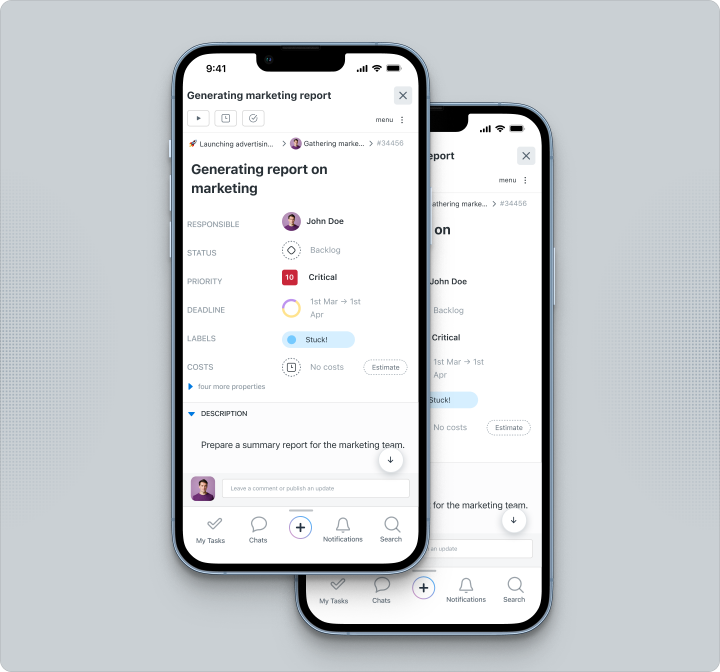
What’s new:
- Adaptive design — the interface adapts to the screen size: swipes, touches, and zooming for comfortable work.
- Most desktop version tools — create, edit tasks, track progress, and communicate with the team.
- Push notifications — reminders about important changes in your projects.
Work faster with Worksection 2.0
We have kept the familiar logic of Worksection, but made it even simpler and more convenient. Quick editing directly in tasks, flexible view settings, saved modes, built-in chats, and an updated interface help you spend less time on routine and more on actual work.
Time is the most valuable resource in project management. Try Worksection 2.0 today — and see how daily work changes when everything you need is at hand.