Solutions
worksection
beta
help
How to give a guest access to all or some project tasks?
Guests do not see tasks automatically — they need to be invited to tasks individually. This can be done for a single task or in bulk for selected tasks via the list.
Permission to invite a guest to tasks belongs to:
- Account owner
- Account administrator with the "Allow admin to edit everything" permission
- Team administrator with the "Allow admin to edit everything" permission (for tasks where a member of their team is the author or assignee)
- Department administrator with the "Allow admin to edit everything" permission (for tasks where a member of their department is the author or assignee)
- Project lead
- Task author
To give a guest access to certain tasks:
- If needed, apply filters to quickly find the required tasks.
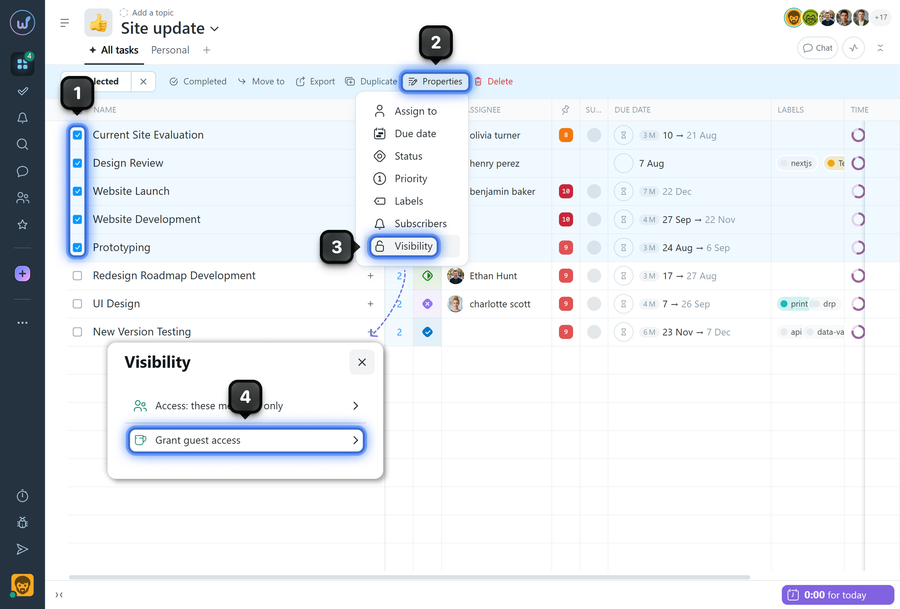
- Select tasks using the checkboxes next to the name1.
- In the bulk actions panel, open "Properties"2 → "Visibility"3.
- Select "Grant guest access"4.
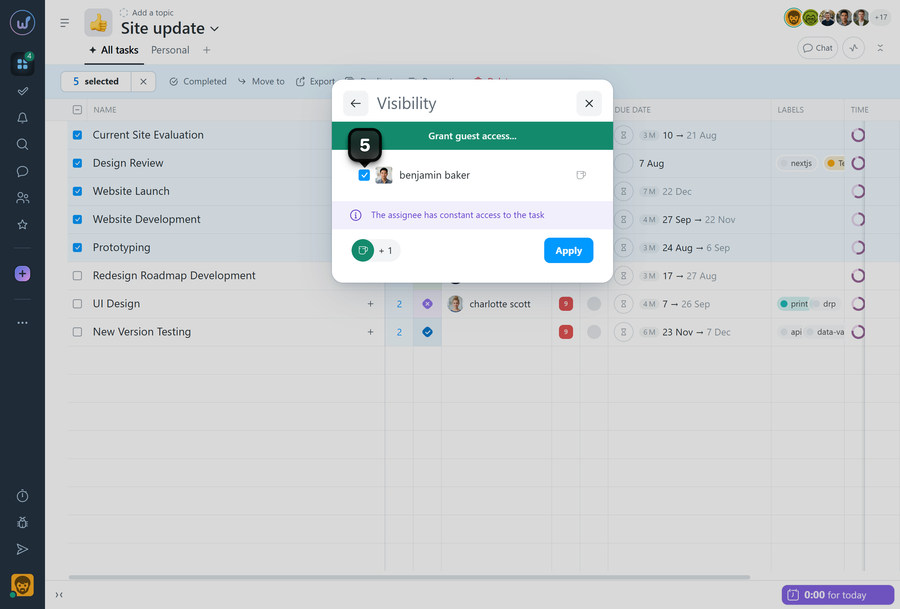
- Select the required guest (or guests) from the list5 and confirm the action.
Please note! The ability to invite a guest directly to subtasks is configured at the account level.
Leave your review
Did this article help you?
Glad we could help! What was helpful?
Sorry this didn't help. What went wrong?

