Solutions
worksection
beta
help
How does the advanced filter by start and finish dates work?
The advanced date filter allows you to select tasks by "start" and "finish" dates — either by a single value or by a date range.
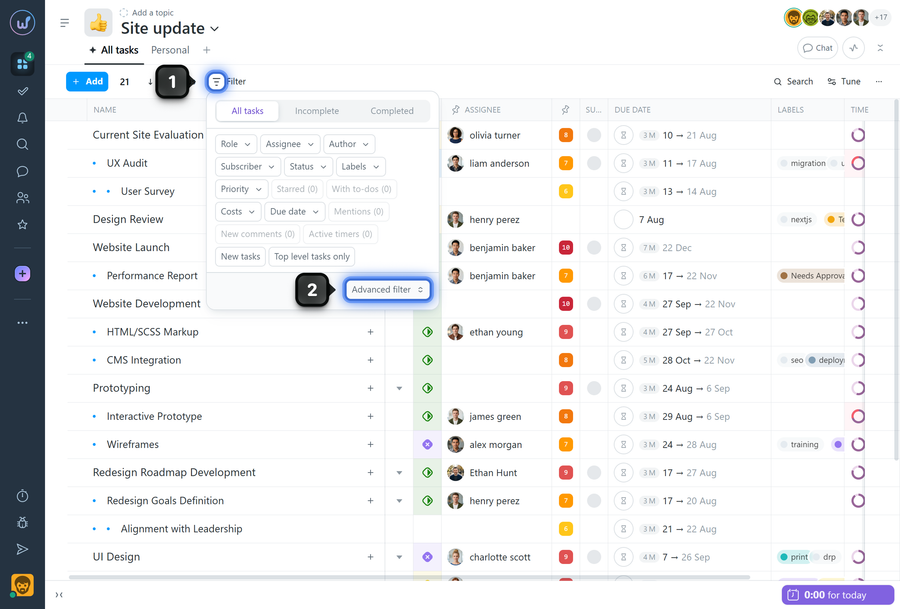
To open the advanced filter, click "Filter"1 and select "Advanced filter"2.
You can fill in all fields or just one, depending on your needs.
How each field works individually
In the "Start" field:
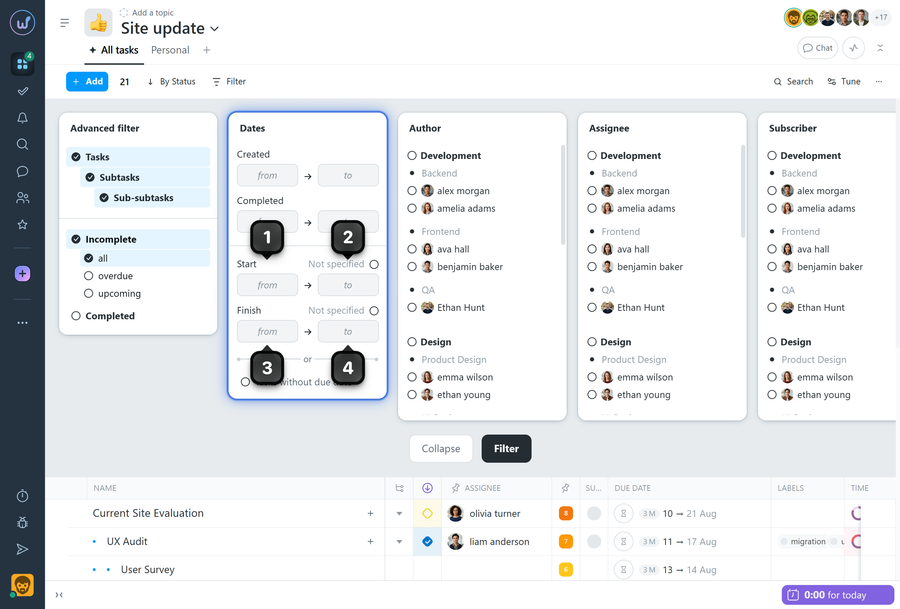
- If you fill in "from"1, the results will include tasks that start on that date, as well as all tasks that start after that date.
- If you fill in "to"2, the results will include tasks that start on that date, as well as all tasks that started before that date.
In the "Finish" field:
- If you fill in "from"3, the results will include tasks that finish on that date, as well as all tasks that finish after that date.
- If you fill in "to"4, the results will include tasks that finish on that date, as well as all tasks that finished before that date.
Combining fields
- If you fill in both "Start" fields1 and2, tasks whose start falls within the specified time period will be displayed.
- If you fill in both "Finish" fields3 and4, tasks whose finish falls within the specified time period will be displayed.
- If you fill in "Start"1 and "Finish"4, tasks whose start and finish fall within the specified time period will be displayed, as well as tasks with a deadline that were created and are expected to finish within the selected period.
Note The same principle applies to the advanced filter fields for creation/completion dates.
Leave your review
Did this article help you?
Glad we could help! What was helpful?
Sorry this didn't help. What went wrong?

