The best alternative to Salesforce depends on the scenario: one team needs a comprehensive CRM instead of Salesforce Sales Cloud for leads, deals, forecasting, and sales automation, while another prioritizes a straightforward CRM funnel and clear management of client projects after signing the contract.
Salesforce remains a strong platform for sales, CRM, lead distribution, forecasting, sales automation, AI, integrations, customization, and large sales department management. However, users look for Salesforce alternatives when they want to understand how to replace Salesforce without unnecessary complexity, lengthy implementation, high total cost of ownership, or dependency on administrators.
This article compares 10 solutions: Worksection, HubSpot CRM, Zoho CRM, Pipedrive, Microsoft Dynamics 365 Sales, Freshsales, Creatio, Monday Sales CRM, Insightly, and Copper. All Salesforce CRM alternatives are analyzed according to a unified structure: positioning, cost, key features, differences from Salesforce, advantages, limitations, and use cases.
Which Salesforce alternative to choose quickly
- Worksection — not a full CRM, but a good option for service and project teams where the main process begins after the sale: client project, tasks, deadlines, responsibilities, time tracking, and reporting.
- HubSpot CRM — for teams that need CRM, marketing, sales, and service with a quick start, understandable ecosystem, and less dependence on complex setup.
- Zoho CRM — for SMB teams that need flexible CRM, sales automation, customization, and integration with other Zoho business applications.
- Pipedrive — for sales departments that need a simple visual funnel, deal tracking, activities, and manager performance without extensive implementation.
- Microsoft Dynamics 365 Sales — for companies already operating within the Microsoft ecosystem and looking for an enterprise CRM with AI, analytics, Outlook, Teams, and Power Platform.
- Creatio — for companies needing CRM without programming and automation of complex processes without traditional dependence on developers.
Not everyone needs to leave Salesforce. If a company actively uses Sales Cloud, complex sales features, forecasting, Agentforce, Data Cloud, custom workflows, API, CPQ, marketing automation, and enterprise integrations, migration can be risky. But if a team is overspending on complexity, has lengthy CRM implementations, or is essentially managing client work post-deal, it’s worth comparing alternatives.
What is Salesforce and what tasks is it used for?
Salesforce Sales Cloud is a CRM platform for managing sales: leads, contacts, accounts, deals, sales opportunities, funnels, forecasting, manager activities, sales automation, reporting, AI features, and integrations. In this review, we limit the comparison to the Salesforce Sales Cloud / CRM scenario, rather than the entire Salesforce ecosystem.
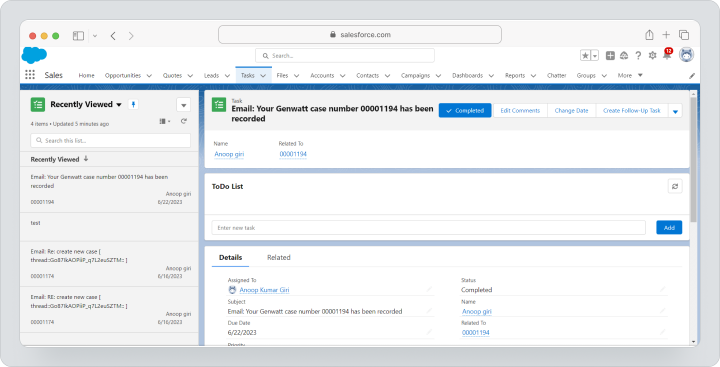
Salesforce is often chosen by mid-sized and large companies, corporate teams, complex B2B sales, RevOps, CRM administrators, and organizations needing customization, API, advanced analytics, complex roles, automation, integrations, and scalable CRM architecture.
The official page for Salesforce Sales Cloud lists the Free Suite, Starter Suite, Pro Suite, Enterprise, Unlimited, and Agentforce 1 Sales editions. The Starter Suite costs $25 per user per month and is available with monthly billing. The Pro Suite costs $100 per user per month, Enterprise — $175, Unlimited — $350, and Agentforce 1 Sales — $550, but these editions require an annual contract. Salesforce also notes that there are add-ons, applications, and additional products that may affect the final cost.
The strength of Salesforce is its depth and scalability. However, this depth can become a problem for small businesses, agencies, or service companies if the team needs to move deals faster rather than utilizing a complex CRM funnel, control clients, launch projects, assign tasks, and see actual work after the sale.
Why are teams looking for Salesforce alternatives?
Teams look for alternatives to Salesforce not because the platform is weak. More often, the reason lies in the mismatch between Salesforce capabilities and the real processes of the company: the product can be too expensive, complex, lengthy in implementation, or excessive for an SMB team.
Total Cost of Ownership
The cost of Salesforce is not just the license price. The budget often includes implementation, customization, data migration, integrations, administration, user training, support, additional products, AI features, and add-ons.
For a large company, this can be justified. For a small business or service team, the total cost of ownership of Salesforce may sometimes exceed the value derived from a complex CRM architecture.
Complexity of Setup and Administration
Salesforce offers many customization options, but it requires prudent setup. The team may need a CRM administrator, integrator, consultant, or internal RevOps specialist to oversee fields, objects, permissions, automations, reports, and data quality.
If there is no owner of the CRM process within the company, the system can quickly turn into a complicated database where managers fill in data superficially, and the leadership does not get an accurate picture.
Redundancy for Small and Medium Businesses
Not every team needs complex sales capabilities, multi-level forecasting, custom objects, intricate approval processes, and corporate integrations. A small sales department often only needs leads, contacts, companies, deals, a pipeline, tasks, emails, calls, and simple reports.
In such cases, the team looks for a simple sales CRM or an affordable alternative to Salesforce that is quicker to launch and easier to maintain.
Long Implementation and User Training
The more complex the CRM, the longer it takes to implement. It is necessary to describe sales processes, clean data, set up pipelines, roles, fields, integrations, reports, automations, and train users.
If the team wants to launch in days or weeks rather than building a CRM project over months, they might consider HubSpot CRM, Zoho CRM, Pipedrive, Freshsales, or Monday Sales CRM.
Features Distributed Between Editions and Products
Salesforce is a large ecosystem. Features can vary depending on the edition, additional products, AI credits, integrations, industry solutions, and partner applications. This is normal for an enterprise platform but complicates the selection for teams looking for a simple and transparent CRM.
Before comparing, it is important to separate Sales Cloud from Service Cloud, Marketing Cloud, Data Cloud, Slack, Tableau, Agentforce, and other products to ensure that you are not comparing “the entire Salesforce ecosystem” with a standalone CRM.
For the Team, Client Project Execution After the Deal is More Important
For service companies and agencies, the main work often begins not at the moment of lead creation but after the contract is signed. It is necessary to launch the client project, assign tasks, agree on deadlines, onboard the client, and monitor time, budget, progress, and results.
In this scenario, Worksection does not replace Salesforce as a full-fledged CRM, but it can be a more useful tool for executing client projects after the sale.
How to Choose an Alternative to Salesforce?
You should choose an alternative to Salesforce based on your core process. If the team manages leads, deals, and sales forecasting, a CRM is needed. If the main value is created post-sale, it is worth looking at the connection between CRM and project management systems.
Main Scenario: Sales, Marketing, Service, or Project Execution
First, determine where the main process lies. For leads, deals, and pipeline, HubSpot CRM, Zoho CRM, Pipedrive, Freshsales, Dynamics 365 Sales, Creatio, Monday Sales CRM, Insightly, or Copper would be suitable. For managing client projects after the sale, it’s better to consider Worksection or the CRM + project management combination.
Leads, Contacts, Companies, and Deals
A CRM should conveniently store leads, contacts, companies, deals, activities, communication history, and pipeline statuses. If managers do not see what stage a deal is at and what to do next, the system will not resolve sales tasks.
Pipeline, Forecasting, and Sales Automation
For the sales department, pipeline, forecasting, lead distribution, reminders, workflows, automated tasks, emails, lead scoring, and reports are important. Teams with a simple pipeline might find Pipedrive or Freshsales suitable, while Salesforce, Dynamics 365 Sales, Creatio, or Zoho CRM would work better for complex corporate scenarios.
Email, Telephony, Forms, and Communications
CRM should be connected to the channels through which the team communicates with customers. Check the synchronization of email, calls, forms, lead capture from the website, chats, calendar integrations, communication logs, and the ability to automatically log activities.
Reports, AI, and Analytics
Managers need not only deal lists but also forecasts, conversion rates, manager activity, reasons for losses, stage completion speed, channel effectiveness, and data quality. AI features should be evaluated separately: where they are included in the plan and where they require add-ons or credits.
Customization, API, and Ecosystem
If the CRM needs to work with ERP, BI, the website, telephony, email marketing, accounting, or a current client management system, check the API, app catalog, webhooks, integration availability, and pricing limitations.
Management of Customer Projects After Sales
CRM is responsible for leads and deals but does not always effectively close customer project execution. If significant client work begins after winning a deal, a system for project management, tasks, timelines, roles, files, time tracking, and reports is needed. In this scenario, Worksection can complement or partially replace unnecessary CRM logic.
Implementation Complexity and Administrator Needs
The more customization, the higher the implementation requirements. A simple CRM launches faster but may limit scalability. An enterprise CRM provides more control but requires a process owner, configuration, and ongoing support.
Licensing and Total Cost of Ownership
Compare not only the starting price. Consider user numbers, paid seats, implementation, support, AI credits, integrations, automation limits, customization, data storage, telephony, migration, and team time for implementation.
Brief Comparison: Service and Best Scenario
| Service | Best Scenario |
|---|---|
| Worksection | Customer projects after sales, tasks, timelines, time tracking, reports, and guest access |
| HubSpot CRM | CRM, marketing, sales, and service with quick start and wide ecosystem |
| Zoho CRM | Flexible CRM for SMBs, sales automation, and integration with Zoho products |
| Pipedrive | Simple visual pipeline, manager activities, and deal tracking |
| Microsoft Dynamics 365 Sales | Enterprise CRM in the Microsoft ecosystem, AI, Outlook, Teams, and Power Platform |
| Freshsales | CRM with communications, automation, and AI within Freshworks |
| Creatio | No-code CRM and automation of complex processes |
| Monday Sales CRM | Visual CRM based on monday.com with flexible boards |
| Insightly | CRM and project management for small and medium businesses |
| Copper | CRM for teams working in Google Workspace |
Best Salesforce Alternatives in 2026
Below are 10 solutions that can be considered alternatives to Salesforce CRM. Worksection ranks first not as a complete CRM replacement for Sales Cloud but as a distinct scenario for companies where managing customer projects after a deal is more important.
Worksection
Worksection is a project and task management system for teams managing client projects, tracking deadlines, assigning responsibilities, logging time, and preparing reports. Important: Worksection is not a full-fledged CRM like Salesforce Sales Cloud and does not replace complex leads, sales capabilities, forecasting, CPQ, marketing automation, or enterprise lead distribution.
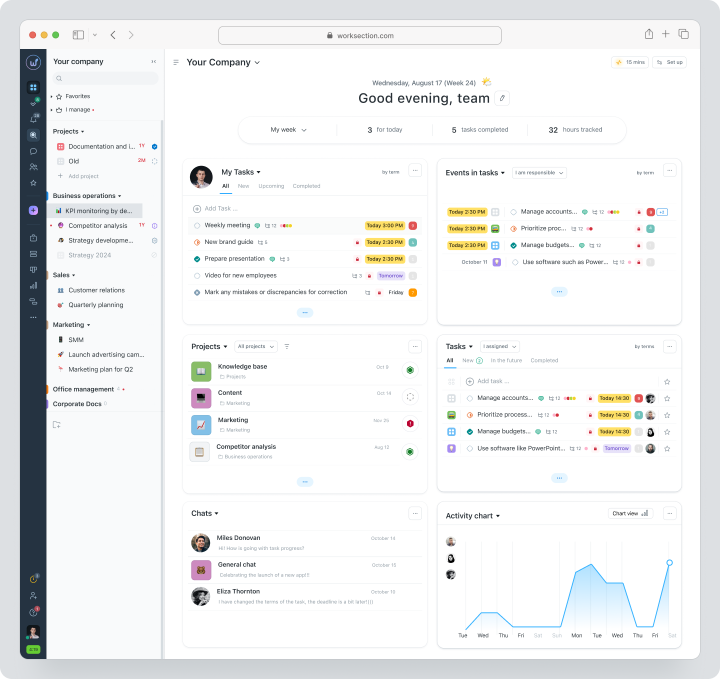
Worksection should be considered in a different scenario: when the sale has already occurred and the team needs to execute client work. For example, an agency closes a deal, creates a project, breaks it down into tasks and subtasks, assigns responsible individuals, sets deadlines, grants client access, logs actual time, and provides a progress report.
Worksection includes projects, tasks, two levels of subtasks, deadlines, responsibilities, priorities, statuses, checklists, tags, a Kanban board, Gantt chart, time tracker, time accounting, reports, guest access, and rights for clients and contractors. Additionally, Worksection offers a CRM scenario for client work: contacts with tags, discussions on tasks with clients, automated reports, and integrations with CRM systems, including Pipedrive, HubSpot, NetHunt, and KeyCRM.
Cost: there is a free plan for up to 5 users and 2 projects. Monthly payment for Worksection is $5 per seat for Basic, $10 for Business, and $15 for Premium. The Business plan includes guest access, Gantt chart, time and finance tracking, status-based automation, timer, API, and webhooks.
Key Features
- projects, tasks, and two levels of subtasks;
- deadlines, responsibilities, statuses, priorities, and tags;
- Kanban board and Gantt chart;
- built-in time tracker, time accounting, and plan vs. actual;
- reports on projects, tasks, and teams;
- guest access and rights for clients and contractors;
- integrations with CRM and external services.
Key Difference from Salesforce
Salesforce manages sales, leads, deals, and forecasts. Worksection manages the execution of client work after the deal: tasks, deadlines, time, reports, and client interactions.
Advantages
- well-suited for service companies, agencies, and project teams;
- helps visualize deadlines, labor costs, and progress on client work;
- easier to implement if the team does not need a complex CRM funnel.
Limitations
- does not replace Sales Cloud for complex deal management;
- not suitable as a primary CRM for enterprise sales, CPQ, and forecasting;
- for a full funnel, integration with HubSpot, Pipedrive, KeyCRM, or another CRM may be required.
Who It’s For
Worksection is suitable for service companies, agencies, consulting, marketing, and production teams that need a system for managing client projects after the sale, not a “cheaper Salesforce”.
HubSpot CRM
HubSpot CRM is a CRM and customer management platform for marketing, sales, service, content, data, and automation. Compared to Salesforce, HubSpot is often chosen by teams that need a quicker start, an understandable CRM structure, a connection between marketing and sales, forms, emails, funnels, sequences, dashboards, and customer data all in one ecosystem.
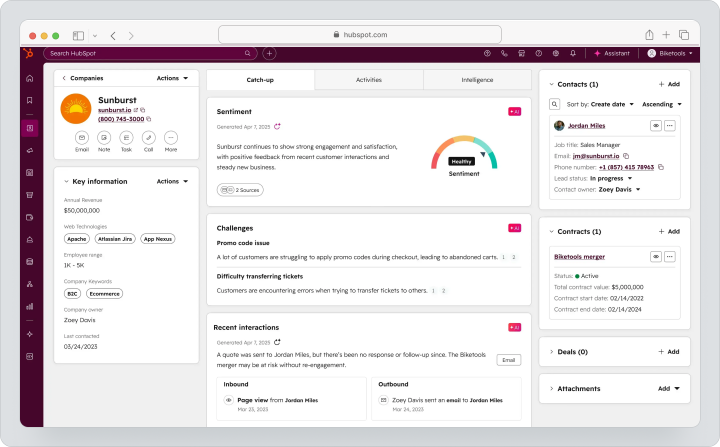
HubSpot is suitable for SMBs, SaaS companies, B2B sales, marketing teams, and sales departments that want to manage leads, contacts, companies, deals, communications, and automations without lengthy corporate implementation.
Cost: HubSpot offers free tools for up to 2 users. Sales Hub Starter costs $20 per seat per month on a monthly payment plan. There is no separate monthly subscription for Professional without annual commitment: the public price is $100 per seat per month with an annual commitment. Enterprise starts at $150 per seat per month and also requires an annual contract. There are also mandatory implementation fees for Professional and Enterprise listed separately: $1,500 and $3,500. HubSpot also uses HubSpot Credits for AI features.
Key Features
- contacts, companies, deals, and funnels;
- email tracking, sequences, and sales automation;
- forms, meetings, proposals, and tasks;
- dashboards and reports;
- AI features via HubSpot Credits;
- linking sales, marketing, and service.
Main Difference from Salesforce
HubSpot is easier to launch, and it is more easily adopted by teams without complex CRM administration. Salesforce is deeper in corporate customization, complex roles, big data, and multi-level processes.
Advantages
- quick start for SMBs and medium-sized businesses;
- strong linking of marketing, sales, and service;
- clear CRM logic for sales managers.
Limitations
- costs can increase when connecting multiple HubSpot products and paid seats;
- complex corporate processes may require expensive editions;
- for deep customization, Salesforce is generally more flexible.
Who It’s For
HubSpot CRM is suitable for companies that need a CRM instead of Salesforce with a simpler launch, a connection between marketing and sales, and a clear operation for the sales department.
Zoho CRM
Zoho CRM is a CRM for small and medium-sized businesses that covers leads, contacts, accounts, deals, activities, automation, forecasting, reporting, email, telephony, customization, and integrations with the Zoho ecosystem.
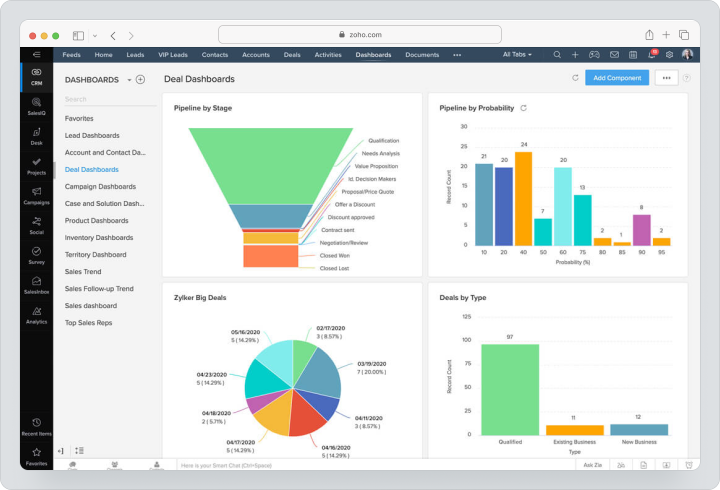
Zoho CRM is worth considering as an alternative to Salesforce for SMB teams that need a flexible CRM with a more accessible pricing model and the ability to gradually connect other Zoho products: Zoho Books, Zoho Desk, Zoho Campaigns, Zoho Projects, and Zoho Analytics.
Cost: Zoho CRM is available in Free, Standard, Professional, Enterprise, and Ultimate editions. Free is designed for 3 users. On a monthly payment plan, Standard costs $20 per user per month, Professional — $35, Enterprise — $50, Ultimate — $65.
Key Features
- leads, contacts, accounts, and deals;
- sales forecasting and automation rules;
- lead scoring, assignment rules, and approvals;
- Zia AI on applicable editions;
- territory management on Enterprise and Ultimate;
- integrations with Zoho products.
Main Difference from Salesforce
Zoho CRM is usually simpler and cheaper for SMBs, while still retaining many CRM capabilities. Salesforce is stronger in the corporate ecosystem, industry solutions, large-scale customization, and partner marketplace.
Advantages
- good feature-to-price ratio for SMBs;
- a wide Zoho ecosystem;
- flexible customization and automation.
Limitations
- interface and setup may take time;
- complex architecture may require a CRM administrator;
- corporate scenarios need to be validated through a pilot.
Who it’s suitable for
Zoho CRM is suitable for SMBs, service companies, and sales departments that need an alternative to Salesforce for small businesses with full CRM logic and an affordable price.
Pipedrive
Pipedrive is a CRM built around a visual sales pipeline. It is chosen by teams that prioritize the daily work of managers: deals, activities, follow-ups, pipeline, forecasting, email synchronization, calls, tasks, and tracking the next steps.
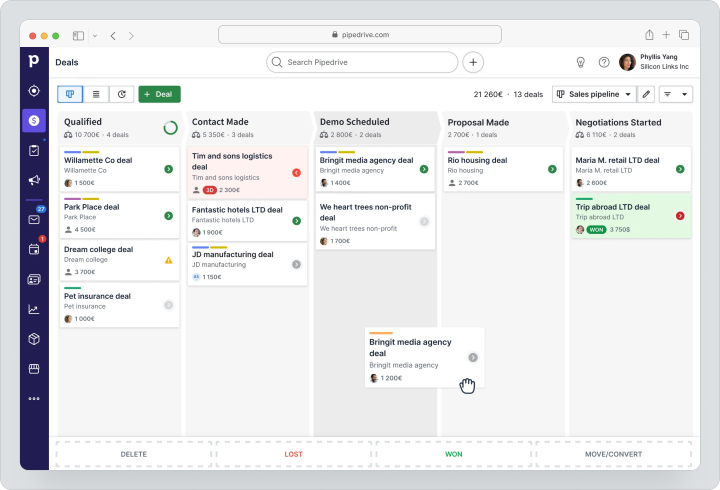
Pipedrive is suitable for B2B sales, small and medium sales teams, agencies, and companies where the process can be described through a few stages of the pipeline, and managers need a simple CRM instead of Salesforce without a heavy implementation.
Cost: Pipedrive offers a 14-day trial. With monthly payments, Lite costs $19 per seat per month, Growth — $34, Premium — $64, Ultimate — $89. LeadBooster, Projects, Campaigns, Web Visitors, and Smart Docs are displayed as add-ons, so project logic needs to be checked separately before purchase.
Key features
- visual pipelines and deals;
- leads, contacts, and activities;
- email sync and automation on applicable plans;
- reports and forecasting;
- 500+ integrations;
- add-ons for additional sales and project scenarios.
Key difference from Salesforce
Pipedrive is simpler and more focused on the actions of the manager in the pipeline. Salesforce is deeper for complex sales, custom objects, corporate roles, forecasting, and large-scale automation.
Advantages
- quick start for sales departments;
- user-friendly visual pipeline;
- clear focus on next actions and deals.
Limitations
- less corporate depth than Salesforce;
- some features depend on the plan and add-ons;
- for complex work with current clients or project execution logic, a separate PM system may be required.
Who it’s suitable for
Pipedrive is suitable for sales departments that need a CRM similar to Salesforce in the basic logic of deals but simpler for daily work and implementation.
Microsoft Dynamics 365 Sales
Microsoft Dynamics 365 Sales is an enterprise CRM for sales within the Microsoft ecosystem. It is chosen by companies that already use Microsoft 365, Outlook, Teams, Power BI, Power Automate, Azure, Power Platform and want a CRM integrated into their familiar infrastructure.
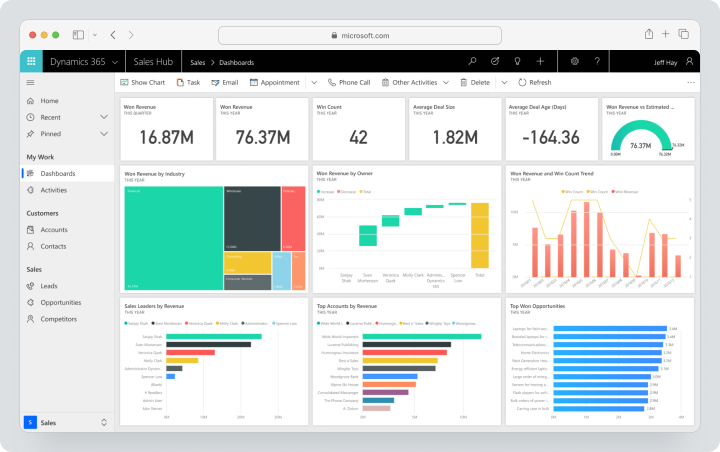
Dynamics 365 Sales is suitable for large companies, B2B sales, complex sales processes, organizations with security, analytics, AI, roles, and integration requirements with Microsoft products.
Cost: Microsoft lists Sales Professional at $65, Sales Enterprise at $105, and Sales Premium at $150 per user per month, but these prices apply with an annual subscription. A separate standard monthly price is not publicly listed. Microsoft Relationship Sales is calculated individually and requires at least 10 seats.
Key features
- sales automation;
- companies, contacts, leads, and sales opportunities;
- reporting and dashboards;
- AI and contextual analytics on applicable plans;
- integration with Microsoft 365, Teams, Outlook, and Power Platform;
- LinkedIn Sales Navigator in Microsoft Relationship Sales.
Key difference from Salesforce
Dynamics 365 Sales is stronger for companies that are already embedded in the Microsoft ecosystem. Salesforce is often chosen as a standalone CRM platform with a broader AppExchange ecosystem and a larger CRM community.
Advantages
- natural integration with Microsoft 365;
- strong enterprise capabilities;
- suitable for complex B2B sales and analytics.
Limitations
- implementation can be complicated;
- availability of products depends on the region;
- a mature Microsoft infrastructure is required for maximum value.
Who it’s suitable for
Dynamics 365 Sales is suitable for companies that need an enterprise CRM instead of Salesforce and deep integration with Microsoft.
Freshsales
Freshsales is a CRM from Freshworks for managing leads, deals, communications, automation, and sales. It’s often considered by SMB teams looking for a CRM that includes email, telephony, AI, and integration with other Freshworks products.
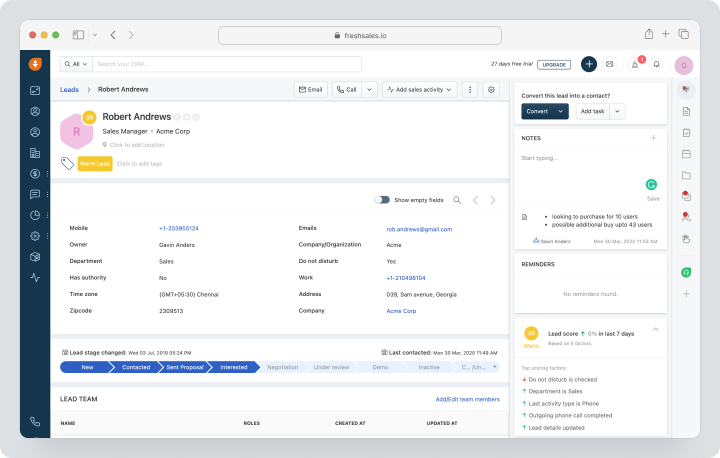
Freshsales is suitable for sales teams that need an easier setup than Salesforce, but still value a funnel, lead scoring, workflows, communications, customer data, reports, and AI capabilities.
Cost: Freshsales offers a 21-day trial. The monthly payment for Growth is $11 per user, Pro — $47, Enterprise — $71. Add-ons, including Branded Documents and Freddy AI Agent, are billed separately.
Key Features
- leads, contacts, companies, and deals;
- funnel management;
- email, telephony, and communications;
- workflows and automation;
- Freshworks AI features;
- reports and dashboards.
Main Difference from Salesforce
Freshsales is simpler as a CRM for SMB and mid-sized teams. Salesforce is more comprehensive for enterprise architecture, customization, complex integrations, and multi-level sales management.
Advantages
- quick start for the sales department;
- CRM, communications, and automation in one product;
- well integrated into the Freshworks ecosystem.
Limitations
- corporate flexibility is lower than Salesforce;
- some features depend on the plan;
- complex processes need to be validated through a pilot and demonstration.
Who It’s Suitable For
Freshsales is suitable for companies that need a CRM for the sales department with communications, automation, and straightforward implementation.
Creatio
Creatio is a no-code CRM and process automation platform. It’s chosen by companies that need not just a CRM for deals, but a flexible system for sales, marketing, service, complex workflows, and automation with minimal or no programming.
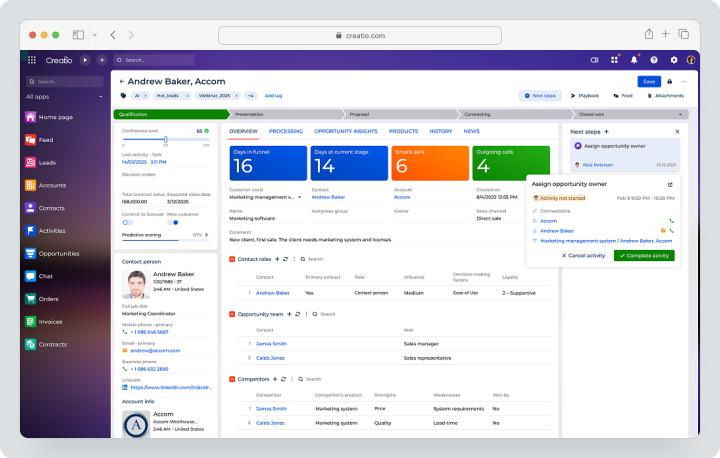
Creatio is suitable for mid-sized and large companies where the CRM must replicate a complex operational model: many stages, roles, approvals, custom processes, integrations, and automated scenarios.
Cost: Creatio offers flexible payment per user and an Unlimited model. Pricing for the Creatio Business & AI Studio platform starts at $33.75 per user per month for the Growth package for small and medium businesses and from $61.25 for the Enterprise package for large companies. The Unlimited rate is calculated individually and provides full access to the entire platform, CRM products, and AI without user limits.
Key Features
- process automation with no coding;
- products for sales, marketing, and service;
- workflows for leads and deals;
- forecasting, contracts, and documents;
- AI Studio and Business Studio;
- app catalog and integrations.
Main Difference from Salesforce
Creatio places more emphasis on configuring processes without coding. Salesforce is deeper as a global CRM ecosystem, but often requires more administration, partners, and implementation.
Advantages
- flexible automation without coding;
- suitable for complex processes;
- can build CRM scenarios tailored to specific operational models.
Limitations
- implementation requires process design;
- costs depend on the platform, products, AI, and support rate;
- may be excessive for a simple sales department.
Who It’s Suitable For
Creatio is suitable for companies that need an alternative to Salesforce for complex CRM processes and automation without coding.
Monday Sales CRM
Monday Sales CRM is a visual CRM based on monday.com for managing leads, contacts, deals, pipeline, customer communications, and sales processes through flexible boards. It is often chosen by teams that appreciate the visual logic of monday.com and need a CRM without the corporate complexity of Salesforce.
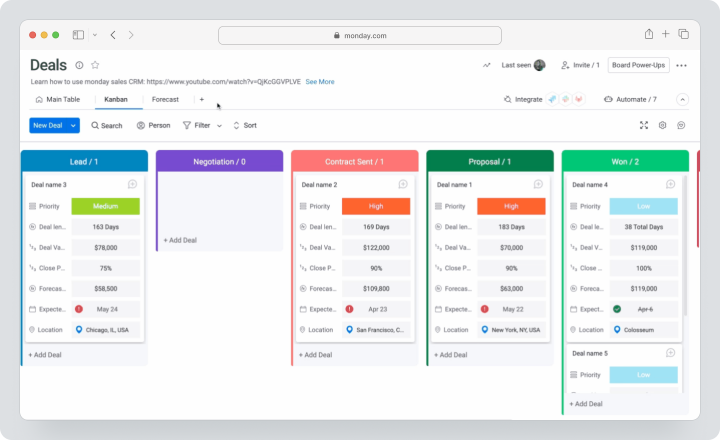
Monday Sales CRM is suitable for small and medium businesses, sales departments, agencies, and operational teams that want to see pipeline, statuses, activities, automation, and dashboards in one visual space.
Cost: monday CRM uses Basic, Standard, Pro, and Ultimate plans. With monthly payment, Basic costs €18 per seat per month, Standard — €25, Pro — €41. Ultimate is calculated individually. The page also states that Ultimate is the new name for Enterprise, and the final price depends on the country of payment.
Key Features
- leads, contacts, and deals;
- visual sales pipelines;
- boards, views, and dashboards;
- automations and integrations;
- email tracking and communication management;
- workflow templates.
Main Difference from Salesforce
Monday Sales CRM is simpler and more visual, but less deep for corporate CRM. Salesforce is stronger for complex customization, intricate sales processes, and multi-level analytics.
Advantages
- visual CRM logic;
- quick implementation for small teams;
- flexible boards and dashboards.
Limitations
- features depend on the plan and region;
- may lack depth for complex CRM architecture;
- teams need to carefully design boards to avoid chaos.
Who It’s For
Monday Sales CRM is suitable for teams that want a CRM instead of Salesforce with a visual pipeline, automation, and straightforward setup.
Insightly
Insightly is a CRM for small and medium businesses that combines sales, customer relationships, marketing, service, and project-related scenarios. It is often considered by companies that need a CRM with the ability to transition from deal to execution.
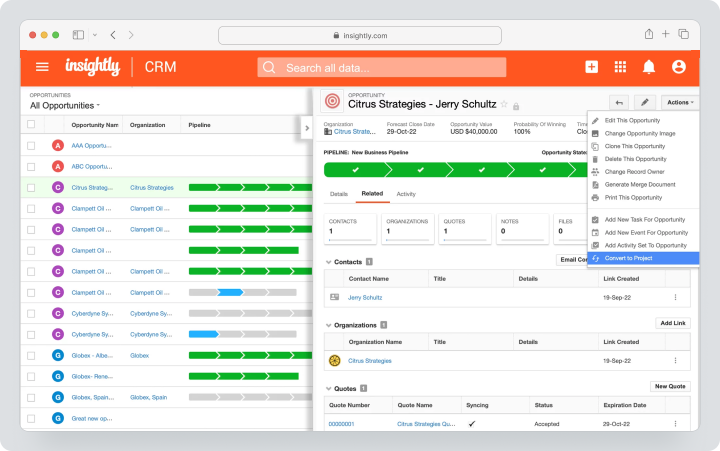
Insightly is suitable for B2B teams, service companies, consultants, and SMBs, where it’s important to see not only the pipeline but also the further lifecycle of the client: contacts, deals, projects, communications, tasks, and reports.
Cost: Insightly offers CRM plans Plus, Professional, and Enterprise, as well as a 14-day trial. On the public page, Plus costs $29, Professional — $49, Enterprise — $99 per user per month, but these prices are only shown for annual payment. A separate standard monthly price is not publicly displayed.
Key Features
- contacts, leads, organizations, and sales opportunities;
- project-related workflows;
- email and communication synchronization;
- process automation;
- dashboards and reports;
- AI Copilot in the CRM.
Main Difference from Salesforce
Insightly is simpler and closer to SMB scenarios, where CRM needs to connect sales and further client work. Salesforce is deeper for corporate sales, large-scale customization, and complex architecture.
Advantages
- combines CRM and project-related logic;
- suited for SMB and service teams;
- features an AI Copilot and implementation materials.
Limitations
- does not replace Salesforce in complex corporate sales;
- some features depend on the plan;
- as the team grows, thoughtful process setup will be needed.
Who It’s For
Insightly is suitable for companies that need a CRM for sales and further client work without a heavy corporate platform.
Copper
Copper is a CRM tightly integrated with Google Workspace. It is chosen by teams that mainly work in Gmail, Google Calendar, Google Drive, and want their CRM to be closer to daily communication rather than a separate, cumbersome system.
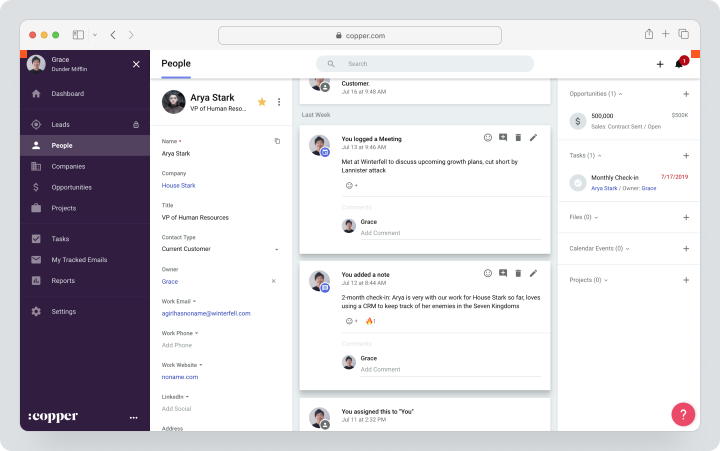
Copper is suitable for small businesses, agencies, consulting, and B2B teams where managers work extensively through Gmail and want to quickly add contacts, opportunities, tasks, and communications into the CRM.
Cost: Copper offers a trial period and three main plans. The monthly payment for Basic is $29 per user, Professional is $69, and Business is $134. Basic includes a limit of 2,500 contacts, task automation, pipelines, project management, and contact data enrichment.
Key Features
- tight integration with Gmail;
- contacts, companies, and sales opportunities;
- email tracking and activity history;
- tasks and reminders;
- pipeline management;
- workflows in Google Workspace.
Main Difference from Salesforce
Copper is simpler and closer to Google Workspace. Salesforce is a separate enterprise CRM platform with deeper customization, automation, reporting, and ecosystem.
Advantages
- convenient for teams living in Gmail;
- reduces manual updates to the CRM;
- easier for small businesses and small sales departments.
Limitations
- weaker for corporate CRM scenarios;
- depends on Google Workspace logic;
- complex sales processes and client project execution may require additional tools.
Who It’s Suitable For
Copper is suitable for teams that need a CRM instead of Salesforce for Google Workspace, communications in Gmail, and straightforward client work.
Comparison Table of Salesforce Alternatives
Price and feature data verified on 12.08.2026 on the official service pages. Currency, availability of features, AI capabilities, rates, add-ons, and total costs may vary depending on region, number of users, payment period, and purchasing conditions.
| Service | Main Focus | Deals / Pipeline | Project Execution | Automation | Implementation Complexity |
|---|---|---|---|---|---|
| Worksection | Not a full CRM, but client project management post-sale | Primarily through CRM scenario and integrations | Strong: projects, tasks, Gantt, time, reports | Automations by statuses, API, webhooks | Low or medium |
| HubSpot CRM | CRM, marketing, sales, and service | Strong: contacts, companies, deals, pipelines | Through service and third-party tools | Strong on paid plans | Low or medium |
| Zoho CRM | Flexible CRM and Zoho ecosystem for SMB | Strong: leads, companies, deals, forecasting | Through Zoho Projects and integrations | Strong on higher editions | Medium |
| Pipedrive | Simple visual sales pipeline | Strong: deals, pipeline, actions | Limited / through Projects add-on | Medium, depends on the plan | Low |
| Microsoft Dynamics 365 Sales | Enterprise CRM in the Microsoft ecosystem | Strong: enterprise sales automation | Through Dynamics/Power Platform/integrations | Strong, especially AI and Power Platform | High |
| Freshsales | CRM with communications, automation, and AI | Strong for SMB and mid-sized businesses | Limited, through Freshworks/integrations | Medium or strong on higher plans | Low or medium |
| Creatio | No-code CRM and complex processes | Strong: workflows for leads and deals | Through no-code processes and CRM scenarios | Strong automation without coding | Medium or high |
| Monday Sales CRM | Visual CRM based on boards | Good for a visual pipeline | Through boards and monday.com workflows | Medium or strong on higher plans | Low or medium |
| Insightly | CRM + project-related scenarios for SMB | Good for SMB | There is a connection between sales and projects | Medium, depends on the plan | Medium |
| Copper | CRM for Google Workspace | Good for sales through Gmail | Limited, through tasks and integrations | Medium | Low |
Which Salesforce alternative to choose?
The choice depends on which part of Salesforce you want to replace: the CRM funnel, sales automation, marketing ecosystem, corporate analytics, or managing client project execution after the deal.
For a full CRM and marketing/sales/service ecosystem
Choose HubSpot CRM or Zoho CRM. HubSpot is better suited for teams that value a quick start, marketing, sales, and service within one ecosystem. Consider Zoho CRM if you need a flexible CRM for SMBs and integration with other Zoho business applications.
For a visual funnel management tool
Choose Pipedrive if managers need a simple visual funnel, deals, activities, follow-ups, and next step tracking. It’s a good option when Salesforce is too complex for daily sales team work.
For the Microsoft ecosystem
Choose Microsoft Dynamics 365 Sales if your company already uses Microsoft 365, Outlook, Teams, Power BI, Azure, and Power Platform. This is a strong option for corporate teams, but implementation needs to be planned as a separate project.
For complex processes without coding
Choose Creatio if the CRM needs to replicate complex company processes, and the team wants to configure workflows and automation without coding.
For a visual CRM
Choose Monday Sales CRM if your team needs flexible boards, a visual funnel, simple dashboards, automations, and quick setup without corporate complexity.
For Google Workspace
Choose Copper if managers work in Gmail and Google Workspace, and the CRM should be closely tied to email communication.
For executing client projects post-sale
Choose Worksection if the main task is not to replace Salesforce Sales Cloud as a CRM, but to manage client projects after the deal: tasks, deadlines, Gantt chart, time tracking in Worksection, reports, access rights, and interaction with the client.
How to transition from Salesforce without data loss?
Transitioning from Salesforce should start with an inventory of data and processes, not with exporting contacts. Salesforce often contains not only leads and deals but also custom fields, objects, automations, reports, integrations, roles, permissions, and historical data.
- Conduct an inventory of objects, fields, automations, reports, and integrations.
- Separate mandatory data from the historical archive.
- Clean up duplicates of contacts, companies, leads, and accounts.
- Match leads, contacts, accounts, sales opportunities, deals, activities, and owners.
- Check APIs, email, telephony, forms, BI, and integrations.
- Determine which data is needed in the new CRM and which can be left in the archive.
- Migrate a pilot segment, not the entire database at once.
- Check access rights, data quality, reports, and funnels.
- Prepare a rollback plan and appoint a migration owner.
- Conduct user training and document new work rules.
The main mistake is to transfer Salesforce “as is.” If the old CRM was overloaded with fields, duplicates, outdated funnel stages, and unused automations, the new system will inherit the same problems.
When is Worksection a suitable alternative to Salesforce?
Worksection is appropriate instead of an excessive CRM only when the primary value for the business is managing client project execution rather than a complex sales funnel. This is an important boundary: Worksection shouldn’t be labeled as the best CRM or a direct replacement for Salesforce Sales Cloud.
Consider Worksection if:
- the team is managing several parallel client projects;
- you need to quickly create a project and assign tasks after a deal;
- it’s important to see timelines and dependencies on a Gantt chart;
- actual time and costs need to be tracked;
- clients or contractors are involved in projects;
- the manager needs transparent reports without manual compilation;
- managers need to see what is happening with the client after the sale;
- CRM is used not for a complex funnel, but as a place to manage tasks and projects.
For example, an agency may keep CRM for leads and deals, while using Worksection for executing client projects: projects, tasks, subtasks, comments, files, deadlines, time tracking, reports, CRM integrations, and client access. This approach is more honest than trying to replace Salesforce with one tool without considering the actual process.
Frequently Asked Questions
What Salesforce alternative is best for small businesses?
For small businesses, it’s often worth considering HubSpot CRM, Zoho CRM, Pipedrive, Freshsales, or Monday Sales CRM. HubSpot is user-friendly for quick starts and connecting marketing with sales, Zoho CRM offers flexible CRM at an affordable price, and Pipedrive is suited for a straightforward funnel. Worksection is appropriate if the key work starts after the deal and is related to client projects.
Are there free alternatives to Salesforce?
Yes, there are free alternatives to Salesforce, but they should be evaluated based on limitations. Free plans or trial periods are available in HubSpot CRM, Zoho CRM, Pipedrive, Freshsales, Worksection, Monday Sales CRM, and other services. The free plan is best used for testing: checking the funnel, data import, reports, roles, automation, and user-friendliness for managers.
What to choose: Salesforce or HubSpot?
Salesforce is worth choosing for complex enterprise sales, custom CRM architecture, large-scale automation, advanced forecasting, and a deep ecosystem. HubSpot is better suited if the team needs quicker deployment, an intuitive CRM, linking marketing, sales, and service, and less dependency on complex administration at the start.
Which CRM is simpler than Salesforce?
Pipedrive, HubSpot CRM, Freshsales, Monday Sales CRM, and Copper are usually considered simpler than Salesforce. Pipedrive is good for a visual funnel, HubSpot is for linking CRM and marketing, Freshsales is for communications and AI within Freshworks, and Copper is meant for Google Workspace. The choice depends on the processes that need to be preserved after the transition.
Which Salesforce alternative is suitable for a service company?
For a service company, it’s worth separating sales from project execution. HubSpot, Zoho CRM, or Pipedrive are appropriate for the CRM funnel. For executing client projects after the deal, Worksection is suitable: projects, tasks, deadlines, Gantt charts, time tracking, reports, and guest access help manage obligations to clients.
Can Worksection completely replace Salesforce?
No, Worksection does not fully replace Salesforce if leads, sales opportunities, forecasting, CPQ, complex sales automation, marketing CRM, and corporate integrations are needed. However, Worksection can replace excessive CRM logic in a service company if the main task is to manage client projects post-deal, including deadlines, tasks, time, and reports.
Which CRM is best for a visual sales funnel?
For a visual sales funnel, most often people look at Pipedrive, Monday Sales CRM, HubSpot CRM, and Zoho CRM. Pipedrive is best focused on the funnel and manager activities. Monday Sales CRM provides visual boards. HubSpot and Zoho CRM are suitable if, in addition to the funnel, you need marketing, automation, reports, and scalability.
How to calculate the total cost of ownership for Salesforce?
The total cost of ownership for Salesforce includes licenses, editions, add-ons, implementation, migration, support, integrations, training, administration, AI features, and team time. Compare not just the price per user but the overall budget over 12 – 24 months. Separately assess which features are essential and which are just “nice to have.”
How to transfer data from Salesforce?
Transferring data from Salesforce should start with an audit of objects, fields, duplicates, automations, reports, and integrations. Next, you need to map leads, contacts, accounts, sales opportunities, activities, and owners to the new system, transfer a pilot segment, check data quality, access rights, and only after that scale the migration.
What’s the difference between CRM and project management systems?
CRM manages sales: leads, contacts, companies, deals, funnels, activities, and forecasts. A project management system manages the execution of work after the deal: tasks, deadlines, responsibilities, files, time, reports, and client access. In service businesses, a combination of CRM + project management is often needed.
Conclusion
Salesforce remains a strong CRM platform for companies that need Sales Cloud, sales opportunities, forecasting, lead distribution, advanced automation, AI, APIs, integrations, customization, Data Cloud, Agentforce, and scalable enterprise architecture. However, the best alternative to Salesforce depends on the specific task the team wants to solve.
If a full-fledged CRM for marketing, sales, and service is needed, consider HubSpot CRM or Zoho CRM. If the sales department needs a simple visual funnel, Pipedrive is suitable. If the company operates within the Microsoft ecosystem, it makes sense to look at Dynamics 365 Sales. For automating complex processes without programming, Creatio is a good choice. For a visual CRM, you can try Monday Sales CRM. For teams working in Google Workspace, Copper is a great fit. For SMB teams that need a blend of CRM and project-related scenarios, Insightly could be considered.
Worksection occupies a unique position in this comparison. It is not a full replacement for Salesforce Sales Cloud but an option for service and project teams where the main value is created after the sale. If you need to manage client projects, tasks, deadlines, time, reports, access rights, and contractors, Worksection may be a more practical solution than trying to manage client project execution within a complex CRM.
Before transitioning, do not choose a service solely based on price or popularity. First, describe the current processes, Salesforce objects, roles, funnels, mandatory reports, integrations, AI features, security requirements, and post-sale scenarios. Then, test 2 – 3 alternatives on a real process. This way, you will choose not just a Salesforce analog but a system that truly fits your team.
If your team’s priority is not a complex CRM funnel, but the execution of client projects after the sale, you can test Worksection as a workspace for tasks, deadlines, time, reports, and client access. Check out Worksection overview or compare Worksection pricing to understand which format suits your team best.