
Task management tools help teams and individuals organize tasks, enhance productivity. With advancements in technology, these tools now offer more than just a basic task list. They integrate features like automation, time tracking, and collaboration, allowing users to manage projects efficiently. This guide explores the best project task management tools of 2026, highlighting their key features and benefits.
What is Task Management Software?
Benefits of Task Management Tools
- Streamlined Operations: Task management tools simplify the way tasks are created, assigned, and tracked. This streamlines operations, reducing the need for manual tracking and allowing teams to focus on completing their work.
- Improved Communication: These management apps often include built-in communication features, such as comments, tags, and notifications. This ensures that team members are always aware of updates and changes, reducing the likelihood of miscommunication.
- Enhanced Time Management: Task management software allows for efficient time tracking, ensuring that every team member’s hours are accounted for. This helps with project scheduling, ensuring tasks are completed within the specified deadlines.
- Better Collaboration: Many project task management software offers features like file sharing, team chat, and collaborative task editing. This makes it easier for teams to work together, even when members are working remotely.
- Increased Productivity: By automating routine tasks, setting reminders, and breaking down projects into manageable steps, task management software boosts individual and team productivity.
How to Choose the Right Task Management Tool
When selecting project task management software, there are several key factors to consider:- Usability
- Integration Capabilities
- Customization Options
- Pricing
- Mobile Support
Best Task Management Tools for 2026
| Software Name | Key Features | Best For | Pricing per user/month |
|---|---|---|---|
| Worksection | Task management, to-do list, time tracking, Gantt chart, Kanban, reporting, calendar, access control. | Small to medium-sized teams | From $5 per user/month |
| Asana | Task tracking, timelines, reporting, team collaboration | Versatile for teams of all sizes | From $13.49 per user/month |
| Trello | Kanban boards, task automation, integrations | Simple project task management for small teams | From $6 per user/month |
| ClickUp | Custom views, task automation, goal tracking | Teams needing advanced customization | From $10 per user/month |
| Monday.com | Customizable workflows, time tracking, automation | Growing teams with scalable needs | From $12 per user/month |
| Wrike | Task management, Gantt chart, resource tracking, reporting | Teams handling complex projects | From $10 per user/month |
| Stackfield | Task management, Kanban, Gantt chart, workflows, time tracking, team chat, video conferencing, true end-to-end encryption | Small to large teams especially with high data protection requirements | From €9 per user/month |
| Todoist | To-do lists, project planning, task priorities | Personal task management and freelancers | From $7 per user/month |
| Smartsheet | Grid-based interface, Gantt chart, resource tracking | Teams managing complex projects | From $12 per user/month |
| Basecamp | Task lists, file sharing, team communication | Simple project management for small teams | From $15 per user/month |
| Microsoft To Do | To-do lists, reminders, task prioritization | Personal and small teams | Free |
Worksection
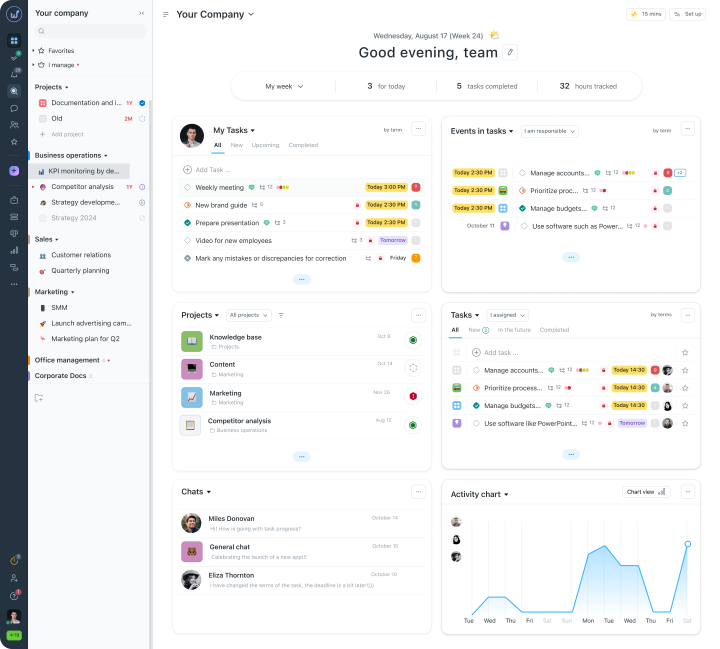
Pricing starts at $5 per user per month.
Asana

Pricing starting at $13.49 per user per month.
Trello

Price starting at $6 per user per month.
ClickUp

Pricing starts at $10 per user per month.
Monday.com

Pricing starts at $12 per user per month.
Wrike

Pricing starts at $10 per user per month.
Stackfield
Stackfield is a project management and collaboration platform from Germany that natively combines task management, team chat and video conferencing in one application. Teams plan their work with Kanban boards, Gantt charts and lists, track time and automate recurring steps with workflows, and discuss tasks right where they are being worked on. This keeps communication and project progress in one place instead of spread across separate tools. Stackfield is particularly suited to organizations that handle sensitive data, such as public authorities, agencies or companies in healthcare and finance: all data is stored exclusively on servers in Germany, and encrypted rooms protect content with true end-to-end encryption. As a result, Stackfield users can rely on a very high level of data protection without having to compromise on features.
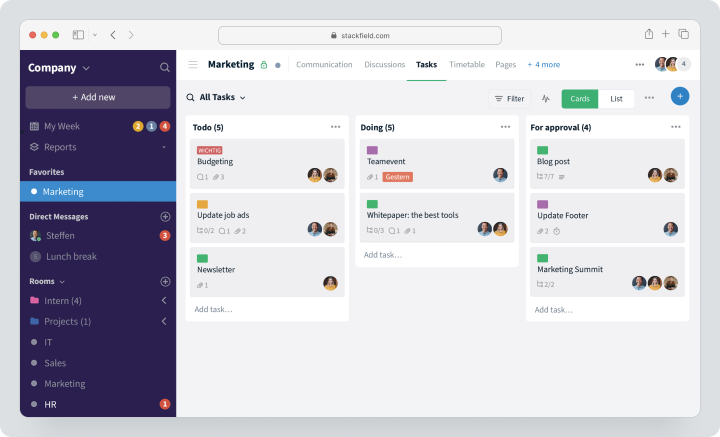
Pricing starts at €9 per user per month.
Todoist

Price starting at $7 per user per month.
Smartsheet

Pricing starts at $12 per user per month.
Basecamp

Pricing starts at $15 per user per month.
Microsoft To Do

Microsoft To Do is free.
Who Should Use Task Management Software?
- Freelancers: Freelancers can greatly benefit from task management software by tracking their personal projects, setting deadlines, and organizing tasks efficiently. This helps them stay on top of their work, ensuring nothing slips through the cracks.
- Small to Medium-Sized Teams: Teams benefit from collaboration tools, task prioritization, and progress tracking. These features help ensure that all team members are aligned and that projects are completed on time, fostering better communication and coordination.
- Large Teams and Enterprises: For larger teams, task management software provides advanced features such as resource management, Gantt chart, and time tracking. These tools allow businesses to manage multiple projects simultaneously and optimize resource allocation, improving operational efficiency.