Solutions
worksection
beta
help
How to mention people, tasks, or contacts in the description?
In the task description, you can add mentions to quickly reference a member, another task, or a contact directly in the text. This is useful for clarifications, providing context, and quick navigation via links.
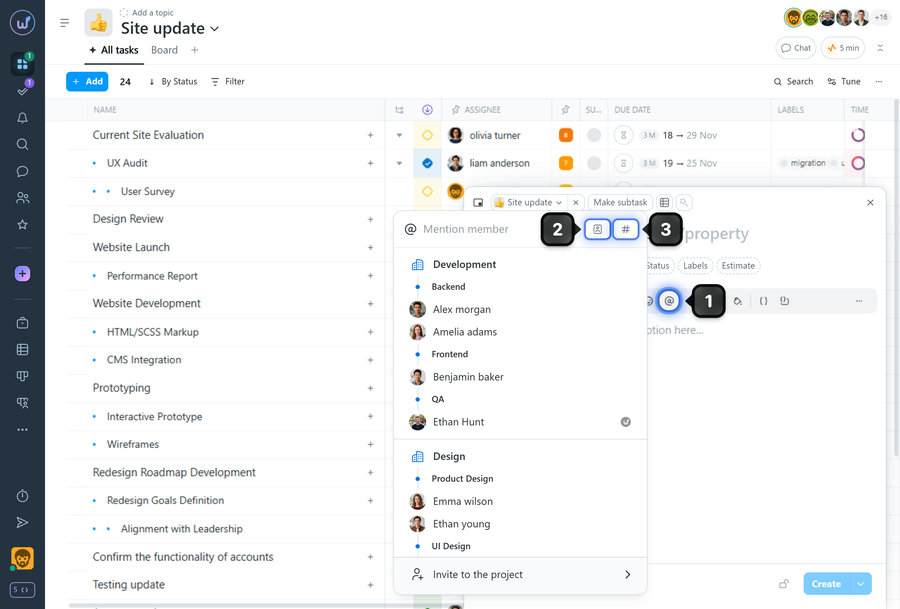
To add a mention when creating a task, click the "@" button1 in the editor toolbar. A window for selecting a member to mention will open, where you can choose a team member, or switch the mode to mention a contact2 or a task3.
Select the required item from the list — the mention will be inserted into the description text.
Note To avoid switching to a different keyboard layout — use the keyboard shortcut Alt+2.
How it works
- A mentioned member will automatically be added to the task's subscribers.
- Mentions are inserted into the text as separate elements so you can quickly navigate to the mentioned task or open a member/contact card.
Leave your review
Did this article help you?
Glad we could help! What was helpful?
Sorry this didn't help. What went wrong?

