Solutions
worksection
beta
help
How to configure task dependencies?
Task dependencies allow you to define relationships: what is linked to what, what blocks execution, and how the start/finish of one task affects another. This is useful for planning and controlling the sequence of work.
Permission to set dependencies belongs to members who have the right to edit a task, namely:
- Account owner
- Account administrator with the "Allow admin to edit everything" permission
- Team administrator with the "Allow admin to edit everything" permission (for tasks where a member of their team is the author or assignee)
- Department administrator with the "Allow admin to edit everything" permission (for tasks where a member of their department is the author or assignee)
- Project manager
- Task author
- Assignee (optionally)
To add a dependency with another task, open the task. In the "Properties" block, click the "Relations" field. From the menu, select the dependency type. Choose the task to link. The dependency will be set.
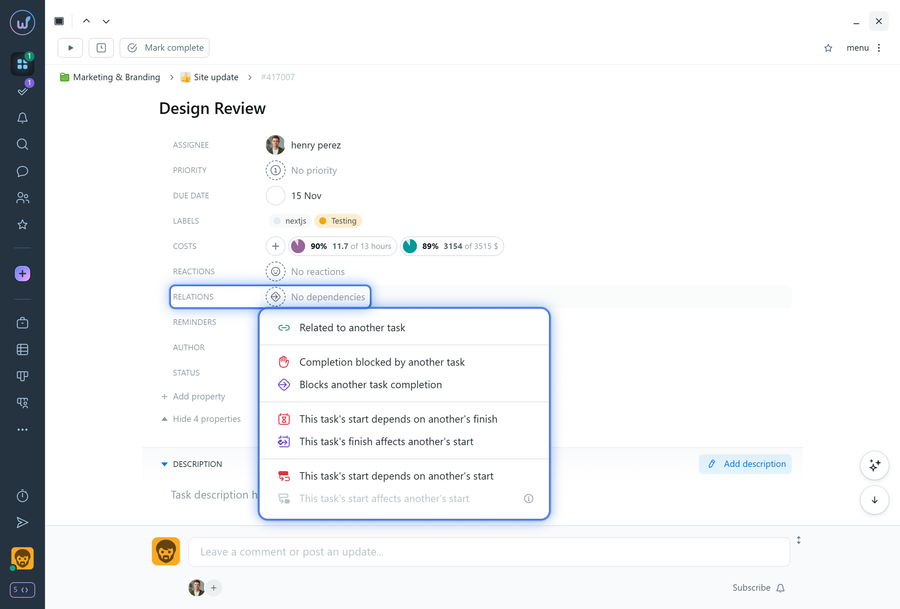
Available dependency types
1 | Dependencies that do not affect task dates:
- Related to another task: an informational link for quick navigation between related tasks.
- Completion is blocked by another task: the current task depends on another task and cannot be completed until the linked task is completed.
- Blocks completion of another task: another task depends on the current task and cannot be completed until this task is completed. This dependency type does not affect task dates.
2 | Finish-to-Start dependencies that affect task dates:
- The start of this task depends on the finish of another task: allows you to schedule the start of this task after another task is completed so their schedules do not overlap. If the linked task is overdue, the start of the current task is automatically postponed. If the linked task is completed ahead of schedule, the current task starts earlier. When this dependency is created, the current task's start date is set to one day after the finish date of the linked task.
- The finish of this task affects the start of another task: completing the current task determines the start date of the linked task.
3 | Start-to-Start dependencies that affect task dates:
- The start of this task depends on the start of another task: the current task's start date is scheduled relative to the start date of another task.
- The start of this task affects the start of another task: the linked task's start date is scheduled relative to the start date of the current task. After the dependency is created, the system records the difference in days between the schedules of the current and linked tasks. Any future changes to the current task's dates automatically adjust the linked task's start date. If the linked task's dates are changed, the system updates the recorded day difference. When this dependency is created, the current task's start date is set to match the start date of the linked task.
Dependency limitations
- Any number of tasks and subtasks can depend on a task, but a task itself can have only one Finish-to-Start or Start-to-Start dependency.
- The start date of Task B cannot be earlier than the start or finish date of Task A (depending on the dependency type). Therefore, you cannot set an earlier date either in the Gantt chart or by editing the task itself.
- Circular dependencies are not allowed (for example, Task A depends on Task B, while Task B depends on Task A).
- To avoid confusion, tasks with dependencies cannot have their dates dragged on the calendar or changed using bulk operations.
Leave your review
Did this article help you?
Glad we could help! What was helpful?
Sorry this didn't help. What went wrong?

