Solutions
worksection
beta
help
How to set up a reminder in a task?
Reminders help you not miss important task events: the start of work, an approaching deadline, or a specific date/time to return to the task. Reminders can be set for yourself or for other members.
Permission to set reminders is available to all members who have access to the task, except "Guest" and "Reader".
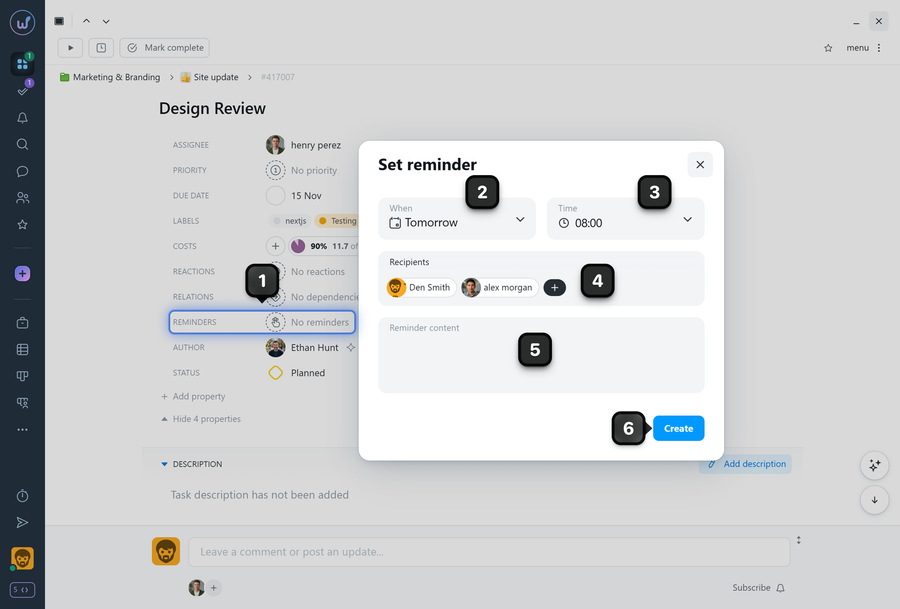
To set a reminder, open the task and in the "Properties" block click the "Reminder" property field1. In the window that appears, select the day2 and time3 to send the reminder. Select recipients4. Write the reminder text5 and click "Create"6.
Please note!
- By default, the system suggests sending the reminder to all project members (except clients).
- Available reminder date options: X days/weeks/months after the start, X days/weeks/months before completion, a custom date, or an immediate notification sent right after the reminder is created.
- Reminders are delivered as notifications in the "Bell", as well as by email and in the app — if these options are enabled in the notification settings of the specific member.
Leave your review
Did this article help you?
Glad we could help! What was helpful?
Sorry this didn't help. What went wrong?

