Solutions
worksection
beta
help
How to add a checklist (interactive list of small to-dos)?
A checklist is an interactive list of items that can be marked as completed. It is convenient when a task consists of several small steps and you need to track progress without creating subtasks.
To add a checklist in the description when creating a task, click the "Checklist" button1 in the editor toolbar. Enter the first item and press Enter to add the next one. Press Enter twice to finish adding items.
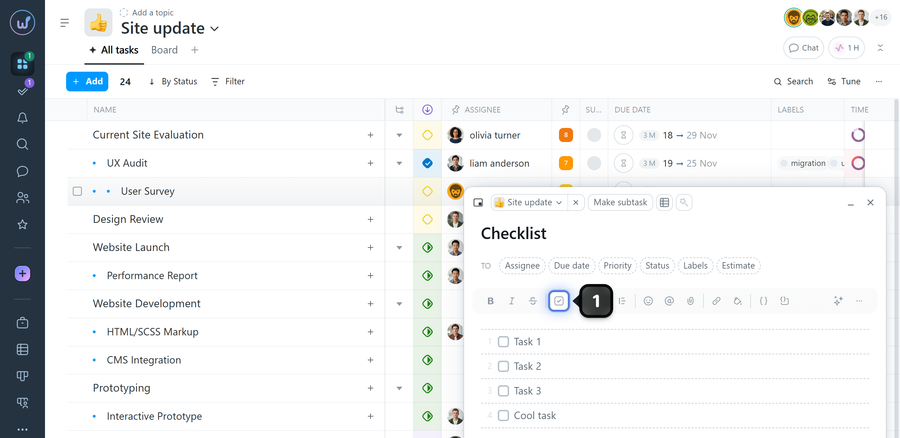
How to use the checklist:
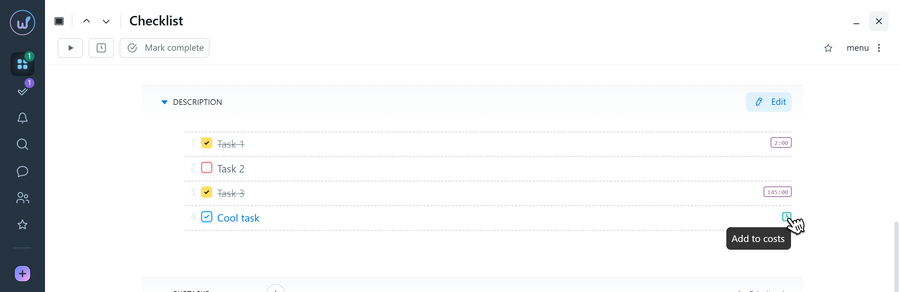
- To mark an item as completed — check the box next to it.
- To return an item to uncompleted — uncheck the box.
Time spent can be logged in task checklists and in comments. All entered hours will appear in reports and be counted toward the respective task.
When to use a checklist vs. subtasks
- Checklist — for small steps without separate deadlines or assignees.
- Subtasks — when separate assignees, deadlines, statuses, or per-step tracking are needed.
Note Task lists can be filtered to "tasks with checklists" by selecting the "with to-dos" menu option.
Leave your review
Did this article help you?
Glad we could help! What was helpful?
Sorry this didn't help. What went wrong?

