Solutions
worksection
beta
help
How do I add a custom field to a task?
Permissions Custom fields can be added to tasks by:
- Account owner
- Account administrator with the "Allow project management" permission
- Project lead
If a custom field has already been created in the account but is not yet used in a specific project, it can be quickly added to the project's tasks without going to Administration.
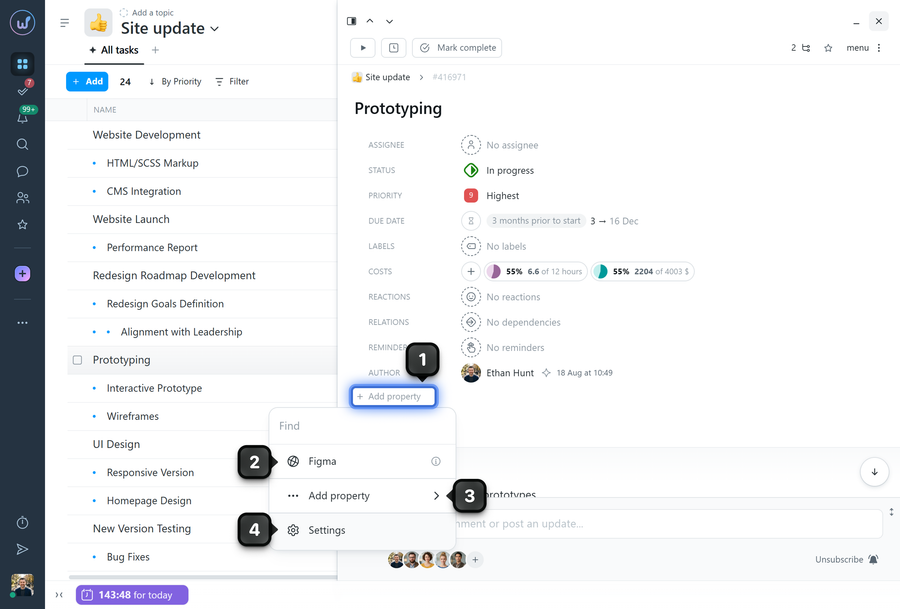
Open the task window and click the "Add property" button1 below the list of existing properties. Select the required field2, and it will be added to the tasks.
Note! You can add as many properties as needed - there is no limit on the number of properties.
If you have access to account administration, additional options are also available in this menu:
3 Add property - opens the list for creating a new property directly from here;
4 Go to settings - takes you to Administration → "Custom fields" to create new properties.
Leave your review
Did this article help you?
Glad we could help! What was helpful?
Sorry this didn't help. What went wrong?

