The best alternative to Asana depends on the use case: some need a simple task management system instead of Asana, while others require a project management system with Gantt charts, time tracking, reports, and guest access for clients. Asana remains a powerful tool for managing tasks, projects, and cross-functional work, but its pricing, logic of plans, level of customization, or feature set at a given plan may not suit all teams.
Therefore, users look for alternatives to Asana when they want to understand how to replace this service without losing control over tasks, deadlines, responsibilities, reporting, and teamwork. This is especially true for service teams, agencies, small businesses, and marketing and product departments that value time tracking, client projects, and transparent reporting.
In this article, we compare 10 solutions: Worksection, ClickUp, monday.com, Trello, Wrike, Jira, Notion, Basecamp, Smartsheet, and Zoho Projects. We evaluate all Asana alternatives using a consistent structure: positioning, pricing, key features, main differences from Asana, advantages, limitations, and use cases.
Which Asana alternative to choose?
- Worksection — for service and project teams that need tasks, deadlines, Gantt charts, time tracking, reports, roles, and client interaction.
- ClickUp — for teams needing extensive customization options, various views, automations, and many modules.
- monday.com — for visual cross-functional processes, templates, automations, and boards.
- Trello — for small teams needing a simple Kanban board without complex setup.
- Wrike — for complex cross-functional projects, approvals, and corporate reporting.
- Jira — for IT teams, development, backlog, sprints, and bug tracking.
- Notion — for document management, knowledge base creation, and simple task management.
- Basecamp — for organizing team work and asynchronous communication.
- Smartsheet — for spreadsheet project management, reporting, Gantt charts, and PMO.
- Zoho Projects — for managing projects within the Zoho ecosystem.
Not everyone needs to switch from Asana. If a team has already established processes, actively uses portfolios, goals, forms, automations, and reports, migration may be unnecessary. However, if they require built-in time tracking, clear reports on actual costs, client interaction, or faster onboarding, comparing alternatives is worth it.
What is Asana and what is it used for?
Asana is a task and project management system for teams that want to plan work, assign responsibilities, control deadlines, gather requests through forms, track progress, and manage multiple projects in one space.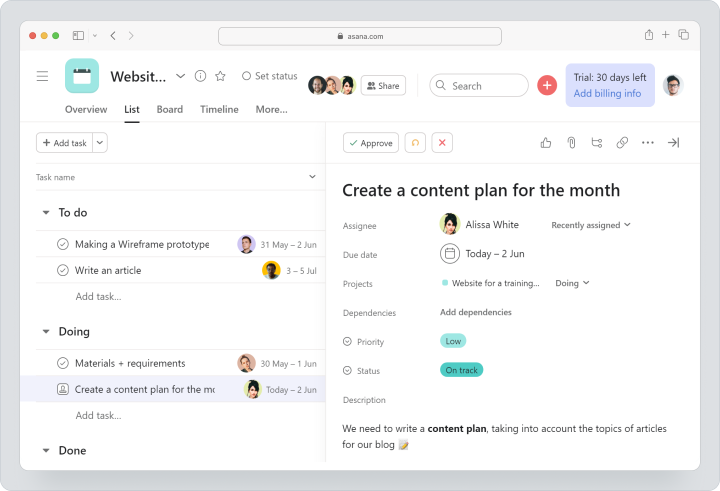
Asana is used for managing tasks and projects, marketing campaigns, operational processes, product launches, cross-functional work, and goal tracking. The platform includes tasks, projects, lists, boards, calendars, timelines, Gantt charts, automations, forms, custom fields, portfolios, goals, and reports.
On Asana's official pricing page, there is a free Personal plan for two users. For monthly payments, the Starter plan costs $13.49 per user per month, and the Advanced plan costs $30.49. The Starter plan includes timeline and Gantt chart, reporting dashboards, forms, custom fields, and free guests, while built-in time tracking is available at the Advanced plan.
Why do teams look for alternatives to Asana?
Teams are looking for an alternative to Asana not because the product is weak. Most often, the reason is that a specific business requires a different way of working: built-in time tracking, simpler onboarding, client access, clear reports, local support, or a different pricing model.
Cost of paid plans
For a small team, the price may be quite acceptable, but as the number of users increases, the costs become a significant part of the budget. Especially if not only employees but also managers, contractors, clients, or external participants need to work in the system.
In this case, the team compares not only the price per user but also the total cost of ownership: required plan, number of licenses, guest access, implementation costs, reports, integrations, and administration time.
Feature availability on different plans
Some features of Asana depend on the selected plan. For example, portfolios, goals, team workload, built-in time tracking, and advanced management features are available on more expensive plans. This is a common model for cloud services, but it is crucial to understand which features the team truly needs and at which plan they are available before choosing.
Excessive functionality for small teams
Asana can be too powerful for teams that need a simple task management system: tasks, deadlines, comments, files, Kanban, and clear statuses. If the team does not use portfolios, complex workflows, and advanced automations, a simpler alternative to Asana may be suitable.
Time tracking and reporting
Service teams, agencies, consulting firms, and contractors often find it essential to understand not only the status of a task but also actual labor costs. For this, time tracking, plan vs. fact reporting, project, employee, and client reports are necessary.
Client projects and external participants
If a team works with clients or contractors, flexible access rights, guest access, private discussions, clear deadlines, and reporting are needed. For agencies and service teams, this is one of the main criteria for choosing an alternative to Asana.
Localization, support, and onboarding speed
Sometimes, the decisive factor is not the feature set but the speed of onboarding. It is important for the team to quickly transfer processes, train employees, obtain support, and not spend months setting up the workspace.
How to choose an alternative to Asana?
When choosing an Asana alternative, it’s essential to consider not overall ratings but the working scenario. One service might be better suited for development, another for an agency, a third for simple Kanban, and a fourth for corporate reporting.
Tasks, subtasks, and dependencies
If a team handles complex projects, they need tasks, subtasks, dependencies, statuses, responsibilities, and acceptance criteria. For simple processes, a board is sufficient, but for long-term projects, it is better to have a Gantt chart and connections between tasks.
Kanban, list, calendar, timeline, and Gantt chart
Different teams organize work differently. Marketing may prefer working with a calendar, development with a backlog and sprints, an agency with Kanban and Gantt charts, and operations with a task list and reports.
Time tracking and reporting
If the team sells hours, calculates workloads, or works with client budgets, time tracking must be part of the workflow. A separate integration may help, but it complicates data control.
Project portfolios and workload monitoring
If a company is simultaneously managing multiple projects, it is essential to see not just individual tasks but also the big picture: portfolios, team workload, overdue tasks, budget, bottlenecks, and progress in various areas.
Roles, rights, and guest access
For client projects, it is crucial to separate employees, clients, and contractors. A good alternative to Asana should allow for flexible access management without exposing unnecessary information to external parties.
Integrations and data import
Before transitioning, it’s essential to determine if projects, tasks, comments, files, fields, and statuses can be transferred. Even if import is supported, it’s better to start with a pilot project rather than moving the entire company at once.
Brief comparison: service and best use case
| Service | Best Use Case |
|---|---|
| Worksection | Service and project teams, client projects, time tracking, Gantt chart, and reporting |
| ClickUp | Maximum customization, various views, automations, and modules in one workspace |
| monday.com | Visual boards, templates, automations, and cross-functional processes |
| Trello | Simple Kanban for small teams and uncomplicated processes |
| Wrike | Corporate projects, approvals, reporting dashboards, and Gantt chart |
| Jira | Software development, Agile, backlog, sprints, and bug tracking |
| Notion | Documents, knowledge base, and simple task management |
| Basecamp | Simple teamwork and asynchronous communication |
| Smartsheet | Spreadsheet project management, reporting, Gantt chart, and PMO |
| Zoho Projects | Project management in the Zoho ecosystem |
Best Alternatives to Asana in 2026
Below is a list of 10 services that are most frequently considered as alternatives to Asana. Worksection ranks first as it addresses an important scenario for service and project teams: tasks, deadlines, clients, time tracking, and reporting in one system.
Worksection
Worksection is a project and task management system for teams that prioritize deadlines, accountability, execution transparency, time tracking, and client interaction. The service is particularly suitable for agencies, consulting, construction, marketing, operational, and other service teams that need to control not only tasks but also actual labor costs.
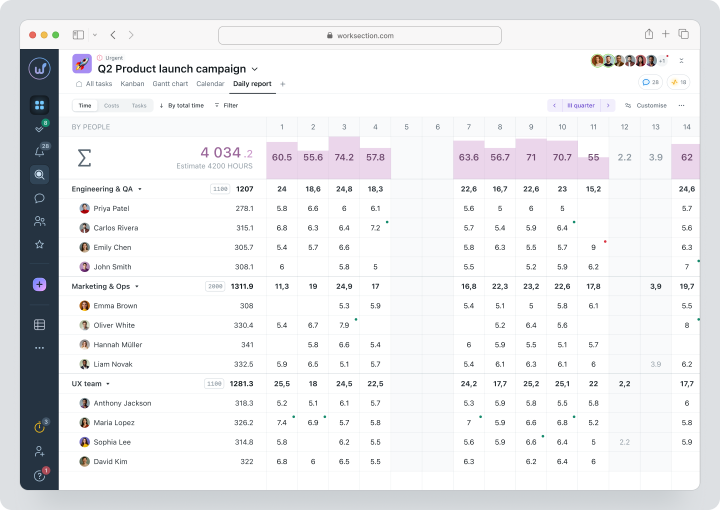
Cost: there is a free plan. For monthly payments, Basic costs $5 per seat per month, Business — $10, Premium — $15. The pricing page also includes unlimited projects, project and team reports, custom roles, and other features of paid plans.
Key Features
- projects, tasks, and two levels of subtasks;
- deadlines, responsible individuals, priorities, statuses, and tags;
- Kanban board and Gantt chart;
- built-in time tracking, time recording, and plan/fact reporting;
- reports for projects, tasks, and teams;
- guest access, roles and permissions for clients and contractors;
- comments, files, and decision history within tasks.
Main Difference from Asana
Worksection is better suited for teams that need to combine task management with time tracking, reporting, client access, and expense control in one project space.Advantages
- clear structure for service and client projects;
- built-in time tracking and reports;
- Gantt chart, Kanban, tasks, files, and comments are linked within the project.
Limitations
- does not replace specialized tools for development at the level of Jira when it comes to complex development;
- large companies need to plan the structure of projects, roles, and access rights in advance.
Who it’s suitable for
Worksection is suitable for agencies, service teams, consulting companies, construction businesses, marketing and operational departments, and companies wanting to manage projects, deadlines, clients, and expenses in one system.
ClickUp
ClickUp is a flexible platform for managing work for teams that need extensive customization options. It includes tasks, documents, Kanban, calendar, Gantt chart, custom fields, goals, reporting dashboards, time tracking, resource management, and many additional modules.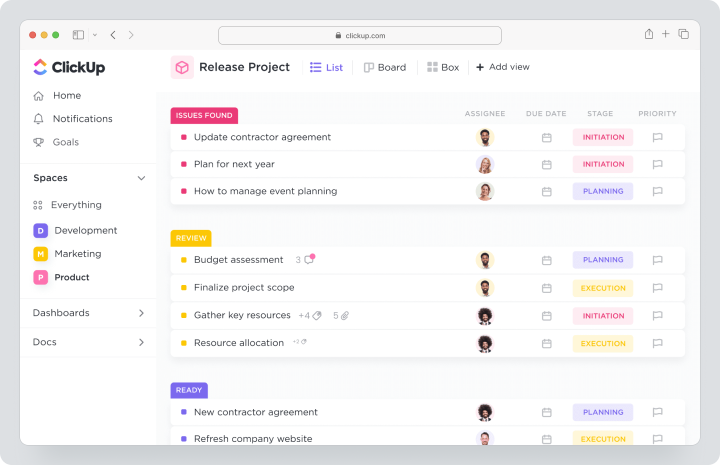
Cost: there is a free plan Free Forever. For monthly payments, Unlimited costs $10 per user per month, Business — $19. The Unlimited plan offers Gantt charts, unlimited integrations, and custom fields, built-in time tracking, goals, portfolio management, guest access with rights settings, and resource management.
Key Features
- various task presentation options;
- custom fields and reporting dashboards;
- built-in time tracking;
- Gantt chart, goals, portfolio, and workload management;
- automations, forms, and integrations.
Main Difference from Asana
ClickUp offers more customization capabilities and modules in one product but requires more time for implementation and standardization.Advantages
- wide range of features for different teams;
- built-in time tracking on paid plans;
- flexible workspace customization.
Limitations
- it can be complex for a quick launch;
- without clear rules, the workspace easily becomes overloaded;
- a process administrator is required for the team.
Who it’s suitable for
ClickUp is suitable for teams that need a customized work management system and are prepared to invest time in its setup.
monday.com
monday.com is a visual platform for managing work for teams who prefer boards, templates, automations, and flexible workflows. It is used in marketing, sales, operations, product teams, HR, and cross-functional processes.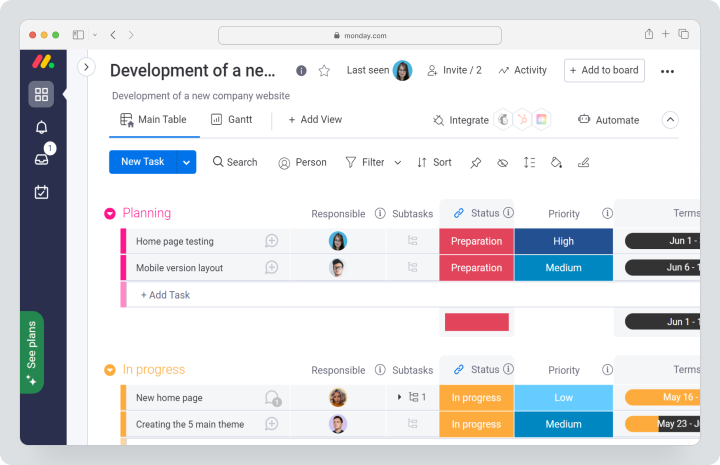
Cost: there is a free plan for up to 2 seats. For monday work management in monthly payments, Basic costs $12 per seat per month, Standard — $14, Pro — $24. The Enterprise price is calculated individually. Paid plans are available for at least 3 seats.
Key Features
- visual boards;
- templates for different teams;
- timeline and Gantt chart presentations;
- automations and integrations;
- reporting dashboards and analytics;
- guest access and access control at suitable pricing tiers.
Main Difference from Asana
monday.com is more like a visual workflow builder than a classic task management system.Advantages
- easy to launch visual processes;
- many templates for different departments;
- powerful automations and reporting dashboards.
Limitations
- the cost depends on the region, number of seats, and chosen product;
- for complex processes, boards need careful planning;
- some features are only available on higher-tier plans.
Who it’s suitable for
monday.com is suitable for marketing, operational, and cross-functional teams where visual workflows and automation are important.
Trello
Trello is a simple alternative to Asana for teams that need an understandable Kanban without complex setup. It is often chosen by small teams, freelancers, editors, users for personal projects, and teams with workflows where boards, cards, lists, and checklists are sufficient.
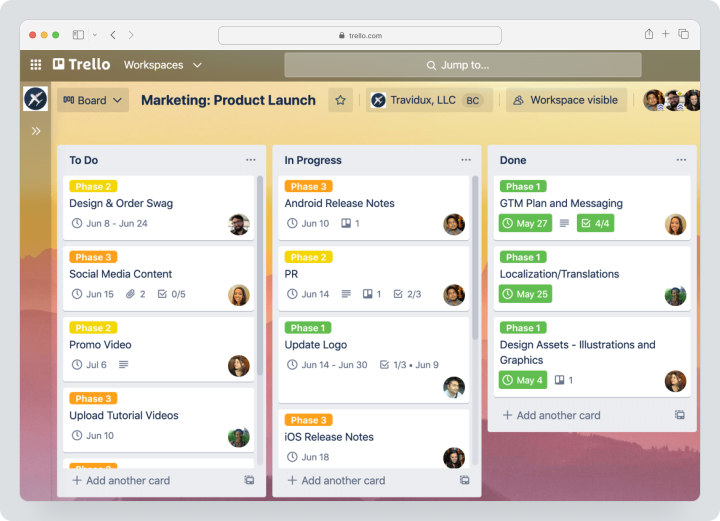
Cost: there is a free plan. For monthly payments, Standard costs $6 per user per month, Premium — $12.50. Premium adds a calendar, timeline, table, reporting dashboard, and roadmap.
Key Features
- Kanban boards;
- cards, checklists, and deadlines;
- Power-Ups;
- automation;
- additional views on Premium.
Main Difference from Asana
Trello is simpler and faster to start, but falls short for complex projects, work with dependencies, reporting, and resource planning.Advantages
- very low entry threshold;
- good option for simple Kanban;
- convenient for small teams and personal tasks.
Limitations
- not the best choice for complex projects;
- for time tracking and enhanced reporting, Power-Ups or integrations are needed;
- scaling processes can become chaotic.
Who it’s suitable for
Trello is suitable for small teams needing a simple task management system instead of Asana without complex implementation.Wrike
Wrike is a work management system for teams with complex projects, approvals, reporting dashboards, Gantt charts, and corporate processes. It is often sought by companies that need manageability across multiple departments.
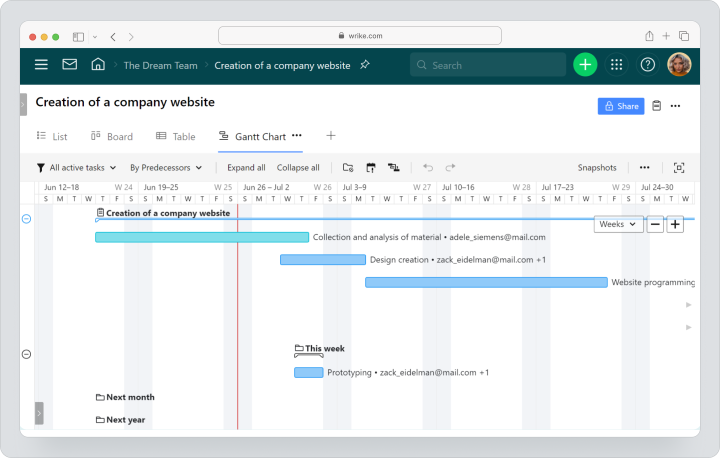
Cost: there is a free plan and a 14-day trial period. For Team, the monthly payment starts at $10. Business and higher tiers are sold only by annual subscription. For teams of 20 users or more, Wrike recommends implementation with support. Advanced resource planning and tracking, as well as time tracking, should be checked separately for the selected plan.
Key Features
- project and task management;
- board, table, and Gantt chart;
- shared reporting dashboards;
- basic AI functionalities;
- workflow templates;
- corporate capabilities at higher tiers.
Wrike is more focused on complex cross-functional processes, corporate control, and formalized implementation.
Advantages
- powerful reporting dashboards and Gantt chart;
- suitable for large teams;
- convenient for approvals and complex workflows.
Limitations
- implementation may be more complex than simple task management systems;
- large teams may require implementation with support;
- time tracking and advanced resource planning should be checked separately for the selected plan.
Who it’s suitable for
Wrike is suitable for companies with cross-functional projects, complex reporting, approvals, and corporate requirements.Jira
Jira is a specialized system for software development and teams working in Agile. It supports backlog, sprints, task and bug tracking, releases, and product development management. It is not a universal replacement for Asana for all departments but one of the best options for IT teams.
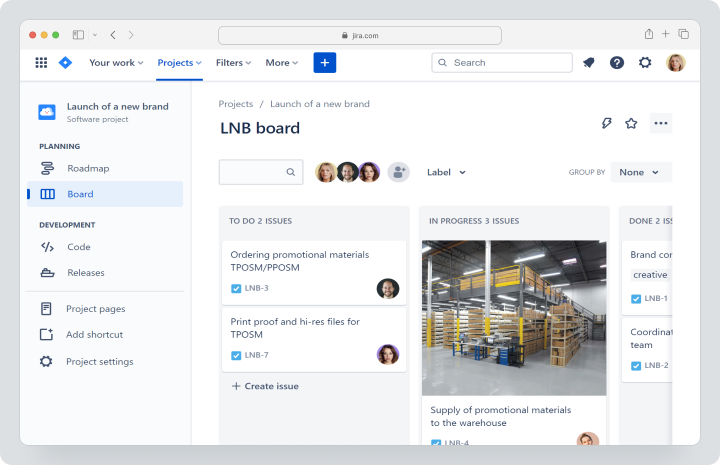
Cost: there is a free plan for up to 10 users. For a small team, the Standard plan costs approximately $9.70 per user per month, Premium — from $19.60. Jira uses a tiered pricing model, so the final cost depends on the number of users and is calculated in Atlassian's pricing calculator.
Key Features
- backlog and sprints;
- board, timeline, and calendar;
- task and bug tracking;
- reports and reporting dashboards;
- automation;
- advanced planning on higher tiers.
Main Difference from Asana
Jira is better suited for development and Agile processes but may be excessive for teams outside of IT.Advantages
- powerful logic for software development;
- easy handling of backlogs, tasks, and bugs;
- suitable for product teams and development teams.
Limitations
- not always convenient for marketing, agencies, and operational processes;
- requires customization of workflows, roles, and task types;
- may have a high entry barrier for users outside of IT.
Who it’s suitable for
Jira is suitable for software development teams, product teams, QA, DevOps, and IT departments.Notion
Notion is a workspace for documents, knowledge bases, notes, and databases. It can be used for task management, but compared to Asana, it is more of a flexible knowledge base with basic project management capabilities than a full-fledged project control system.
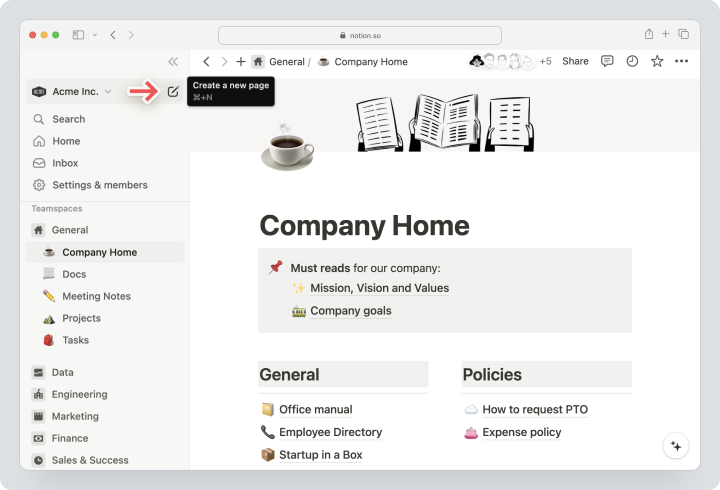
Cost: there is a free plan. For monthly payments in USD, Plus costs $12 per participant per month, Business — $24. The Enterprise price is calculated individually. The final amount may differ depending on the currency and region.
Key Features
- documents and knowledge bases;
- databases;
- pages and blocks;
- templates;
- data visualization from bases;
- basic connections to other services.
Main Difference from Asana
Notion is better for working with knowledge, documentation, and flexible databases but falls short as a strict project control system.Advantages
- easy to create a knowledge base;
- flexible page and database structure;
- suitable for small teams with simple task management.
Limitations
- time tracking and deep project reporting are not among the core advantages of the service;
- complex workflows need to be manually designed;
- with an increasing database, a clear page architecture may be required.
Who it’s suitable for
Notion is suitable for teams where documentation, knowledge bases, and flexible databases are prioritized over strict project execution control.Basecamp
Basecamp is a tool for simple team organization, asynchronous communication, task lists, messaging, files, and scheduling. It is an alternative to Asana for teams that want less complexity and more calm communication.
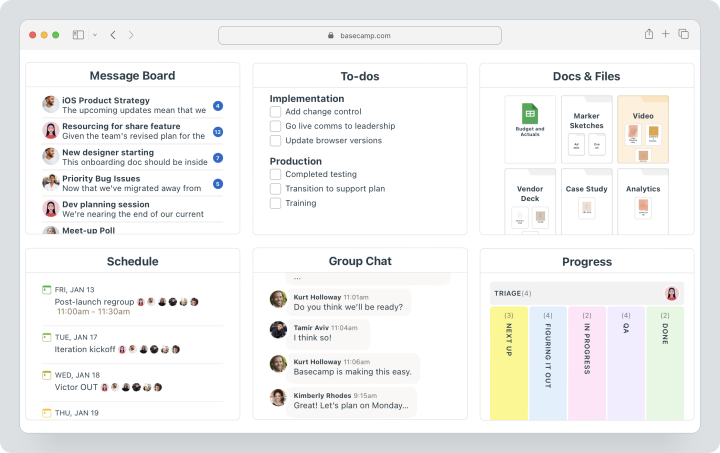
Basecamp does not aim to be the most flexible project management tool. Its strength lies in simplicity, centralized discussions, task lists, documents, files, schedules, and team communication without overload.
Cost: Basecamp offers a free account for 1 project, with 1 GB of storage and the ability to add up to 20 users. Pro costs $15 per user per month and is billed monthly. Pro Unlimited is only available via annual payment; there is no separate monthly plan for it.
Key Features
- task lists;
- message boards;
- Card Tables;
- group chat and personal messages;
- scheduling;
- documents and files;
- reports and automatic status surveys.
Main Difference from Asana
Basecamp emphasizes simplicity and asynchronous communication rather than complex workflows, dependencies between tasks, and resource planning.Advantages
- simple structure for small teams;
- convenient for asynchronous work;
- the fixed Pro Unlimited price can be advantageous for large teams.
Limitations
- fewer capabilities for flexible management of complex projects;
- not the best choice for detailed Gantt charts, portfolios, and resource planning;
- may not fit teams needing complex roles and reports.
Who it’s suitable for
Basecamp is suitable for small and medium teams wanting to simplify communication and not overload workflows.Smartsheet
Smartsheet is a platform for teams accustomed to a tabular approach. It combines tables, forms, reports, Gantt charts, board and calendar views, automation, workload control, and program management.
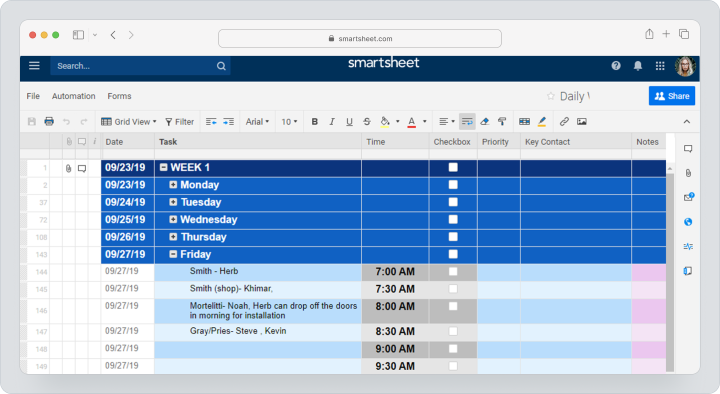
Smartsheet should be considered if a team is accustomed to managing work through tables, formulas, reports, and PMO processes. It is not the simplest task management system, but a powerful tool for structured processes.
Cost: for monthly payments, Pro costs $12 per participant per month, Business — $24. The cost of Enterprise and Advanced Work Management is calculated individually. Pro includes Gantt charts, tables, boards, calendars, formulas, sheets, forms, and reports. Business adds timeline, workload control, advanced administration, unlimited automation, and 1 TB of storage for attachments.
Key Features
- tables and formulas;
- Gantt chart, board, calendar, and timeline;
- forms and reports;
- reporting dashboards;
- workload control;
- automations.
Main Difference from Asana
Smartsheet is closer to a tabular approach and is suitable for teams managing processes with tables, reports, and structured workflows.Advantages
- powerful tabular format;
- suited for reporting and PMO;
- includes Gantt chart, reporting dashboards, and workload control.
Limitations
- may be less familiar for teams needing a classic task management system;
- higher tiers are needed for portfolio management;
- implementation requires a thoughtful table and reporting structure.
Who it’s suitable for
Smartsheet is suitable for operational, PMO, and corporate teams that prefer tables, formulas, reports, and structured processes.Zoho Projects
Zoho Projects is a project management system within the Zoho ecosystem. It is often considered by teams already using Zoho CRM, Zoho Books, Zoho Desk, or other Zoho products.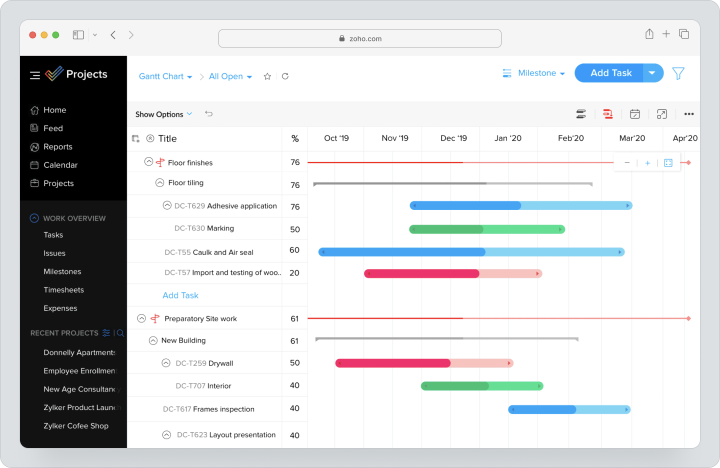
Zoho Projects is suitable if the team needs project management related to other Zoho products: CRM, finances, support, analytics, and internal processes.
Cost: there is a 15-day trial period and a free plan for up to 5 users and 3 projects. For monthly payments, Premium costs $5 per user per month, Enterprise — $10, Ultimate — $15. Paid plans add an unlimited number of projects, custom views, budgets, EVM, time tracking, time sheets, approvals, reporting, and portfolio dashboards. Pricing and currency may vary depending on the region.
Key Features
- projects and tasks;
- subtasks;
- Gantt chart;
- time tracking records and timesheets;
- budget and EVM;
- workflow actions;
- integrations with Zoho and third-party services.
Main Difference from Asana
Advantages
- close integration with Zoho products;
- on paid plans, time tracking records, timesheets, and budgets are available;
- the free plan is suitable for very small teams.
- the interface and logic may be less familiar for teams outside of the Zoho ecosystem;
- the final cost needs to be checked considering the region and currency;
- for complex processes, role, status, and template setup will be required.
Who it’s suitable for
Zoho Projects is suitable for small and medium businesses that already use Zoho or wish to organize project management within one ecosystem.
Comparison table of Asana alternatives
Pricing and feature data verified on 12.08.2026 on the official service pages. Currency, feature availability, and final pricing may vary based on region, team size, payment period, and chosen product.| Service | Best Suited For | Visualization | Time Tracking | Reporting / Analytics | Pricing Model |
|---|---|---|---|---|---|
| Worksection | Service and project teams | Kanban, Gantt, calendar | Built-in time tracking | Project and team reports | Free + Basic $5/user/month for monthly payments. Time tracking available on Business plan — $10 per user/month. |
| ClickUp | Maximum customization | Kanban, Gantt, calendar, reporting dashboards | Built-in time tracking on Unlimited | Reporting dashboards, goals, portfolios | Free + Unlimited $10/user/month for monthly payments |
| monday.com | Visual processes and automations | Boards, timeline, Gantt, reporting dashboards | Available on respective plans | Reporting dashboards and analytics | Free + Basic $12/user/month for monthly payments |
| Trello | Simple Kanban | Boards; on Premium — additional views | Through Power-Ups/integrations | Limited / via Power-Ups | Free + Standard $6/user/month for monthly payments |
| Wrike | Complex projects and approvals | Board, table, Gantt | On higher tiers / in advanced resource planning | Shared reporting dashboards | Free; Team — from $10 on monthly payment; Business — annual subscription only |
| Jira | IT, Agile, backlog and sprints | Board, timeline, calendar | Through marketplace/integrations | Reports and reporting dashboards | Free + Standard from $9.70/user/month. |
| Notion | Documents, knowledge bases, and databases | Databases, presentations, diagrams | Not a primary focus | Limited through databases and diagrams | Free + Plus $12/user/month for monthly payments |
| Basecamp | Simple teamwork | Task lists, Card Tables, schedule | Timesheet module / Pro Unlimited | Reports, automatic status surveys | Free + Pro $15/user/month for monthly payments; Pro Unlimited — annual subscription only |
| Smartsheet | Spreadsheet management and PMO | Gantt, table, board, calendar, timeline | Through processes and fields | Reports, reporting dashboards | Pro $12/user/month for monthly payments |
| Zoho Projects | Teams in the Zoho ecosystem | Gantt, workload, reporting dashboards | Time tracking and timesheets on paid plans | Reports, portfolio dashboard | Free for 5 users + Premium $5/user/month for monthly payments |
Which Asana alternative to choose?
The choice depends on the team and the working scenario. There is no single best service for everyone. It’s better first to determine what is lacking in Asana: accessible pricing, time tracking, reports, simplicity, client access, development tools, visualization, or a knowledge base.
For service and project teams
Choose Worksection if the team is managing client projects, tracking time, working with contractors, controlling deadlines, and wants to view project reports without manual data collection.
For maximum customization
Choose ClickUp if you need a flexible system with many views, custom fields, automations, and modules. But plan ahead to allocate time for implementation.
For visual processes
Choose monday.com if the team wants to quickly create boards, set up automations, reporting dashboards, and cross-functional processes.
For a simple start
Choose Trello if the process can be described using Kanban: planned, in progress, done. It’s a good choice for small teams and straightforward workflows.
For IT development
Choose Jira if you need a backlog, sprints, task and bug tracking, Agile reporting, and workflows for the development team.
For knowledge base and documentation
Choose Notion if the primary task is documentation, knowledge base, databases, and simple task planning.
For spreadsheets and PMO
Choose Smartsheet if the team is more comfortable working in a tabular logic, with formulas, reports, programs, and workload control.
How to transition from Asana without data loss?
Transitioning from Asana should be done gradually. It’s a mistake to move all projects to a new system at once without prior auditing. It’s better to start with one process and check how the new platform supports real working scenarios.
- Document the current processes, roles, fields, statuses, and reports.
- Clean up archived projects, old tasks, and duplicates.
- Select one process for a pilot launch.
- Map Asana elements to the new system: projects, tasks, subtasks, fields, statuses, comments, files.
- Export data in a supported format.
- Check users, access rights, deadlines, comments, files, and relationships.
- Train those responsible for the processes.
- Organize a parallel working period in both systems.
- Only after confirmation, turn off the old system.
- Establish new work rules so the team does not revert to chaos from chats and tables.
When is Worksection the needed alternative to Asana?
Worksection should be considered as an alternative to Asana if the team manages several parallel projects, works with clients or contractors, tracks actual time spent, and wants to see not just tasks, but also real costs.Worksection is particularly suitable if:
- the team manages client projects;
- it's necessary to see deadlines and dependencies on a Gantt chart;
- it's important to track actual time and compare planned vs. actual;
- clients or contractors are involved in projects;
- the manager requires reports on people, tasks, and projects;
- a quick launch without complex administration is needed;
- files, comments, and decisions need to be stored within tasks.
Frequently asked questions
What is the best alternative to Asana for small businesses?
For small businesses, it’s best to choose an alternative to Asana based on process complexity. If client projects, deadlines, time tracking, and reports are needed, Worksection will fit. If a simple Kanban is required, starting with Trello is advisable. If a team wants extensive customization options and is willing to set up the workspace themselves, ClickUp should be considered.
Are there free alternatives to Asana?
Yes, there are free alternatives to Asana. Free plans are offered by Worksection, ClickUp, monday.com, Trello, Wrike, Jira, Notion, Basecamp, and Zoho Projects. However, the limitations vary: it may be the number of users, projects, boards, storage capacity, available automations, or reports. The free plan should be used for testing rather than immediately as the primary system for the entire company.
Which alternative to Asana has built-in time tracking?
Worksection has time tracking, plan/fact matching, and reports within the project logic. ClickUp offers built-in time tracking at the Unlimited plan. monday.com has time tracking on respective plans. Zoho Projects includes time tracking records and timesheets on paid plans. Before choosing, it’s essential to check not only for the timer availability but also for the reporting capabilities on time spent.
What to choose: Asana or Worksection?
Asana should be chosen if the team is already working according to its logic and uses portfolios, goals, forms, automations, and reporting dashboards. Worksection should be considered if client projects, built-in time tracking, Gantt charts, reports on actual costs, guest access, and clearer execution controls are important.
Which system is simpler than Asana?
The simplest options instead of Asana are Trello and Basecamp. Trello is suited for Kanban boards and small processes. Basecamp is convenient for asynchronous communication, task lists, and file handling. However, if simplicity goes hand in hand with Gantt charts, time tracking, and reporting, it’s worth evaluating not only interface simplicity but also the entire working scenario.
Which alternative is suitable for an agency?
Worksection is well-suited for an agency since task management, deadlines, clients, contractors, time tracking, files, comments, and reports are crucial in agency projects. ClickUp can also be considered for flexible customization, or monday.com for visual marketing processes. However, it's essential to verify time tracking capabilities and client access beforehand.
Can projects be migrated from Asana?
Yes, projects can be migrated from Asana, but migration should be done gradually. First, you should clean up old projects, review fields, statuses, comments, files, roles, and dependencies. After that, it’s advisable to run a pilot in the new system, train those responsible for the processes, and only then migrate the main workspaces.
How does ClickUp differ from Asana?
ClickUp differs from Asana with broader customization capabilities and a larger set of modules in one workspace. It includes built-in time tracking, Gantt chart, goals, portfolio, reporting dashboards, documents, and a vast number of settings. But due to its flexibility, ClickUp may be more complex to implement and standardize for the entire team.
Is Trello suitable instead of Asana?
Trello is suitable instead of Asana if the team needs a simple Kanban, cards, checklists, deadlines, and an understandable visual board. For small teams and straightforward processes, it’s a convenient option. But for complex projects, dependencies, reporting, time tracking, and resource planning, Trello often requires Power-Ups or additional tools.
How to compare the cost of Asana and alternatives?
Compare not only the price per user but also the total cost of owning the system. Check how many people need to be connected, which features are available on the needed plan, whether guest users are included, if time tracking, reports, Gantt charts, automations, data imports, and support are available. Sometimes, a service has a lower plan cost but ends up being more expensive due to implementation and administration.
Conclusion
Asana remains a powerful product for managing tasks, projects, and cross-functional work. However, the best alternative to Asana depends on which processes are more important to the team: client projects, time tracking, visual boards, development, knowledge base, spreadsheets, or simple communication.
If a system for service and project teams is needed, consider Worksection: tasks, subtasks, Gantt charts, Kanban, time tracking, reports, guest access, and client interaction in one system. For maximum customization, ClickUp is suitable. If visual workflows and automations are essential, monday.com can be considered. For a simple Kanban, Trello fits, for development, use Jira, and for documentation and knowledge bases, choose Notion.
Before switching, do not choose a service merely based on price or popularity. First, outline your processes, critically important features, roles, reports, client access requirements, and budget. Then test 2–3 tools on one real project. This way, you will choose not just an alternative to Asana, but a system that truly fits your team.