The best alternative to Basecamp depends on the scenario: some need a simple team environment for communication, files, and task lists, while others need a more comprehensive task management system instead of Basecamp with Gantt charts, time tracking, reports, roles, dependencies, and client project oversight.
Basecamp remains a strong product for teams that value simplicity, asynchronous communication, bulletin boards, to-do lists, group chat Campfire, personal messages Pings, kanban boards Card Tables, documents and files, and automatic status polls. But users seek alternatives to Basecamp when they want to understand how to replace Basecamp without losing team context, but with more detailed task management, deadlines, workload, and reporting.
This article compares 10 solutions: Worksection, ClickUp, Asana, Trello, monday.com, Wrike, Teamwork, Notion, Zoho Projects, and Smartsheet. All alternatives to Basecamp are examined under a unified structure: positioning, cost, key features, main differences from Basecamp, advantages, limitations, and use cases.
Which Basecamp alternative to choose quickly
- Worksection — for agencies, service, and project teams that need projects, tasks, Gantt charts, time tracking, reports, and client access.
- ClickUp — for teams that require extensive customization, automation, documents, reporting dashboards, and various work views.
- Asana — for cross-functional coordination, timelines, goals, portfolios, and task management across departments.
- Trello — for teams that need a minimalist kanban and quick start without a complex setup.
- monday.com — for visual processes, templates, automation, and management dashboards.
- Teamwork — for agencies and client projects where time, billing, workload, and profitability are important.
What is Basecamp and what tasks is it used for?
Basecamp is a team collaboration platform that brings together projects, discussions, task lists, files, schedules, chat, kanban boards Card Tables, reports, and automatic check-ins. Each project has a separate page where the team can add the necessary tools: task lists, bulletin boards, group chat, calendar, kanban boards Card Tables, documents, and files.
Basecamp is often chosen by small businesses, agencies, remote teams, freelancers, and companies that want less chaos in chats and emails. The service is well-suited for asynchronous communication: announcements are placed on bulletin boards, quick discussions take place in Campfire, personal messages in Pings, and regular inquiries can be gathered through automatic status polls.
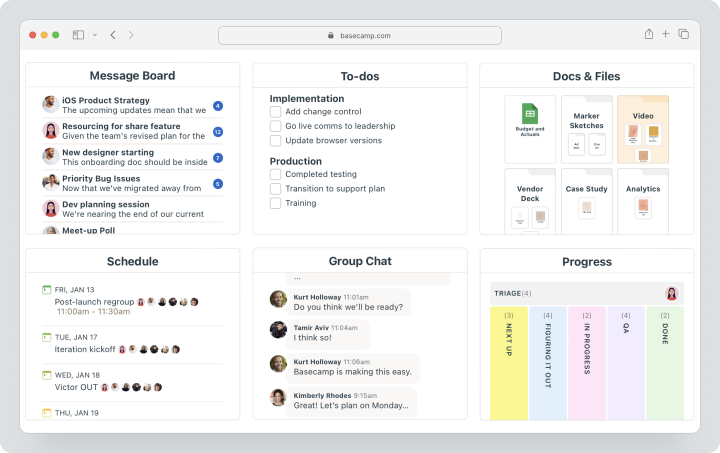
Basecamp offers a free account for 1 project, 1 GB of storage, and up to 20 users. Pro costs $15 per user per month and is billed monthly. Pro Unlimited is available only with annual payment; there is no separate monthly rate for it. It includes unlimited users and projects, 5 TB of storage, advanced administration, time tracking, and personal assistance during setup.
Basecamp’s strength is its simplicity and unified space for team communication. But this very simplicity can become a limitation if the team has grown and needs to manage deadlines, dependencies, workload, budgets, clients, and actual labor costs in more detail.
Why are teams looking for alternatives to Basecamp?
Teams search for alternatives to Basecamp not because the product is weak. More often the reason is that Basecamp handles communication well but a specific team already needs deeper project management features: Gantt charts, dependencies, statuses, time tracking, resource planning, automation, or financial reporting.
Lack of a classic Gantt chart and dependencies
Basecamp helps view tasks, calendar, Lineup, and Card Tables, but for complex project planning, teams often need dependencies between tasks, critical paths, milestone tracking, and Gantt charts.
This is particularly important for agencies, construction, engineering, marketing, and project teams, where one delay impacts the entire schedule.
Limited customization of workflows
Basecamp bets on simplicity. This is convenient for a quick start but does not always suit teams that need custom statuses, various workflows, rules, fields, complex roles, and separate processes for different departments.
If the team wants to customize the system to fit their operational model, they should consider more flexible alternatives to Basecamp.
Analytics and resource management are simpler than in project management systems
Basecamp has reports, Lineup, Mission Control, Hill diagrams, and time tracking, but for resource planning, team workload, profitability control, and portfolio analytics, specialized project management systems usually provide more depth.
For an agency head or PMO, it is important to see not only “what is happening,” but also how much time is spent, who is overloaded, where the project is going over budget, and which tasks are hampering results.
The price is not always convenient for a specific team size
Basecamp has two different models: Pro at $15 per user per month on a monthly basis and Pro Unlimited with a fixed price for the organization, which is available only with an annual subscription. For a large team, the fixed price can be beneficial, but for a small department or a few active users, the per-user model may sometimes be more convenient.
Therefore, it’s important to compare not just the rate, but also the actual composition of the team: employees, clients, contractors, number of projects, volume of files, and necessity for a time tracking module or Admin Pro Pack.
Not everyone has enough deep automation and portfolio management
Basecamp works well as a simple team environment but does not always suit processes where automatic rules, SLAs, custom reports, project portfolios, workload, complex approvals, or integrations with multiple working systems are needed.
In such scenarios, the team starts looking at ClickUp, Asana, monday.com, Wrike, Teamwork, or Smartsheet.
Need built-in tracking of planned and actual time
Basecamp Pro Unlimited includes a Timesheet module, while for Pro it is available as a separate paid extension for $50 per month. The Timesheet module helps track time by projects, users, and tasks, but service teams often want to link time to planned vs. actual, budgets, reports, roles, and client projects within one project logic.
If time tracking affects payment, margin, and workload, this criterion becomes one of the main ones when choosing a replacement for Basecamp.
How to choose an alternative to Basecamp?
Choosing an alternative to Basecamp should not be based on a general rating, but on what the team specifically lacks: Gantt charts, dependencies, time tracking, reports, automation, client access, portfolios, or a more flexible price.
Simplicity of startup and training
If the team values Basecamp for its simplicity, the new system should not be overly complex. Trello is suitable for minimal kanban, Worksection — for project work with clear tasks and reports, and Notion — for teams for whom documents and a knowledge base are important.
Tasks, subtasks, dependencies, and statuses
If work has become more complex, tasks, subtasks, deadlines, assignees, statuses, and dependencies are needed. For an agency or service team, this helps see not just discussions, but the actual progress of the project.
Communication, files, and context
Basecamp is strong in asynchronous communication. Therefore, during the transition, it is important to check where discussions, files, decisions, comments, and notifications will live. A good replacement for Basecamp should not drag the team back into chaos from chats and emails.
Kana, calendar, timeline, and Gantt chart
Different teams look at work differently. Some need a kanban, some a calendar, some a timeline, while project managers often require a Gantt chart. Before selecting, verify which views are available at the desired rate.
Time tracking and reporting
For client projects, it is important to understand how many hours are going into tasks, who is overloaded, and how well the project is adhering to the plan. Therefore, time tracking, time sheets, reports, and planned vs. actual should be checked before migration.
Client and contractor access
If the team works with external participants, guest access, permissions, private discussions, and a clear structure for client projects are needed. This is especially important for agencies, consulting, and service businesses.
Automation and integrations
Automation is needed when the team frequently repeats the same actions: creating tasks, changing statuses, sending notifications, assigning responsible parties, or gathering requests. Integrations are crucial if the new system needs to work with CRM, calendars, files, chats, and accounting.
Quick comparison: service and best scenario
| Service | Best Scenario |
|---|---|
| Worksection | Agencies, service teams, client projects, Gantt, time tracking, and reports |
| ClickUp | Maximum customization, documents, reporting, time tracking, and automation |
| Asana | Cross-functional coordination, goals, portfolios, forms, and timelines |
| Trello | Minimalist kanban and quick start for small processes |
| monday.com | Visual processes, templates, automation, and dashboards |
| Wrike | Corporate processes, approvals, reports, workload, and Gantt |
| Teamwork | Agencies, client projects, time, billing, and profitability |
| Notion | Documents and knowledge bases, and flexible organization of information |
| Zoho Projects | Projects, tasks, time, and integration with Zoho products |
| Smartsheet | Spreadsheet-style project management, portfolios, and processes |
Best alternatives to Basecamp in 2026
Below are 10 solutions that can be considered analogues of Basecamp. Worksection is first because it addresses the scenario where the team enjoys the simplicity of Basecamp but already needs deadlines, Gantt charts, time tracking, reports, access rights, and control of client work.
Worksection
Worksection is a project and task management system for teams that need deadlines, assignees, statuses, discussions, files, time tracking, reports, and client work. Unlike Basecamp, Worksection is built not only around communication but also around controlled project execution.
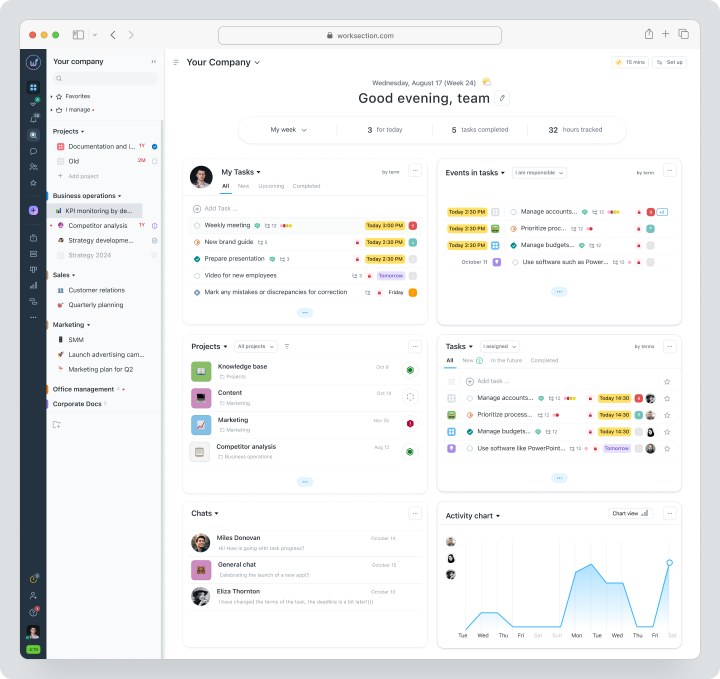
Worksection is suitable for agencies, service companies, consulting, marketing, operations, construction, and project teams. The system allows managing projects, tasks, and two levels of subtasks, assigning responsibles, setting deadlines, working with priorities, statuses, checklists, tags, a kanban board, and a Gantt chart.
Cost: there is a free plan. For monthly billing Basic costs $5 per user per month, Business — $10, Premium — $15. On the pricing page, it states that unlimited projects, time tracking, reports, Gantt chart, custom roles, and other features are offered on paid plans.
Key Features
- projects, tasks, and two levels of subtasks;
- deadlines, responsibilities, priorities, statuses, and tags;
- kanban board and Gantt chart;
- built-in time tracking, time logs and planned vs. actual;
- reports by projects, tasks, and teams;
- guest access, roles, and permissions for clients and contractors;
- comments, files, and history of decisions within tasks.
Main Difference from Basecamp
Basecamp helps keep team communication in one place, whereas Worksection adds stricter project logic: deadlines, Gantt chart, time tracking, reports, roles, and performance control.
Advantages
- suitable for client and service projects;
- built-in time tracking and reports help monitor actual costs;
- Gantt chart, kanban, files, and comments are linked to tasks.
Limitations
if the team only needs simple chat, documents, and task lists, Worksection can be excessive;
for large teams, careful thought into the structure of projects, roles, and permissions is needed;
does not replace niche corporate P‑systems without a specific audit.
Who It’s Suitable For
Worksection is suitable for agencies, service teams, project managers, marketing, and operations departments that need a Basecamp alternative with Gantt charts, time tracking, reports, and client access.
ClickUp
ClickUp is a universal work platform for teams that need extensive customization. ClickUp offers tasks, documents, reporting dashboards, Gantt charts, calendars, time tracking, goals, forms, custom fields, automation, and various work views.
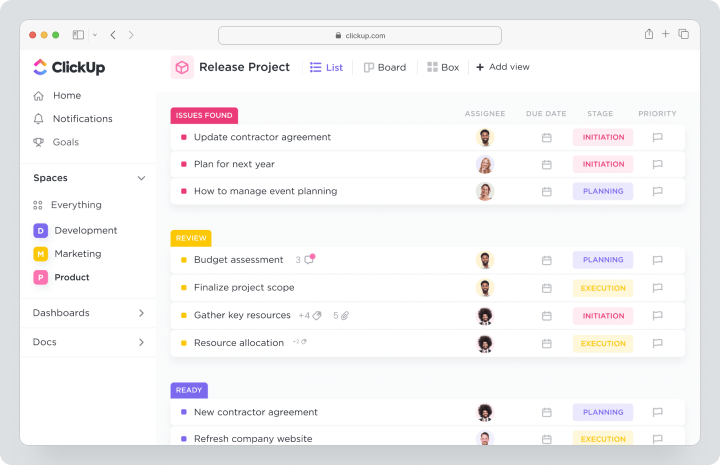
Consider ClickUp as a replacement for Basecamp if the team has outgrown a simple shared space and wants to consolidate tasks, documents, goals, reports, automation, and planning in one workspace.
Cost: there is a free Free Forever plan. For monthly billing Unlimited costs $10 per user per month, Business — $19. Unlimited provides Gantt charts, integrations, and unlimited custom fields, built-in time tracking, goals, portfolio management, guest access with permission settings, and resource management.
Key Features
- tasks, documents, and reporting dashboards;
- Gantt chart, calendar, kanban, list, and more views;
- built-in time tracking;
- custom fields and automation;
- goals, portfolios, and workload management.
Main Difference from Basecamp
ClickUp offers more flexibility, automation, and project control but requires more time for setup and administration.
Advantages
- a wide range of features in one product;
- built-in time tracking on the paid plan;
- flexible workspace customization for different teams.
Limitations
- can be complex for a quick start;
- without rules, the workspace can easily become overloaded;
- a team member is needed to manage process setup.
Who It’s Suitable For
ClickUp suits teams for whom Basecamp is too simple, and the new system needs to cover tasks, documents, automation, reports, and custom workflows.
Asana
Asana is a task and project management system for cross-functional teams. It is used for tasks, projects, forms, goals, portfolios, automation, dependencies, timelines, and managing work across departments.
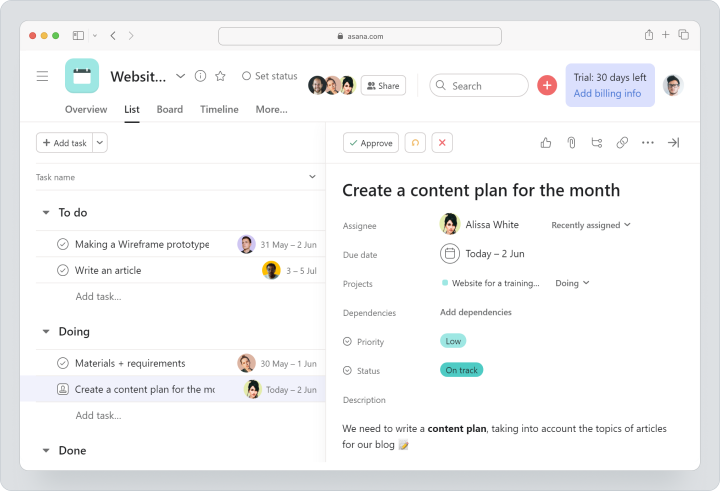
Asana can replace Basecamp if the team needs not just communication, but also a more structured coordination of tasks, deadlines, dependencies, goals, and interdepartmental processes.
Cost: there is a free Personal plan for 2 users. For monthly billing Starter costs $13.49 per user per month, Advanced — $30.49. Starter includes timelines and Gantt charts, reporting dashboards, forms, custom fields, and free guests, while Advanced adds portfolios, goals, workload monitoring, and built-in time tracking.
Key Features
- tasks, subtasks, and dependencies;
- list, board, calendar, timeline, and Gantt chart views;
- forms and custom fields;
- portfolios and goals;
- reporting dashboards, automation, and rules.
Main Difference from Basecamp
Asana focuses more on task coordination and interdepartmental work, while Basecamp is centered around simple team communication and collaboration.
Advantages
- clear task management logic;
- suitable for cross-functional teams;
- strong capabilities for portfolios and goals in higher plans.
Limitations
- some advanced features depend on the pricing plan;
- for large teams, rules for usage must be established;
- not always suitable for service teams that require deep planned vs. actual cost insights.
Who It’s Suitable For
Asana is suitable for marketing, product, operations, and cross-functional teams that need tasks, timelines, goals, and portfolios instead of a simple communication environment.
Trello
Trello is a simple kanban system for teams that need a quick start and minimal setup. It is used by small teams, freelancers, editors, for personal projects, and processes that are easy to manage through boards, lists, and cards.
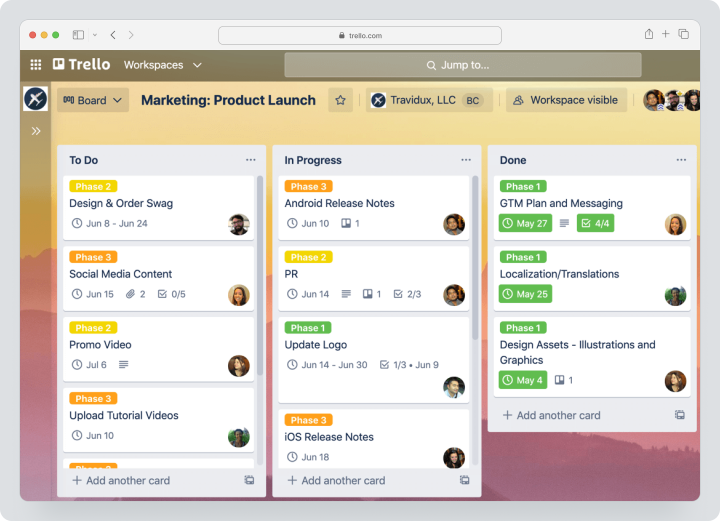
Trello should be considered as an alternative to Basecamp if the team wants not necessarily to replace all communication but to get a more visual kanban for tasks and simple processes.
Cost: there is a free plan for up to 10 participants in a workspace. For monthly billing Standard costs $6 per user per month, Premium — $12.50. Premium adds calendar, timeline, table, reporting panel, and map.
Key Features
- kanban boards;
- cards, checklists, and deadlines;
- Power-Ups;
- automation;
- additional views on Premium.
Main Difference from Basecamp
Trello is easier as a visual kanban but weaker as a full-fledged space for discussions, documents, reports, and client work.
Advantages
- very low entry threshold;
- quick start without complex implementations;
- convenient for small processes.
Limitations
- not the best choice for complex projects;
- time tracking and advanced reporting require Power-Ups or integrations;
- as it scales, boards can become chaotic.
Who It’s Suitable For
Trello suits small teams that need a simple kanban instead of or in addition to Basecamp for visual task tracking.
monday.com
monday.com is a visual work management platform for teams that want to manage processes through boards, templates, automation, timelines, Gantt charts, and reporting dashboards. It is used by marketing, sales, HR, operations, and cross-functional teams.
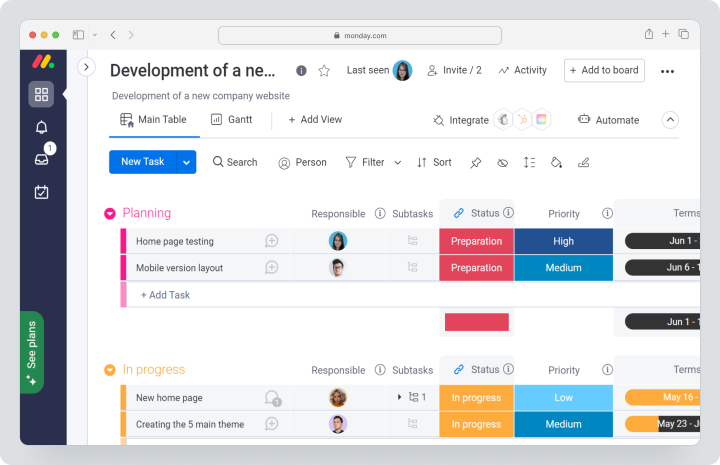
monday.com can replace Basecamp if the team needs more visual processes, automation, statuses, reporting dashboards, and various work views.
Cost: there is a free plan for up to 2 users. For monday work management, Basic costs $12 per user per month, Standard — $14, Pro — $24. Enterprise pricing is customized. Paid plans start with a minimum of 3 users.
Key Features
- visual boards;
- templates for different departments;
- timeline and Gantt views;
- automation and integrations;
- reporting dashboards and analytics;
- guest access on relevant plans.
Main Difference from Basecamp
monday.com is stronger in visual process management and automations, while Basecamp is simpler in communication and asynchronous teamwork.
Advantages
- a lot of templates for different teams;
- convenient reporting dashboards and visual statuses;
- suitable for cross-functional processes.
Limitations
- pricing depends on the region, number of seats, and chosen product;
- some features are only available on higher plans;
- complex boards need to be designed in advance.
Who It’s Suitable For
monday.com is suitable for teams that need a visual process management system instead of just a simple team space from Basecamp.
Wrike
Wrike is a work management system for teams with complex projects, approvals, Gantt charts, reporting dashboards, reports, resource planning, and corporate processes. It is often chosen by companies that need control at the departmental and program levels.
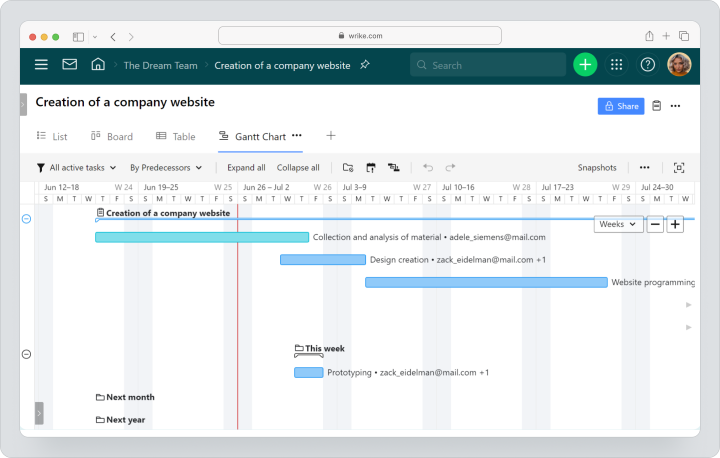
Wrike is worth considering if Basecamp has become too simple for complex projects, approvals, team workload, and corporate reporting.
Cost: there is a free plan and a 14-day trial period. For Team, monthly billing is available, but the exact amount is shown during checkout. Business and higher plans are sold only by annual subscription. For teams of 20 users or more, the service recommends implementation with support; time tracking and advanced resource planning depend on the pricing plan.
Key Features
- project and task management;
- board, table, and Gantt chart;
- reporting dashboards and reports;
- workflows and approvals;
- resource planning on higher tiers;
- corporate access and security capabilities.
Main Difference from Basecamp
Wrike is more suited for complex corporate work management, whereas Basecamp is for simple team communication and basic work organization.
Advantages
- strong reporting dashboards and Gantt charts;
- fits well for larger teams;
- convenient for approvals and complex workflows.
Limitations
- implementation may be more complex than simple tools;
- large teams might need implementation with support;
- some features depend on pricing and configuration.
Who It’s Suitable For
Wrike is suitable for companies with cross-functional projects, approvals, corporate reporting, and resource planning requirements.
Teamwork
Teamwork is a project management platform focused on client work, agencies, service teams, time, billing, and project profitability. Unlike Basecamp, Teamwork focuses more on executing client projects and controlling costs.
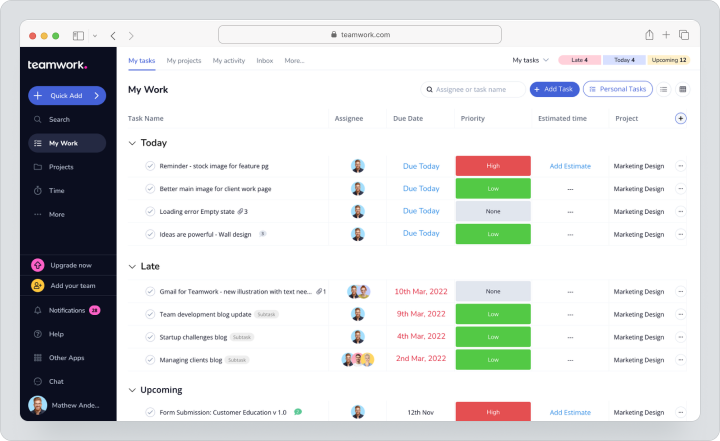
Teamwork is worth considering for agencies that need tasks, milestones, time tracking, resource planning, profitability, budgeting, reporting, and client work in one system.
Cost: there is a free plan for up to 5 users and 5 projects, and the trial period lasts 14 days. For monthly billing, paid plans start at $13.99 per user per month. Annual subscriptions are cheaper, but this comparison uses the monthly cost. Optimize and Enterprise are priced individually.
Key Features
- tasks, milestones, and project templates;
- time tracking and time sheets;
- resource planning;
- budgets and profitability;
- client users and access permissions;
- project and team reporting.
Main Difference from Basecamp
Teamwork is more tailored toward the agency model: client projects, time, budgets, workload, and profitability. Basecamp is simpler and more communication-oriented.
Advantages
- suitable for agencies and service teams;
- includes time, budget, and client work functions;
- helps control project profitability.
Limitations
- may be excessive for small teams without billing;
- process setup takes time;
- final costs should be carefully calculated per user and necessary functions.
Who It’s Suitable For
Teamwork is suitable for agencies, consulting, and service companies that want to transition from Basecamp to a system with client projects, time tracking, billing, and reporting.
Notion
Notion is a workspace for documents, knowledge bases, notes, tables, databases, and lightweight task management. It is often used by teams for whom combining documentation, processes, and simple task management is important.
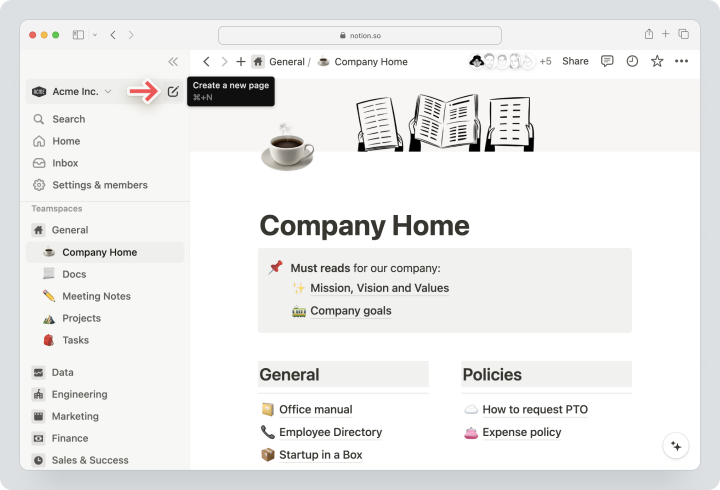
Notion can replace Basecamp if the main task is to structure knowledge, decisions, documents, meeting notes, instructions, and light project bases in one space.
Cost: there is a free plan. For monthly billing in USD, Plus costs $12 per participant per month, Business — $24. Enterprise pricing is customized. Final pricing may vary depending on currency and region.
Key Features
- documents and knowledge base;
- databases;
- tables, boards, calendar, and other views;
- templates;
- pages and blocks;
- basic integrations with other services.
Main Difference from Basecamp
Notion is stronger in documentation and knowledge bases but weaker as a ready-to-use project execution system with time tracking, reporting, and client projects.
Advantages
- convenient to build a knowledge base;
- flexible structure of pages and databases;
- suitable for lightweight task management.
Limitations
- time tracking is not a core strength;
- complex workflows need to be designed manually;
- as the workspace grows, a strict page architecture is needed.
Who It’s Suitable For
Notion is suitable for teams for whom a knowledge base, documents, internal instructions, and a flexible organization of information are more important than deep project management.
Zoho Projects
Zoho Projects is a project and task management system within the Zoho ecosystem. It is often considered by companies already using Zoho CRM, Zoho Books, Zoho Desk, or other Zoho products.
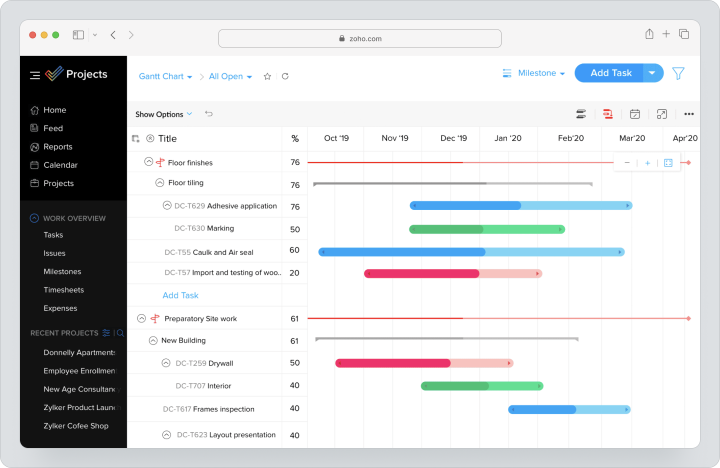
Zoho Projects can replace Basecamp if the team needs tasks, Gantt charts, milestones, time tracking records, time sheets, budgets, workload reports, and integration with other Zoho products.
Cost: there is a 15-day trial period and a free plan for up to 5 users and 3 projects. For monthly billing, Premium costs $5 per user per month, Enterprise — $10, Ultimate — $15. Paid plans add unlimited projects, Gantt charts, workload reports, and advanced project management features.
Key Features
- projects, tasks, and subtasks;
- Gantt chart;
- time tracking records and time sheets;
- budget and EVM;
- workload reports;
- workflow actions;
- integrations with Zoho and third-party services.
Main Difference from Basecamp
Zoho Projects is closer to classic project management and works well within the Zoho ecosystem. Basecamp is simpler and more focused on team communication.
Advantages
- strong tie with Zoho products;
- time records, time sheets, and budget in paid plans;
- the free plan is suitable for very small teams.
Limitations
- the interface and logic may be less familiar for teams outside of Zoho;
- final pricing should be checked against region and currency;
- for complex processes, roles, statuses, and templates need to be set up.
Who It’s Suitable For
Zoho Projects is suitable for small and medium businesses that already use Zoho or want project management within one ecosystem.
Smartsheet
Smartsheet is a work management platform for teams that prefer a spreadsheet approach. It combines spreadsheet views, Gantt charts, boards, calendars, forms, reports, reporting dashboards, formulas, automation, and portfolio scenarios.
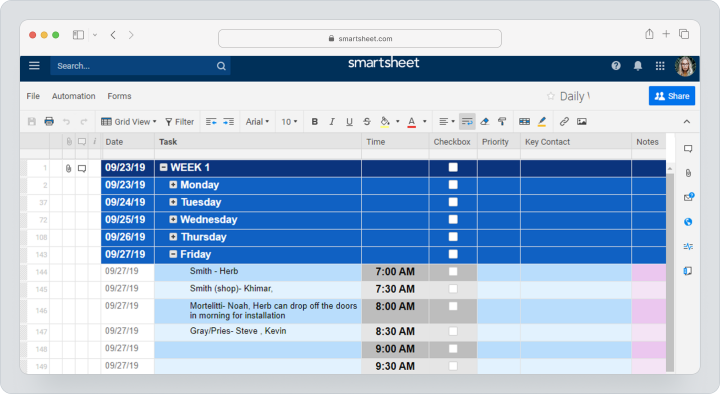
Smartsheet can replace Basecamp if the team wants to transition from a simple team space to a more structured management of processes, sheets, reports, resources, and programs.
Cost: for monthly billing, Pro costs $12 per participant per month, Business — $24. Enterprise and Advanced Work Management are priced individually; separate premium features and additional modules may increase the total cost of ownership.
Key Features
- tables and formulas;
- Gantt chart, board, calendar, and timeline;
- forms and reports;
- reporting dashboards;
- workload control;
- automation.
Main Difference from Basecamp
Smartsheet is stronger in spreadsheet-style process management, reporting, and portfolio scenarios. Basecamp is simpler in communication, discussions, and daily team work.
Advantages
- strong spreadsheet format;
- suitable for PMO and operational processes;
- features Gantt charts, reporting dashboards, and workload control.
Limitations
- can be complex for teams needing a simple task management system;
- for portfolio and corporate scenarios, higher plans are required;
- implementation requires a thoughtful structure of sheets, reports, and access rights.
Who It’s Suitable For
Smartsheet is suitable for PMO, operational, corporate, and project teams that want to manage processes through tables, reports, and portfolios.
Comparative table of Basecamp alternatives
Data on prices and features was verified on 12.08.2026 on the official service pages. Currency, feature availability, and the final cost may vary depending on the region, team size, payment period, and the product chosen.
| Service | Best For | Visualization | Time Tracking | Reports / Analytics | Pricing Model |
|---|---|---|---|---|---|
| Worksection | Agencies and service teams | Kanban, Gantt, calendar | Built-in time tracking | Project and team reports | Free + Basic $5/user/month on a monthly basis |
| ClickUp | Extensive customization | Kanban, Gantt, calendar, reporting dashboards | Built-in time tracking on Unlimited | Reporting dashboards, goals, portfolios | Free + Unlimited $10/user/month on a monthly basis |
| Asana | Cross-functional coordination | List, board, calendar, timeline, Gantt | On Advanced; time sheets and budgets — separate module | Reporting dashboards, goals, portfolios | Free + Starter $13.49/user/month on a monthly basis |
| Trello | Minimalist kanban | Boards; Premium includes calendar, timeline, table, dashboard | Via Power-Ups / integrations | Limited / via Power-Ups | Free + Standard $6/user/month on a monthly basis |
| monday.com | Visual processes | Boards, timeline, Gantt, reporting dashboards | On relevant plans | Reporting dashboards and analytics | Free + Basic $12/user/month on a monthly basis |
| Wrike | Corporate processes and approvals | Board, table, Gantt | Business and higher plans / advanced resource planning | Shared dashboards and extended reporting | Free; Team pricing during checkout is displayed; Business — annual subscription only |
| Teamwork | Agencies and client projects | List, board, Gantt, calendar | Time tracking and timesheets | Reports, budgets, profitability | Free + paid plans starting from $13.99/user/month on a monthly basis |
| Notion | Documents and knowledge base | Databases, pages, calendar, boards | Not a core focus | Via databases, charts, and pages | Free + Plus $12/user/month on a monthly basis |
| Zoho Projects | Teams within the Zoho ecosystem | Gantt, workload, reporting dashboards | Time tracking and timesheets on paid plans | Reporting, portfolio dashboard | Free for up to 5 users + Premium $5/user/month on a monthly basis |
| Smartsheet | Spreadsheet management and PMO | Table, Gantt, board, calendar, timeline | Via processes and fields / additional modules | Reports, dashboards, portfolio analytics | Pro $12/user/month on a monthly basis |
Which Basecamp alternative to choose?
The choice depends on why the team is looking for a replacement for Basecamp. If planning is lacking, one group of solutions is needed. If the issue is price, simplicity, or client work, the criteria will be different.
For service and project teams
Choose Worksection if the team manages client projects, tracks time, works with contractors, oversees deadlines, and wants to see reports by projects without manual gathering.
For maximum customization
Choose ClickUp if a universal system with tasks, documents, reporting, automations, Gantt charts, time tracking, and flexible workflow customization is needed.
For cross-functional coordination
Choose Asana if goals, portfolios, dependencies, forms, and coordination among departments are important for the team.
For a simple start
Choose Trello for a minimalist kanban and quick start without complex implementation.
For visual processes
Choose monday.com if the team wants to build processes through boards, templates, reporting dashboards, and automation.
For agencies with billing
Choose Teamwork if client projects, time tracking, budgets, profitability, and tracking billable hours are important.
For complex corporate requirements
Choose Wrike, Smartsheet, or Microsoft-oriented solutions after a pilot and checking roles, security, integrations, reports, and total cost of ownership.
How to transition from Basecamp without losing data?
Transitioning from Basecamp should start not with selecting the export button but with auditing processes. It’s important to understand what is stored in projects: tasks, messages, files, client discussions, decisions, dates, status polls, or working documents.
- Document the current projects, roles, teams, clients, and contractors.
- Define which Basecamp elements need transferring: task lists, messages, files, cards, schedules, comments, check-ins.
- Clean up archived projects, outdated files, and duplicates.
- Select one pilot process for migration.
- Map Basecamp entities to the new system: projects, tasks, subtasks, statuses, comments, files, roles, and deadlines.
- Ensure that client access and private discussions are configured correctly.
- Set up reports, notifications, roles, and work rules in the new system.
- Train process owners and the team.
- Conduct a parallel period so the team doesn’t lose context.
- Only after verifying, turn off the old system or move it to archive.
The main mistake is migrating projects “as is.” If the new system provides more structure, it’s better to rebuild the process around tasks, deadlines, responsibles, access rights, and reporting immediately.
When is Worksection a suitable alternative to Basecamp?
Consider Worksection as an alternative to Basecamp if the team wants to maintain a clear project workflow but add more control over deadlines, tasks, time, clients, and reports.
Worksection is especially suitable if:
- the team manages several parallel projects;
- it is necessary to see deadlines and dependencies in a Gantt chart;
- it’s important to account for actual time and planned vs. actual expenses;
- clients or contractors are involved in projects;
- managers need reports without manual compilation;
- employees are losing deadlines and context in discussions;
- a quick start without heavy administration is needed.
Worksection should not be positioned as a replacement for Basecamp for teams that only need simple chat, documents, and basic task lists. But if the team works on client projects, deadlines, time, and reporting, Worksection provides more project control without transitioning to a complex corporate system.
Frequently Asked Questions
Which Basecamp alternative is better for agencies?
For agencies, Worksection or Teamwork often fits well. Worksection is convenient if client projects, tasks, deadlines, Gantt charts, time tracking, reports, and guest access are needed. Teamwork should be considered if billing, profitability, and managing billable time are particularly important for the agency. For maximum customization, ClickUp can be tested.
Are there free alternatives to Basecamp?
Yes, free alternatives to Basecamp exist. Free plans are available for Worksection, ClickUp, Asana, Trello, monday.com, Wrike, Notion, Zoho Projects, and Smartsheet. But limitations vary: user number, projects, boards, storage, automation, access to Gantt charts, reports, or client access. The free plan is best used for testing before a transition.
What to choose: Basecamp or Worksection?
Basecamp should be chosen if simplicity, bulletin boards, task lists, Campfire, documents, files, and asynchronous communication are important for the team. Worksection is better suited if, in addition to communication, tasks, subtasks, deadlines, Gantt charts, time tracking, reports, guest access, and client project control are needed.
Which Basecamp alternative has Gantt charts?
The Gantt chart is available in Worksection, ClickUp, Asana, monday.com, Wrike, Teamwork, Zoho Projects, and Smartsheet at relevant plans. For service teams, Worksection is convenient because Gantt is linked to tasks, deadlines, time, and reports. For corporate scenarios, it’s worth comparing Wrike and Smartsheet.
Which system is better for remote teams?
For remote teams, the choice depends on the working style. Basecamp is good for asynchronous communication and a simple shared space. Worksection fits a remote team that needs deadlines, tasks, Gantt charts, reports, and client access. Notion is convenient for a knowledge base, and Trello is for a simple visual kanban.
Is Trello suitable as a replacement for Basecamp?
Trello is suitable as a replacement for Basecamp if the team needs a simple kanban for tasks rather than a full-fledged space for messages, files, check-ins, and client communication. It is good for small processes, but for complex projects, time tracking, reports, and roles, Worksection, ClickUp, or another project management system is often needed.
How does ClickUp differ from Basecamp?
ClickUp differs from Basecamp in terms of customization level. ClickUp offers more task types, custom fields, reporting dashboards, Gantt charts, automation, time tracking, goals, and workload. Basecamp is simpler and more relaxed for team communication. ClickUp is worth choosing if the team is ready to customize the system and manage processes in more detail.
How to migrate projects from Basecamp?
Migrating projects from Basecamp should start with an audit: which projects are active, which files are needed, and which task lists, messages, comments, and dates must be retained. Then it’s best to select a pilot project, migrate the structure to the new system, check access rights, and only then scale the migration to the whole team.
For which team is Basecamp’s fixed pricing advantageous?
Basecamp’s fixed pricing for Pro Unlimited is advantageous for teams with a large number of employees, projects, and external participants, as there is no charge per user. But for small teams or departments, the per-user model in another system may be cheaper. You need to calculate costs for each specific number of employees, clients, and needed functions.
Which alternative includes time tracking and reporting?
Worksection includes time tracking and reports in its project logic. ClickUp offers built-in time tracking on Unlimited. Teamwork is oriented toward agencies, time, budgets, and profitability. Zoho Projects includes time tracking records and timesheets on paid plans. In Basecamp, the Timesheet module is included in Pro Unlimited or added as an additional module.
Conclusion
Basecamp remains a strong product for teams that need simple communication, task lists, bulletin boards, Campfire, Pings, Card Tables, documents and files, automatic status polls, and a clear shared space for work. But the best alternative to Basecamp depends on what the team lacks: Gantt charts, dependencies, time tracking, reports, automation, client access, or portfolio management.
If a project-task system for service and client projects is needed, consider Worksection: tasks, subtasks, deadlines, Gantt chart, kanban, time tracking, reports, and guest access help manage deadlines and labor costs without heavy corporate logic. If maximum customization is needed, ClickUp is a fit. For cross-functional coordination, Asana can be chosen, for a simple kanban — Trello, for visual processes — monday.com, for agency billing — Teamwork, for documents — Notion, for the Zoho ecosystem — Zoho Projects, for PMO — Smartsheet or Wrike.
Before transitioning, don’t choose a service solely based on price or popularity. First, describe current processes, active projects, roles, client access, files, reports, requirements for time and budget. Then test 2 – 3 alternatives on one real project. This way, you will choose not just a Basecamp analogue but a system that truly fits your team.