Solutions
worksection
beta
help
How are project statuses configured and where are they displayed?
Project statuses mark the stage of work at the entire project level and help the team quickly understand progress.
Permissions The following have access:- Owner
- Account Administrator with permission: "Access to account settings".
To configure and view project statuses, go to Administration → Workflows → "Project statuses" tab1.
Here you can create a status by clicking the "+" button2 or edit/rename/delete a status using the "three dots" menu3.
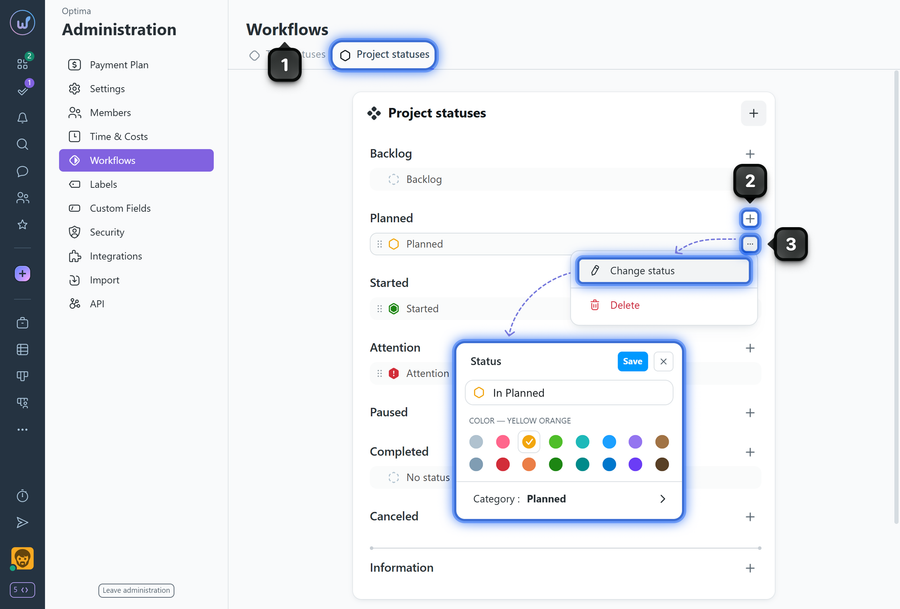
Where project statuses are displayed:
- In the projects panel — as a status icon.
- On the specific project page — in the header/main info.
- When viewing account project pages (Kanban, List, Cards).
Restrictions
- The "Project statuses" feature is available on Business and Premium plan.
- When deleting a status assigned to projects, those projects need to be moved to another status. If there are other statuses in the same category, you can move projects to Backlog ("no status") or select any other status in that category. If there are no other statuses in the category, projects will automatically be assigned Backlog ("no status").
- The order of project statuses affects the order of columns on the projects Kanban page.
Leave your review
Did this article help you?
Glad we could help! What was helpful?
Sorry this didn't help. What went wrong?
Previous
How to create a new workflow?

