Solutions
worksection
beta
help
How to delete a workflow? What are the deletion restrictions?
Permissions The following have access:
- Owner
- Account Administrator with permission: "Access to account settings".
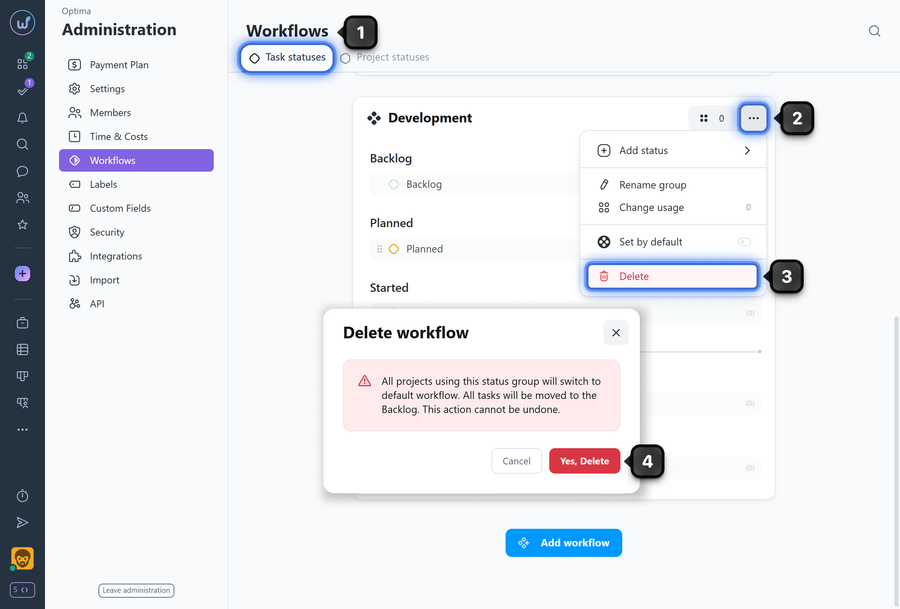
To delete a workflow:
- Go to Administration → Workflows.
- Find the desired workflow in the list and click "three dots" on the workflow card.
- Select "Delete".
- Confirm the action.
Restrictions
- The standard "General process" created automatically after account registration cannot be deleted.
- Only manually created workflows can be deleted.
Please note! After deleting a workflow, all tasks in the projects where it was used will receive the "backlog" status (i.e., become tasks "without a status"). The "default" workflow will automatically be applied to those projects.
Leave your review
Did this article help you?
Glad we could help! What was helpful?
Sorry this didn't help. What went wrong?

