Solutions
worksection
beta
help
How to delete or edit a status in a workflow?
Permissions The following have access to deleting and editing statuses:
- Owner
- Account Administrator with permission: "Access to account settings".
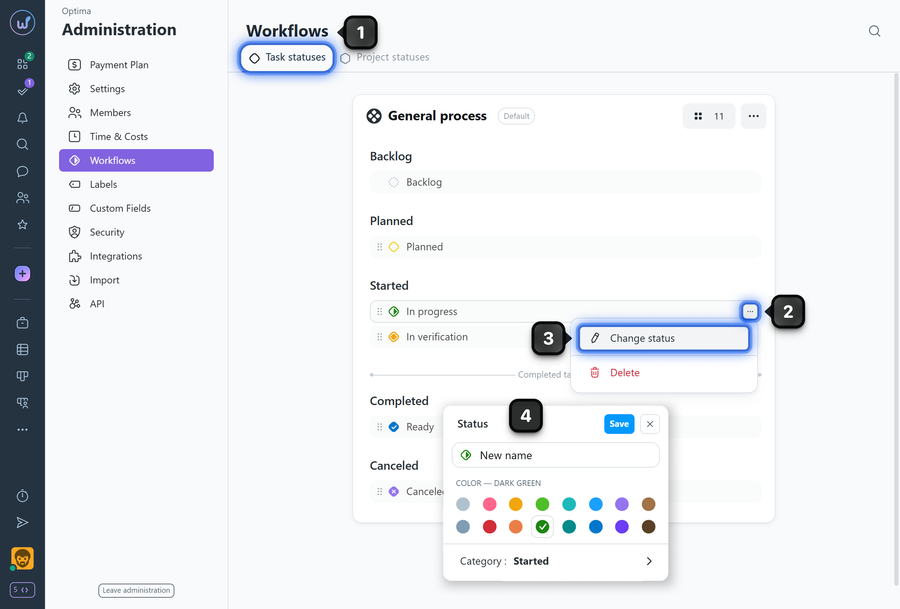
To edit a workflow status:
- Open Administration → Workflows.
- Hover over the status and click the "three dots" button.
- To edit: select "Change status".
- Change the name, color, or category of the status and click "Save".
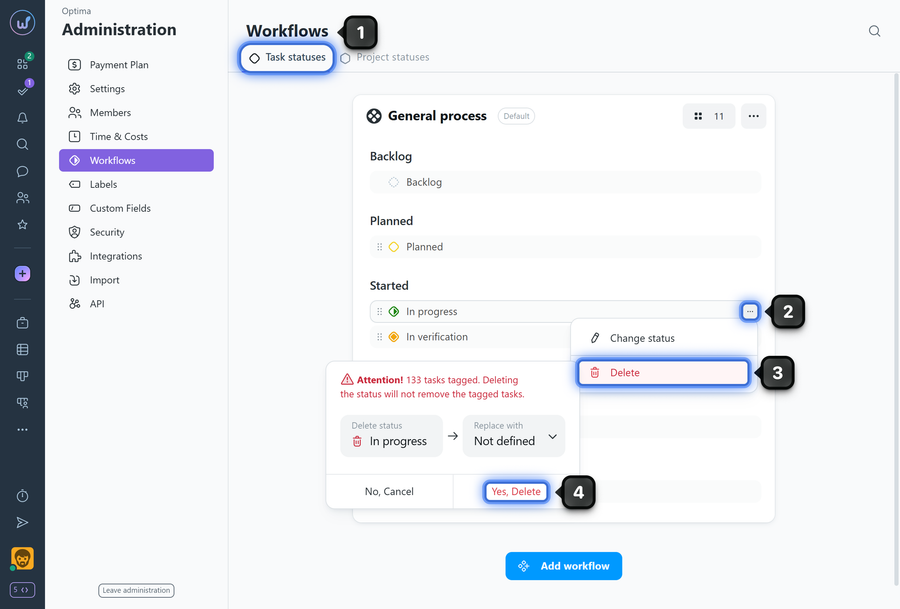
To delete a workflow status:
- Open Administration → Workflows.
- Hover over the status and click the "three dots" button.
- To delete: select "Delete".
- Confirm the action.
Please note!
- Changes to the status set and order are applied to all projects where this workflow is active.
- The order of statuses determines the order of columns in the project task Kanban view.
- When deleting a status that is used in tasks, those tasks must be moved to another status. If there are other statuses in the same category, you can move tasks to Backlog (“no status”) or choose any other status from that category. If there are no other statuses in the category, tasks will automatically be moved to Backlog (“no status”).
- The “Backlog” status cannot be deleted.
Leave your review
Did this article help you?
Glad we could help! What was helpful?
Sorry this didn't help. What went wrong?

