Solutions
worksection
beta
help
How to drag a status between categories or change its position?
Dragging statuses allows you to quickly change the sequence of stages and the display of columns in the Kanban view.
Permissions The following have access to these actions:
- Owner
- Account Administrator with permission: "Access to account settings".
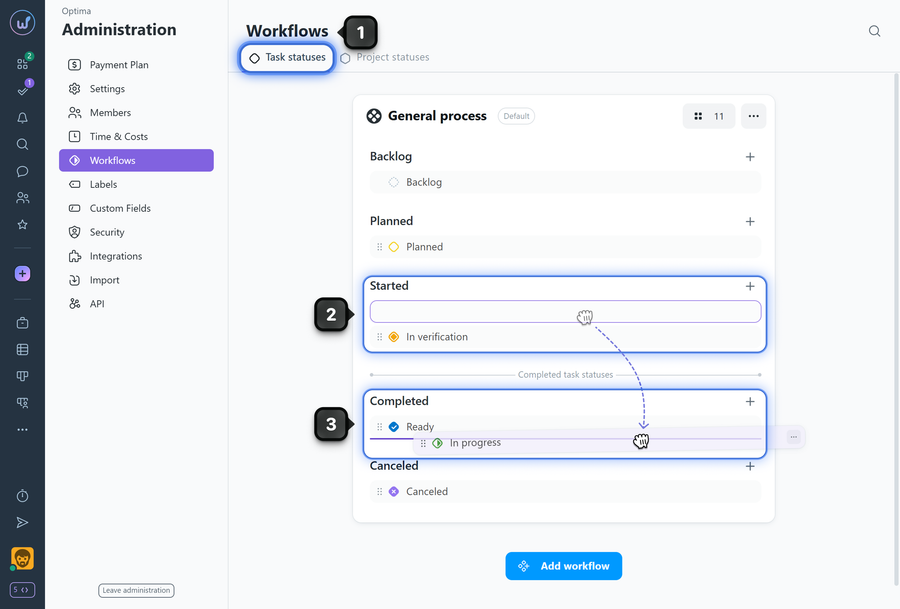
To change the order of statuses in a workflow:
- Go to Administration → Workflows.
- Hover over a status and, holding the left mouse button, drag the status to the desired position within the workflow.
- Release the button to fix the new position.
Please note!
- The order of statuses determines the order of columns in the project's Kanban task view.
- Changes to the workflow apply to all projects where this workflow is active.
- Each category can have an unlimited number of statuses and their order can be changed at any time.
Leave your review
Did this article help you?
Glad we could help! What was helpful?
Sorry this didn't help. What went wrong?

