Solutions
worksection
beta
help
How to assign a workflow to a project from the account administration page?
Permissions The following can assign a workflow to projects from the Account Administration > Workflows page:
- Owner
- Account Administrator with permission: "Access to account settings.
To assign a workflow to projects from the account administration page, go to Administration → Workflows.
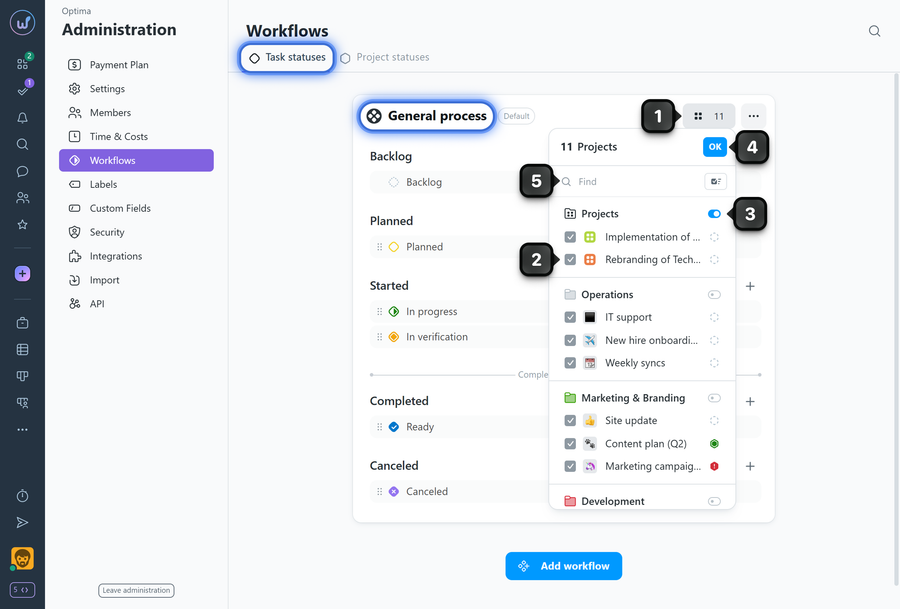
Find the desired workflow in the list (e.g., "General process") and click the button showing the number of projects1 to which this workflow is assigned. Check the desired projects2 or all projects in a folder3 and click "OK"4. Use the search field5 to quickly find the needed project.
Please note!
- In a workflow marked as "default", projects cannot be removed, as each project must have an active workflow.
- If a project is removed from a workflow that is not the "default", the system will automatically assign the "default" workflow to it.
Leave your review
Did this article help you?
Glad we could help! What was helpful?
Sorry this didn't help. What went wrong?

