Solutions
worksection
beta
help
How to add a status to a workflow?
Permissions The following can add a status to a workflow:
- Owner
- Account Administrator with permission: "Access to account settings".
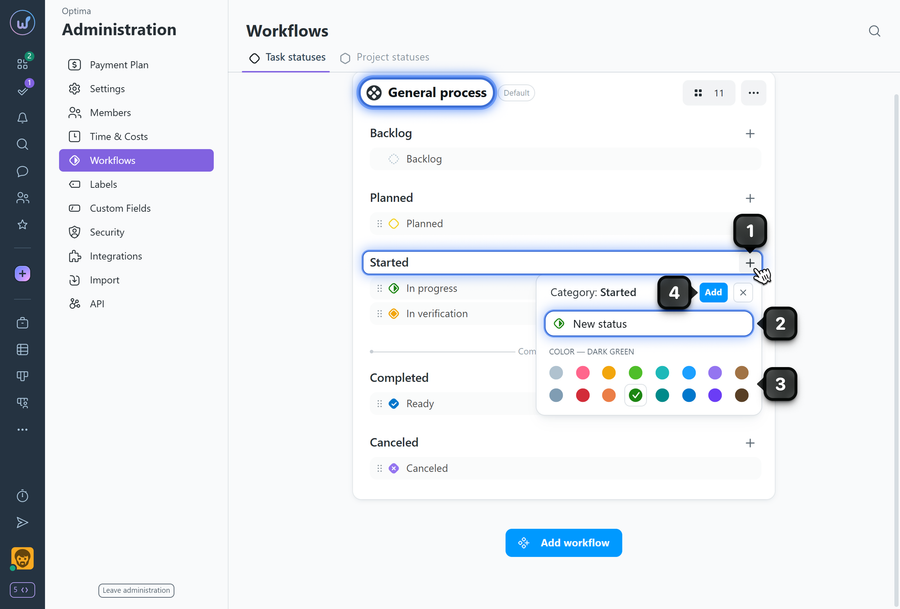
To add a status, go to Administration → Workflows. Find the desired workflow in the list (e.g., "General process") and in the desired category click the "plus" button1 to add a status:
2 enter the status name;
3 optionally select a color;
4 click "add".
What to know
- The order of statuses determines the order of columns in the project's Kanban task view.
- It is usually not necessary to add a status to the "Backlog" category. It already has an initial "Backlog" status which forms the corresponding column on the Kanban page, where all tasks without a status are placed.
- There is no limit on the number of statuses in a workflow.
- Changes to the workflow apply to all projects where this workflow is active.
Leave your review
Did this article help you?
Glad we could help! What was helpful?
Sorry this didn't help. What went wrong?

