Solutions
worksection
beta
help
What does the "Workflows" section contain and what is it for?
Permissions The following have access to these settings:
- Owner
- Account Administrator with permission: "Access to account settings".
Workflows are sets of statuses for tasks and projects. They help standardize the stages of task and project execution, simplify navigation in the Kanban view, and align the rules for transitions between stages.
Note Project statuses are available on Business and Premium plans.
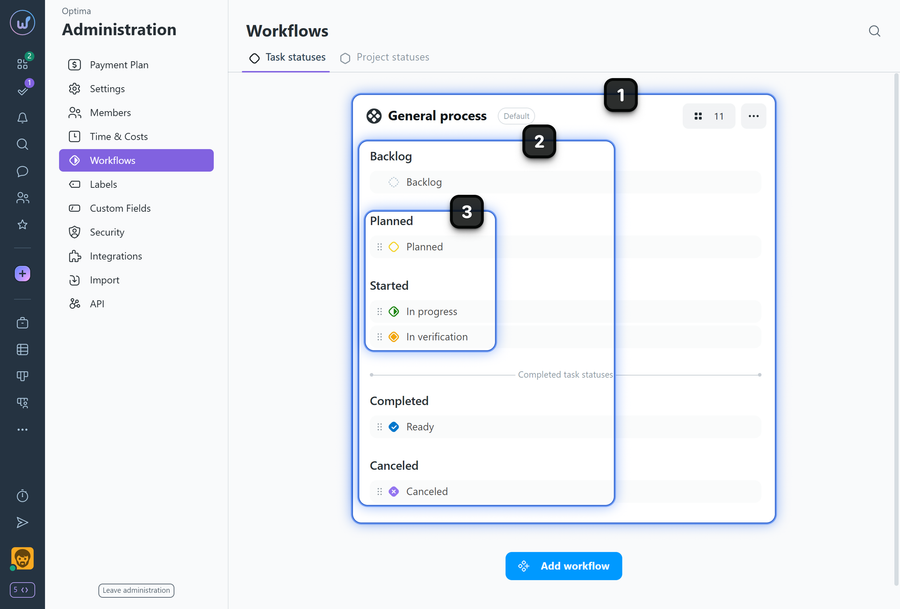
1 General process — created automatically after account registration and applied to all new projects by default. You can select any of the workflows as the "default" and it will be applied to all new projects.
2 Categories — each workflow consists of logical categories (e.g., Backlog, Planned, Started, Completed, Cancelled).
3 Statuses — inside categories you can add custom statuses, set names and colors, and reorder them by drag & drop.
Please note! The order of statuses in the workflow determines the order of columns in the project's Kanban view. Changing the sequence of statuses changes the column arrangement.
Leave your review
Did this article help you?
Glad we could help! What was helpful?
Sorry this didn't help. What went wrong?

