The best alternative to Smartsheet depends on the scenario: some need familiar spreadsheet logic with formulas and dashboards, while others prefer a more visual project management system instead of spreadsheets, where each task has an assignee, deadline, status, discussion, files, and actual execution time.
Smartsheet remains a strong product for teams managing processes through sheets, spreadsheets, Gantt chart views, reports, forms, automated workflows, and project portfolios. However, users look for alternatives to Smartsheet when they want to understand how to replace Smartsheet without a complex spreadsheet model, expensive modules, or prolonged administration.
In this article, we compare 10 solutions: Worksection, Airtable, Asana, monday.com, ClickUp, Wrike, Microsoft Project, Trello, Notion, and Zoho Projects. All alternatives to Smartsheet are analyzed within one structure: positioning, cost, key features, main differences from Smartsheet, advantages, limitations, and use cases.
Which Smartsheet alternative to choose quickly
- Worksection — for service and project teams needing a project-task logic, Gantt chart, time tracking, reports, roles, and client access without complex spreadsheets.
- Airtable — for teams needing flexible databases, different views, no-code scenarios, and more freedom in data structure.
- Asana — for cross-functional teams where tasks, portfolios, goals, automation, and interdepartmental coordination are essential.
- monday.com — for visual processes, templates, automation, dashboards, and workboards.
- ClickUp — for teams needing a versatile working platform with many customization options.
- Microsoft Project — for classic calendar-network planning, resources, budgets, and complex project schedules.
Not everyone needs to move away from Smartsheet. If the team works well with sheets, formulas, reports, automations, Control Center, Dynamic View, or Data Shuttle, migration might be unnecessary. But if employees perceive processes as a “table of tasks,” and a manager needs clear deadlines, time, discussions, and performance control, it’s worth comparing alternatives.
What is Smartsheet and what tasks is it used for?
Smartsheet is a work management platform that combines a spreadsheet approach, project management, automation, forms, reports, dashboards, and portfolio scenarios. It is often chosen by PMO, operations teams, marketing, large companies, and leaders who find it important to manage processes through structured data.
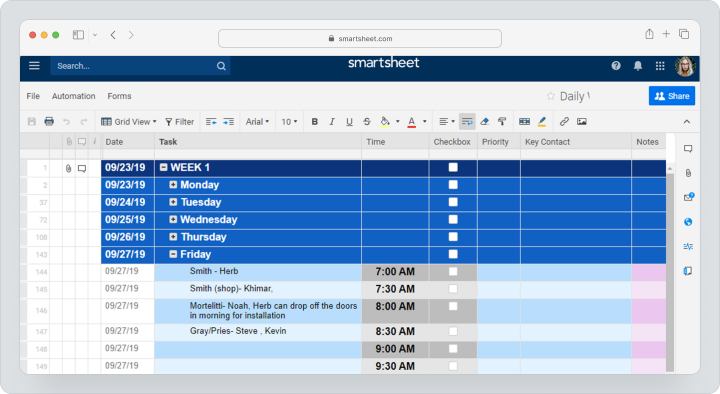
Smartsheet has a spreadsheet view, Gantt chart view, board, calendar, reports, forms, dashboards, automated workflows, formulas, dependencies, and mobile applications. Higher plans and additional solutions offer more complex scenarios: portfolios, Control Center, Dynamic View, Data Shuttle, Connectors, resource management, and other premium applications.
With monthly payments, Smartsheet Pro costs $12 per participant per month, Business — $24. Enterprise and Advanced Work Management are priced individually. Additional premium features and modules, including Dynamic View, Data Shuttle, resource management, and Control Center, can increase the total cost of ownership.
Smartsheet’s strength lies in working with projects and processes where tables, data connections, reports, and scaling across multiple teams are important. But the spreadsheet logic can become a limitation if a team wants to manage daily work through tasks, discussions, checklists, statuses, and actual time.
Why are teams looking for alternatives to Smartsheet?
Teams search for alternatives to Smartsheet not because the product is weak. More often, the reason is that a specific business needs a different management model: fewer tables, more tasks, simpler implementation, clearer time tracking, clearer client work, or lower total cost of ownership.
The spreadsheet interface is not always convenient for daily tasks
Smartsheet is convenient for teams thinking in rows, columns, formulas, filters, and reports. But executors often find it easier to work with a task as a separate unit of work: open it, see the deadline, assignee, checklist, comments, files, and history of decisions.
If a team loses context in the rows of a table, it’s worth comparing Smartsheet with task-oriented systems where tasks and communication are in one place.
Complexity of setting up sheets, reports, and dashboards
Smartsheet offers a lot of flexibility, but that flexibility requires administration. The structure of sheets, connections, reports, formulas, views, automations, and access permissions need to be well thought out.
For PMO, this can be an advantage. For an agency, marketing team, or small business, such setup can sometimes become an unnecessary burden.
Total costs can rise due to modules and licenses
The base price does not always reflect the actual cost of the system. In Smartsheet, individual premium features and additional modules can affect the overall budget: for example, Dynamic View, Data Shuttle, Calendar App, DataMesh, Pivot App, Connectors, Brandfolder, or resource management.
So it’s important to consider not just the per-user fee, but all mandatory modules, administration, support, implementation, and team training.
Employees may find it difficult to work with formulas and sheet structure
If the team has outgrown Excel or Google Sheets, moving to Smartsheet may seem logical. But if employees are not used to spreadsheet logic, they may perceive the system as a complex table where it’s easy to miss updates, connections, and comments.
In such cases, it’s better to look at Smartsheet analogs, where daily work is built around tasks, statuses, boards, deadlines, and notifications.
Not everyone has enough project context inside a row
In a table, a row can be a task, phase, request, client, or process unit. But discussions, files, decisions, plan/fact, and history of changes are not always perceived as naturally as in a full-fledged project task.
For service teams working with clients, contractors, and actual labor costs, this is a critical point.
Built-in time tracking and transparent client work are needed
Agencies, consulting, construction, marketing, and service teams need to see not only the status of a task but also the actual time, workload, project costs, and reports on client projects.
If time tracking, client access, and reports have to be collected manually or through additional tools, the team starts looking for a replacement for Smartsheet.
How to choose an alternative to Smartsheet?
Choosing an alternative to Smartsheet should not be based on overall ratings, but rather on which management logic fits the team: spreadsheets, databases, tasks, portfolios, Kanban, Gantt charts, resources, or no-code processes.
Data model: sheets or projects and tasks
First, decide what the primary work unit is. If it’s a row of data, Smartsheet, Airtable, or Notion will work. If it’s a task with an assignee, deadline, discussion, and time, look at Worksection, Asana, ClickUp, monday.com, Wrike, or Zoho Projects.
Views: table, Kanban, calendar, Gantt chart, and timeline
A good Smartsheet replacement should display work in different views. PMO often needs Gantt charts and timelines, marketing requires calendars, agencies need Kanban and Gantt charts, operations teams prefer task lists and reports.
Forms, reports, and dashboards
If Smartsheet is used for gathering requests, reporting, and management dashboards, check if the alternative offers forms, reporting panels, filters, reports, and data export. Otherwise, migration will simplify tasks but worsen management insights.
Automation and action limits
Automation is useful if the team frequently repeats the same actions: notifications, status updates, assigning responsibilities, creating tasks, and updating fields. It’s important to check not only the presence of automations but also the action limits on the chosen plan.
Time tracking, budgets, and workload
If the team tracks hours, budgets, or workload, verify time tracking, timesheets, workload control, budget, plan/fact, and reports on actual expenses. For service businesses, this is often more critical than the number of views in a table.
Roles, guest access, and security
If projects involve clients, contractors, or external performers, flexible permissions, guest access, private comments, and secure file handling are essential. For corporate teams, SSO, administration, auditing, and access policies are also crucial.
Integrations and data transfer
Before switching, check if sheets, attachments, comments, statuses, fields, and reports can be exported. Even if there’s an import, it’s better to start with a pilot project than to transfer the entire company in one day.
Brief comparison: service and best scenario
| Service | Best scenario |
|---|---|
| Worksection | Project-task logic, client projects, Gantt chart, time tracking, and reports |
| Airtable | Flexible databases, no-code applications, various views, and data relationships |
| Asana | Tasks, portfolios, goals, and cross-functional coordination |
| monday.com | Visual processes, templates, automations, and dashboards |
| ClickUp | Universal working platform with extensive customization options |
| Wrike | Corporate processes, approvals, Gantt charts, reporting panels, and analytics |
| Microsoft Project | Classic planning, resources, budgets, dependencies, and portfolios |
| Trello | Simple Kanban alternative for small processes |
| Notion | Documents and knowledge bases and light project bases |
| Zoho Projects | Projects, tasks, Gantt chart, time tracking, and Zoho ecosystem |
Best Smartsheet Alternatives in 2026
Below is a list of 10 services that can be considered Smartsheet alternatives. Worksection is listed first because it covers the scenario where a team wants to move from a “row in a spreadsheet” to a managed task with an assignee, deadline, status, discussion, files, and actual time tracking.
Worksection
Worksection is a project and task management system for teams that need deadlines, assignees, statuses, discussions, files, time tracking, reports, and client collaboration. As a Smartsheet replacement, Worksection should not be viewed as a spreadsheet equivalent, but as a task-oriented alternative: instead of a row in a sheet, the team gets a full-fledged task.
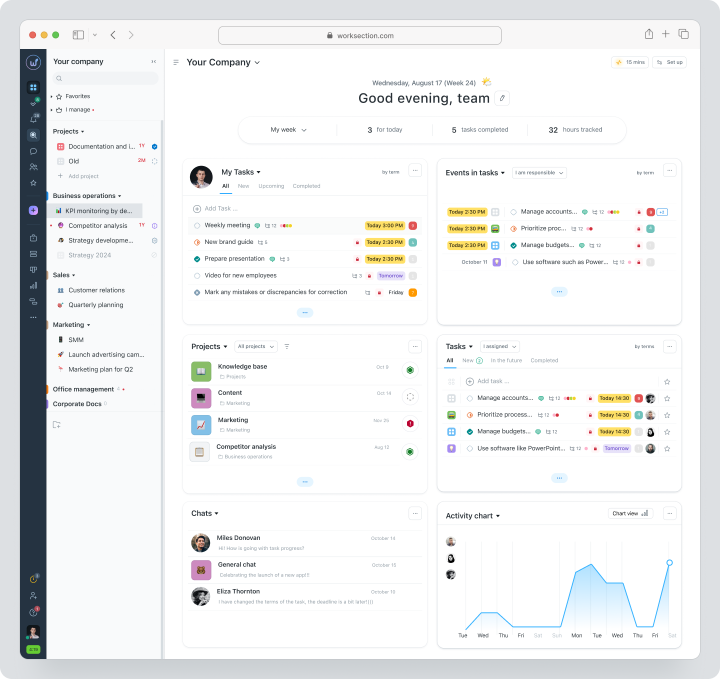
Worksection is especially suitable for agencies, consulting, construction, marketing, operations, and service teams that need to manage multiple projects, involve clients or contractors, track actual time, and access reports without collecting the data manually.
Pricing: There is a free plan for up to 5 users and 2 projects. With monthly billing, Basic costs $5 per seat per month, Business — $10, and Premium — $15. Business includes guest access, Gantt charts, time and financial tracking, day planning and a timer, API, and webhooks.
Key features
- Projects, tasks, and two levels of subtasks;
- Deadlines, assignees, priorities, statuses, and tags;
- Kanban boards and Gantt charts for projects;
- Built-in time tracking and planned vs. actual time;
- Reports for projects, tasks, and teams;
- Guest access, roles, and permissions for clients and contractors;
- Comments, files, and decision history within tasks.
Main difference from Smartsheet
Worksection shifts work from spreadsheet logic to project-and-task logic. This is convenient when task execution, deadlines, discussions, clients, and actual effort are more important to a team than complex relationships between sheets.Advantages
- Clear structure for service and client projects;
- Built-in time tracking and reports;
- Gantt charts, Kanban, tasks, files, and comments are connected within the project.
Limitations
- Does not replace complex Smartsheet PPM scenarios without an audit;
- Not suitable if a team builds its processes around complex tables, formulas, and linked sheets;
- Large companies should plan the structure of roles and permissions in advance.
Best for
Worksection is suitable for agencies, service teams, consulting, construction, marketing, and operations departments that need a project management system instead of spreadsheets.Airtable
Airtable is a flexible database, app-building, and workflow platform for teams where data is as important as tasks. It is often chosen by teams that need freedom in their structure: tables, linked records, different views, interfaces, and automations.
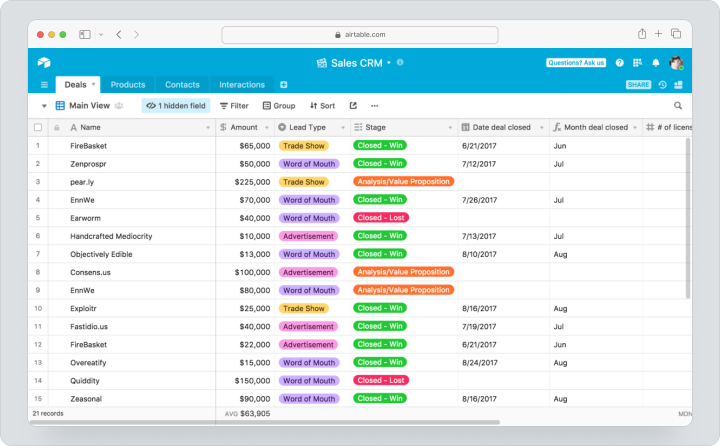
Airtable is closer to a database than to a classic project management system. This makes it well suited for content calendars, CRM, product operations, inventory management, catalogs, marketing processes, and internal no-code tools.
Pricing: There is a free plan. With monthly billing, Team costs $24 per participant per month, while Business costs $54. Participants with corresponding editing permissions are billed on these plans; read-only users, form submissions, and public share links are not billed under the same rules.
Key features
- Flexible databases;
- Table, Kanban, calendar, gallery, and timeline views;
- Forms and interfaces;
- Automations;
- Links between tables;
- No-code applications and workflows.
Main difference from Smartsheet
Airtable is more like a flexible relational database and a no-code solution-building platform. Smartsheet is more strongly focused on work management, reporting, dashboards, and enterprise processes.Advantages
- Highly flexible data structure;
- Convenient for building internal databases and interfaces;
- Suitable for no-code scenarios.
Limitations
- Not always convenient as a strict task execution system;
- Complex structures require a database administrator;
- Costs can increase as the number of users and volume of data grow.
Best for
Airtable is suitable for teams that need databases, linked records, no-code workflows, and flexible views.Asana
Asana is a task and project management system for cross-functional teams. It is used for task planning, deadline management, portfolio management, goals, automation, forms, and coordination between departments.
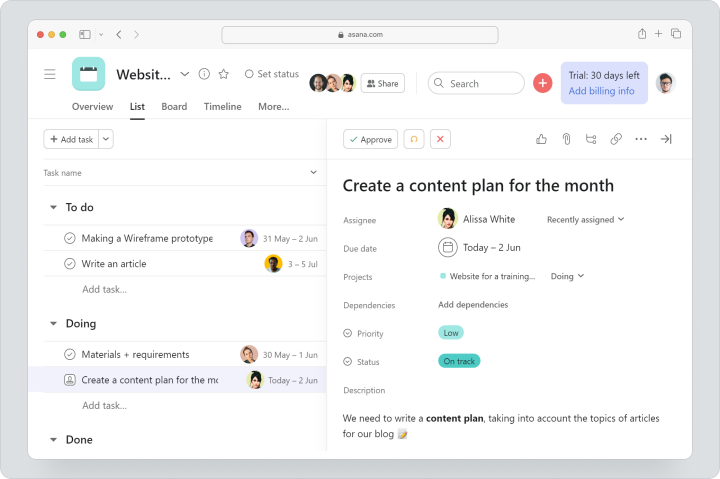
As a Smartsheet alternative, Asana is suitable for teams that want to move from spreadsheet logic to more familiar task management: tasks, subtasks, assignees, deadlines, dependencies, projects, portfolios, and dashboards.
Pricing: There is a free Personal plan for up to 2 users. With monthly billing, Starter costs $13.49 per user per month, while Advanced costs $30.49. Starter includes timeline and Gantt chart views, while Advanced adds portfolios, goals, workload management, and built-in time tracking. The separate Timesheets and Budgets module is sold separately and billed annually; no separate monthly price is listed for it.
Key features
- Tasks, subtasks, and dependencies;
- List, board, calendar, timeline, and Gantt chart views;
- Forms and custom fields;
- Portfolios and goals;
- Dashboards, automations, and rules.
Main difference from Smartsheet
Asana is less spreadsheet-oriented and more focused on task coordination and teamwork. This makes it convenient when Smartsheet is being used as an overloaded task list.Advantages
- Clear task management logic;
- Suitable for cross-functional teams;
- Strong portfolio and goal management on higher-tier plans.
Limitations
- Does not replace complex Smartsheet spreadsheet models;
- Time tracking and some advanced features depend on the plan;
- Large teams need to establish clear working rules.
Best for
Asana is suitable for marketing, product, operations, and cross-functional teams that need task coordination without a complex spreadsheet architecture.monday.com
monday.com is a visual work management platform for teams that want to manage processes through boards, templates, automations, and dashboards. It is often used by marketing, sales, HR, operations, and cross-functional teams.
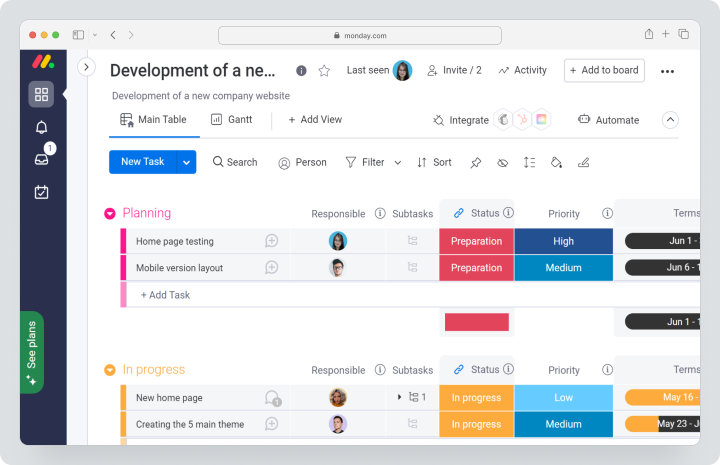
monday.com can replace Smartsheet when a team needs visual process logic but does not require a deep spreadsheet model with complex formulas and linked sheets.
Pricing: There is a free plan for up to 2 seats. For monday work management, monthly billing costs $12 per seat for Basic, $14 for Standard, and $24 for Pro. Enterprise pricing is customized. Paid plans start at a minimum of 3 seats.
Key features
- Visual boards;
- Templates for different departments;
- Timeline and Gantt chart views;
- Automations and integrations;
- Dashboards and analytics;
- Guest access on eligible plans.
Main difference from Smartsheet
monday.com is easier to understand as a visual workboard. Smartsheet is stronger for spreadsheet and portfolio scenarios, while monday.com focuses more on visual process organization.Advantages
- Fast creation of visual workflows;
- Many templates;
- Strong dashboards and automation.
Limitations
- Pricing depends on region, number of seats, and selected product;
- Some important features are available only on higher-tier plans;
- Complex processes require careful board design.
Best for
monday.com is suitable for marketing, operations, and cross-functional teams that need visual processes and automation.ClickUp
ClickUp is an all-in-one work platform with extensive customization options. It includes tasks, documents, dashboards, Gantt charts, time tracking, goals, workload management, forms, automations, custom fields, and multiple views of work.
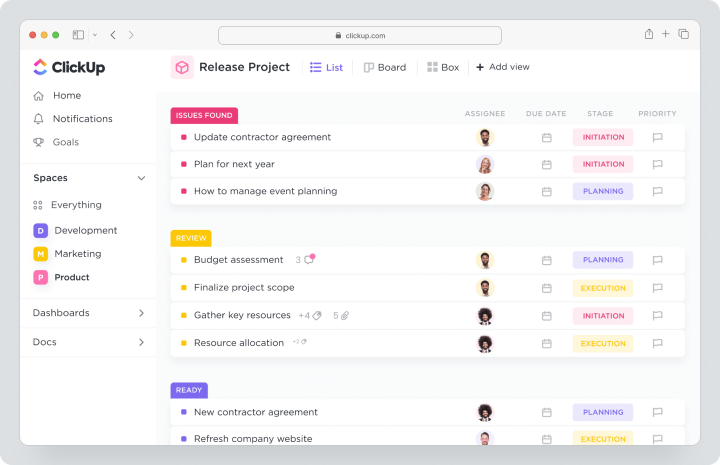
ClickUp is worth considering as a Smartsheet replacement if a team wants more flexibility while moving from spreadsheets to tasks, documents, and dashboards within one workspace.
Pricing: There is a free Free Forever plan. With monthly billing, Unlimited costs $10 per user per month, while Business costs $19. Unlimited includes Gantt charts, integrations and unlimited custom fields, built-in time tracking, goals, portfolio management, guest access with permission controls, and workload management.
Key features
- Tasks, documents, and dashboards;
- Gantt charts, calendar, Kanban, list, and other views;
- Built-in time tracking;
- Custom fields and automations;
- Goals, portfolios, and workload management.
Main difference from Smartsheet
ClickUp provides more options for task management and workspace customization, but it requires more time to configure than simpler tools.Advantages
- Broad range of features in one product;
- Built-in time tracking on the paid plan;
- Flexible workspace customization.
Limitations
- High risk of overloading the workspace with configuration;
- Requires a process administrator;
- Implementation can be more complicated than it initially appears.
Best for
ClickUp is suitable for teams that want an all-in-one platform and are willing to invest time in configuration.Wrike
Wrike is a work management system for companies with complex projects, approvals, reporting, dashboards, Gantt charts, and enterprise processes. It is often chosen by teams that need control across multiple departments.
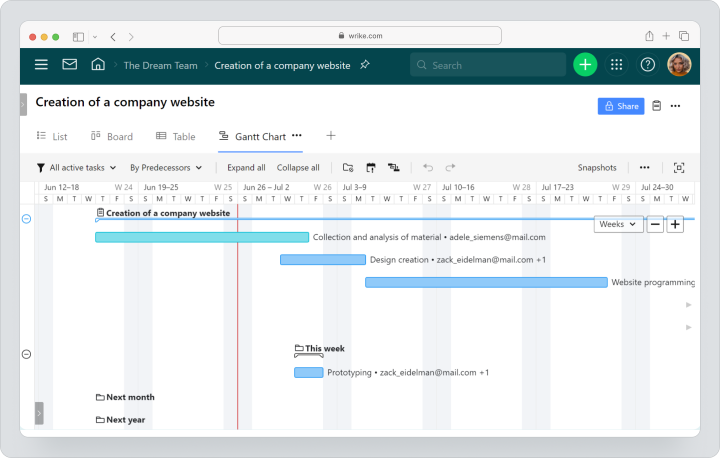
Wrike is worth considering if Smartsheet is used for cross-functional processes but the team needs stronger project logic, approvals, reporting, and enterprise-level control.
Pricing: There is a free plan and a 14-day trial. Team is available with monthly billing starting at $10. Business and higher-tier plans are sold only with annual subscriptions. For teams of 20 or more users, the service recommends implementation support; advanced resource planning, workload management, and time tracking depend on the plan.
Key features
- Project and task management;
- Board, table, and Gantt chart views;
- Dashboards and reports;
- Workflows and approvals;
- Resource planning on higher-tier plans;
- Enterprise access and security features.
Main difference from Smartsheet
Wrike is closer to enterprise work management and project coordination, while Smartsheet is stronger in spreadsheet-based scenarios, linked sheets, and premium applications.Advantages
- Strong dashboards and Gantt charts;
- Suitable for large teams;
- Convenient for approvals and complex workflows.
Limitations
- Implementation can be more complicated than with simpler task management systems;
- Large teams may need implementation support;
- Time tracking and advanced resource planning depend on the plan.
Best for
Wrike is suitable for companies with cross-functional projects, enterprise reporting, approval processes, and complex work management requirements.Microsoft Project
Microsoft Project is a classic tool for calendar-network planning, resource management, budgets, dependencies, critical paths, and project schedules. It is often chosen by PMOs, enterprise teams, construction, engineering, and project-based organizations.
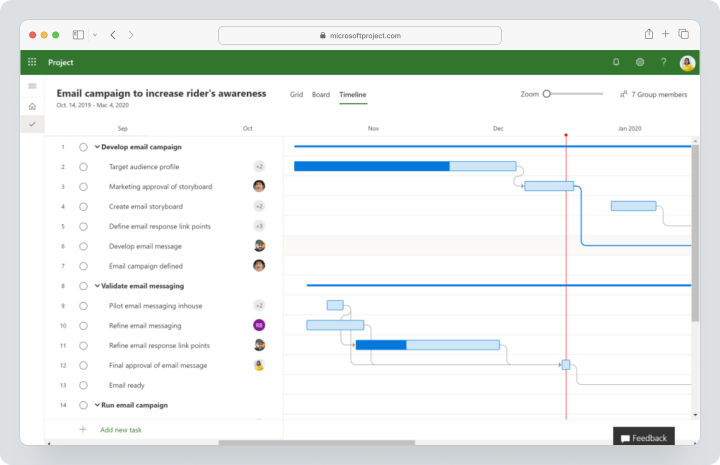
As a Smartsheet alternative, Microsoft Project is not suitable for everyone. It is stronger for planning complex projects and resources but can be less convenient for daily task management in small teams.
Pricing: Microsoft’s cloud plans for this scenario are offered with annual subscriptions on the public pricing page; a separate monthly price is not listed. Planner and Project Plan 3 includes advanced project execution, portfolios, baselines, critical path, and advanced dependencies. Plan availability should be checked by region.
Key features
- Table, board, timeline, and Gantt chart views;
- Project dependencies and calendar planning;
- Resources and budgets;
- Reports and dashboards;
- Portfolio management on higher-tier plans;
- Integration with the Microsoft ecosystem.
Main difference from Smartsheet
Microsoft Project is stronger for classic project planning, schedules, resources, and dependencies. Smartsheet is more flexible for spreadsheet-based workflows, formulas, automations, and linked data.Advantages
- Strong project planning;
- Suitable for PMO and enterprise scenarios;
- Works well within the Microsoft ecosystem.
Limitations
- Can be complex for small teams;
- Not always convenient for daily team communication;
- Pricing and capabilities depend on the selected Microsoft plan.
Best for
Microsoft Project is suitable for PMOs, construction, engineering, manufacturing, and enterprise teams with complex schedules and resource requirements.Trello
Trello is a simple Kanban alternative for teams that do not need complex spreadsheet logic. It is often chosen by small teams, freelancers, editorial teams, and for personal projects and processes where boards, cards, lists, and checklists are enough.
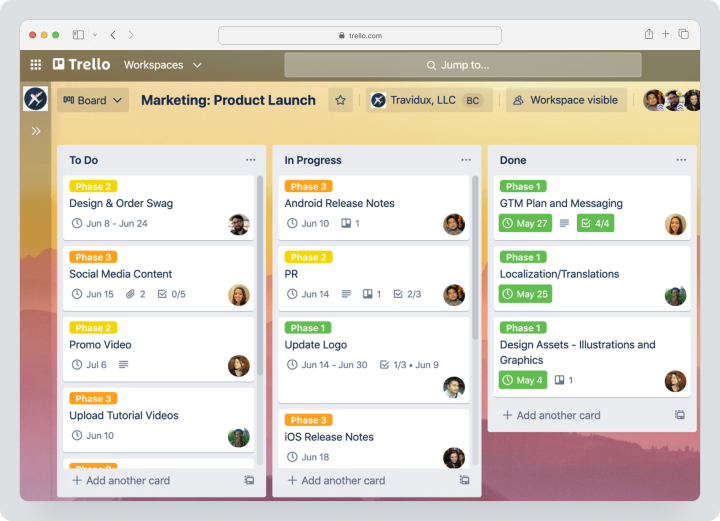
Trello can replace Smartsheet when a team uses it as a simple task list and wants to move to visual Kanban.
Pricing: There is a free plan for up to 10 users per workspace. With monthly billing, Standard costs $6 per user per month, while Premium costs $12.50. Premium adds calendar, timeline, table, dashboard, and map views.
Key features
- Kanban boards;
- Cards, checklists, and deadlines;
- Power-Ups;
- Automation;
- Additional views on Premium.
Main difference from Smartsheet
Trello is much simpler than Smartsheet. It is convenient for visual Kanban but does not replace complex tables, reports, formulas, portfolios, or resource management.Advantages
- Low learning curve;
- Fast start without complex implementation;
- Convenient for small processes.
Limitations
- Weaker for complex projects;
- Time tracking and reporting require Power-Ups or integrations;
- Scaling processes can become chaotic.
Best for
Trello is suitable for small teams that need simple Kanban instead of a task-based spreadsheet.Notion
Notion is a workspace for documents, knowledge bases, notes, tables, databases, and lightweight task management. It is often used by teams that want to combine documentation, processes, and simple task management.
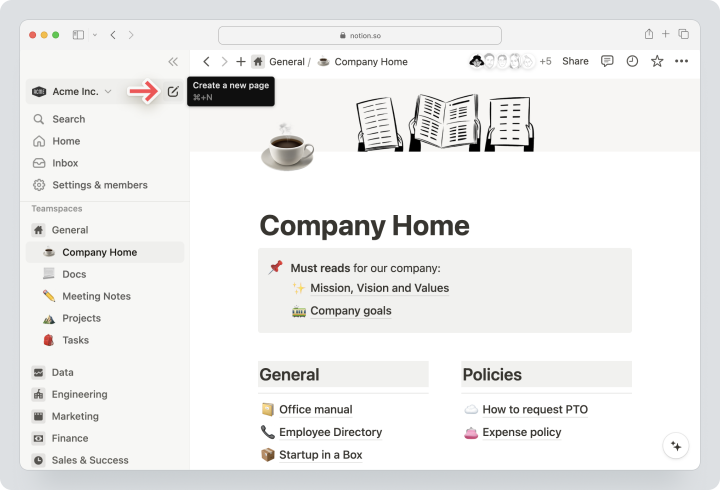
As a Smartsheet alternative, Notion is suitable for teams that want more flexibility in documents and knowledge bases but do not need a full work management system at the level of Smartsheet.
Pricing: There is a free plan. With monthly billing in US dollars, Plus costs $12 per participant per month, while Business costs $24. Enterprise is priced individually. Pricing may vary depending on currency and region.
Key features
- Documents and knowledge bases;
- Databases;
- Tables, boards, calendars, and other views;
- Templates;
- Pages and blocks;
- Basic connections to other services.
Main difference from Smartsheet
Notion is better suited to knowledge management, documentation, and flexible databases. Smartsheet is stronger for controlled workflows, reporting, portfolios, and enterprise scenarios.Advantages
- Convenient for building knowledge bases;
- Flexible page and database structure;
- Suitable for lightweight task management.
Limitations
- Time tracking is not a core strength;
- Complex workflows need to be designed manually;
- As databases grow, a strict architecture becomes necessary.
Best for
Notion is suitable for teams where documentation, knowledge bases, and flexible databases are more important than strict project control.Zoho Projects
Zoho Projects is a project and task management system within the Zoho ecosystem. It is often considered by companies that already use Zoho CRM, Zoho Books, Zoho Desk, or other Zoho products.
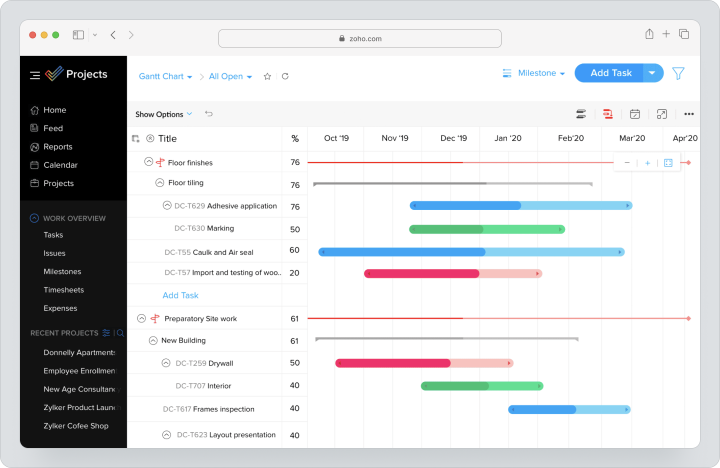
As a Smartsheet alternative, Zoho Projects is suitable for teams that want to move to project-based logic: tasks, Gantt charts, milestones, time entries, timesheets, workload management, and reports.
Pricing: There is a 15-day trial and a free plan for up to 5 users and 3 projects. With monthly billing, Premium costs $5 per user per month, Enterprise — $10, and Ultimate — $15. Paid plans add unlimited projects, Gantt charts, workload reports, and advanced reporting. Pricing and currency may vary by region.
Key features
- Projects, tasks, and subtasks;
- Gantt charts;
- Time entries and timesheets;
- Budget and EVM;
- Workload reports;
- Workflow actions;
- Integrations with Zoho and third-party services.
Main difference from Smartsheet
Zoho Projects is closer to classic project management and works particularly well within the Zoho ecosystem. Smartsheet is stronger in spreadsheet logic, linked sheets, and portfolio scenarios.Advantages
- Strong integration with Zoho products;
- Time entries, timesheets, and budgets are available on paid plans;
- The free plan works for very small teams.
Limitations
- The interface and logic may feel less familiar to teams outside the Zoho ecosystem;
- Final pricing should be checked by region and currency;
- Complex processes require configuration of roles, statuses, and templates.
Best for
Zoho Projects is suitable for small and medium-sized businesses that already use Zoho or want project management within a single ecosystem.Comparison Table of Smartsheet Alternatives
Pricing and feature data were checked on August 12, 2026, against the official pages of the services. Currency, feature availability, and total cost may vary depending on region, team size, billing period, and selected product.
| Service | Best for | Visualization | Time tracking | Reports / analytics | Pricing model |
|---|---|---|---|---|---|
| Worksection | Service and project teams | Kanban, Gantt, calendar | Built-in time tracking | Project and team reports | Free + Basic $5/seat/month with monthly billing |
| Airtable | Flexible databases and no-code solutions | Table, Kanban, calendar, gallery, timeline | Not a core focus / through integrations | Interfaces, dashboards, reports | Free + Team $24/participant/month with monthly billing |
| Asana | Cross-functional coordination | List, board, calendar, timeline, Gantt | On Advanced; timesheets and budgets are a separate module | Dashboards, goals, portfolios | Free + Starter $13.49/user/month with monthly billing |
| monday.com | Visual processes | Boards, timeline, Gantt, dashboards | On applicable plans | Dashboards and analytics | Free + Basic $12/seat/month with monthly billing |
| ClickUp | All-in-one work management | Kanban, Gantt, calendar, dashboards | Built-in on Unlimited | Dashboards, goals, portfolios | Free + Unlimited $10/user/month with monthly billing |
| Wrike | Enterprise processes and approvals | Board, table, Gantt | On higher-tier plans / advanced resource planning | Shared dashboards and advanced reporting | Free; Team from $10 with monthly billing. Business requires annual billing |
| Microsoft Project | Classic planning, resources, and portfolios | Table, board, timeline/Gantt, charts | In project and resource scenarios on applicable plans | Reports, dashboards, portfolio analytics | No separate monthly price published; cloud plans are offered with annual billing |
| Trello | Simple Kanban | Boards; calendar, timeline, table, dashboard, map on Premium | Through Power-Ups / integrations | Limited / through Power-Ups | Free + Standard $6/user/month with monthly billing |
| Notion | Documentation, knowledge bases, and databases | Databases, views, pages, calendar | Not a core focus | Through databases, charts, and pages | Free + Plus $12/participant/month with monthly billing |
| Zoho Projects | Teams within the Zoho ecosystem | Gantt, workload, dashboards | Time tracking and timesheets on paid plans | Reports, portfolio dashboard | Free for up to 5 users + Premium $5/user/month with monthly billing |
Which Smartsheet alternative to choose?
The choice depends on how the team currently uses Smartsheet. If it’s a PMO platform with reports, portfolios, and premium applications, a different group of solutions is needed. If it’s just a table of tasks, a simpler and clearer tool may be appropriate.
For service and project teams
Choose Worksection if the team manages client projects, tracks time, works with contractors, monitors deadlines, and wants to see project reports without manual collection in spreadsheets.
For flexible databases and no-code scenarios
Choose Airtable if you need to build databases, connect data, create views, and interfaces for different roles.
For cross-functional coordination
Choose Asana if tasks, goals, portfolios, dependencies, and interdepartmental work coordination are important for the team.
For visual processes
Choose monday.com if the team wants to quickly launch boards, templates, automations, and dashboards without deep spreadsheet architecture.
For maximum customization
Choose ClickUp if you need to combine tasks, documents, reporting panels, time tracking, Gantt charts, and resource management in one workspace.
For PMO and complex schedules
Choose Microsoft Project or Wrike if resources, budgets, Gantt charts, critical path, portfolios, approvals, and corporate control are important.
How to migrate from Smartsheet without losing data?
Migration from Smartsheet should begin not with exporting, but with an audit. It is important to understand what is currently stored in sheets: tasks, projects, clients, requests, budgets, resources, reports, or portfolio data.
- Document current processes, roles, fields, statuses, and reports.
- Separate working sheets, archives, duplicates, and obsolete data.
- Identify which sheets are tasks and which are directories or reports.
- Select a single pilot process for migration.
- Map Smartsheet entities to the new system: rows, tasks, fields, statuses, comments, attachments, and users.
- Export data in a supported format.
- Check deadlines, assignees, access rights, files, and connections.
- Set up reports and notifications in the new system.
- Educate process owners.
- Conduct a parallel period and only then deactivate the old structure.
The main mistake is to transfer tables “as is.” If the new system is task-oriented, it’s better to immediately reconstruct the process around tasks, deadlines, roles, and reports.
When is Worksection a suitable alternative to Smartsheet?
Worksection should be considered as an alternative to Smartsheet if the team desires less spreadsheet logic and more managed execution. This is a scenario where a row in a table no longer helps, as for each piece of work it’s necessary to see the assignee, deadline, status, discussion, files, time, and outcome.
Worksection is particularly suitable if:
- the team manages multiple parallel projects;
- there is a need to see deadlines and dependencies in a Gantt chart;
- it’s essential to account for actual time and plan/fact expenses;
- clients or contractors are connected to projects;
- managers need reports without manual collection;
- employees lose context in spreadsheets;
- a quick launch without heavy administration is required.
Worksection should not be positioned as a substitute for all PPM scenarios of Smartsheet. If a company uses Control Center, Data Shuttle, Dynamic View, complex portfolios, and related sheets, a separate audit is necessary. But for service and project work, Worksection is often simpler: tasks immediately become work units, not rows in a sheet.
Frequently Asked Questions
Which Smartsheet alternative is easiest to master?
The easiest to master are Trello or Worksection if the team needs regular tasks, deadlines, comments, and reports. Trello is suitable for a simple Kanban, and Worksection is for project work with Gantt charts, time tracking, and client access. Airtable and Notion are flexible but require a thoughtful structure.
Are there free Smartsheet analogs?
Yes, there are free Smartsheet analogs. Free plans are available with Worksection, Airtable, Asana, monday.com, ClickUp, Wrike, Trello, Notion, and Zoho Projects. However, the limitations differ: users, projects, databases, boards, storage, automations, forms, reports, or access to Gantt charts. The free plan is better used for testing rather than as a final system for the entire company.
What to choose: Smartsheet or Worksection?
Smartsheet should be chosen if the team manages processes through tables, formulas, reports, portfolios, and premium applications. Worksection is better suited if the main task is project execution: tasks, deadlines, assignees, Gantt charts, time tracking, client access, and reports. These are different management logics, so the choice depends on the process.
Which alternative is best for an agency?
For an agency, Worksection often fits well, as agency teams need client projects, deadlines, assignees, files, comments, time tracking, and reports. ClickUp can also be considered for customization or monday.com for visual marketing processes. If an agency manages complex databases, Airtable should be explored.
How does Airtable differ from Smartsheet?
Airtable resembles a flexible database and no-code solution platform, while Smartsheet resembles a work management system through sheets, reports, reporting panels, and portfolio scenarios. Airtable is convenient for databases, interfaces, and data relationships. Smartsheet is stronger for managed workflows, reporting, and corporate control.
Which system has built-in time tracking?
Built-in time tracking is available in Worksection and ClickUp on corresponding plans. Asana includes time tracking on Advanced; timesheets and budgets need to be checked separately as an additional module. Zoho Projects includes time tracking records and timesheets on paid plans. In Wrike, time tracking capabilities are linked to senior plans and advanced resource planning. Before choosing, it’s essential to look not just at the timer but also at time reports.
Can Smartsheet be replaced by a regular project management system?
Yes, Smartsheet can be replaced by a regular project management system if the team primarily uses it as a task list or project tracker. However, if Smartsheet is used for related sheets, reports, formulas, portfolios, Control Center, or Data Shuttle, a simple task system won’t replace all scenarios without refining the process.
How to transfer data from Smartsheet?
The transfer should start with an audit of sheets, fields, formulas, attachments, comments, users, and reports. After that, select a pilot process, export the data, map rows with tasks or projects, check access rights, and only then scale the migration. Do not transfer old tables without cleaning.
Which alternative is best for PMO?
For PMO, it’s worth considering Wrike, Microsoft Project, Smartsheet, Airtable, and partially ClickUp for customization needs. Worksection is suitable for PMO scenarios where the primary focus is on project execution, deadlines, team, time tracking, and reports. If complex portfolios and resource planning are needed, it’s better to conduct a pilot project and compare the total cost of ownership.
How to calculate the total cost of Smartsheet and additional modules?
Calculate not just the plan price but the total cost of ownership. Take into account the number of licenses, roles, guests, premium applications, additional modules, automations, support, implementation, training, administration, and integrations. Check separately if Dynamic View, Data Shuttle, resource management, Control Center, or other modules are needed for your process.
Conclusion
Smartsheet remains a strong product for teams needing table logic, Gantt charts, reporting panels, forms, reports, automated workflows, resource management, and portfolio scenarios. However, the best alternative to Smartsheet depends on what task the team wants to solve: moving away from tables, simplifying executor work, reducing costs, adding time tracking, or building a no-code process.
If a project-task system for service and client projects is needed, consider Worksection: tasks, subtasks, deadlines, Gantt charts, Kanban, time tracking, reports, and guest access help manage work without complex spreadsheet architecture. If flexible databases are needed, Airtable will work. For cross-functional coordination, Asana is a good fit; for visual processes, choose monday.com; for maximum customization, go for ClickUp; and for PMO and complex schedules, consider Wrike or Microsoft Project.
Before transitioning, do not choose a service solely based on price or popularity. First, describe the current processes, critical sheets, roles, reports, integrations, modules, and security requirements. Then, test 2 – 3 alternatives on one real project. This way, you will choose not just a Smartsheet analog but a system that truly fits your team.