Solutions
worksection
beta
help
Task Parameters
Task parameters are fields that help describe the work, assign responsibility, and manage execution: who does what, by when, and in what status. Parameters can be filled in when creating a task or changed later in the task window.
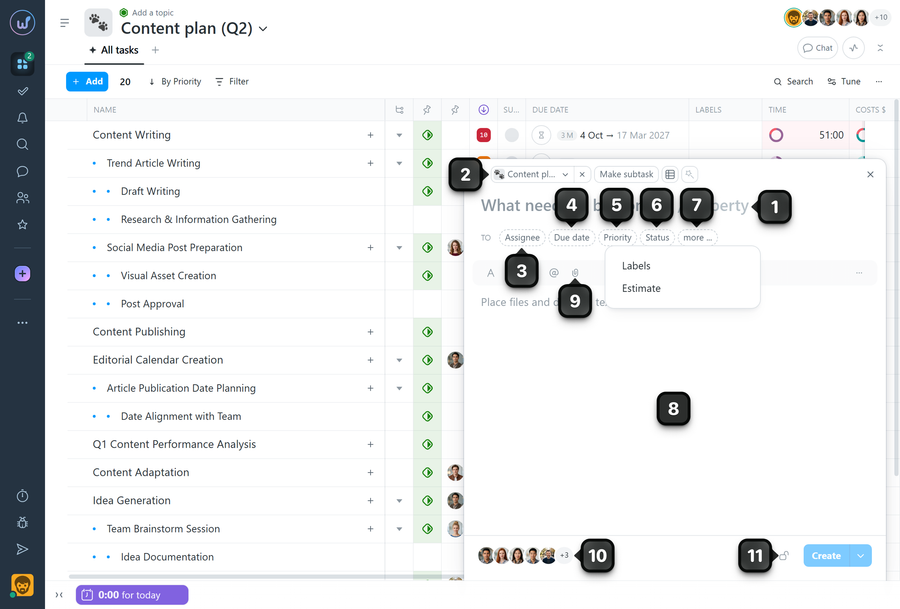
1. Name - briefly describe the essence of the task. This is the only field required to create a task.
2. Project - select the project where the task will be created (relevant if you are creating a task outside a specific project page).
3. Assignee - assign the person responsible for completing the task. You can leave the task “unassigned” or select “Anyone” as the assignee. If “Anyone” is selected, any project participant can take the task into work by assigning it to themselves.
4. Due date - specify a deadline (due date/time) or a start and end date/time. This helps plan workload and track progress.
5. Priority - indicate the importance of the task to help the team determine the order of execution.
6. Status - set the current stage of work (for example: New, In Progress, Checking, Done). Statuses are used in task lists, Kanban boards, and filters.
7. More - when opened, contains:
- Labels - add labels for quick classification and search (area, type of work, client, team, etc.).
- Estimate - set an estimated costs.
8. Description - add details such as context, requirements, acceptance criteria, links, and the expected result. If needed, you can also add a “Checklist” (a list of items to be completed as part of the task).
9. Attachments - attach files (specifications, mockups, documents) or other materials required to complete the task.
10. Subscribers - add participants who need to stay informed about the progress and receive notifications about the task.
11. Visibility - if the task should be visible only to certain participants, you can restrict its visibility.
Leave your review
Did this article help you?
Glad we could help! What was helpful?
Sorry this didn't help. What went wrong?

