Solutions
worksection
beta
help
How to create a "No project" task and where will it appear?
A "No project" task is a task created without selecting a project. This format is convenient for personal notes, temporary, or individual tasks that don't require other users' involvement.
To create a task "No project," don't select a project in the "Project" field. If a project was filled in automatically, clear1 this field.
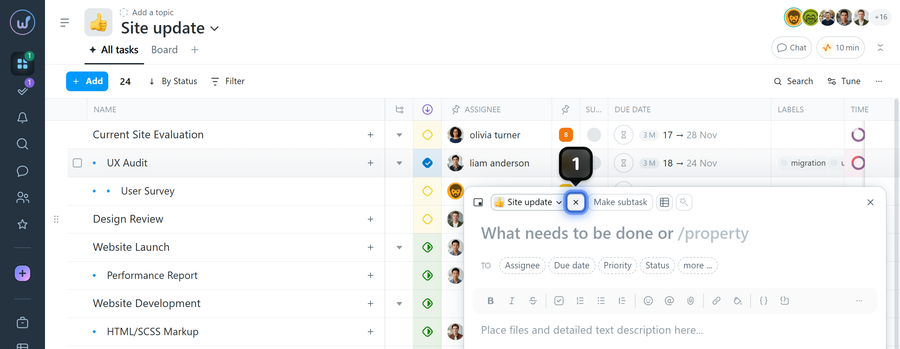
Please note! When creating a task from a project page, the relevant project is filled in automatically. If you create a task from general account pages (for example, the project list view page), the project field will be empty.
Such tasks appear in the "My tasks" window and in search results. If the "My tasks" section is grouped "By project," they will be placed in a separate "No project" group.
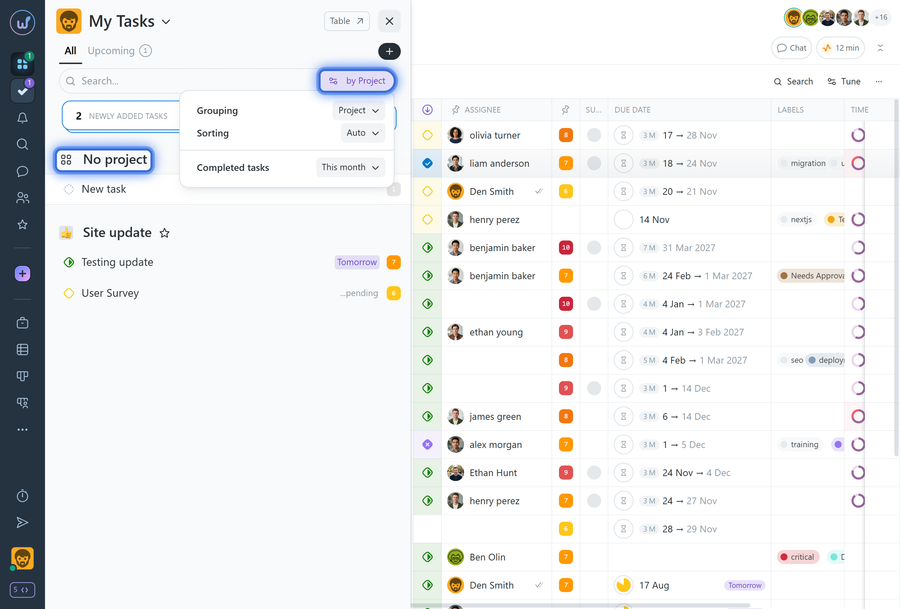
What's important to know:
- By default, only you can see such a task, but if you specify an assignee for it, the assignee will also be able to see it.
- A "No project" task is not displayed on the system's pages (Kanban, Calendar, task list view, etc.)
- You can assign a project later: open the task → task menu → move the task to the desired project.
- Estimated costs (time and financial) cannot be set for such tasks, and it's not possible to log expenses or start the timer for them.
Leave your review
Did this article help you?
Glad we could help! What was helpful?
Sorry this didn't help. What went wrong?

