Solutions
worksection
beta
help
How to set up name templates for recurring tasks?
Templates let you automatically add a sequential number and/or a date to the names of created tasks.
To set up a template for recurring tasks, open the due date window and edit the name template field for recurring tasks.
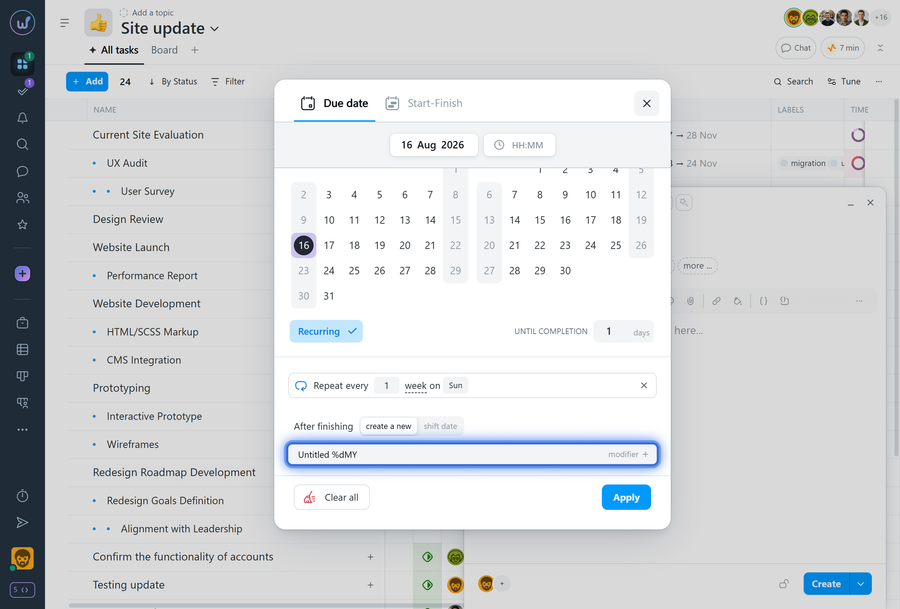
Task sequence number
To add a sequence number, use the %n template.
- %n — number without a fixed number of digits
- %nn — two-digit number (01, 02, 03…)
- %nnn — three-digit number (001, 002, 003…)
Numbering starts from 1 by default.
If needed, you can change the starting value by adding a number to the template: %n + 10
In this case, numbering will start from 11.
Date in the task name
To add the day, month, year, or quarter, use a template like %dmy, combining the letters d, D, m, M, q, Q, y, Y in any order.
Available notations:
- d — day of the month (1–31)
- D — day of the month with a leading zero (01–31)
- m — month number with a leading zero (01–12)
- M — month name (depends on the account's language)
- q — quarter of the year (I, II, III, IV)
- Q — quarter of the year with the word "quarter" added
- y — year, 2 digits
- Y — year, 4 digits
Examples
If the current date is February 25, 2013:
- %dmy → 25.02.13
- %dM → 25 February
- %MY → February 2013 (for example, for monthly payments)
- %QY → I quarter 2013 (for example, for quarterly reports)
Past and future dates
You can specify a date offset in the template:
- %dmy-1 — yesterday's date
- %M+1 — next month
- %QY-2 — the quarter before last
Leave your review
Did this article help you?
Glad we could help! What was helpful?
Sorry this didn't help. What went wrong?

