Solutions
worksection
beta
help
How do I create identical tasks for multiple assignees?
When you need to assign the same task to multiple people, create separate identical tasks for each assignee. In Worksection this is not one task with multiple assignees, but several identical tasks each with their own assignee.
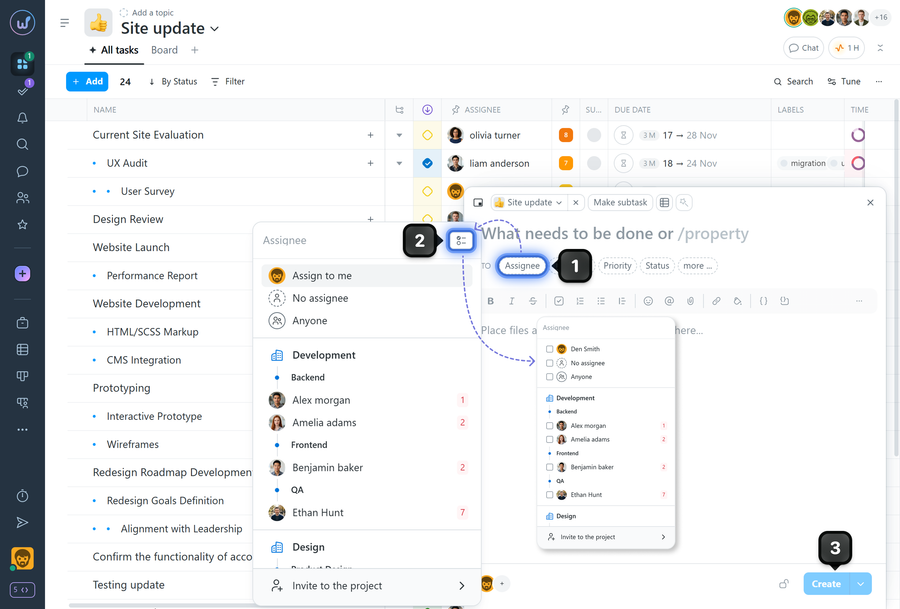
To create identical tasks for multiple assignees, in the task creation window click "Assignee"1. Enable "Multiple selection"2 and select all the assignees you want to create tasks for. Fill in the task name. If needed, add a description, deadlines, priority, status, labels.
Click "Create"3. The system will create tasks for each individual assignee.
How it works
- One creation form is applied to all selected assignees; the task fields are copied.
- The minimum requirement for creating a task is a filled-in name.
- Visibility and subscribers can be added after the tasks are created. These parameters are not available at the creation stage.
Leave your review
Did this article help you?
Glad we could help! What was helpful?
Sorry this didn't help. What went wrong?

