
ThinkGlobal Franchisor Company — a network of innovative schools (25 schools across Ukraine), creating a space for implementing global educational changes and developing education in Ukraine. Our headquarters manages the entire network and oversees the management of the learning process.
What do we do?
We develop programs, keep the IT systems running, monitor network standards, and ehandle brand marketing.
How has the quarantine changed our work?
In fact, we did not switch to a different mode. A year before the quarantine, we’d started working remotely. Formally, we kept only the document office for exchanging official papers. Today, the management of the educational process has changed significantly.
What tools do we use in our work?
Google services: Google Calendar (handy to integrate with Google Meet — we schedule an event in the calendar and join Google Meet at the right time), Google Sheets, Google Docs, Google Drive. In Google Sheets, you can “launch a space station” — link different sheets in cascades and “pull” all kinds of data. These are common tools for running an educational institution.
For remote work, you have to forget about Word and Excel. Sending documents by email is a thankless task.
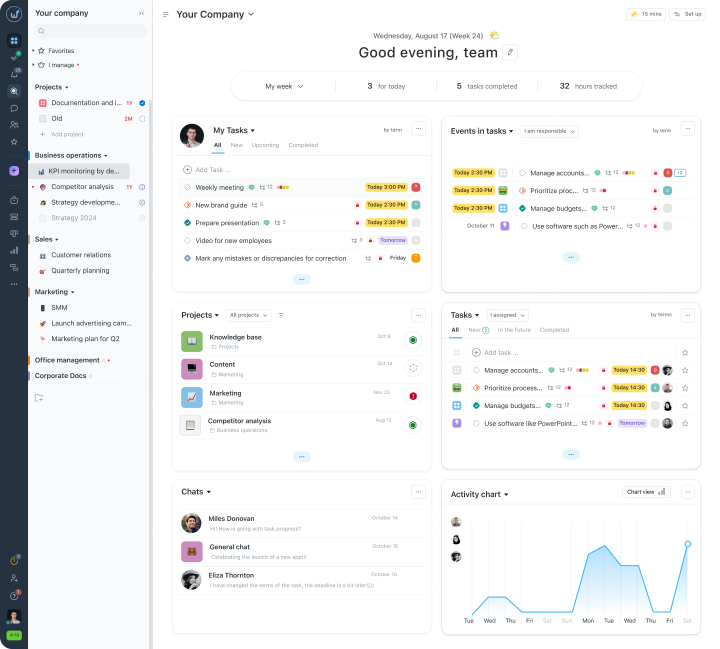
What do we use Worksection for?
- Distributing work across projects. The company essentially decides which work we’re willing to commission from our employees (which work we’re willing to pay for, and which we aren’t).
- Time tracking. It’s hard to organize your time at home. There are always some “switchovers” between tasks, checking emails, socializing with someone, having tea, a snack, and you lose a third of your working time. Tracking is effective for making sure time is spent productively. I understand that time is being paid for by the company right now. So payment is based on tracked time.
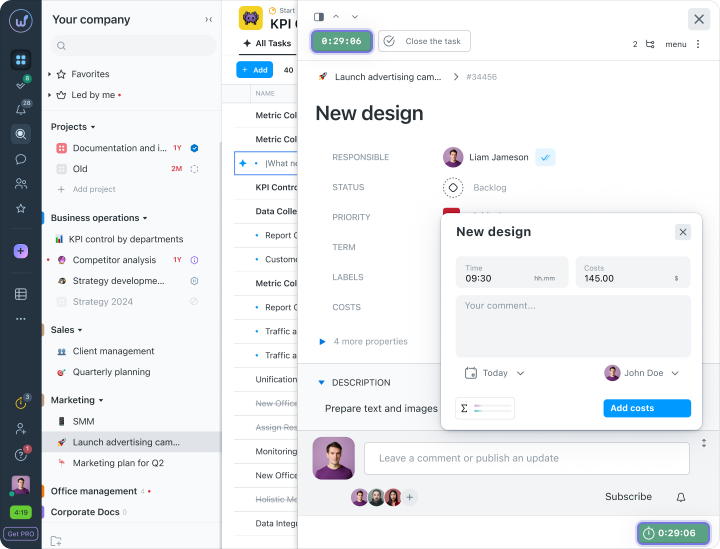
Time is a resource just like money. We allocate the appropriate amount of time for the corresponding task. It’s about productivity.
Using tracking takes some adjustment. The company needs to designate 1 – 2 people to be responsible for implementing time tracking and establishing the habit. It’s important to check if people have managed to log in and use this feature at all.
Experience shows that some employees initially do not use the tracker at all because it’s new to them. They do not realize, despite the agreements, that this time will not be paid.
The people who oversee the process and manage the educational projects, should offer their help: “If you are having trouble using tracking, let’s log in together and try.” It’s important to ensure that trackers are being used correctly. That is, not starting the tracker at nine in the morning and turning it off at six in the evening.
Rolling out other services should also happen in several stages:
- First stage — getting acquainted (started using it);
- Second — started using it properly to manage educational programs across the network and to create new projects and tasks.
There are almost no tasks that can take all day. Most tasks last 20 minutes, half an hour, or an hour.
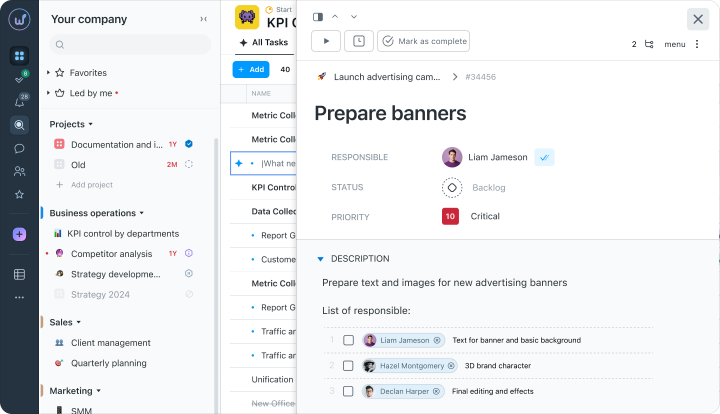
Each task should end with a micro-report. After the adaptation period, the absence of micro-reports means no payment. We want to see the result.
Worksection is convenient because we can create projects and large tasks there. From there, tasks are assigned to employees within Worksection and broken down in more detail.
- Trello. Some use it as a service for organizing tasks on boards. It’s an option. Convenient.
- Workplace from Facebook. Essentially, it’s a corporate Facebook where we can create various groups.
The time killer in the office is all the meetings that “kill” time and spawn other “parasite” tasks.
The company’s leaders should support every process
For example, by recording internal videos. Explaining that tracking through Worksection isn’t done because the company doesn’t trust you, but because the company is fighting for the productivity of the time spent.
At the start, our employees got the impression that the company didn’t trust them. In reality, we’re creating the conditions for more coordinated, effective, results-focused work.