PlanGrid has become one of the prominent mobile tools for working with drawings, comments, photographs, and field documentation. The service has helped general contractors, subcontractors, and property owners receive up-to-date sheets directly on the construction site, perform markings, and synchronize changes among project participants.
In 2026, the selection of PlanGrid alternatives primarily has a migration sense. Autodesk no longer sells PlanGrid to new clients, but officially states that it does not plan to close the product and will continue to provide existing users with access and support. The next generation of solutions is Autodesk Forma Build, previously known as Autodesk Build. Therefore, alternatives to PlanGrid need to be compared not only by features but also by the capability to transfer old projects, drawing versions, photographs, forms, and interaction history.
The list includes Worksection, Autodesk Forma Build, Procore, Fieldwire, Bluebeam Revu, PlanRadar, Raken, LetsBuild, Contractor Foreman, and Buildertrend. Worksection stands out first as an accessible layer of project management for tasks, deadlines, responsibilities, files, Gantt charts, and reports. It does not replace specialized management for drawings, BIM, RFIs, approval documents, or financial management in construction.
PlanGrid Alternatives in 30 Seconds
- Worksection — for small construction and engineering teams that need tasks, a schedule, accountability, and reporting without a heavy construction platform.
- Autodesk Forma Build — the official progression of PlanGrid within the Autodesk ecosystem with documents, sheets, comments, RFIs, approval documents, forms, meetings, and expense management.
- Procore — for large contractors that need a unified construction platform from documents to finance.
- Fieldwire — for the closest on-site working scenario with plans, markings, tasks, inspections, and offline access.
- Bluebeam Revu — for deep work with PDF drawings, measurements, markings, layer overlays, and collaboration in Studio.
- PlanRadar — for comments on plans, mobile inspections, reports, approvals, and free external participants.
- Raken — for daily reports, time sheets, production tracking, safety, and field analytics.
- LetsBuild — for managing defects, QHSE, inspections, handover, and implementing standardized field processes.
- Contractor Foreman — for small contractors that need estimates, timelines, daily logs, work tasks, and financial documents in a comprehensible package model.
- Buildertrend — for home builders and renovation companies with scheduling, a client portal, material selection, estimates, and payments.
For the closest replacement of PlanGrid’s mobile logic, start with Forma Build and Fieldwire. For a PDF-oriented process, consider Bluebeam. For strict corporate boundaries — Procore. For defects and inspections — PlanRadar or LetsBuild. Worksection is rational only when official drawings and construction documentation are maintained in another system, and the team needs straightforward execution tracking.
What is PlanGrid and who is it for?
PlanGrid is a cloud application for working with construction documentation that provides access to project plans, issues, photos, forms, and other materials from a computer or mobile device. Its strong point was the ease of use for field teams: users could open the current sheet, add markup, a photo, or comments, and sync data with the office.
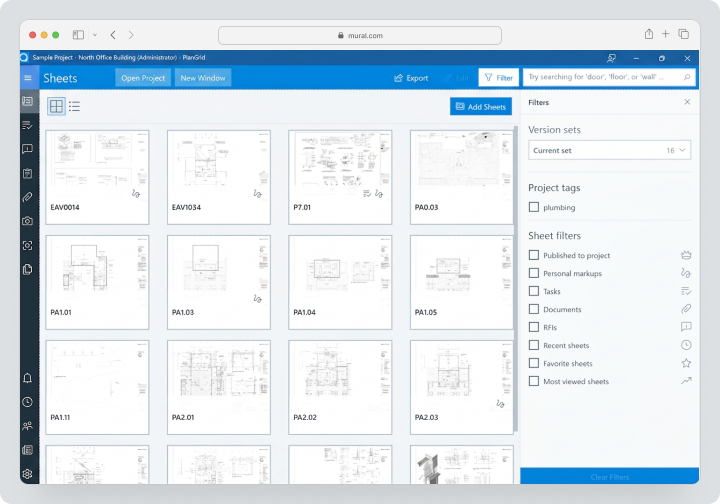
PlanGrid is no longer available for purchase by new customers. Existing users continue to work through the web and the PlanGrid Build application, and Autodesk officially states that there are currently no plans to shut down PlanGrid. Access to new features is offered through Forma Build, which combines many functions of PlanGrid and BIM 360 and adds RFIs, approval documents, meetings, schedules, assets, models, and expense tracking.
Therefore, the main question for existing customers sounds not “Does PlanGrid work?” but “When and where to transfer workflows?” Urgent migration is not needed for every company, but reliance on an aging product should be considered when planning new projects, integrations, and training staff.
Why are teams looking for alternatives to PlanGrid?
PlanGrid is no longer sold to new customers
A company cannot standardize a new branch or contractor on a product that is unavailable for purchase by new clients. This is especially important for long projects, where licenses, roles, and team composition change over several years.
Need to transition to a modern Autodesk ecosystem
Forma Build is the official successor to PlanGrid. For teams using Revit, Autodesk Docs, model coordination, and other Autodesk products, this transition may be logical. However, migration involves more than just a name change: project structure, access rights, sheets, and field processes need to be reviewed.
An independent platform is needed
Not every company wants to tie site work management to a single technology provider. Fieldwire, PlanRadar, Raken, and LetsBuild offer independent scenarios, while Bluebeam focuses on PDF documents and collaboration.
Deeper financial or management functions are needed
Historically, PlanGrid has excelled in field and drawings. Procore and Forma Build delve deeper into RFIs, approval documents, contracts, budgets, changes, and portfolio reporting. Buildertrend and Contractor Foreman tailor financial processes for residential construction and small/mid-sized businesses.
A simpler task management level is needed
A small engineering team may not require complex sets of sheets, BIM, and construction ERP. If approved drawings are already stored in a CDE, Worksection can be used for tasks, deadlines, time, and reports.
A different mobile specialization is needed
Raken centers on daily reporting, labor costs, production, and safety. LetsBuild focuses on inspections, defects, and project handover. PlanRadar deals with comments, forms, and approvals. A general comparison of features falls short compared to comparing specific daily activities.
How did we choose and compare services?
Drawings, versions, and markup
The system was checked for recognizing new versions of the sheet, retaining markup, supporting overlays, hyperlinks, measurements, and offline access. Simply attaching a PDF to a task does not equate to managing drawings.
Field processes
Comments, punch lists, inspections, daily reports, photos, forms, voice notes, and offline work capability were compared. It’s not just about the list of features, but the speed of action taken by workers or supervisors.
RFIs, approval documents, and approvals
A formal log should maintain number, status, responsible party, deadline, correspondence, attachments, and change history. Worksection can create tasks with files, but it doesn’t replace a specialized workflow.
Planning and tasks
Assignments, deadlines, dependencies, scheduling, short-term planning, Gantt charts, and reports were evaluated. Some field systems capture facts well, but do not manage the main schedule effectively.
Cost and External Participants
Payment for each user can be expensive with a large number of subcontractors. Therefore, it’s important to check on free participants, view-only users, and subcontractors, as well as project and sheet limits, implementation, training, and storage.
Migration and Export
For PlanGrid, it’s critical to retain sheets, versions, comments, photos, forms, and history. Official transition tools, APIs, export capabilities, and the possibility of conducting a pilot were examined.
Checklist Before Choosing a PlanGrid Replacement
Prepare a real data set before the demonstration: several versions of one drawing, comments with photos, a filled-out form, a comment list item, a daily report, and a list of external participants. Ask the provider to execute a complete workflow scenario on a mobile device.
Check:
- how the latest version of the sheet is determined;
- whether markings and links are carried over between versions;
- what is available offline;
- how the system resolves synchronization conflicts;
- whether a subcontractor can be invited for free;
- whether a change log is maintained;
- whether RFIs and approval documents are supported or if separate modules are required;
- what limitations apply to projects, sheets, storage, and APIs;
- how to export a full archive in case of subscription cancellation;
- who carries out data transfer and how much implementation and training cost.
How to Conduct a Pilot of a PlanGrid Alternative?
It’s best to conduct the pilot on an active site, but not during a critical phase where an error in accessing drawings would pose a risk to operations. Select one field team, one project engineer, and one external contractor. Upload a real set of sheets, two revisions, several comments, forms, and photos.
Record baseline metrics:
- how much time an employee spends looking for the current sheet;
- how quickly the office receives field comments;
- how many errors are related to outdated versions;
- how long it takes to create a daily report or inspection report;
- how many actions are needed to invite a subcontractor;
- whether the application works with weak connectivity;
- how easy it is to export reports and archives.
The pilot should include updates to the drawing version. Check whether markings, hyperlinks, and open comments are carried over to the new revision, how the system alerts the user, and whether the previous version can be accessed. Test bulk uploads and naming conventions separately.
After two to four weeks, gather feedback separately from the office and the site. The office typically evaluates structure, reports, and access rights, while field users assess speed, offline mode, and the number of clicks. Decisions should not be made solely based on the administrator’s opinion.
Before signing the contract, request written confirmation regarding data transfer, data retention periods, APIs, storage, support, and export after subscription cancellation. For transitioning from an obsolete product, these terms are more important than the number of features demonstrated. Additionally, clarify who is responsible for failed transfers, how many times imports can be repeated, and whether the provider will assist in reconciling the number of sheets, issues, forms, and attachments.
It is advisable to document backup retention terms and the process for recovering the project after user error in the contract. Also, check if completed projects can be kept in archived mode at a reduced price, how temporary contractors are billed, and whether access to documents is maintained after the number of licenses is reduced. For a construction company, these terms affect costs more significantly than the price of a single active user, especially for long-term projects with many temporary participants and mandatory documentation retention.
Best PlanGrid Alternatives in 2026
Worksection
Worksection — a comprehensive project and task management system. In a construction company, an object can be set up as a project, with stages as tasks and subtasks, while deadlines, priorities, and responsibilities can be assigned to executors.
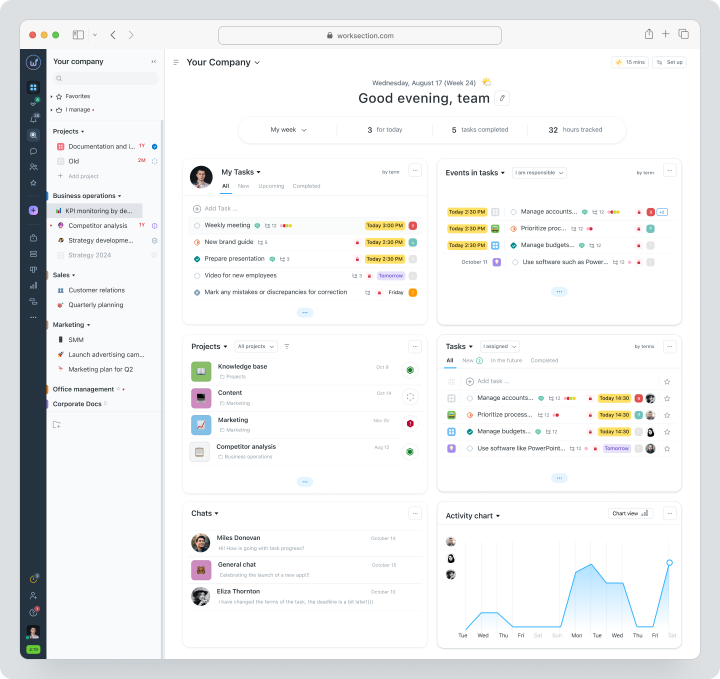
Available on Business are Gantt chart, dependencies, time tracking, expenses, and guest access. The manager oversees overdue tasks, workload, and the plan/fact ratio. Approved drawings can be attached or linked from an external CDE, but Worksection does not manage the versions of sheets and does not create specific RFIs or special document logs for approvals.
Cost: Free for up to 5 users and 2 projects. Monthly payment for Basic is $5 per seat, Business — $10, Premium — $15.
| Fact | Value |
|---|---|
| Price | Free for up to 5 users and 2 projects; Basic $5, Business $10, Premium $15 per seat per month on a monthly payment basis |
| Free / trial | There is a permanent Free |
| Pricing model | Per active seat; annual payment for quoted prices |
| Verified | August 3, 2026 |
Key features
- task planner, projects, subtasks, and checklists;
- deadlines, statuses, responsible parties, and priorities;
- calendar, Kanban, and Gantt chart;
- time tracking, expenses, and reports;
- files, comments, roles, and guests;
- API and integrations.
Main difference from PlanGrid
PlanGrid organizes mobile work with plans and field documentation. Worksection organizes overall task and deadline execution.
Advantages
- quick implementation;
- affordable pricing;
- convenient task and responsibility tracking.
Limitations
- no control over drawing versions;
- no BIM or CDE;
- no special RFI processes or approval documents.
Who it’s suitable for
Small contractors, engineering firms, and internal teams that need an additional layer of project management.
Autodesk Forma Build
Autodesk Forma Build — the official successor to PlanGrid, built on the capabilities of PlanGrid and BIM 360. The product combines sheets, files, comments, forms, RFIs, approval documents, meetings, schedules, assets, quality, safety, and cost management.
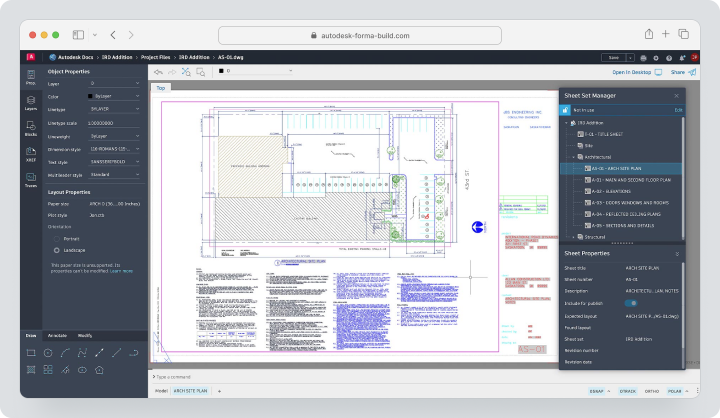
Existing PlanGrid users can link their Autodesk and PlanGrid accounts and start a trial period for Forma Build. Autodesk publishes migration guidelines and materials, but the completeness of transferring sheets, comments, forms, photos, and history needs to be confirmed with support for the specific project.
Cost: custom offer. A 30-day trial period is available, and the summary depends on the product or bundle, scale, and contract conditions.
| Fact | Value |
|---|---|
| Price | Custom offer |
| Free / trial | 30-day trial period |
| Pricing model | Quote-based for products, bundles, scale, and contract |
| Verified | August 3, 2026 |
Key features
- sheets, versions, and markup;
- documents and access rights;
- comments, forms, and field reports;
- RFIs and approval documents;
- meetings and schedules;
- cost management;
- models and connectivity with the Autodesk ecosystem.
Main difference from PlanGrid
Forma Build retains familiar field logic, but extends it to a connected construction management platform.
Advantages
- official migration path;
- integration with Autodesk;
- wider range of processes.
Limitations
- custom pricing;
- migration requires preparation;
- the interface and structure differ from the legacy PlanGrid.
Who it’s suitable for
Current PlanGrid clients and companies within the Autodesk ecosystem.
Procore
Procore is the only construction platform for project execution, financial management, pre-construction preparation, and workforce management. It suits organizations that need more than just field drawings and require a comprehensive management framework.
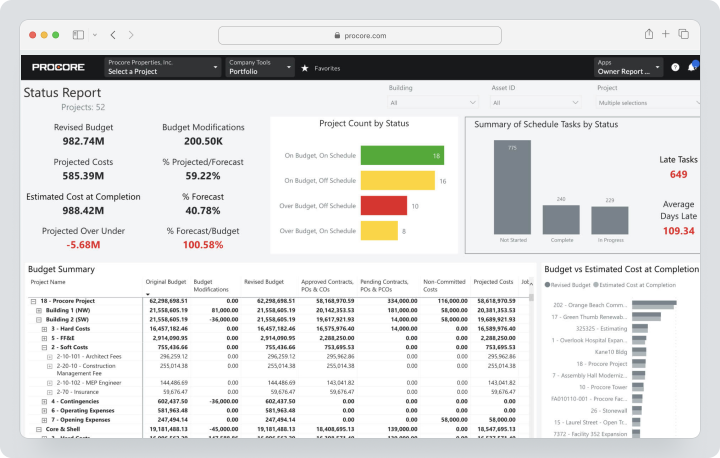
Cost: individual annual subscription. The price depends on the products and annual construction volume. Procore states unlimited users, data, and support, but implementation, data migration, and additional solutions should be considered separately.
| Fact | Value |
|---|---|
| Price | Individual annual subscription |
| Free / trial | No permanent free plan |
| Pricing model | Based on selected products and annual construction volume; unlimited users |
| Verified | August 3, 2026 |
Key Features
- drawings and document management;
- RFIs, approval documents, and daily logs;
- quality, safety, and punch lists;
- budgets, contracts, and project changes;
- cost estimation and analytics;
- mobile app for the job site;
- integrations and API.
Main Difference from PlanGrid
Procore is significantly broader as a construction platform and financial framework, but requires more complex implementation.
Advantages
- one unified platform;
- strong construction finance;
- scalable for large projects.
Limitations
- no public fixed pricing;
- high implementation costs;
- may be excessive for SMBs.
Ideal For
General contractors, developers, and large construction organizations.
Fieldwire
Fieldwire is a job site-oriented platform for plans, tasks, markup, inspections, and contractor coordination. It closely resembles PlanGrid in daily mobile logic.
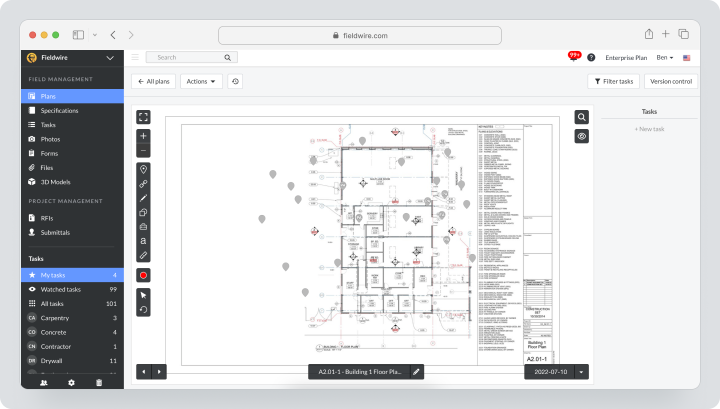
Cost, verified on August 12, 2026: Basic is free for up to 5 users. For monthly payment, Pro costs $54, Business — $79, Business Plus — $104 per user per month.
| Fact | Value |
|---|---|
| Price | Basic free; Pro $54, Business $79, Business Plus $104 per user per month for monthly billing |
| Free / trial | Basic for up to 5 users |
| Pricing model | Per user; price depends on plan and region |
| Verified | August 3, 2026 |
Key Features
- plan viewing and version control;
- markup, hyperlinks, and sheet comparisons;
- tasks, punch lists, and inspections;
- forms, reports, and export;
- BIM viewer on Business;
- RFIs, approval documents, project changes, and Budget on Business Plus;
- mobile access without internet.
Main Difference from PlanGrid
Fieldwire remains an independent job site management system and offers public rates per user.
Advantages
- use case similar to PlanGrid;
- free start;
- ease of use on site.
Limitations
- advanced workflows require Business Plus;
- cost increases depending on the number of users;
- fewer corporate finance features than Procore.
Ideal For
Subcontractors, field teams, and mid-sized contractors.
Bluebeam Revu
Bluebeam Revu is a PDF-centric solution for viewing, creating, marking up, measuring, and comparing construction documents. Studio allows for collaborative working with PDFs and managing Sessions.
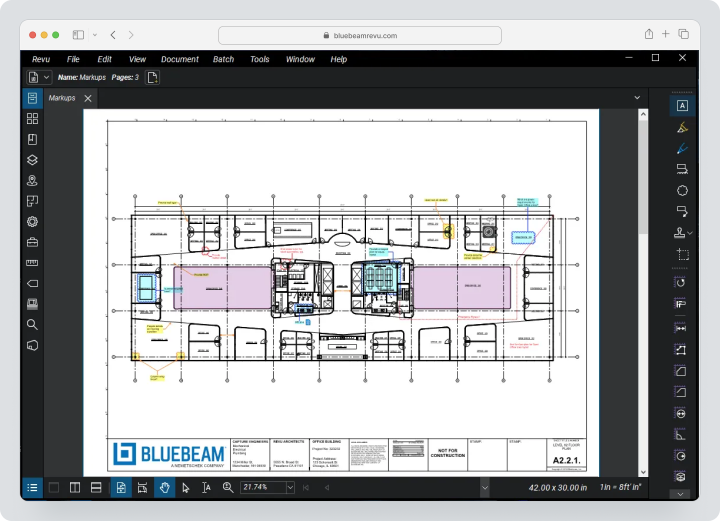
Pricing, verified August 3, 2026: Basics — $260, Core — $330, Complete — $440 per user per year. Max is offered at a starting price of $590 per year; the standard price for future renewals has yet to be announced. All plans include Revu for Windows, web and mobile access, support, training, and unlimited centralized storage.
| Fact | Value |
|---|---|
| Price | Basics $260, Core $330, Complete $440; Max $590 at the starting price per user per year |
| Free / trial | Trial depends on the vendor’s offer |
| Pricing model | Annual license per user |
| Verified | August 3, 2026 |
Key Features
- PDF markup and toolbars
- measuring and calculating work volumes
- overlaying and comparing drawings
- collaborative sessions and projects
- batch linking and sheet replacement in the Complete version
- CAD plugins
- AI-driven drawing analysis in the Max version
Main Difference from PlanGrid
Bluebeam works more extensively with PDFs and measurements, but it doesn’t serve as a complete construction management system on-site.
Advantages
- powerful tools for drawings and markup;
- familiar to AEC professionals;
- detailed measurement processes.
Limitations
- the main desktop client is Windows-oriented;
- tasks and field reports are secondary;
- does not replace construction ERP.
Who It’s Suitable For
Engineers, estimators, architects, and document control specialists.
PlanRadar
PlanRadar builds work around comments attached to digital plans. A comment can have a status, assignee, deadline, photos, voice notes, checklist, and signature added, and then a report can be generated.
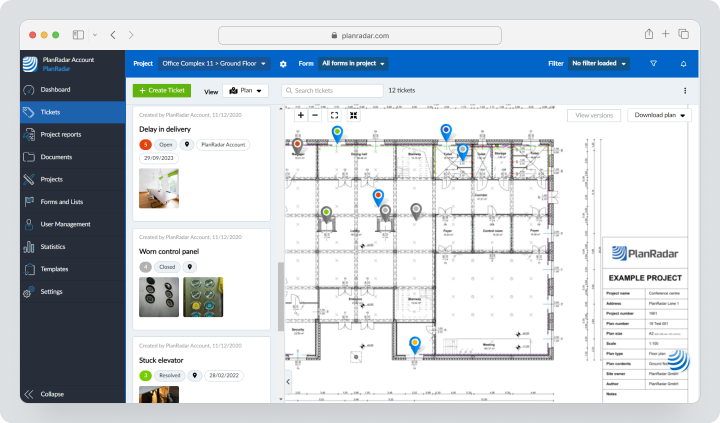
Pricing, verified August 12, 2026: a 30-day free trial without a credit card, subcontractors and observers connect for free. With monthly payment in the US, Basic costs $35, Starter — $119, Pro — $179 per user per month; Enterprise is priced individually. Regional pricing and currency may vary.
| Fact | Value |
|---|---|
| Price | Basic $35, Starter $119, Pro $179 per user per month for monthly payment; Enterprise — priced individually |
| Free / trial | 30-day trial; subcontractors and watchers are free |
| Pricing model | Per user; regional prices vary |
| Verified | August 3, 2026 |
Key Features
- comments on plans;
- offline mobile mode;
- photos, voice notes, and forms;
- customizable reports;
- approval processes;
- document management;
- Gantt and BIM on relevant plans;
- SiteView as a standalone 360° module.
Main Difference from PlanGrid
PlanRadar centers on defects, inspections, and structured comments, rather than just access to sheets.
Advantages
- free external participants;
- strong mobile documentation;
- flexible reports.
Limitations
- high Starter and Pro rates;
- some features are limited by the plan;
- SiteView is priced separately.
Who It’s Suitable For
Inspectors, owners, architects, and field QA/QC teams.
Raken
Raken is a field-oriented system for daily reports, time sheets, production control, safety, quality control, and document management. In 2026, the platform will also develop RFI, approval documents, and project management.
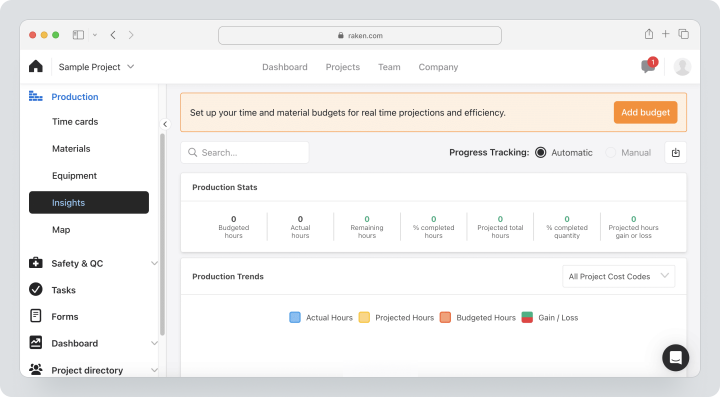
Price, verified August 3, 2026: individual as per commercial proposal. Raken offers a free trial with a full set of features, including unlimited projects and users, but does not publish a fixed rate for self-registration.
| Fact | Value |
|---|---|
| Price | Individual proposal |
| Free / trial | Free trial with a full set of features |
| Pricing model | Quote-based on order form; unlimited projects and users in trial |
| Verified | August 3, 2026 |
Key Features
- daily and segmented reports
- photos, videos, and notes
- time tracking and timesheets
- production, materials, and equipment
- safety briefings and checklists
- RFI, approval documents, and files
- dashboards and PDF reports
Main Difference from PlanGrid
Raken captures daily progress, working hours, production, and safety in more detail.
Advantages
- quick onboarding on-site;
- detailed daily reports;
- time and production analytics.
Limitations
- individual pricing;
- drawing management is not a main module;
- implementation of field processes is required.
Who It’s Suitable For
General contractors and subcontractors for whom daily reporting is important.
LetsBuild
LetsBuild in 2026 redirects the product page to the Aproplan brand. The solution is designed for addressing remarks, defect management, QHSE, inspections, planning, and handover. The product focuses on standardizing field processes.
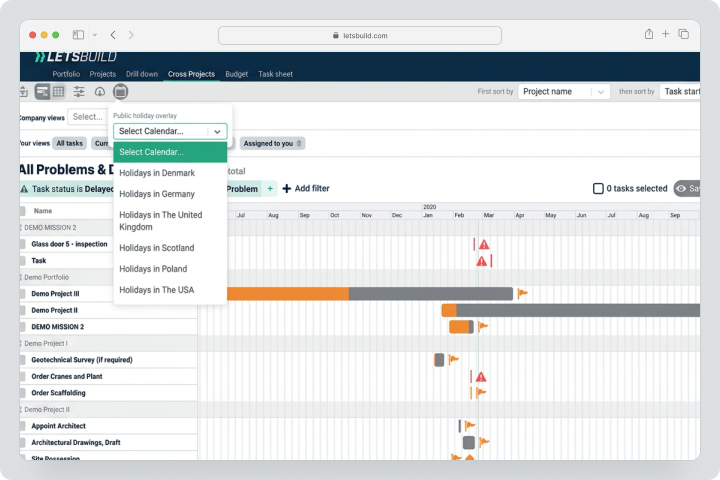
Price, verified August 3, 2026: individual. New customers require an implementation package, the cost of which depends on the number of processes, team size, and service format. A free trial is available.
| Fact | Value |
|---|---|
| Price | Individual proposal; implementation billed separately |
| Free / trial | Free trial available |
| Pricing model | Annual subscription per user, project, and module |
| Verified | August 3, 2026 |
Key Features
- plans and remarks;
- defects and addressing remarks;
- QHSE and inspections;
- forms and reports;
- planning and progress;
- handover;
- mobile access.
Main Difference from PlanGrid
Aproplan sells not only the application but also mandatory process implementation.
Advantages
- strong verification and quality control;
- structured rollout;
- suitable for handover.
Limitations
- no public pricing;
- mandatory services increase TCO;
- less suitable for simple self-service launches.
Who It’s Suitable For
Organizations looking to standardize quality and safety on-site.
Contractor Foreman
Contractor Foreman is a construction management package for small and medium contractors. It combines estimates, schedules, daily logs, work tasks, inspections, purchase orders, project changes, invoices, and a client portal.
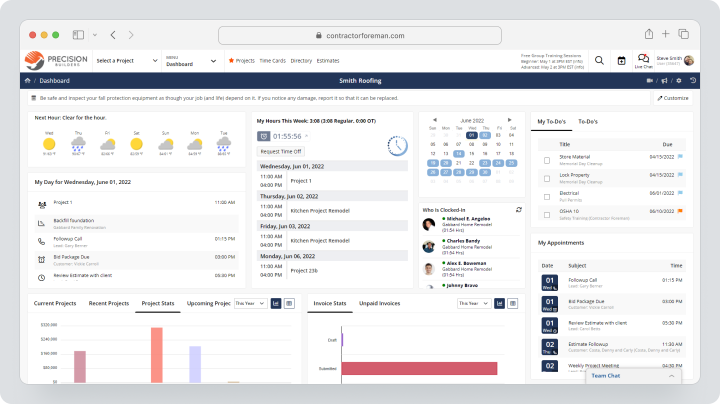
Cost, verified August 12, 2026: Contractor Foreman does not offer a separate monthly subscription: payment is available quarterly or annually. Rates are advertised on the site starting at $49 per month, but this is a calculated price for a longer payment period. All plans start with a 30-day trial period. A 100-day money-back guarantee applies only if the program conditions are met.
| Fact | Value |
|---|---|
| Price | From $49/month as a calculated price; actual payment quarterly or annually, no separate monthly subscription |
| Free / trial | 30-day trial; 100-day guarantee under conditions |
| Pricing model | Package price with user limits, except Unlimited |
| Verified | August 3, 2026 |
Key Features
- Estimates and bid proposals
- Schedule and tasks
- Daily logs and photos
- Work tasks and inspections
- Purchase orders and changes in orders
- Invoices and payments
- Client portal
Main Difference from PlanGrid
Contractor Foreman is broader in SMB finance and administrative processes but weaker as a specialized drawing viewer.
Advantages
- Accessible start;
- Wide range of modules;
- Package pricing.
Limitations
- User limits depend on the plan;
- No BIM/CDE;
- The interface is simpler than in enterprise platforms.
Who it’s suitable for
General, specialized, and service contractors of small businesses.
Buildertrend
Buildertrend is a construction management system for home builders, remodeling companies, and contractors in residential construction. The platform connects scheduling, estimates, budgets, material selection, project changes, client portal, and payments.
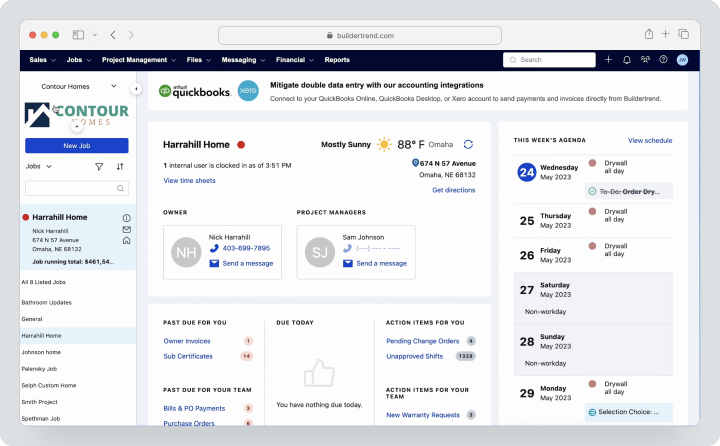
Cost, verified August 3, 2026: customized. The calculator asks for the contractor type and annual construction volume range. The offer includes an unlimited number of users and projects, and the summary depends on the scale of the business and the selected configuration.
| Fact | Value |
|---|---|
| Price | Custom proposal |
| Free / trial | Demo and launch terms are specified in the proposal |
| Pricing model | Based on business type, annual construction volume, and configuration; unlimited users and projects |
| Verified | August 3, 2026 |
Key Features
- Planning and tasks
- Estimates and budgets
- Material selection and changes in orders
- Client portal
- Invoices, payments, and Bill Pay;
- Daily logs, files, and messages.
Main Difference from PlanGrid
Buildertrend is more deeply adapted to the residential business and interaction with homeowners.
Advantages
- Strong client portal;
- Financial processes of residential construction;
- Single process from lead to payment.
Limitations
- Custom pricing;
- No enterprise CDE;
- Overkill for teams that only need plans.
Who it’s suitable for
Home builders, remodelers, and design-build companies.
Comparison Table of PlanGrid Alternatives
The table compares the core scenario and depth of construction features; prices and service capabilities were verified on August 3, 2026.
| Service | Best Scenario | Drawings | RFI / Submittals | Finance | Field Application | Planning | BIM / CDE |
|---|---|---|---|---|---|---|---|
| Worksection | Tasks and Deadlines | Files without Version Control | No Special Features | Costs and Plan/Fact | General Mobile App | Gantt | No |
| Forma Build | Official Autodesk Migration | Strong | Strong | Cost Management | Strong | Yes | Models and Docs |
| Procore | Connected Construction | Strong | Strong | Very Strong | Strong | Yes | Integrations |
| Fieldwire | Field Coordination | Strong | Business Plus | Budget on Business Plus | Strong/Offline | Limited | BIM Viewer |
| Bluebeam Revu | PDF and Measurements | Very Strong PDFs | Through Documents | No | Web/Mobile Limited | No | No CDE |
| PlanRadar | Tickets and Inspections | Strong | Approval Workflows | Limited | Strong/Offline | Gantt on Pro | BIM Depending on Plan |
| Raken | Daily Reporting | Documents | Developing | Time/Production | Strong | Resource Scheduling | No |
| LetsBuild | Defects and QHSE | Yes | Through Processes | Limited | Strong | Yes | Not Core Scenario |
| Contractor Foreman | SMB Contractor Suite | Files and Plans | Basic | Estimates, Invoices, Changes | Yes | Yes | No |
| Buildertrend | Residential Construction | Documents | Residential Workflows | Strong | Yes | Strong | No Fully Functional CDE |
Which Service to Choose for Different Scenarios?
For Migration Within Autodesk
Forma Build is the official successor to PlanGrid. It makes sense if your company is using Autodesk Docs, Revit, and other ecosystem products and is ready to restructure project setups.
For Closest Independent Replacement
Fieldwire supports field-first work with plans, tasks, and offline mobile. PlanRadar is a good fit if your key process revolves around tickets, inspections, and reports.
For PDF Drawings
Bluebeam Revu is ideal for measurements, overlays, markups, and studio collaboration. However, for daily reports, RFIs, and financials, an additional system will be needed.
For Daily Field Reporting
Raken captures labor, production, daily reports, and safety more comprehensively. LetsBuild is stronger in QHSE, defects, and handover.
For Small Contractors
Contractor Foreman offers a comprehensive construction suite starting at $49 per month. Worksection is suitable only for general tasks and deadlines when specialized construction workflows are already covered by other tools.
For Residential Construction
Buildertrend is better suited for homeowner communication, selections, estimates, and payments.
How to Transition from PlanGrid Without Data Loss?
- Compile a list of organizations, projects, licenses, and roles.
- Individually conduct an inventory of sheets, versions, markups, issues, photos, forms, attachments, and reports.
- Identify active, completed, and archived projects.
- Request from Autodesk the current migration matrix of PlanGrid → Forma Build and limitations for each data type.
- For another platform, request the official migration matrix.
- Export a backup archive before changing permissions.
- Check naming, sheet numbers, revisions, and linked references.
- Transfer one completed and one active project.
- Compare the number of sheets, issues, photos, and forms.
- Test the offline mobile workflow on-site.
- Train office and field users on a single scenario.
- Keep PlanGrid in read-only mode until the migration is accepted.
Do not assume that all types of data are migrated equally. Sheets, issues, photos, forms, and audit history need to be checked separately.
How to use Worksection with your construction system?
- Store approved drawings, BIM, RFI, and documents for approval in Forma, Fieldwire, Procore, or another CDE.
- Create a project in Worksection for the object or work package.
- Convert solutions from the construction system into tasks and subtasks.
- Assign responsible parties, deadlines, and priorities.
- Add a link to the official document, not an independent copy.
- Monitor dependencies on the Gantt chart.
- Track labor hours and expenses.
- Connect clients and contractors through guest access.
- Use reports for delays, workload, and plan vs. actual.
This way, Worksection does not duplicate the CDE but acts as an execution layer between the solution and specific action.
FAQ
What is the best alternative to PlanGrid in 2026?
For an official transition within Autodesk, Forma Build is the most logical choice, as it develops familiar processes with sheets, comments, and field documentation. Fieldwire is closer to an independent on-site workflow; Bluebeam is suitable for PDF drawings, and PlanRadar is for inspections and comments. There is no universal winner: the choice depends on migration, offline work, formal RFIs, and budget.
Are there free alternatives to PlanGrid?
There is no fully functional free alternative with the same set of construction features. Fieldwire Basic is available for free for up to five users and is suitable for a small pilot with plans and tasks. Worksection also has a Free version, but it only covers general task management. Before choosing, check the limits on projects, sheets, exports, storage, and external participants.
What alternative to PlanGrid is suitable for small businesses?
For small contractors, Fieldwire, Contractor Foreman, or Worksection are often the most sensible options. Fieldwire is suitable for plans and field coordination, Contractor Foreman combines administrative and financial processes, and Worksection helps manage tasks and deadlines. The choice depends on whether specialized sheets, inspections, estimates, and change orders are required, or if a simple PM layer is enough.
What PlanGrid replacement is better for teams?
For teams looking to maintain mobile work with drawings, it’s worth comparing Forma Build and Fieldwire. PlanRadar is convenient when employees work through tickets, forms, and inspections, while Raken is used for daily reports and labor tracking. With a large number of contractors, be sure to compare free external participants, offline mode, permissions, and the cost of each active license.
What distinguishes Worksection from PlanGrid?
PlanGrid is designed for mobile work with drawings, versions, markups, and field documentation. Worksection manages projects, tasks, deadlines, responsible parties, labor efforts, and reports. It does not replace drawing version control, BIM, RFI, or submittal workflows. It is reasonable to use it as an execution layer alongside a specialized construction system or CDE.
Can data be transferred from PlanGrid?
Yes, transition is possible, especially to Autodesk Forma Build, but don’t assume all data will transfer automatically and uniformly. Check sheets, revisions, markups, issues, photos, forms, permissions, and audit history carefully. First, export a backup archive, then conduct a pilot on a completed and active project and cross-check the number of items for each type.
How to compare service prices?
Compare not only the user price but also the total cost of ownership. Consider the incorporation of free subcontractors, project and sheet limits, storage, onboarding, migration, mandatory modules, API, support, and renewal. For multi-year projects, it’s crucial to find out the cost of archival access, temporary licenses, and documentation retention after reducing the number of users or ending a subscription.
How to choose between a specialized and a universal platform?
A specialized construction platform is needed when the central processes are sheets, RFIs, documents for approval, inspections, change logs, and official field documentation. A universal PM system is suitable for tasks, deadlines, and internal coordination. Do not turn it into an unofficial CDE: approved drawings and legally significant records must remain in a specialized system.
What functions should be checked before migration?
Check drawing versioning, markup transfer, offline mode, forms, issues, photos, permissions, audit history, exports, API, and mobile applications. Additionally, test the drawing version update, synchronization conflicts, and offline operation. Document what data the provider transfers, who is responsible for import errors, and how long the backup of the old project is retained.
Conclusion
PlanGrid remains available for existing customers but is no longer being sold to new users. Therefore, it is essential for companies to choose a migration path in advance and not delay data checks until launching the next major project.
Forma Build is the official successor. Fieldwire is closer with independent field-logic. Bluebeam is stronger in PDFs. PlanRadar and LetsBuild excel in inspections and defects. Raken specializes in daily reporting. Procore is within a unified construction platform. Contractor Foreman and Buildertrend cover various SMB and residential construction scenarios.
Worksection does not replace PlanGrid as a drawing management product. It should be used as an accessible layer of project management for tasks, deadlines, responsible parties, Gantt charts, time, and reports. More information can be found in the Worksection overview and on the pricing page.