The best alternative to Miro depends on what the team does after a visual session. Some users need an online whiteboard that closely resembles a brainstorming board, mind maps, facilitation, and customer journey maps. For others, it’s more important to connect ideas with real tasks, deadlines, responsibilities, and reports.
Miro remains a strong platform for online whiteboards, visual collaboration, work sessions, diagrams, prototypes, and collaborative planning. However, teams look for alternatives to Miro when they want to reduce costs, change access rules, obtain a simpler interface, improve handling of large boards, or transition from discussion to execution faster.
The review compares Worksection, FigJam, Mural, Lucidspark, Microsoft Whiteboard, Canva Whiteboards, ClickUp Whiteboards, Whimsical, Creately, and Stormboard. Worksection stands out not as a replacement for an online whiteboard but as a separate scenario for teams that need tasks, deadlines, labor costs, and performance control after brainstorming sessions.
Which Miro alternative to choose quickly
- Worksection — when ideas are already formed and need to be turned into tasks, stages, deadlines, responsibilities, and reports.
- FigJam — for simple collaborative boards within the Figma ecosystem.
- Mural — for facilitating work sessions, corporate collaboration, and working with external participants.
- Lucidspark — for brainstorming and planning in conjunction with Lucidchart diagrams and integrations.
- Microsoft Whiteboard — for organizations holding meetings in Teams and using Microsoft 365.
- Canva Whiteboards — for marketing, training, and visual content that needs to be quickly turned into a presentation or design.
- Whimsical — for product teams that need quick flowcharts, wireframes, mind maps, and documents.
- Creately — for visual modeling, diagrams, and working data on the canvas.
If the team’s main work consists of facilitation, synthesizing research results, UX mapping, or free drawing, Worksection won’t replace Miro. However, if the board is used as a temporary stage where the manager manually transfers decisions into the project management system, a task-oriented tool can reduce the amount of manual work.
What is Miro and who is it for?
Miro is a visual collaboration platform with infinite boards, sticky notes, drawing, mind maps, diagrams, Docs, Tables, Slides, Kanban, and AI tools. It is used by product, design, research, agile, engineering, and strategic teams for brainstorming, work sessions, customer journey mapping, retrospectives, planning, and presentations.
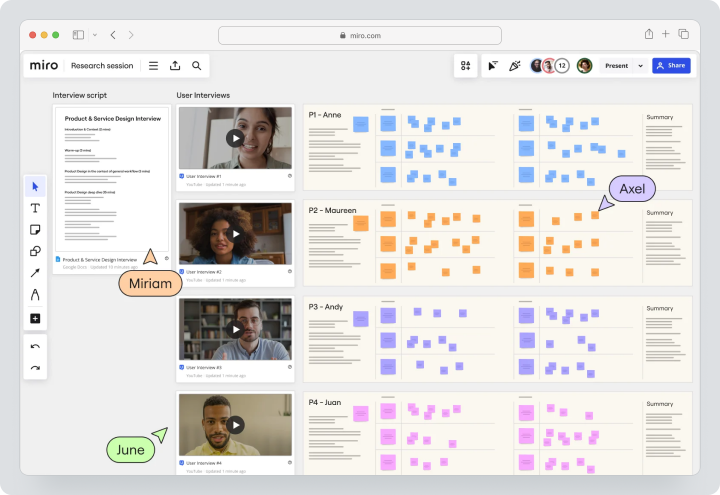
As of 12.08.2026, Free, Starter, Business, and Enterprise plans are available. Free is intended for an unlimited number of participants, but only the last three boards remain editable. Under monthly billing, Starter costs $10 per participant per month and adds unlimited private boards, visitors, voting, timers, version history, and advanced export. Business + AI Workflows costs $25 per participant per month under monthly billing. It includes unlimited workspaces and guests, AI Workflows, prototypes, Engage, advanced data tables, and extended diagram building.
Miro remains one of the most versatile online whiteboard services. However, this versatility can be excessive for a team that needs one specific feature: design sessions, diagrams, Microsoft meetings, or transferring decisions into tasks.
Why do teams search for alternatives to Miro?
Teams compare Miro with other services when the size, budget, or primary workflow changes.
Cost for the team
Miro charges permanent participants based on the number of seats. In Starter and Business plans, each participant uses a paid license, and the total bill increases along with the team size. Guests and visitors operate under separate rules and are not available at all levels.
If only a few facilitators are editing the boards while others join sporadically, it’s worth comparing the visitor, guest, and user access models in Mural, FigJam, and Whimsical.
Limitations of the Free Plan
Free allows an unlimited number of participants to work, but only the last three boards remain editable. All materials are available to team members, and there is no separate guest role.
For ongoing project work, this may be insufficient. Mural also limits the number of murals that can be edited simultaneously, while Whimsical and FigJam have different limitations.
Access Management
External clients, research respondents, and contractors should not automatically have access to all internal materials. Before selecting, check private boards, rooms, guest access, public links, password protection, and export restrictions.
Performance of Large Boards
Large research boards and process maps can contain thousands of objects, images, videos, tables, and embedded items. Performance depends not only on the service but also on the browser, device, and board structure. Sometimes splitting into several related boards or switching to a more specialized diagramming platform yields better results.
The Need to Connect Ideas with Execution
After a working session, the team votes, selects ideas, and agrees on the next steps. If these steps remain as stickers, decisions get lost. To continue working, responsibility, deadlines, status, and progress tracking are required.
Worksection is relevant for this stage. It does not provide an infinite canvas but helps transform session summaries into a manageable project.
How Did We Select and Compare Services?
Each product was evaluated based on a workflow scenario: create a board, invite participants, brainstorm, group ideas, vote, export results, and move on to next actions.
Canvas and Visual Objects
Check stickers, shapes, connectors, hand-drawn elements, images, embedded objects, tables, mind maps, flowcharts, and wireframes. For technical diagrams, UML, BPMN, cloud architecture libraries, and data relationships are important.
Collaboration and Facilitation
A timer, voting, private mode, following mode, attention grabbers, separate working boards, reactions, and presentation mode help conduct a working session, rather than just collaboratively editing a canvas.
Guests and External Participants
It is essential to understand the difference between participants, guests, visitors, users with view access, and co-authors. A free link may only provide reading, commenting, or full editing rights.
Templates and Specialization
A universal online board is useful for various departments. A specialized service may be stronger in product design, diagram construction, PI planning, education, or marketing content.
Connection with Tasks
Some platforms create cards and tasks but do not replace a comprehensive project management system. Check if it is possible to assign responsibility, monitor deadlines, dependencies, time, and reporting.
Import and Export
Before migration, it is important to check if the structure, comments, links, and images are transferable. PNG and PDF preserve the appearance but turn the board into a static file. Not all competitors support native Miro import.
Pricing and Administration
Compare prices for editors, free users with view access, visitors, and guests. For corporate use, SSO, SCIM, audit logs, data hosting, and access management are additionally important.
Best Miro Alternatives in 2026
Below are solutions for various tasks: execution, design, working sessions, diagrams, Microsoft 365, marketing content, and data-focused collaboration.
Worksection
Worksection — a project and task management system. It’s not an online board or a free facilitation tool. It’s designed for teams that need to continue working after a visual session.
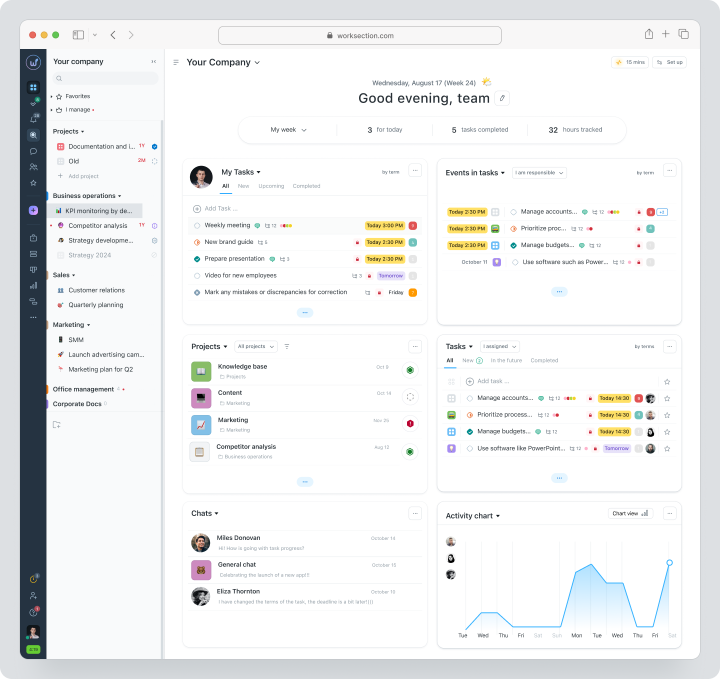
The result of a brainstorming session can be organized as a project, task, and subtasks. For each piece of work, a responsible person, deadline, priority, status, and planned time are assigned. Dependencies are displayed on a Gantt chart, and progress is tracked in the kanban, calendar, and reports.
Pricing: Free for up to 5 users and 2 projects. With monthly payment, Basic costs $5 per user per month, Business — $10, Premium — $15.
Key Features
- projects, tasks, and subtasks;
- checklists, comments, files, and links;
- responsible persons, deadlines, priorities, and statuses;
- Gantt chart, kanban, and calendar;
- time tracker, planned vs. actual, and reports;
- guest access for clients and contractors;
- integrations, API, and webhooks.
Main Difference from Miro
Miro helps to explore, discuss, and visualize ideas. Worksection helps to execute the chosen solutions. The services are not direct replacements and can often be used sequentially.
Advantages
- clear responsibilities after the working session;
- control over deadlines and labor costs;
- reports on projects and people.
Limitations
- no infinite canvas;
- no brainstorming with sticky notes and facilitation tools;
- visual schemes need to be attached or created in an external service.
Who It’s For
Teams who prioritize implementing ideas over constant work on an online board.
FigJam
FigJam — an online board for collaboration within the Figma ecosystem. It suits design and product teams that need to brainstorm alongside mockups, prototypes, and the design system.
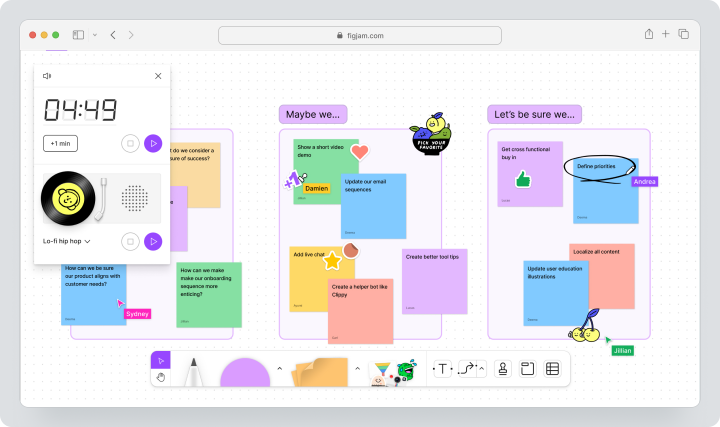
Pricing: Starter is available for free. With monthly payment, a Collab seat on Professional with full access to FigJam costs $3 per month. Collab seats on Organization and Enterprise cost $5 per month, but are only available under an annual contract. Free users with view-only access can view and comment on available materials.
Key Features
- stickers, drawing, and connectors;
- sections, stamps, reactions, and widgets;
- timer, voting, and audio discussions;
- diagrams and simple planning;
- import and export of PNG, JPG, PDF, and CSV for stickers;
- tight integration with Figma Design.
Main Difference from Miro
FigJam is simpler and fits better into the product design process. Miro is broader with business templates, diagram building, tables, working sessions, and portfolio management processes.
Advantages
- low price for Collab seat;
- ease of working alongside design;
- simple interface.
Limitations
- less depth for corporate working sessions;
- weaker complex diagram building;
- does not replace the task system.
Who It’s For
Product, UX, and design teams already working in Figma.
Mural
Mural — a visual collaboration platform with strong facilitation tools. It is suitable for working sessions, design thinking, strategic sessions, and corporate programs.
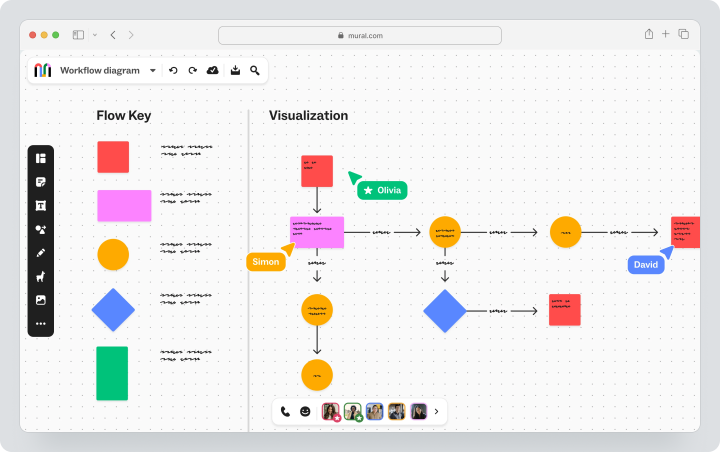
Pricing: Free — $0, unlimited number of participants, and three boards can be edited simultaneously. With monthly payment, Team+ costs $12 per participant per month. Business costs $17.99 per participant per month, but is only available with annual payment. Enterprise is individually priced.
Key Features
- infinite canvas with adjustable size;
- stickers, diagrams, templates, and content library;
- timer, polling, private mode, and attention-grabbing tools;
- visitor access on all plans;
- unlimited editable boards on Team+;
- unlimited guests, SSO, and advanced permissions on Business.
Main Difference from Miro
Mural focuses more on facilitation and managed group sessions. Miro offers a broader set of formats and AI processes.
Advantages
- advanced facilitation tools;
- visitors included in all plans;
- clear structure of rooms and boards.
Limitations
- guests available only with Business;
- cost increases based on the number of permanent participants;
- project execution remains an external process.
Who It’s Suitable For
Facilitators, consultants, innovation and strategy teams.
Lucidspark
Lucidspark is Lucid’s virtual board for brainstorming, strategic planning, agile sessions, and visual organization of ideas. It is closely integrated with Lucidchart and the overall Visual Collaboration Suite.
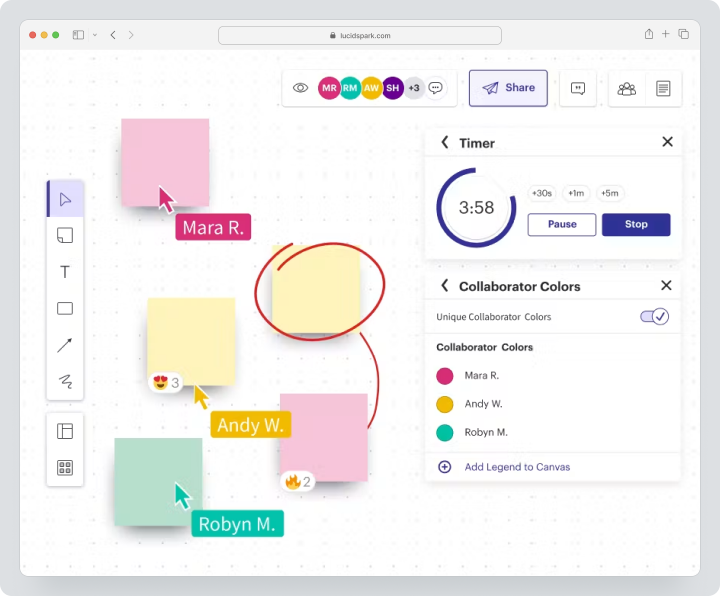
Cost: a free tier is available with a limited number of documents and boards. The current price for individual and team subscriptions is calculated on the Lucid checkout page and depends on the product bundle and number of licenses; it should be checked for the specific region before publication.
Key Features
- stickers, containers, Frames, and Paths;
- separate working boards;
- timer, polling, private mode, and facilitator tools;
- timelines, Dynamic Tables, and Lucid Cards;
- AI generation, sorting, and summary creation;
- import of boards from Miro, Mural, and FigJam;
- integrations with major workspace services.
Main Difference from Miro
Lucidspark is particularly strong in pairing the online board with Lucidchart and structured diagrams.
Advantages
- developed diagram building;
- import from other online board systems;
- strong facilitation tools.
Limitations
- price depends on Suite configuration;
- some enterprise controls are available on higher plans;
- tasks do not replace full PM.
Who It’s Suitable For
Engineering, architectural, agile, and strategic teams that need boards and diagrams in one ecosystem.
Microsoft Whiteboard
Microsoft Whiteboard is an online board for drawings, sticky notes, templates, and collaboration within Microsoft Teams and Microsoft 365.
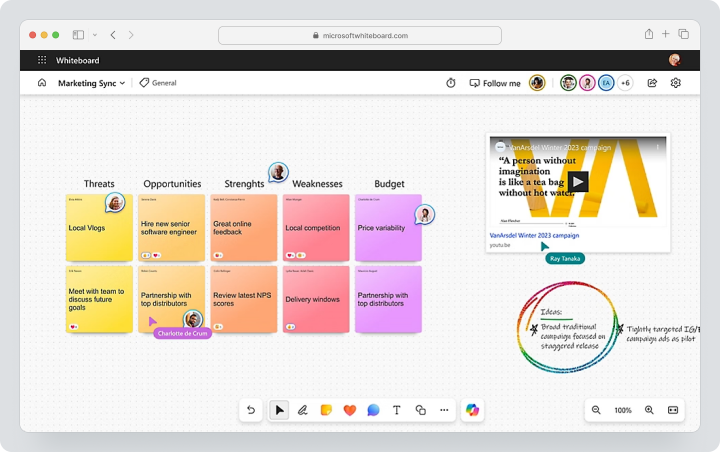
Cost: Whiteboard is available to users with relevant work and education subscriptions for Microsoft 365 and integrated with Teams. Availability for personal accounts, storage conditions, and feature set may depend on the type of account, so it should be checked directly with Microsoft 365 before implementation.
Key Features
- infinite canvas;
- doodling, handwriting input, sticky notes, text, and shapes;
- templates and reactions;
- collaboration in Teams;
- web, Windows, iOS, and Android;
- storage in Microsoft 365 and corporate policies.
Main Difference from Miro
Whiteboard is simpler and more deeply integrated into Microsoft meetings. Miro is stronger in templates, facilitation, integrations, and advanced visual processes.
Advantages
- convenient for Teams;
- low entry threshold;
- managed through Microsoft 365.
Limitations
- availability and storage conditions depend on the type of Microsoft account;
- fewer specialized workshop functions;
- limited connection to project execution.
Who It’s Suitable For
Organizations that already use Teams and Microsoft 365.
Canva Whiteboards
Canva Whiteboards — free online boards within Visual Suite. They are suitable for marketing, education, content, and small teams that need brainstorming, templates, and a quick transition to presentations or designs.
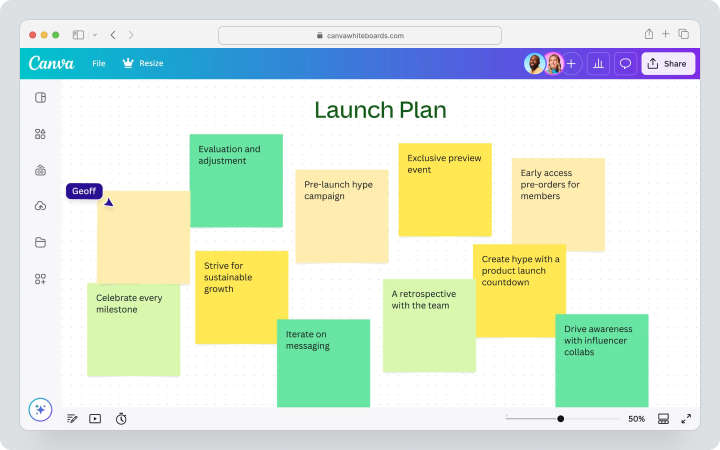
Cost: Canva Free allows you to create and collaboratively edit online boards. Paid Canva Pro and Business add premium resources, brand customization, advanced AI, and other features, but limits and pricing depend on the country and chosen plan; it is best to check the current terms on the local checkout page.
Key Features
- online boards available on Free;
- stickers, connectors, drawing, and templates;
- real-time collaboration;
- diagrams and mind maps;
- integration with presentations, documents, and designs;
- a wide range of visual assets.
Main Difference from Miro
Canva is stronger in visual content and design. Miro is deeper in work sessions, agile planning, and complex facilitation.
Advantages
- powerful free version;
- easy transition from board to design;
- large selection of templates and resources.
Limitations
- permissions and access management are weaker than in specialized corporate online boards;
- complex technical diagrams are limited;
- tasks are not a core module.
Who It’s Suitable For
Marketing, educational, content, and creative teams.
ClickUp Whiteboards
ClickUp Whiteboards — a visual canvas within ClickUp, tied to tasks, Docs, and workspace. Objects on the board can be converted into tasks and linked to execution.
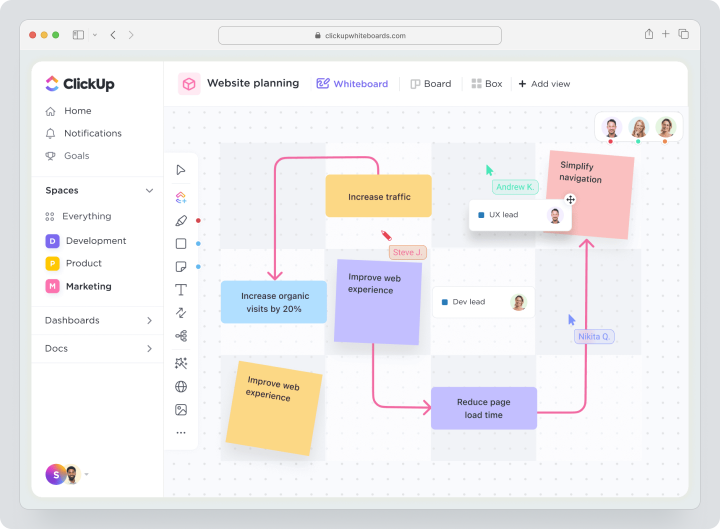
Cost: Free Forever includes limited access to online boards. The monthly Unlimited plan costs $10 per user, Business is $19. Private boards and mind maps are included in Business.
Key Features
- stickers, drawing, shapes, and connectors;
- embedded objects and task cards;
- creating tasks from objects;
- collaboration;
- connection to Docs, Chat, and Projects;
- private boards on Business.
Main Difference from Miro
ClickUp Whiteboards more strongly links the canvas to tasks. Miro is deeper in visual facilitation and specialized formats for work sessions.
Advantages
- short path from idea to task;
- single workspace;
- affordable pricing.
Limitations
- fewer facilitation tools;
- ClickUp’s interface may feel overloaded;
- online boards are part of a broader product, not a separate focus.
Who It’s Suitable For
Teams already using ClickUp who want to reduce manual transfer of ideas.
Whimsical
Whimsical — a visual workspace for flowcharts, wireframes, mind maps, documents, and boards. It is particularly popular among product teams and development teams.
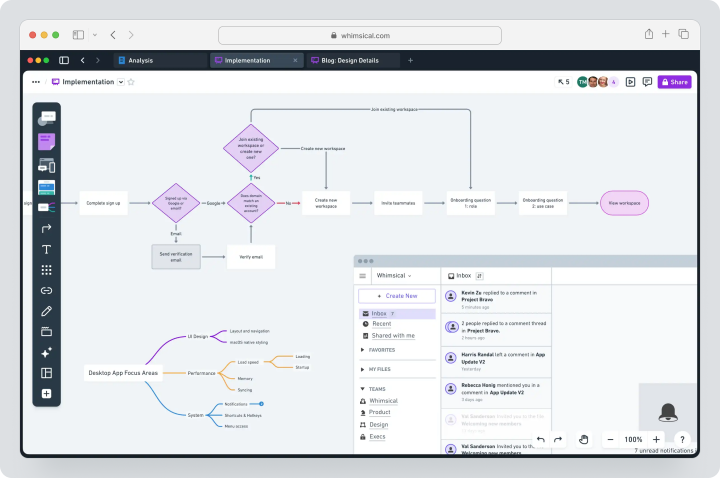
Cost: Free — $0 with three team boards. The monthly Pro plan costs $12 per editor, Business is $24. Users with view access can connect for free. Pro includes unlimited team boards, 50 guests, and 90 days of history, Business — SSO, SCIM, 200 guests, and unlimited history.
Key Features
- flowcharts and diagrams;
- wireframes;
- mind maps;
- docs;
- real-time collaboration;
- voting, timer, and custom templates on paid plans;
- Slack and GitHub integrations.
Main Difference from Miro
Whimsical is simpler and more structured for product schematics and wireframes. Miro is more versatile for work sessions and free canvases.
Advantages
- quick, neat diagrams;
- clear pricing;
- free users with view access.
Limitations
- Free limits team boards;
- fewer corporate facilitation options;
- no full project management.
Who It’s Suitable For
Product managers, UX, engineering teams, and startups.
Creately
Creately is a visual collaboration platform for diagrams, online boards, databases, and business modeling. It features professional libraries of shapes and visual models with linked data.
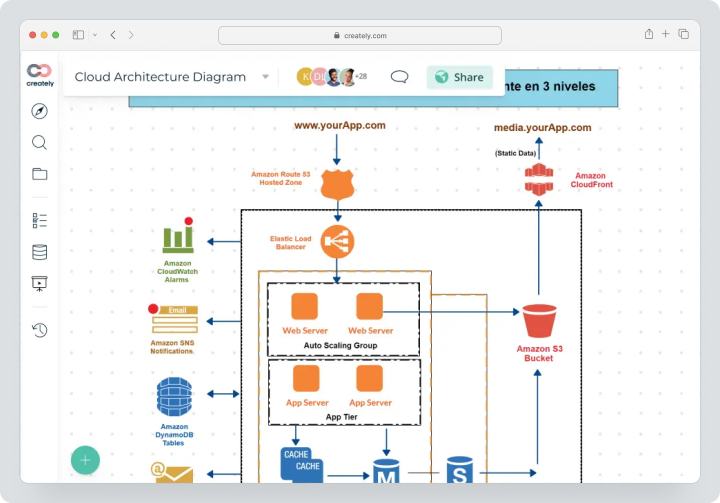
Pricing: There is a free plan called Free with unlimited canvases but a limit of 45 objects per canvas. Paid plans cost: Starter — $8 per month, Team — $8 per user per month, and Business — $149 per month (discounts apply for annual payments). A 7‑day free trial is available for the Business plan.
Key Features
- online boards and diagrams;
- large libraries of shapes;
- real-time collaboration and comments;
- data linking and databases;
- integrations with Teams, Slack, GitHub, and Atlassian;
- project management tools for Business;
- export to JPEG, PNG, SVG, and PDF.
Main Difference from Miro
Creately is stronger in structured diagrams and visual databases. Miro is broader in facilitation and collaborative working sessions.
Advantages
- many types of diagrams;
- objects with linked data;
- a free plan for testing.
Limitations
- Free is limited to 45 objects per canvas;
- price transparency depends on checkout;
- the interface can be more complex for simple brainstorming.
Who It’s Suitable For
Business analysts, process, architectural, and operational teams.
Stormboard
Stormboard is a digital online board with a focus on data for meetings, brainstorming, agile planning, and decision-making. Stickers can be turned into structured data and reports.
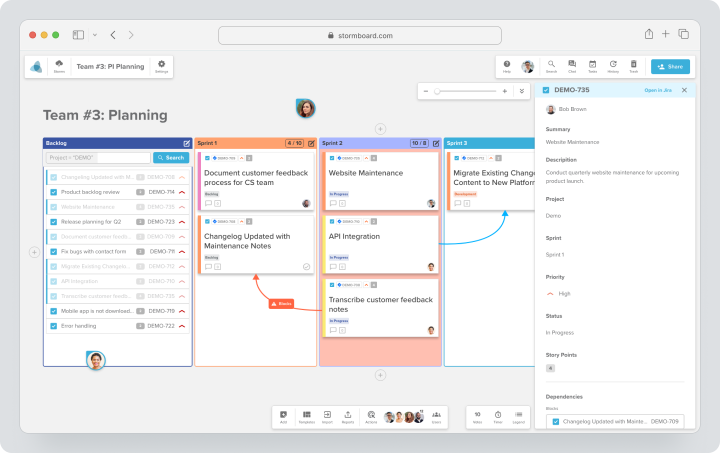
Pricing: The Personal plan is available for free without a credit card for individual users or teams of up to 5 people. The paid Business plan costs $10 per user per month with monthly payments and offers a 30-day free trial. A custom Enterprise plan is available for larger organizations with flexible pricing.
Key Features
- stickers and templates;
- real-time collaboration;
- voting and prioritization;
- reports and exports;
- integrations with Microsoft, Google, Jira, and Azure DevOps;
- roles for participants, co-authors, guests, and users with view access;
- corporate security and support.
Main Difference from Miro
Stormboard places more emphasis on transforming work session results into structured data and reports. Miro is more versatile in formats and AI processes.
Advantages
- data-first approach;
- 30-day Business trial;
- good integrations with agile systems.
Limitations
- the public pricing page doesn’t always show a fixed price;
- co-authors may become paid participants;
- smaller ecosystem of templates and community content.
Who It’s Suitable For
Agile, transformation, consulting, and corporate teams for whom results and session reports are important.
Comparative Table of Miro Alternatives
Data regarding features and pricing were verified on 12.08.2026. Prices may vary by region, payment period, number of seats, AI credits, and corporate conditions.
| Service | Best Use Case | Whiteboard | Facilitation | Diagrams | Tasks | External Participants | Export |
|---|---|---|---|---|---|---|---|
| Worksection | Execution post brainstorming | No infinite canvas | No | Gantt and dependencies | Strong | Guest access | Reports, files, API |
| FigJam | Product design and quick boards | Yes | Timer, polling, audio | Basic | Light elements | View-only users and co-authors | PNG, JPG, PDF, CSV |
| Mural | Working sessions and facilitation | Yes | Strong | Yes | Limited | Visitors, guest on Business | Images/PDF and integrations |
| Lucidspark | Boards plus Lucidchart | Yes | Strong | Strong | Lucid Cards | Flexible sharing | Import Miro/Mural/FigJam |
| Microsoft Whiteboard | Meetings in Teams | Yes | Basic | Basic | No project management | Through Microsoft 365 | Images and Microsoft storage |
| Canva Whiteboards | Content and visual design | Yes | Basic | Yes | No project management | Collaboration via link | Export designs |
| ClickUp Whiteboards | Ideas alongside tasks | Yes | Basic | Yes | Strong connection | Guests on the plan | Through ClickUp and images |
| Whimsical | Flowcharts, wireframes, mind maps | Yes | Voting/timer on paid plan | Strong | Limited | Free view, guests | Images/PDF |
| Creately | Diagrams and visual data | Yes | Basic | Strong | On Business | Guest access on Business | JPEG, PNG, SVG, PDF |
| Stormboard | Working sessions with a data focus | Yes | Voting and reports | Basic | Light actions | Guests/view-only users | Reports and export |
Which service to choose for different scenarios?
For the closest replacement to Miro
Compare Mural and Lucidspark. Mural is suitable for facilitating working sessions and external participants. Lucidspark is rational if along with brainstorming, Lucidchart, technical diagrams, and importing existing Miro boards are needed.
For product and design teams
FigJam fits better into the Figma workflow. Whimsical is suitable for quick flowcharts, wireframes, and mind maps. Both services are simpler than Miro but cover a narrower set of tasks.
For Microsoft 365
Microsoft Whiteboard is convenient in Teams meetings. Availability, storage, and permissions for a specific type of Microsoft 365 account should be checked before implementation.
For content and training
Canva Whiteboards work well if the outcome of the brainstorming needs to quickly turn into a presentation, poster, training material, or branded design.
For transitioning from idea to execution
Choose Worksection or ClickUp Whiteboards. ClickUp maintains a visual canvas and creates tasks from objects. Worksection is suitable if the online board is no longer needed, and focus shifts to deadlines, responsible individuals, Gantt chart, timing, and reporting.
How to transition from Miro without data loss?
The migration starts with determining the value of each board.
- Create a list of active, reference, and archived boards.
- Identify owners of critical boards.
- Remove temporary workshop duplicates.
- Decide which boards should remain editable, which can be saved as PDF/images, and which need to be converted into tasks.
- Check the native import of the target service. For example, Lucidspark supports Miro import.
- Transfer one complex board with images, comments, frames, links, and diagrams.
- Check permissions for external participants.
- Save the original and export until testing is complete.
- Train facilitators and administrators.
- Keep Miro in read-only mode during the transition period.
Static export retains appearance, but not collaboration. Therefore, critical boards need to be tested separately.
How to transfer brainstorm results into Worksection?
After a visual session, the team can follow this process:
- Select ideas to implement.
- Create a project for the result or initiative.
- Add tasks and subtasks.
- Attach a link or PDF of the output board.
- Assign responsible parties, deadlines, and priorities.
- Connect dependent stages in the Gantt chart.
- Track time and monitor plan vs. actual.
- Use reports to control progress.
This way, Miro or another online board remains a tool for exploration and discussion, while Worksection is an execution system.
FAQ
What is the best alternative to Miro in 2026?
There is no single winner. Mural is suitable for professional facilitation, Lucidspark for diagrams and agile planning, FigJam for design teams, and Whimsical for flowcharts and wireframes. Choose Worksection if tasks, deadlines, and execution control are more important after brainstorming.
Are there free alternatives to Miro?
Yes. Free options include Worksection, FigJam, Mural, Microsoft Whiteboard for appropriate accounts, Canva Whiteboards, ClickUp, Whimsical, Creately, and Stormboard. Limitations vary by boards, objects, guests, storage, and export.
Which Miro alternative is suitable for small businesses?
For small businesses, FigJam, Canva Whiteboards, Whimsical, and Mural Free are suitable. Worksection is rational if the team has already defined ideas and wants to manage their implementation. Before choosing, count the number of editors and external participants.
Which Miro replacement is better for a team?
FigJam is convenient for design teams, Mural for strategic working sessions, Lucidspark or Creately for engineering diagrams, and Whiteboard for Microsoft 365. The team should choose based on the primary scenario, not the number of templates.
How does Worksection differ from Miro?
Miro is an infinite visual board for collaborative exploration and facilitation. Worksection is a project and task management system. It does not replace sticky notes, mind maps, or free drawing, but it provides accountability, deadlines, dependencies, time tracking, and reports.
Can data be transferred from Miro?
Yes, but the completeness of the transfer depends on the target platform. Lucidspark supports Miro import, while some services only work with images or PDFs. Check comments, links, frames, images, and permissions on a single pilot board.
How to compare prices of whiteboard services?
Count paid editors, participants, guests, visitors, and users with viewing access separately. Check for annual payment discounts, AI credits, private boards, export options, SSO, and minimum seat requirements. Sometimes, a more expensive seat can be more beneficial if external participants join for free.
How to choose between whiteboard and project management?
An online board is needed for uncertainty: brainstorming, research, diagrams, and collaborative discussion. Project management is necessary after a decision is made: tasks, deadlines, responsibilities, and control. Many teams use both product types sequentially.
What features to check before migration?
Check the canvas, sticky notes, diagrams, templates, voting, timer, private mode, comments, guests, public links, version history, import/export, SSO, and integrations. Test the largest and most complex board separately.
Conclusion
Miro remains a strong visual platform with a wide range of formats and the new Business + AI Workflows. But the best alternative is determined by which part of Miro the team uses most often.
FigJam is suitable for design, Mural for facilitation, Lucidspark for diagrams and agile planning, Microsoft Whiteboard for Teams, Canva for visual content, Whimsical for product diagrams, Creately for modeling with connected data, and Stormboard for data-focused working sessions.
Worksection is not an online board. It is suited for the next stage when ideas must turn into controlled work. For this, you can explore Worksection capabilities and compare pricing.