Memtime automatically tracks work in applications, documents, browsers, and calendars but keeps a raw activity timeline locally on the device. Users decide which fragments to turn into time entries and submit to the project system. This privacy-focused approach helps reconstruct the workday without screenshots and constant manual timers.
Alternatives to Memtime are sought when teams need more affordable plans, manual timers, centralized timesheets, deep focus analytics, cloud activity history, or employee monitoring. Therefore, Memtime alternatives cannot be evaluated as interchangeable products. Some solutions restore billable hours, others analyze digital habits, while others monitor employee attendance and activity.
The selection includes Worksection, Timely, RescueTime, Timing, Rize, Clockify, Toggl Track, ManicTime, DeskTime, and EARLY, previously known as Timeular. Worksection ranks first only in the project scenario: the employee intentionally tracks time on the task, while the manager compares planned vs. actual time, deadlines, and costs. The system does not record applications, URLs, document titles, or screen backgrounds.
Memtime Alternatives in 30 Seconds
- Worksection is suitable when time needs to be linked to tasks, responsible parties, deadlines, expenses, and reports.
- Timely is closest to automatically generating timesheets with AI suggestions and cloud team analytics.
- RescueTime is designed for analyzing digital habits, focus, and blocking distracting resources.
- Timing is rational for macOS users who require a detailed automatic history of applications, documents, calls, and meetings.
- Rize combines automatic tracking, focus analytics, billable hours, and profitability without screenshots.
- Clockify offers affordable manual tracking, kiosk mode, approvals, billing, and optional monitoring features.
- Toggl Track is convenient with a fast manual timer, project billing, and simple implementation.
- ManicTime is suitable for companies that need cloud or on-premises deployment, automatic tracking, and flexible privacy settings.
- DeskTime focuses on attendance tracking, productivity monitoring, URL and application tracking, shifts, and screenshots.
- EARLY is suitable for professionals and small teams for whom manual and automatic tracking, PTO, overtime, and physical tracking are important.
For the closest replacement for Memtime, first compare Timely, Timing, and Rize. For manual timesheets and billable hours, Toggl Track and Clockify will work well. For local or on-premises deployment, consider ManicTime. DeskTime falls under employee monitoring, so it requires transparent policies and legal checks.
What is Memtime and who is it for?
Memtime is an automatic desktop tracker for Windows, macOS, and Linux. The application records activity in applications, documents, browser tabs, calls, and meetings, and then shows the user a personal timeline. Automatic data remains on the device and is not available to the manager until the user manually creates a time entry.
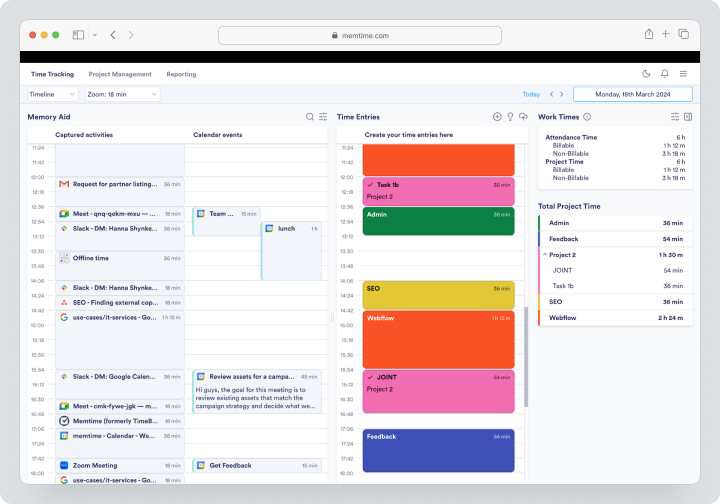
The service supports projects, tasks, billable time, calendar synchronization, reports, and integrations with external PM, PSA, and accounting products. Connect opens a wider range of integrations, while Premium adds corporate features and additional synchronization methods.
As of the review date Memtime pricing on August 4, 2026, the service offered a 14-day trial without a card. There is no monthly subscription: the minimum payment period is quarterly. With quarterly payment, Basic costs €15 per user per month, Connect €22, Premium €30. Enterprise is priced individually for teams starting from 50 seats. Memtime is reasonable for consultants, lawyers, agencies, and IT teams looking to restore hours without monitoring employees.
Why are teams looking for Memtime alternatives?
Centralized Team Timesheets Needed
Memtime makes personal automatic timelines private, which is a strong point of the product. However, some organizations require centralized approvals, blocking periods, attendance tracking, overtime, and bulk editing. Clockify, Toggl Track, and Timely better handle these processes at the workspace level.
Team Prefers Manual Timer
Automatic tracking is not useful for everyone. A consultant may want to start the timer only for billable calls, while a variable team employee needs to mark the start of work. Toggl Track, Clockify, and Worksection build the process around conscious time recording.
Cloud Activity Analytics Needed
Memtime stores raw activity locally. This increases privacy but limits scenarios where a user wants to see a unified cloud timeline from multiple devices or where a company intentionally implements activity monitoring. Timely, Rize, RescueTime, and DeskTime use different storage and access models.
Focus Analytics Needed
RescueTime and Rize answer questions about focus time, breaks, distractions, and digital habits. Memtime primarily helps recover actual hours and allocate them to projects, rather than assessing the quality of focus.
Competitive Pricing is Important
Memtime does not offer a permanent free plan. Clockify, Worksection, and the limited free plan of Toggl Track allow starting without payment. However, it’s important to compare not only the license but also the costs of forgotten hours, admin time, and the quality of billing data.
Employee Monitoring Features Needed
DeskTime, Clockify Pro, and ManicTime can collect screenshots, URLs, applications, attendance data, or other metrics. Memtime should not be described as such a system: its local timeline is primarily for the user themselves. Monitoring features should be implemented only with notification and a clear business purpose.
How Did We Select and Compare Services?
Manual and Automatic Tracking
It was checked whether a user can start a timer, enter hours manually, recover a day from the activity timeline, and edit entries. Automatically collected data is not always an approved timesheet.
Privacy and Control
Considered were local storage, screenshots, URLs, document names, GPS, personal time, and the user’s right to confirm data before passing it to a manager. The more detailed the monitoring, the higher the requirements for corporate policies.
Link to Projects
For agencies, important factors include clients, projects, tasks, rates, budgets, labor costs, and profitability. A product for personal focus may not cover these processes, even if it shows time spent in applications brilliantly.
Team Processes
Roles, approvals, time blocking, attendance tracking, scheduled reports, workload, and export were compared. Whether the product is suitable for voluntary project time tracking or for monitoring work activity was evaluated separately.
Integrations and Data Migration
APIs, CSV, calendar synchronization, connections to PM, CRM, accounting systems, and PSA were checked. During migration, it is important to preserve approved time records, not just dump raw activity history.
Checklist for Choosing a Memtime Alternative
Before registering, determine what result you need from time tracking. Accurate client hours are needed for billing. For personal productivity, categories, focus, and distractions are important. For payroll calculation, attendance tracking, overtime, and approvals are required.
Check:
- where the raw activity timeline is stored;
- whether the manager sees applications, URLs, or document names;
- whether the service takes screenshots;
- whether a user can delete personal time;
- whether there are timers, manual entries, and corrections;
- whether rates, budgets, and invoices are supported;
- whether approved periods can be blocked;
- whether Windows, macOS, Linux, and mobile applications are available;
- how CSV, PDF, and data export via API work;
- what the license costs as the team grows.
Best Memtime Alternatives in 2026
Worksection
Worksection is a project management system where time is linked to a specific task. An employee starts a timer or adds hours manually, while a manager sees labor costs along with deadlines, responsible persons, statuses, and expenses.
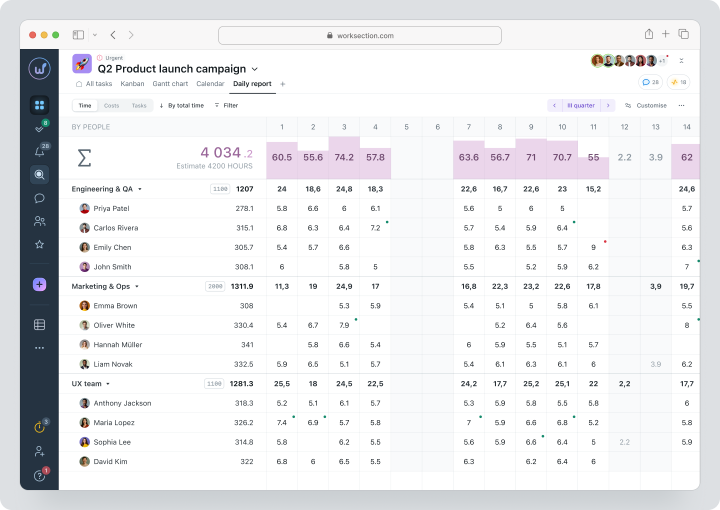
This is not an automatic desktop tracker. Worksection does not create a local history of programs or collect applications, URLs, or screenshots. Its script starts with a task and an outcome.
Cost: Free for up to 5 users and 2 projects. The monthly payment is $5 for Basic, $10 for Business, and $15 for Premium per user per month. Time tracking, expenses, Gantt chart, and guest access are available starting from Business.
| Fact | Value |
|---|---|
| Price | Free; Basic $5, Business $10, Premium $15 per user per month with monthly billing |
| Free / trial period | Permanent Free for up to 5 users and 2 projects |
| Model | Per active user |
| Last verified | August 4, 2026 |
Key features
- task planner, projects and subtasks;
- deadlines, responsible persons, statuses, and priorities;
- Gantt chart and dependencies;
- time, expenses, planned vs. actual, and reports;
- roles, permissions, and guest access;
- API and integrations.
Main difference from Memtime
Memtime automatically restores the day based on local activity. Worksection only records the time that the user consciously associates with a task and project.
Advantages
- hours are immediately linked to the outcome;
- no hidden computer monitoring;
- convenient project reporting.
Limitations
- no automatic activity timeline;
- does not analyze concentration and applications;
- time tracking available starting from Business.
Who it’s suitable for
Agencies, service, and project teams that need tasks, deadlines, and voluntary labor cost tracking.
Timely
Timely automatically records work in applications and helps convert it into draft timesheets. The user confirms the entries, and the manager receives project and team reports.
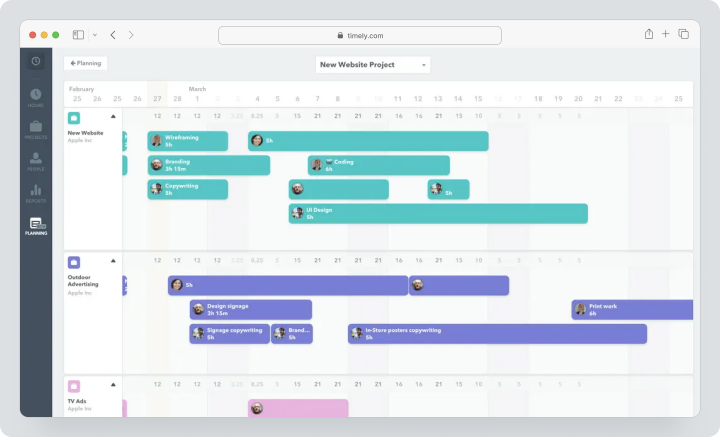
Cost, verified August 4, 2026: with monthly billing, Starter costs $11, Premium $20, Unlimited $28 per user per month. A free trial is available on the official pricing page, but the duration is not specified.
| Fact | Value |
|---|---|
| Price | Starter $11; Premium $20; Unlimited $28 with monthly billing |
| Free / trial period | Free trial available; duration not specified on the pricing page |
| Model | Per user; Starter up to 5, Premium up to 50 users |
| Last verified | August 4, 2026 |
Key features
- automatic tracking via Memory;
- timesheets with AI suggestions;
- projects, budgets, and cost tracking;
- load and team planning;
- invoices and reports;
- API and integrations.
Main difference from Memtime
Timely makes timesheet automation and team analytics a cloud process, while Memtime stores raw activity locally.
Advantages
- less manual input;
- strong budgeting and load management;
- clear team reporting dashboards.
Limitations
- no permanent Free;
- cost increases with the number of users;
- privacy model differs from Memtime’s local model.
Who it’s suitable for
Consultancies, agencies, and professional services with billable work.
RescueTime
RescueTime automatically analyzes applications and websites, generates productivity reports, and helps protect focus. Solo+ and Team+ add timesheets, projects, and rates for billable hours.
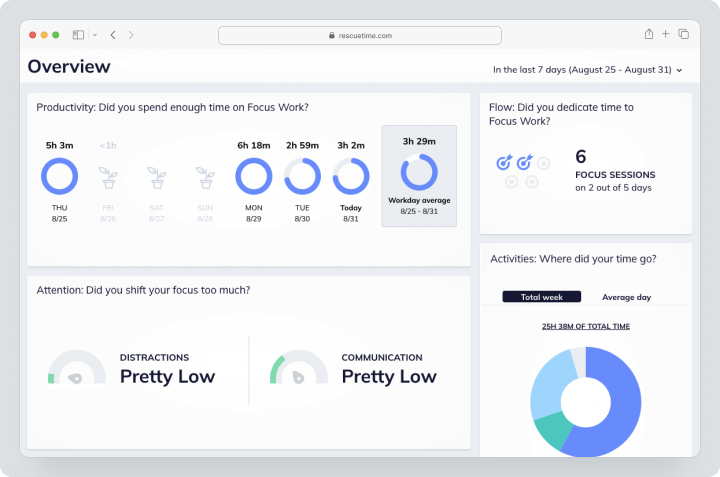
Price, verified on August 4, 2026: monthly, Solo Focus costs $9, Solo+ — $15, Team Focus — $12 per user, Team+ — $18 per user per month. A free Lite version and a 14-day trial of paid features are available.
| Fact | Value |
|---|---|
| Price | Solo Focus $9; Solo+ $15; Team Focus $12; Team+ $18 for monthly payment |
| Free / trial period | Lite free; 14-day trial |
| Model | Individual and team plans |
| Verified | August 4, 2026 |
Key Features
- automatic tracking of applications and websites;
- focus sessions and distraction blocking;
- goals, notifications, and productivity reports;
- offline time tracking;
- timesheets in Solo+ and Team+;
- shared clients and projects in Team+.
Main Difference from Memtime
RescueTime provides deeper analysis of digital habits and focus, while Memtime focuses on recovering billable time privately.
Advantages
- strong focus analytics;
- free Lite;
- automatic history without a timer.
Limitations
- not a full-fledged PM system;
- cloud analytics less focused on local storage;
- advanced timesheets require Plus.
Who it’s for
Knowledge workers for whom focus and habits are more important than financial project reporting.
Timing
Timing automatically recognizes applications, documents, websites, calls, and meetings in the Apple ecosystem. Users assign activities to projects and generate reports.
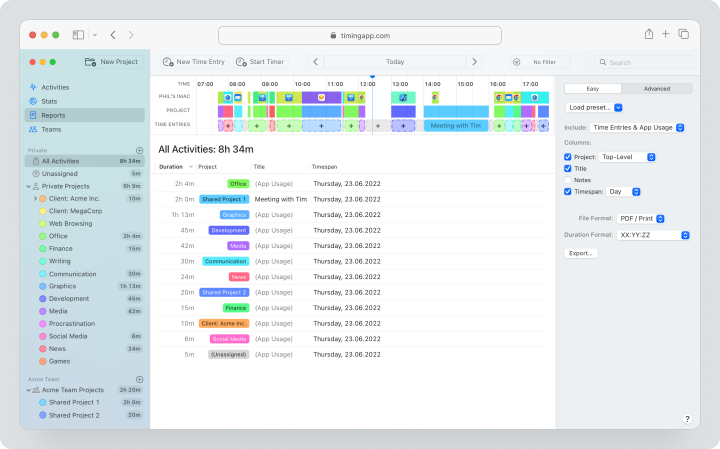
Price, verified on August 4, 2026: monthly, Professional costs about $11, Expert — $14, Connect — $20; final pricing depends on the country and is displayed at checkout. The trial period lasts 30 days without a card.
| Fact | Value |
|---|---|
| Price | Professional about $11; Expert $14; Connect $20 for monthly payment; summary depends on the region |
| Free / trial period | 30-day trial |
| Model | Subscription per user and number of Macs |
| Verified | August 4, 2026 |
Key Features
- automatic tracking on macOS;
- manual entries and payment status;
- importing iOS activity and call tracking;
- calendar and automatic meeting recognition;
- ClickUp, Linear, Clio, and GrandTotal;
- API, Zapier, and MCP in Connect.
Main Difference from Memtime
Timing is more deeply integrated into the Apple ecosystem and supports team collaboration in Connect, but does not function as a universal tracker for Windows/Linux.
Advantages
- detailed context on Mac;
- strong professional integrations;
- 30-day trial period.
Limitations
- primary desktop application only for macOS;
- price depends on the plan and region;
- not suitable for mixed Windows teams.
Who it’s for
Mac users: designers, developers, consultants, and lawyers.
Rize
Rize automatically captures the active window, URL in supported browsers, and meetings from Google Calendar. It combines focus analytics, AI categorization, projects, and profitability.
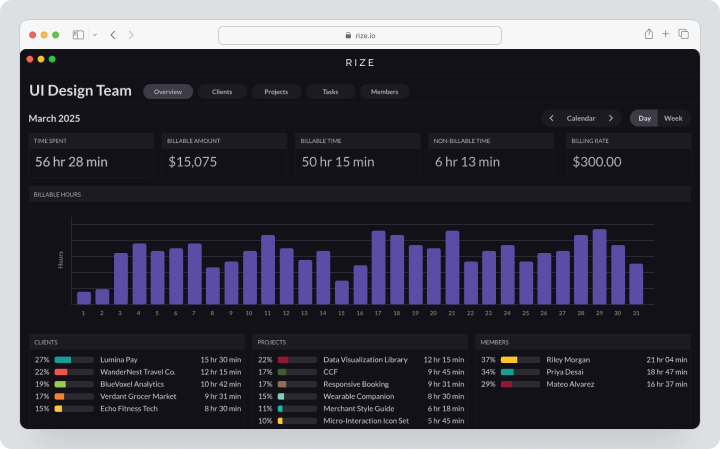
Pricing, verified on August 4, 2026: individual plans cost: Basis $12.99, Pro $28.99, Max — $49.99 per user per month. The trial period lasts 7 days.
| Fact | Value |
|---|---|
| Price | Basis $12.99, Pro $28.99, Max $49.99 |
| Free / Trial Period | 7‑day free trial without a card |
| Model | Per user or seat |
| Verified | August 4, 2026 |
Key Features
- automatic tracking on computer;
- focus, breaks, and distraction analysis;
- AI categories;
- clients, projects, and billable hours;
- profitability and team reporting dashboards;
- CSV and PDF export.
Main Difference from Memtime
Rize stores data in cloud infrastructure and provides more focus and profitability analytics but does not use local raw timeline.
Advantages
- no screenshots or keystroke logging;
- user confirms data;
- combines focus and billing.
Limitations
- high price;
- no permanent free plan;
- Linux not supported.
Who It Is Suitable For
Agencies and intellectual labor professionals who need automatic billing and focus analytics.
Clockify
Clockify combines a timer, timesheets, kiosk mode, reports, approvals, invoicing, and HR management functions. Monitoring tools are only enabled in higher plans.
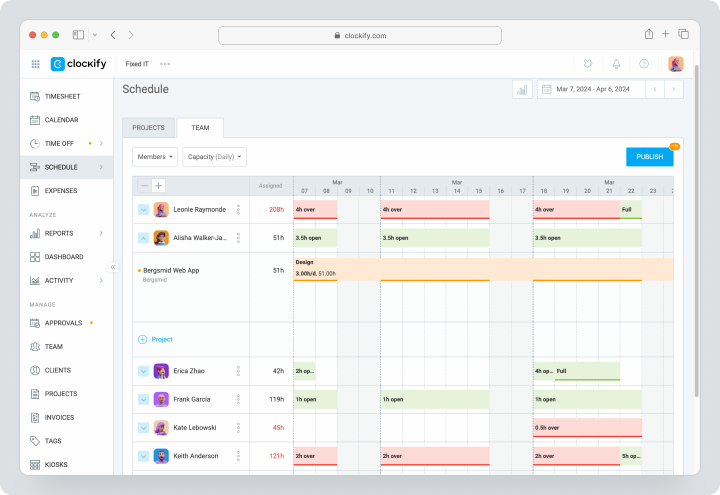
Pricing, verified on August 4, 2026: for monthly payment, Basic costs $6.99, Standard — $9.99, Pro — $14.99, Enterprise — $15.99 per seat per month. Free allows the owner to invite up to four people. The Pro trial lasts 7 days.
| Fact | Value |
|---|---|
| Price | Basic $6.99; Standard $9.99; Pro $14.99; Enterprise $15.99 for monthly payment |
| Free / Trial Period | Free for the owner and up to 4 invitees; 7‑day trial period |
| Model | Per active seat; separate seats for kiosks are cheaper |
| Verified | August 4, 2026 |
Key Features
- timer, timesheet, kiosk mode, and private Auto Tracker;
- approvals and time blocking;
- invoices, budgets, and profitability;
- planning and forecasting;
- GPS and screenshots on Pro;
- SSO, SCIM, and audit log on Enterprise.
Main Difference from Memtime
Clockify is built around manual entries and team administration. Automatic private timeline is not its core scenario.
Advantages
- low entry price;
- many features for timesheets;
- optional kiosk mode and monitoring.
Limitations
- advanced features spread across plans;
- Free is limited in team size;
- screengrabs and GPS require agreed rules.
Who It Is Suitable For
Small teams, service companies, and organizations with formal timesheets.
Toggl Track
Toggl Track offers a quick timer, manual entry, calendar, computer activity, and project reports. The user decides which automatic prompts to convert into time entries.
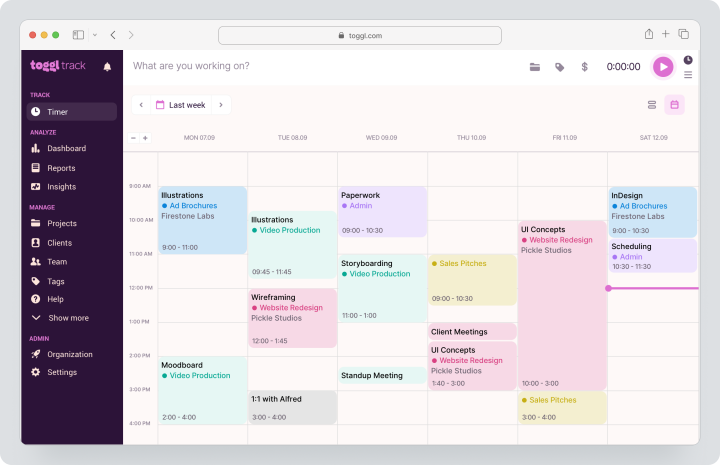
Pricing, verified on August 4, 2026: for monthly payment, Starter costs $12, Premium — $20 per license per month. Free is available for a limited number of users, and Premium trial lasts 30 days.
| Fact | Value |
|---|---|
| Price | Starter $12; Premium $20 for monthly payment |
| Free / Trial Period | Free for a small team; trial period 30 days |
| Model | Per license |
| Verified | August 4, 2026 |
Key Features
- web, desktop, and mobile timer;
- manual input and calendar entries;
- private activity on the computer;
- bids and time estimates;
- profitability and fixed-cost projects;
- approvals and scheduled reports.
Main Difference from Memtime
Toggl Track is focused on quick manual tracking, while the automatic activity history is supplementary and user-controlled.
Advantages
- easy implementation;
- strong billing;
- over 100 integrations.
Limitations
- you might forget to start the timer;
- Premium is noticeably more expensive than Starter;
- no local raw activity history.
Who It’s For
Freelancers, agencies, lawyers, and client teams.
ManicTime
ManicTime automatically records applications, documents, websites, downtime, and can use screenshots. The service is available in a cloud version or deployed on your own server.
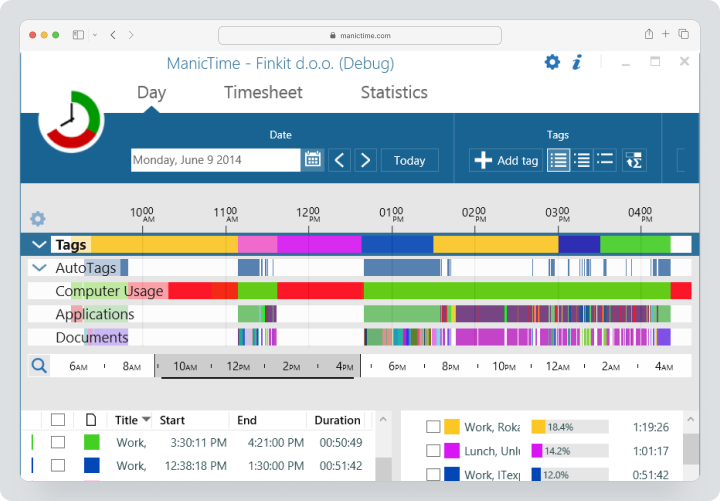
Price, checked on August 4, 2026: Cloud Standard costs $9 per user per month with monthly billing and includes a 30-day trial. Ultimate adds more devices and cloud screenshots; the exact monthly price is shown in the configurator.
| Fact | Value |
|---|---|
| Price | Cloud Standard $9 monthly; Ultimate — exact monthly price in configurator |
| Free / Trial Period | 30-day trial period |
| Model | Per user; cloud or own server |
| Verified | August 4, 2026 |
Key Features
- automatic tracking of applications, documents, and websites;
- tags, projects, and automatic labels;
- screeshots;
- attendance, vacations, and overtime tracking;
- invoices and reports;
- cloud/own server and API.
Main Difference from Memtime
ManicTime offers team monitoring with deployment on your own server and centralized reporting, while Memtime restricts access to raw history to the user.
Advantages
- Windows, Mac, and Linux;
- flexible deployment;
- advanced reporting.
Limitations
- more complex setup;
- screeshots increase privacy risk;
- not all features are included in Standard.
Who It’s For
IT companies and organizations with deployment and data control requirements.
DeskTime
DeskTime automatically tracks applications, URLs, document titles, attendance, and productivity. Premium adds screenshots, integrations, API, and shift planning.
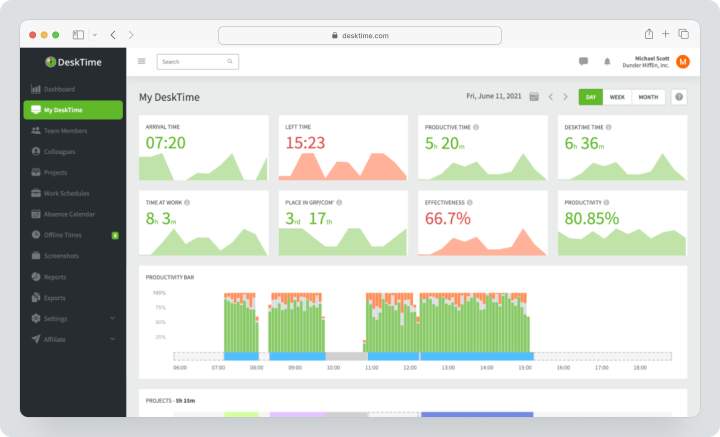
Price, checked on August 4, 2026: with monthly billing, Pro costs $7, Premium $10 per user per month excluding VAT. Enterprise for 200+ users is calculated individually.
| Fact | Value |
|---|---|
| Price | Pro $7; Premium $10 with monthly billing |
| Free / Trial Period | Available trial period |
| Model | Per user; Enterprise — individually |
| Verified | August 4, 2026 |
Key Features
- automatic and manual tracking;
- URLs, applications, and document titles;
- productivity calculation;
- screeshots in Premium;
- shift planning and absence calendar;
- reports, export, and API.
Main Difference from Memtime
DeskTime is an employee monitoring system where managers receive activity data. Memtime keeps raw history private.
Advantages
- attendance tracking and planning;
- detailed team reports;
- clear pricing.
Limitations
- more invasive model;
- screeshots show screen content;
- does not replace project management.
Who It’s For
Companies that truly need attendance tracking and monitoring under transparent rules.
EARLY (formerly Timeular)
EARLY, formerly Timeular, combines manual timing, automatic tracking, project budgets, PTO, and overtime. A physical octagonal Tracker, sold separately, allows you to switch between activities.
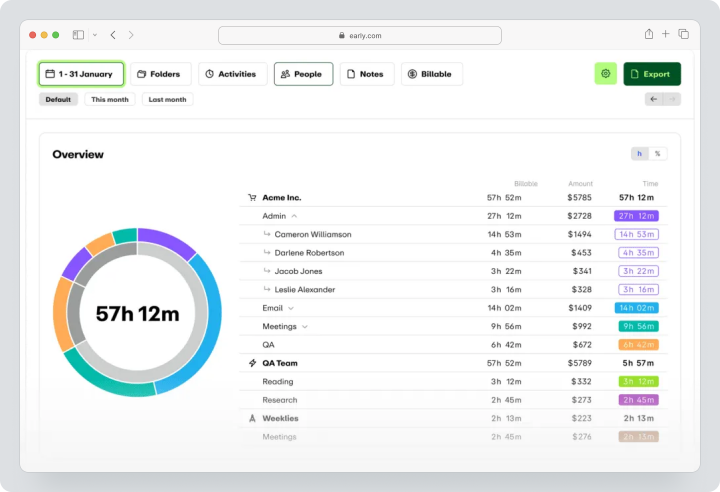
Price, verified on August 4, 2026: for monthly payments, Personal costs $9, Personal Pro — $14, Team — $19 per user per month. Enterprise is priced individually. The Tracker is purchased separately.
| Fact | Value |
|---|---|
| Price | Personal $9; Personal Pro $14; Team $19 for monthly payment |
| Free / trial period | 30-day trial |
| Model | Personal, Team, and Enterprise; Tracker sold separately |
| Verified | August 4, 2026 |
Key Features
- manual and automatic tracking;
- performance analytics;
- rates and budgets;
- PTO, working hours, and overtime;
- CSV, Excel, and PDF export;
- API, webhooks, Jira, and Zapier;
- physical Tracker.
Main Difference from Memtime
EARLY integrates manual tracking, a physical device, and vacation management more effectively but does not use the same model of local raw activity storage.
Advantages
- multiple tracking methods;
- PTO and overtime;
- API available even in Personal.
Limitations
- Tracker sold separately;
- Team is designed for up to 20 participants;
- automatic tracking does not fully replicate Memtime.
Who It’s For
Professionals and small teams that need hybrid tracking: a timer, automatic recording, and a physical device.
Comparison Table of Memtime Alternatives
Prices and features in the table verified on August 4, 2026.
| Service | Best Use Case | Manual Timer | Auto Tracking | Projects / Tasks | Team Reports | Activity Monitoring | Billing / Budget |
|---|---|---|---|---|---|---|---|
| Worksection | Project Time Tracking | Yes | No | Strong | Strong | Yes | Yes |
| Timely | AI Timesheets | Editing | Yes | Yes | Strong | Private Memory | Strong |
| RescueTime | Focus Analytics | Limited | Yes | In Plus | In Team+ | Applications and websites | Rates for billable hours in Plus |
| Timing | Automatic Tracking on Mac | Yes | Yes | Yes | Connect | Applications and documents | Payment Status |
| Rize | Focus + Profitability | Complements auto tracking | Yes | Yes | Strong | Metadata without screenshots | Strong |
| Clockify | Affordable Timesheets | Strong | Yes, private Auto Tracker | Yes | Strong | GPS/screenshots optional | Yes |
| Toggl Track | Manual Timer for Billable Time | Strong | Private Suggestions | Yes | Yes | No Monitoring | Strong |
| ManicTime | On-Premise Tracking | Yes | Yes | Yes | Yes | Applications/screenshots | Yes |
| DeskTime | Attendance Tracking and Monitoring | Yes | Yes | Project Tracking | Yes | URL/applications/screenshots | Partially |
| EARLY (Timeular) | Hybrid Tracking and PTO | Strong | Yes | Yes | Team | Application Suggestions | Budgets and Rates |
Which Service to Choose for Different Scenarios?
For the Nearest Replacement of Memtime
Timely is suitable for automatic timesheet creation, Timing deeply records work on Mac, and Rize combines automatic tracking with focus and profitability. The choice depends on whether the team is ready to store activity data in the cloud.
For Manual Tracking
Toggl Track offers a quick timer and billing convenience. Clockify provides a broader administrative set at a low price. Worksection is needed when hours must be part of tasks, deadlines, and the overall project process.
For privacy-priority scenarios
Memtime remains one of the most consistent solutions with local storage. Among alternatives, ManicTime allows deployment on your own server, while Rize does not take screenshots and lets employees confirm records before passing them to the manager.
For employee monitoring
DeskTime, ManicTime, and certain features of Clockify collect more detailed data. They should only be chosen based on real need, transparent employee notifications, and minimizing collected information.
For small budgets
Clockify and Worksection offer ongoing free plans. RescueTime Lite is suitable for personal analytics. When comparing, consider that the free plan may not include approvals, budgets, integrations, or monitoring.
How to switch from Memtime without losing data?
- Determine which data needs to be saved: projects, tasks, confirmed records, rates, calendar links, and integrations.
- Do not rely on transferring raw activity timelines: they are stored locally and have a different structure than the approved timesheet.
- Export confirmed records and directories.
- Capture the time zone, rounding rules, payment status, and currencies.
- Create clients and projects in the new system.
- Transfer one completed billing period.
- Compare total hours and amounts.
- Check approvals, blocked periods, and exports.
- Run parallel accounting for one to two weeks.
- Only cancel the subscription and delete local data after reconciliation.
How to organize project accounting in Worksection?
- Create a project for a client or internal initiative.
- Break down the work into tasks, subtasks, and checklists.
- Assign responsible persons, deadlines, and planned hours.
- The employee starts the Worksection timer or enters hours manually.
- The manager compares plan and fact.
- Add expenses and rates as needed.
- Connect the client through guest access.
- Analyze workload, overdue items, and cost per reports.
- You can check the pricing conditions on the Worksection pricing page.
FAQ
What is the best alternative to Memtime in 2026?
For automatic team timesheets, Timely is often suitable, for Mac users — Timing, and for analyzing focus and billable time — Rize. Toggl Track and Clockify are rational for manual accounting. Worksection should be chosen when time needs to be linked to tasks and deadlines. There is no universal winner: privacy model and workflow are more important than rating.
Are there free analogs of Memtime?
Yes, but they cover different scenarios. Clockify offers free team accounting with a limit on the number of participants, Worksection — Free for projects and tasks, RescueTime Lite — basic personal analytics. There is no permanent free version of Memtime with the same automatic local timeline. When choosing, check exports, projects, approvals, and availability of desktop applications.
Which Memtime alternative is suitable for small businesses?
For budget-friendly timesheets, Clockify works, for quick billing — Toggl Track, for projects — Worksection. Timely and Rize are more expensive but reduce losses of billable hours due to automatic tracking. Small businesses should conduct a pilot with one client and compare not only the license but also the time spent filling out and correcting timesheets.
Which Memtime replacement is better for teams?
Timely provides automatic timesheets, workload management, and budgeting. Clockify excels in approvals, attendance tracking, and administration. Rize is suitable for agencies that need automatic hours and profitability without screenshots. Worksection combines tasks and labor costs but does not automatically restore the day. The choice depends on who confirms the records and what data the manager is allowed to see.
How does Worksection differ from Memtime?
Memtime automatically records activity on the computer and keeps the raw timeline private for the user. Worksection does not track applications or websites. The employee consciously records hours within the task, while the manager analyzes deadlines, plans, facts, and costs. Worksection is suitable for project management but does not replace automatic computer accounting and recovery of forgotten hours.
Can data be transferred from Memtime?
Confirmed time entries, projects, and references can be exported and transferred depending on the capabilities of the target system. Raw local activity logs usually are not transferred as a completed timesheet. First, export one period, check the time zone, rounding rules, rates, and payment status, then compare the total hours and amounts before shutting down the old process.
How to compare service prices?
Calculate the cost of all locations, payment periods, mandatory integrations, APIs, monitoring add-ons, implementation, and administrator time. An automated product may cost more than a license but can recover missed paid hours. A manual timer is cheaper, however, requires discipline. For an objective comparison, calculate the cost of one confirmed hour and the total cost over three years.
How to choose between a specialized and a universal platform?
A specialized automatic tracker is rational when the main issue is forgotten hours or analyzing digital activity. A universal PM system is better if a company needs tasks, deadlines, communication, and reporting around outcomes. Sometimes an effective combination exists: Memtime or Timely collects time, while Worksection manages the project. It is important to define the primary accounting system in advance.
What features to check before migration?
Check automatic and manual accounting, downtime definition, calendar synchronization, projects, rates, budgets, approvals, blocked periods, export, API, desktop platforms, and privacy settings. Clarify separately who sees applications, URLs, window names, and screenshots, whether personal time can be deleted, and how long data is stored. The pilot should cover one complete billing period.
Conclusion
Memtime remains a strong tool with a privacy priority for automatic workday recovery. Its key distinction lies not only in automatic accounting but in that the raw chronology is stored locally and controlled by the user.
Timely is closer to automated team timesheets. Timing excels on Mac, Rize focuses on concentration and profitability, RescueTime on digital habits. Clockify and Toggl Track are suitable for manual accounting. ManicTime offers flexible deployment, DeskTime for monitoring, EARLY for physical tracking and leave management.
Worksection is worth considering when a company needs to manage performance rather than just recover activity in applications: tasks, deadlines, responsibilities, labor costs, and reports. More about the features can be read in the Worksection overview.