The best alternative to MeisterTask depends on what the team wants to preserve and what it lacks. Some users need a similarly intuitive visual task manager with Kanban boards and quick set-up. Others require deeper project management: subtasks, dependencies, Gantt charts, time tracking, workload, client access, and reporting.
MeisterTask remains a user-friendly service for visual task management, collaborative boards, tasks, automations, Notes, and daily teamwork. However, users are looking for alternatives to MeisterTask when project work becomes more complex than a simple Kanban board or when the team needs different pricing, integrations, reporting, and scalability.
This review compares Worksection, Trello, Asana, ClickUp, Notion, Microsoft Planner, Basecamp, Todoist, Monday.com, and Quire. All solutions are evaluated based on the same criteria: tasks and subtasks, Gantt charts, time, reports, guest access, automation, implementation, and cost.
Which MeisterTask alternative to choose quickly
- Worksection — for teams that need a Gantt chart, dependencies, time tracker, guest access, and project reports along with Kanban.
- Trello — for the simplest visual Kanban and quick start of small processes.
- Asana — for cross-functional projects, dependencies, goals, portfolios, and multiple work presentations.
- ClickUp — for teams needing maximum customization, documents, dashboards, automations, and time tracking.
- Microsoft Planner — for companies within Microsoft 365 and Teams, especially if a premium timeline and dependencies are needed.
- Todoist — for personal productivity and simple team tasks without complex project structure.
Not everyone needs to switch from MeisterTask. If the team is working through visual boards, uses a limited number of projects, doesn’t require complex resource analytics, and values easy training, the current system may fully cover the process. Switching makes sense when the limitations start affecting deadlines, reporting, and manageability.
What is MeisterTask and who is it for?
MeisterTask is a visual platform for tasks, documents, and team collaboration. The main logic is built around shared Kanban boards: the team creates projects, adds tasks, assigns responsible parties, deadlines, and tags, moves cards between stages, and tracks progress. Additionally, Notes, templates, automations, time tracking, reports, and mobile apps are available.
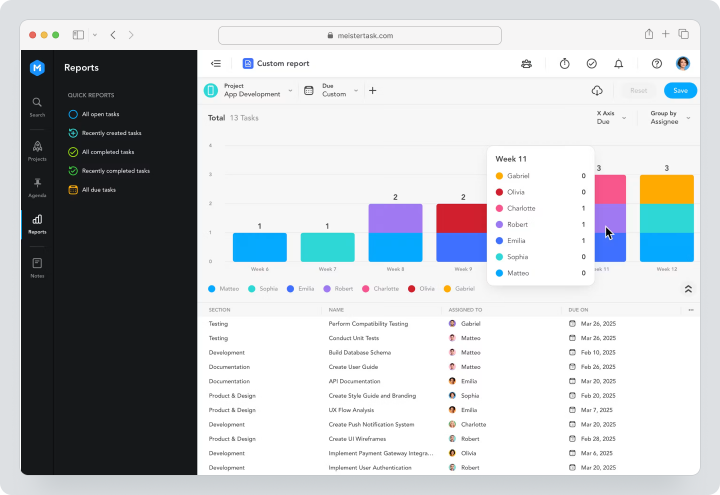
The service is suitable for small and medium teams where it’s important to quickly start working without lengthy implementation. It is convenient for marketing, operations, educational and administrative processes, internal requests, and repetitive workflows.
As of 12.08.2026, the free plan includes up to 3 projects, up to 5 Notes, and up to 5 Content Manager slots, with view-only slots being unlimited. The official Pro pricing page states $9 per user per month, Business — $16; the final currency and amount depend on the region and may be updated during checkout. A 14-day trial is available for Business.
The strength of MeisterTask is its low entry barrier and visual clarity. Limitations arise when the team requires deeper dependencies, portfolios, resource planning, or complex financial reporting.
Why do teams look for alternatives to MeisterTask?
Teams seek a replacement for MeisterTask when a simple Kanban is insufficient for their current scale of work. These are not universal product shortcomings, but scenarios where the requirements change.
Limited depth of project management
For simple processes, cards and stages are enough. But long projects require subtasks, multiple levels of structure, dependencies, milestones, and a comprehensive plan. If the manager separately tracks the schedule in a spreadsheet, it’s worth comparing deeper PM systems.
Reporting
MeisterTask has reporting and time tracking; however, mature teams may need reports on projects, people, overdue tasks, workload, expenses, and portfolios. It’s important to check if answers can be obtained without manual data exports.
Gantt Chart and Dependencies
The timeline, subtasks, and relationships between tasks are available to Business users. It is essential for project teams to see not only a list of dates but also the impact of one task on another, critical delays, and the overall schedule of multiple projects.
Scalability
As the number of projects, roles, teams, and access rules increases, the system must support portfolios, standardized templates, management reports, and the handling of multiple directions.
Automation
Simple automations help move tasks and send notifications. However, complex processes may require forms, conditional logic, webhooks, automatic project creation, and integrations with CRM or support systems.
Pricing and Licensing Model
It is important to consider not only the Pro or Business price but also the number of users with editing rights, free users with view-only access, payment periods, and features needed by the team. A cheaper plan may not include critical capabilities.
How Did We Choose and Compare Services?
The comparison is based around real work: creating a project, adding tasks, assigning responsibilities, linking deadlines, viewing the schedule, accounting for time, and preparing reports.
Tasks, Subtasks, and Dependencies
Check the number of subtask levels, the availability of custom fields, statuses, priorities, milestones, and connections. A visual board does not replace structure when a project consists of dozens of stages.
Gantt Chart, Calendar, and Other Views
Kanban is convenient for flow, the calendar is for content and campaigns, and the Gantt chart is for dependent work. The service should provide the necessary views at the selected plan.
Time Tracking, Budgets, and Reporting
For an agency or service team, time tracking should be linked to tasks and reports. If costs need to be calculated, check the plan/fact, rates, export, and financial analytics.
Roles, Guest Access, and Client Collaboration
It is important to understand if an external participant can be invited, have their access restricted, and not pay the full cost of an employee. Guest access should be clear and secure.
Automation, Integrations, and API
Check the limits of automation, the availability of an API, webhooks, and import/export capabilities. For migration, CSV, JSON, and transferring attachments or comments are especially important.
Ease of Implementation and Scalability
The more flexible the product, the greater the risk of overwhelming the team with configurations. Small businesses often benefit from a simple service with a few clear rules.
Total Cost of Ownership
Consider the plan for all editors, possible seat packages, AI, add-ons, implementation, and administrator time. A free plan is useful for testing but may not always be suitable for real scale.
The Best Alternatives to MeisterTask in 2026
Below are 10 solutions — from simple visual task managers to complete project management systems.
Worksection
Worksection is a project and task management system for teams that need not only Kanban but also controlled execution: subtasks, dependencies, deadlines, Gantt charts, time, roles, and reports.
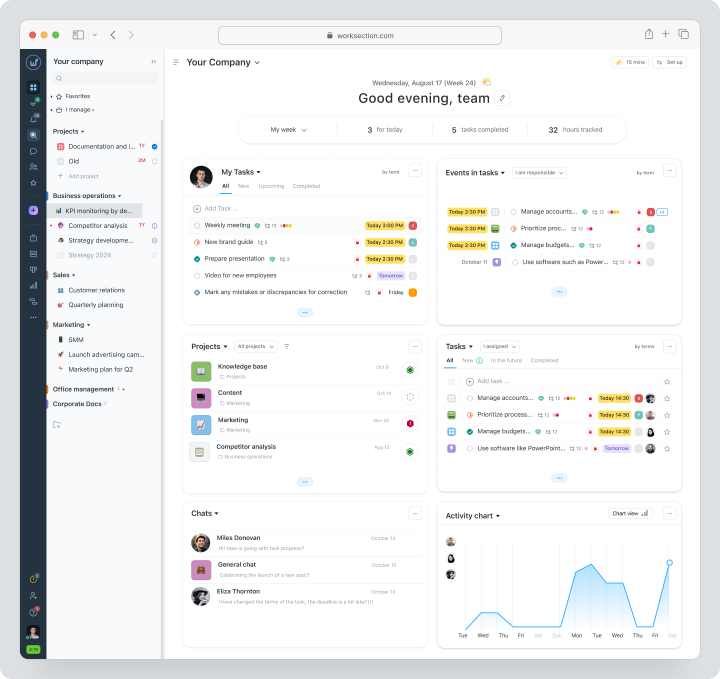
The team can create a project, break it down into tasks and two levels of subtasks, assign responsible parties, deadlines, priorities, statuses, and labels. All work is displayed in a list, calendar, Kanban board, and on the Gantt chart. The task card stores files, comments, checklists, planned time, and actual costs.
Cost: There is a free plan for up to 5 users and 2 projects. For monthly payment, Basic costs $5 per user per month, Business — $10, Premium — $15. The terms are available on the pricing page.
Key Features
- projects, tasks, and subtasks;
- deadlines, dependencies, assignees, and statuses;
- kanban, calendar, and Gantt chart;
- built-in time tracker and plan/actual;
- reports for projects, tasks, people, and time;
- guest access and roles for clients and contractors;
- integrations, API, and webhooks.
Main Difference from MeisterTask
MeisterTask excels in simple visual task management. Worksection is worth considering when the priority is managed execution: dependencies, Gantt chart, labor costs, permissions, and reporting.
Benefits
- more project depth without corporate complexity;
- time and reports connected to tasks;
- convenient for client and parallel projects.
Limitations
- might be excessive for simple personal kanban;
- role structure needs to be set up before launch;
- not a specialized tool for development.
Who it’s Suitable For
Agencies, service and project teams, marketing, operations, and companies for whom MeisterTask is no longer sufficient for managing deadlines and reporting.
Trello
Trello is one of the closest analogs to MeisterTask in visual logic. Work is centered around boards, lists, and cards, with additional Power-Ups extending integrations and automation.
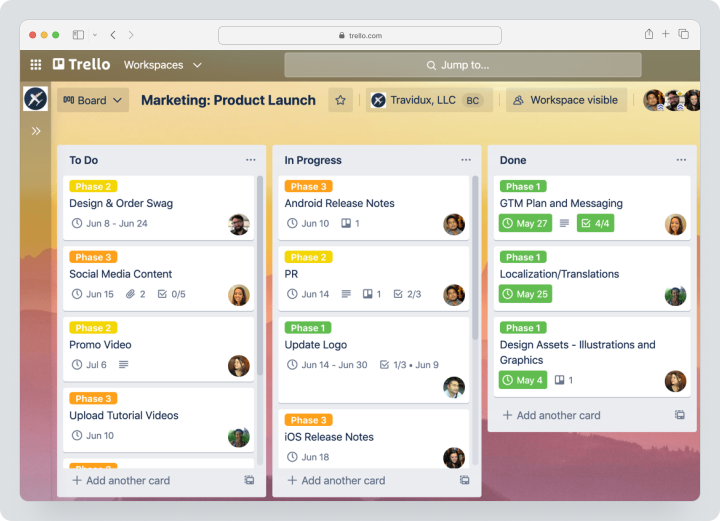
Pricing: Free for up to 10 participants in a workspace. The Standard plan costs $6 per user per month with monthly billing, and Premium is $12.50. Enterprise starts at $17.50 per user per month and is billed annually. Premium adds calendar, timeline, table, dashboard, and map views.
Key Features
- boards, lists, and cards;
- checklists, deadlines, and assignees;
- custom fields on Standard;
- automation and Power-Ups;
- additional views on Premium;
- guests on a single board and observers on applicable plans.
Main Difference from MeisterTask
Trello offers the most recognizable kanban model and a large ecosystem of Power-Ups. MeisterTask is more deeply integrated with Notes and Meister products.
Benefits
- very quick start;
- familiar interface;
- flexible expansion through Power-Ups.
Limitations
- does not provide deep project reporting out of the box;
- time tracking usually requires integration;
- with a large number of boards, the structure becomes fragmented.
Who it’s Suitable For
Small teams looking to maintain a simple kanban logic with minimal training.
Asana
Asana is a system for managing tasks, dependencies, projects, goals, and portfolios. Compared to MeisterTask, it is better suited for cross-functional teams and projects with multiple views.
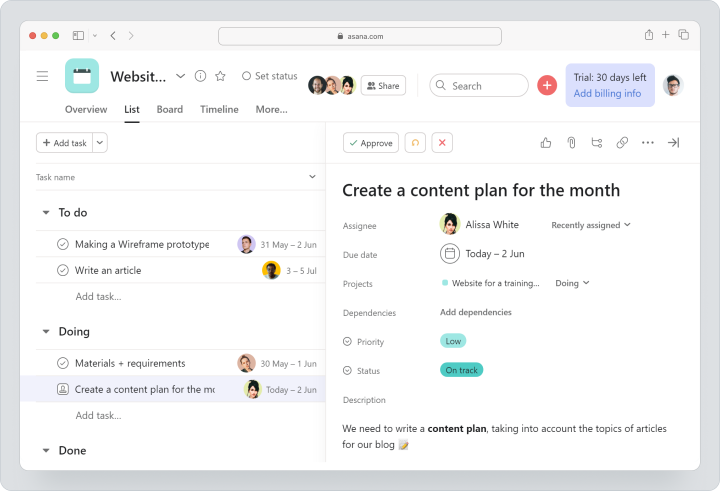
Pricing: Personal is available for free. The Starter plan costs $13.49 per user per month with monthly billing, and Advanced is $30.49.
Key Features
- tasks, subtasks, and dependencies;
- list, board, calendar, timeline, and Gantt chart;
- forms, custom fields, and rules;
- dashboards and overall reporting;
- portfolios, goals, and team workload on Advanced;
- guests and integrations.
Main Difference from MeisterTask
Asana is deeper in dependencies, portfolios, and cross-functional coordination. MeisterTask is simpler for small kanban processes.
Benefits
- many work views;
- strong dependencies and portfolios;
- convenient for marketing and product.
Limitations
- some important features are available on Advanced;
- cost rises quickly with team size;
- financial tracking is not a core specialization.
Who it’s Suitable For
Teams that need goals, portfolios, dependencies, and coordination among multiple departments.
ClickUp
ClickUp is a universal workspace for tasks, documents, boards, chats, forms, time tracking, Gantt charts, and automations. It’s the choice for teams that value maximum flexibility.
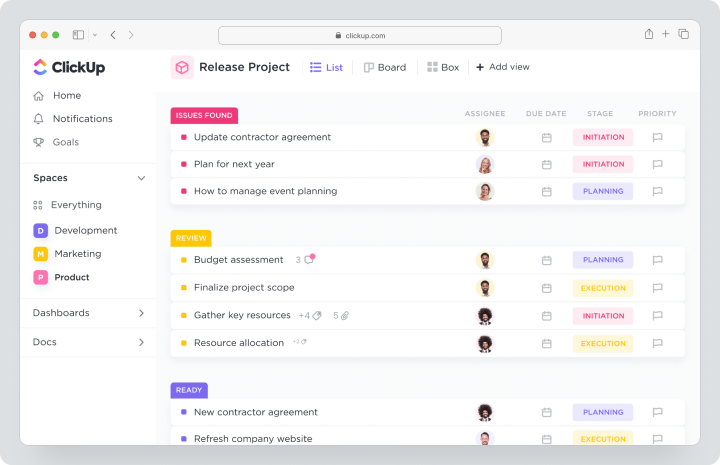
Cost: Free access is available at no cost. For monthly billing, Unlimited costs $10 per user per month, Business — $19. AI plans are billed separately.
Key Features
- tasks, subtasks, dependencies, and custom fields;
- list, board, calendar, timeline, and Gantt chart;
- built-in time tracking;
- documents, idea boards, dashboards, and goals;
- automations, webhooks, and integrations;
- guest access with permission management.
Main Difference from MeisterTask
ClickUp is significantly broader and more customizable, but requires more time for setup and standardization.
Advantages
- a lot of features in one product;
- built-in time tracking and resource management;
- flexible workspace architecture.
Limitations
- the interface can be overwhelming;
- a process administrator is needed;
- teams easily create unnecessary fields and views.
Who It’s Suitable For
Companies that need a universal workspace instead of just a simple visual task manager.
Notion
Notion is a workspace for documents, knowledge bases, databases, and easy task management. It’s suitable for teams where knowledge and flexible structure are more important than strict project logic.
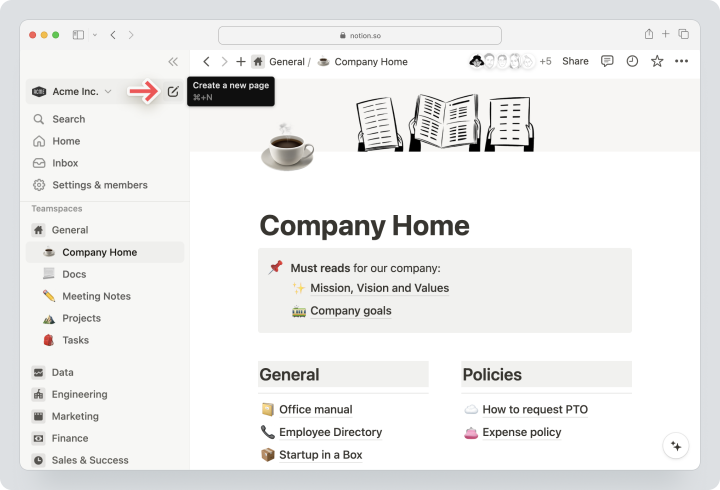
Cost: Free access is available at no cost. For monthly billing, Plus costs $12, Business — $24 per user per month. Enterprise pricing is calculated individually.
Key Features
- documents and knowledge base;
- databases, boards, calendars, and timeline;
- templates and linked pages;
- relations, rollup values, and formulas;
- charts and dashboards based on databases;
- integrations and API.
Main Difference from MeisterTask
Notion is stronger in documentation and databases. MeisterTask provides a more ready-made kanban task model without needing to design the workspace yourself.
Advantages
- a single space for knowledge and tasks;
- flexible structure;
- a wide variety of templates.
Limitations
- time tracking is not a built-in strong point;
- complex workflows need to be assembled manually;
- as it grows, a strict page architecture is needed.
Who It’s Suitable For
Teams that need to combine a knowledge base, instructions, content, and light task planning.
Microsoft Planner
Microsoft Planner is a task management and planning system within Microsoft 365 and Teams. The basic version is suitable for boards and team tasks, while premium plans add timeline, dependencies, custom fields, workload management, and advanced scheduling.
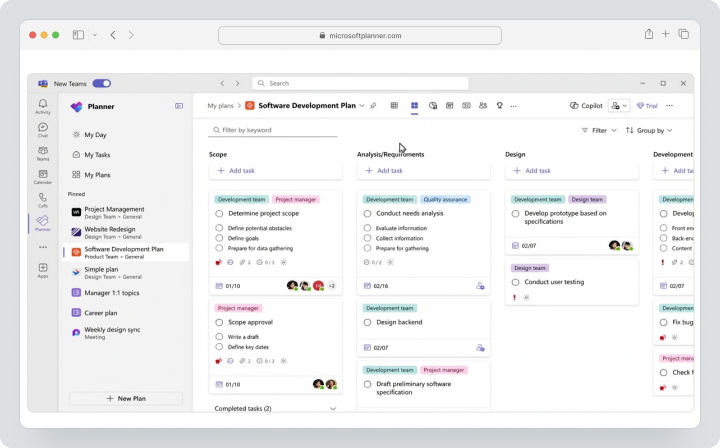
Cost: the basic Planner is included in applicable Microsoft 365 subscriptions. For Planner Plan 1, Microsoft publicly lists $10 per user per month, for Planner and Project Plan 3 — $30, but these prices apply to annual subscriptions. A separate standard monthly price is not listed on the public page. A 30-day trial of advanced features is available.
Key Features
- table, board, and charts;
- tasks, groups, labels, and assignments;
- integration with Teams and Microsoft To Do;
- timeline/Gantt chart and dependencies on premium plan;
- sprints, custom fields, and workload management;
- portfolios and goals on applicable plans.
Main Difference from MeisterTask
Planner is closely tied to Microsoft 365. MeisterTask is simpler as a standalone visual tool, especially for teams outside the Microsoft ecosystem.
Advantages
- natural operation in Teams;
- premium dependencies and timeline;
- a single Microsoft account.
Limitations
- the best features require a separate license;
- the interface and accessibility depend on Microsoft 365;
- external collaboration with clients may be more complex.
Who It’s For
Companies that already use Teams, Outlook, and Microsoft 365 and want to reduce the number of separate services.
Basecamp
Basecamp is a simple platform for projects, messaging, task lists, files, schedules, and asynchronous communication. It is suitable for teams where overall context is more important than complex statuses and dependencies.
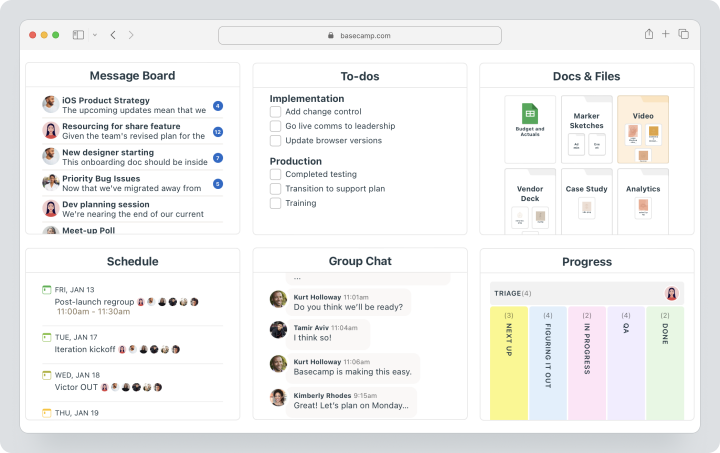
Price: Free allows for one project with up to 20 users. Pro costs $15 per employee per month on a monthly plan, clients and contractors connect for free. Pro Unlimited costs $299 per month only for annual payment.
Key Features
- task lists and Card Tables;
- Message Boards, Campfire, and Pings;
- schedule and checkpoints;
- documents and files;
- automated polls and reports;
- time tracking add-ons.
Main Difference from MeisterTask
Basecamp covers communication and documents more broadly but is less focused on visual kanban and detailed project structure.
Advantages
- simple asynchronous work;
- clients connect for free;
- fixed pricing is beneficial for large teams.
Limitations
- no classic deep Gantt chart;
- dependencies and automation are limited;
- weaker load analytics.
Who It’s For
Remote and small teams that need to replace chat chaos with a unified project space.
Todoist
Todoist is a simple task manager for personal productivity and team lists. It is built around projects, tasks, sub-tasks, priorities, labels, filters, and calendar planning.
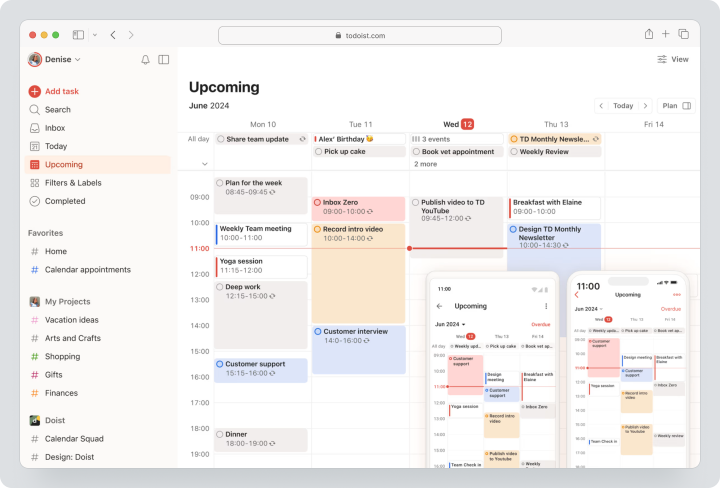
Price: Beginner — free. On a monthly plan, Pro costs $7 per user per month, Business — $10 plus local taxes.
Key Features
- tasks, sub-tasks, deadlines, and priorities;
- list, board, and calendar;
- recurring tasks and reminders;
- filters, labels, and shared projects;
- team workspace on Business;
- roles, permissions, and activity logs.
Main Difference from MeisterTask
Todoist is simpler and stronger for personal organization. MeisterTask is better suited for visual team workflows on shared boards.
Advantages
- quick input and recurring tasks;
- convenient for personal and small team processes;
- clear pricing.
Limitations
- no full-fledged Gantt chart;
- limited project reporting;
- not suitable for complex client projects.
Who It’s For
Small teams and professionals who need a lightweight task manager without complex architecture.
Monday.com
Monday.com is a visual work management platform with boards, columns, dashboards, and automations. It allows gathering processes for various departments and scenarios.
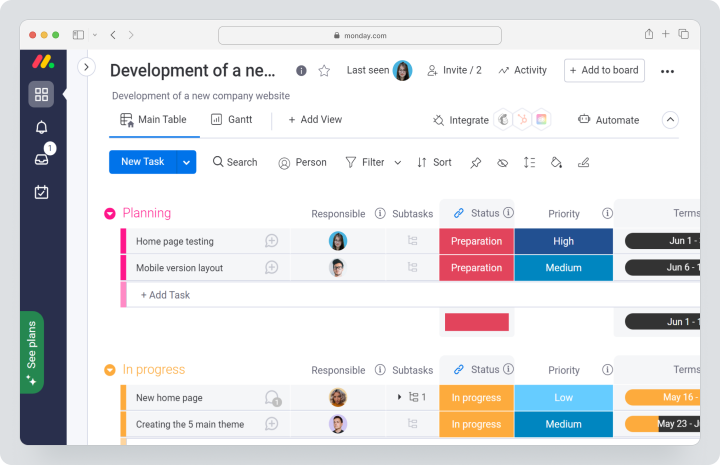
Price: Free for up to 2 seats. On a monthly plan, Basic costs $12, Standard — $14, Pro — $24 per seat per month. Paid plans usually start with three seats.
Key Features
- boards and custom columns;
- timeline, Gantt chart, calendar, and dashboards on relevant plans;
- forms, automations, and integrations;
- templates for marketing, operations, and projects;
- users with view-only access and guests depending on the plan;
- AI credits.
Main Difference from MeisterTask
Monday.com is more flexible as a visual builder but requires more setup. MeisterTask offers a more ready-made and simpler kanban process.
Advantages
- vibrant visualization;
- many templates;
- strong automations on higher plans.
Limitations
- the cost depends on the package of seats;
- complex boards can become chaotic;
- time tracking and advanced views depend on the rate.
Who it’s for
Marketing, operational, and cross-functional teams that need a visual process builder.
Quire
Quire is a task management system with nested lists, kanban boards, a timeline, a calendar, and a flexible hierarchy. It’s suitable for teams that find a simple flat board insufficient but don’t need a heavy PM platform.
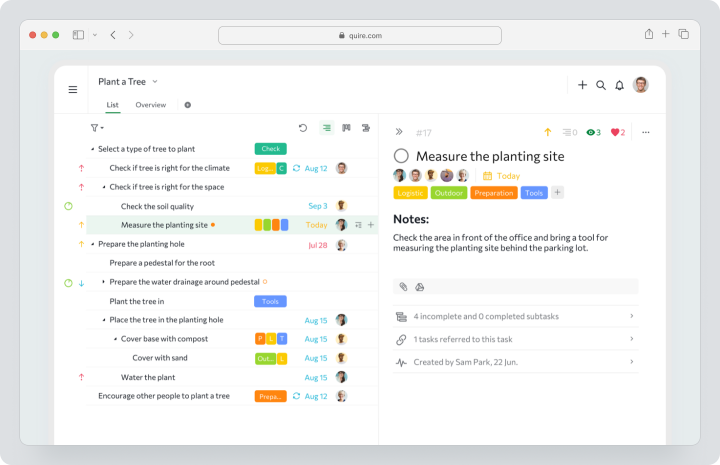
Cost: there is a Free plan. Monthly, Professional costs $10.95 per user, Premium — $18.95, Enterprise — $24.95.
Key features
- multi-level tasks and nested lists;
- board, timeline, table, and calendar;
- milestones and project overview;
- time tracking on Professional;
- time sheets and approvals on Premium;
- CSV/JSON import and export, integrations with Slack, Teams, Zapier, and n8n.
Main difference from MeisterTask
Quire is stronger in deep task hierarchy and combining lists with visual representations. MeisterTask is simpler and more familiar for traditional kanban.
Advantages
- flexible task nesting;
- affordable paid plan;
- good set of views.
Limitations
- less developed corporate ecosystem;
- external participants may count towards paid seats;
- advanced roles and time sheets are available on higher plans.
Who it’s for
Small and medium teams that need a structured alternative to MeisterTask without heavy implementation.
Comparison table of MeisterTask alternatives
Data on features and prices verified on 12.08.2026. The final cost depends on the region, taxes, payment period, number of seats, and add-ons.
| Service | Best scenario | Tasks and subtasks | Gantt / Timeline | Time tracking | Reports | Guest access | Pricing model |
|---|---|---|---|---|---|---|---|
| Worksection | Projects, deadlines, time, and reports | Yes, 2 levels of subtasks | Yes | Built-in | Projects, people, time, expenses | Yes | Free; $5 / $10 / $15 for monthly payment |
| Trello | Simple visual kanban | Checklists and advanced checklists | Timeline on Premium | Through integrations | Dashboard on Premium | Yes, depending on role | Free; Standard $6, Premium $12.50 for monthly payment |
| Asana | Cross-functional projects | Yes | Timeline and Gantt | Built-in on Advanced; integrations on lower plans | Dashboards, portfolios | Yes | Free; Starter $13.49, Advanced $30.49 for monthly payment |
| ClickUp | Customizable universal workspace | Yes | Yes | On Unlimited | Dashboards and team uploads | Yes | Free; Unlimited $10, Business $19 for monthly payment |
| Notion | Documents, knowledge base, and databases | Through databases | Timeline | Not a main focus | Diagrams and databases | Through guests | Free; Plus $12, Business $24 for monthly payment |
| Microsoft Planner | Teams in Microsoft 365 | Yes | Premium | Not a main focus | Diagrams and advanced reports | Through Microsoft groups | Included in some subscriptions; $10 / $30 is specified for annual subscription |
| Basecamp | Asynchronous communication | To-do lists | No classic Gantt | Add-on | Basic reports | Clients free of charge | Free; Pro $15 for monthly payment; Pro Unlimited $299/month for annual payment |
| Todoist | Personal and simple team tasks | Yes | No | No built-in | Activity and history | On Business | Free; Pro $7, Business $10 for monthly payment |
| Monday.com | Visual process builder | Yes | Depends on the plan | Depends on the plan | Dashboards | Depends on the plan | Free; Basic $12, Standard $14, Pro $24 for monthly payment |
| Quire | Task hierarchy and light PM | Unlimited nesting on higher plans | Professional | Professional | Dashboard, analytics, time sheet | External teams | Free; Professional $10.95, Premium $18.95, Enterprise $24.95 for monthly payment |
Which service to choose for different scenarios?
For tasks, deadlines, and project reporting
Choose Worksection if you need dependencies, Gantt charts, time tracking, permissions, and reports along with visual control. This is a choice for teams that have outgrown a simple board.
For a close replacement of MeisterTask
Trello is suitable for users who want a familiar Kanban with a large ecosystem. Quire is worth considering if a deeper task hierarchy is needed, but simplicity is important.
For cross-functional work
Asana works well for marketing, product, and operations when you need to link projects to goals and portfolios. ClickUp is better for teams that require maximum customization.
For Microsoft 365
Microsoft Planner is efficient if employees are already working in Teams, Outlook, and To Do. Before purchasing a premium plan, check if a timeline, dependencies, and load management are needed for all users.
For personal productivity and small processes
Todoist is simpler than heavy PM systems. Notion is suitable if tasks need to be linked to documents and a knowledge base. Basecamp is ideal if the main requirement is related to communication and files.
How to migrate to a new platform without data loss?
Migrating from MeisterTask is best done in stages.
- Compile a list of active projects, users, roles, automations, and integrations.
- Archive completed boards and remove duplicates.
- Check the export of projects, tasks, comments, and files.
- Select one typical project for a pilot.
- Map sections, tasks, checklists, labels, deadlines, and responsibilities to the entities in the new system.
- Check the transfer of attachments, history, and automations.
- Configure templates, roles, notifications, and guest access.
- Train the team on real tasks.
- Run a parallel period.
- After verification, switch MeisterTask to read-only mode or archive it.
Do not mechanically transfer the old structure. If the new system supports subtasks and dependencies, it’s better to rebuild the project to a more manageable model right away.
How to organize work in Worksection after MeisterTask?
The transition can be built around a simple workflow:
- Create a project for a client, campaign, or internal result.
- Break down the MeisterTask board into tasks, subtasks, and checklists.
- Add assignees, deadlines, priorities, and dependencies.
- Set up statuses and a Kanban board to fit the existing workflow.
- Invite the client or contractor via guest access.
- Log time directly in tasks.
- Monitor the overall schedule on the Gantt chart and use reports to analyze progress.
This way, the team retains visual logic while gaining more project depth and management information.
FAQ
What is the best alternative to MeisterTask in 2026?
The choice depends on the scenario. Worksection is suited for projects with Gantt charts, time tracking, and reports. Trello is closest for simple Kanban. Asana and ClickUp are suitable for complex cross-functional processes. Quire is convenient if a deep task hierarchy is needed without a heavy corporate system.
Are there free alternatives to MeisterTask?
Yes. Free plans are available in Worksection, Trello, Asana, ClickUp, Notion, Basecamp, Todoist, Monday.com, and Quire. Microsoft Planner may be included in your existing Microsoft 365 subscription. Limitations apply to projects, users, submissions, automations, reports, and time.
Which alternative to MeisterTask is suitable for small businesses?
Small businesses should compare Worksection, Trello, Todoist, and Quire. Worksection is suitable for project teams, Trello is for simple Kanban, Todoist is for light tasks, and Quire is for structured lists. The choice depends on the need for a Gantt chart, time tracking, and client access.
Which replacement for MeisterTask is best for teams?
For teams, roles, reporting, integrations, and scalability are important. Worksection is suitable for service and project teams. Asana is for cross-functional departments. ClickUp is for companies with diverse workflows. Microsoft Planner is for Microsoft 365 users.
How does Worksection differ from MeisterTask?
MeisterTask is simpler and stronger in visual Kanban. Worksection is deeper in project execution: tasks and subtasks, dependencies, Gantt chart, time tracker, plan/fact, guest access, and reports. It’s rational when a single board is no longer enough to manage deadlines and resources.
Is it possible to transfer data from MeisterTask?
Yes, but standard export options have limitations. Exporting a project to CSV or JSON does not include attachments, assignees, comments, time tracking data, and some links between tasks. Exporting reports can include tracked time, action logs with comments, and links between tasks, but attachments and automations need to be transferred or set up separately.
How to compare service prices?
Calculate the cost for all editors, not just the basic price. Consider free users with view-only access and guests, minimum seat packages, payment terms, AI, automations, storage, and add-ons. Additionally, assess the time needed for setting up and supporting the workspace.
How to choose between a specialized and a universal platform?
A specialized task manager is better if speed and simplicity are important for the team. A universal PM platform is needed when dependencies, resources, portfolios, and complex reports come into play. Don’t buy enterprise features if the team won’t use them.
What features to check before migrating?
Check subtasks, dependencies, Gantt chart, calendar, time tracking, reports, roles, guest access, automations, API, import, and export. Then test one project fully: creation, execution, reporting, and participation of an external user.
Conclusion
MeisterTask remains a user-friendly visual task manager for teams that value simple boards, tasks, notes, and quick implementation. However, as you grow, a deeper system with dependencies, Gantt chart, time tracking, workload, and reports may be necessary.
Worksection should be considered for managed project execution. Trello is for the simplest Kanban. Asana and ClickUp are for complex cross-functional work. Notion is for knowledge and databases. Microsoft Planner is for Microsoft 365. Basecamp is for asynchronous communication. Todoist is for light tasks. Monday.com is for visual customization. Quire is for task hierarchy.
Before making a switch, test 2 – 3 solutions on one real process. Evaluate not only the interface but also how the system supports deadlines, accountability, reporting, and scalability.
When a team needs tasks, a Gantt chart, time tracking, roles, and reports in one space, start with an overview of Worksection and compare pricing.